Website Migration Services: What They Include and What to Ask

A website migration service moves your site to a new host, platform, domain or design without losing the search rankings, leads and email you already have. The work is more than copying files. A proper migration covers a full page inventory, redirects from old addresses to new ones, testing before launch, and monitoring after it. If you run a service business or a real estate practice in South Florida, the risk is simple: a bad move quietly cuts off the phone calls and form fills that pay your bills.
We are a Delray Beach web design studio, and this guide explains what you are buying, what should be on the checklist, and how to judge a quote.
TL;DR
- A migration is any significant change to your site’s structure, domain, platform or design. Each one puts your Google visibility at risk.
- A good service delivers a page inventory, a redirect map, pre-launch testing, and post-launch monitoring. Ask to see all four.
- Google says to change one major thing at a time and keep redirects in place for at least 180 days after a domain move.
- Free host migrations move files. They do not rebuild your site, map your URLs for SEO or check that your lead forms still work.
- If your current site is a template that is holding you back, migrate and improve in planned stages instead of one risky jump.
Table of Contents
- What counts as a website migration
- What a good migration service includes
- How to protect your Google rankings during a move
- Free host migration vs. a migration service
- Migration for a template site that has stopped working
- What a migration costs
- How to choose a migration provider
- Protect the site after the move
- Where we fit
- FAQ
- Sources
What counts as a website migration
People use the phrase for several different jobs. Search Engine Land describes a migration as a significant change to a site’s structure or content hierarchy. Common triggers are changing the domain, launching a new design or rebrand, merging sites, restructuring pages and content, or moving to a new platform.
For a small business owner, that usually looks like one of these:
- Host to host. Same site, new server. Often the simplest job.
- Platform to platform. For example, a site built on a page builder moves to a custom-coded site. Every page is rebuilt, so every address and every form needs attention.
- Domain change. A rebrand or a new business name means a new web address.
- Redesign with new page structure. The look changes and so do the URLs and menu.
- Consolidation. A practice with three location sites folds them into one.
The type matters because it sets the risk and the price. Moving hosts leaves your pages where they are. Changing platforms or domains changes how Google finds everything you have built.
What a good migration service includes
The quotes you receive will vary a lot in detail. These are the pieces that separate a real migration from a file copy.
1. A page inventory and baseline
Before anything moves, someone needs a complete list of what exists. Search Engine Land’s migration checklist recommends running a site crawler to inventory every page, noting peak traffic hours to avoid, recording current rankings, and annotating your analytics so you can tell pre-move data from post-move data.
Why it matters to you: this baseline is how you prove after launch that nothing was lost. Without it, a drop in leads becomes an argument instead of a diagnosis.
2. A redirect map
Every old address that has a ranking, a backlink or a bookmark needs to point to its new equivalent. Google states that permanent redirects do not cause a loss in PageRank, which is why a careful map protects you. A sloppy one sends visitors to your home page or a dead page.
Where it goes wrong: a rebuild that changes “/services/roof-repair” to “/roofing” without a redirect. Google drops the old page, the new one starts from zero, and the calls from that page stop.
3. Build and testing before launch
Semrush’s checklist breaks a migration into five phases: planning and preparation, build and test, URL mapping, completing the migration, and post-migration monitoring. The test phase is where you find the broken contact form, the missing phone number on mobile, or the booking tool that no longer fires.

For a service business, test the things that make money: every form, every click-to-call button, every thank-you page, and the way each lead reaches your inbox or CRM.
4. Launch with a rollback plan
The same Semrush checklist lists the usual risks: ranking and traffic losses, broken functionality, redirect errors, indexing problems and falling conversion rates. It recommends planning for each, including a rollback plan. Ask your provider one direct question: if launch day goes wrong, how do we get back to the old site, and how fast?
5. Monitoring after launch
The job is not done at launch. Someone should check crawl errors, indexing, traffic and lead volume against the baseline for the weeks that follow. Google notes that for a medium-sized site, it can take a few weeks or more for new URLs to gradually replace old ones in search results, and longer for larger sites. A small dip in the first weeks can be normal. A dip that keeps going needs someone looking at the redirect map.
How to protect your Google rankings during a move
Three rules cover most of the risk.
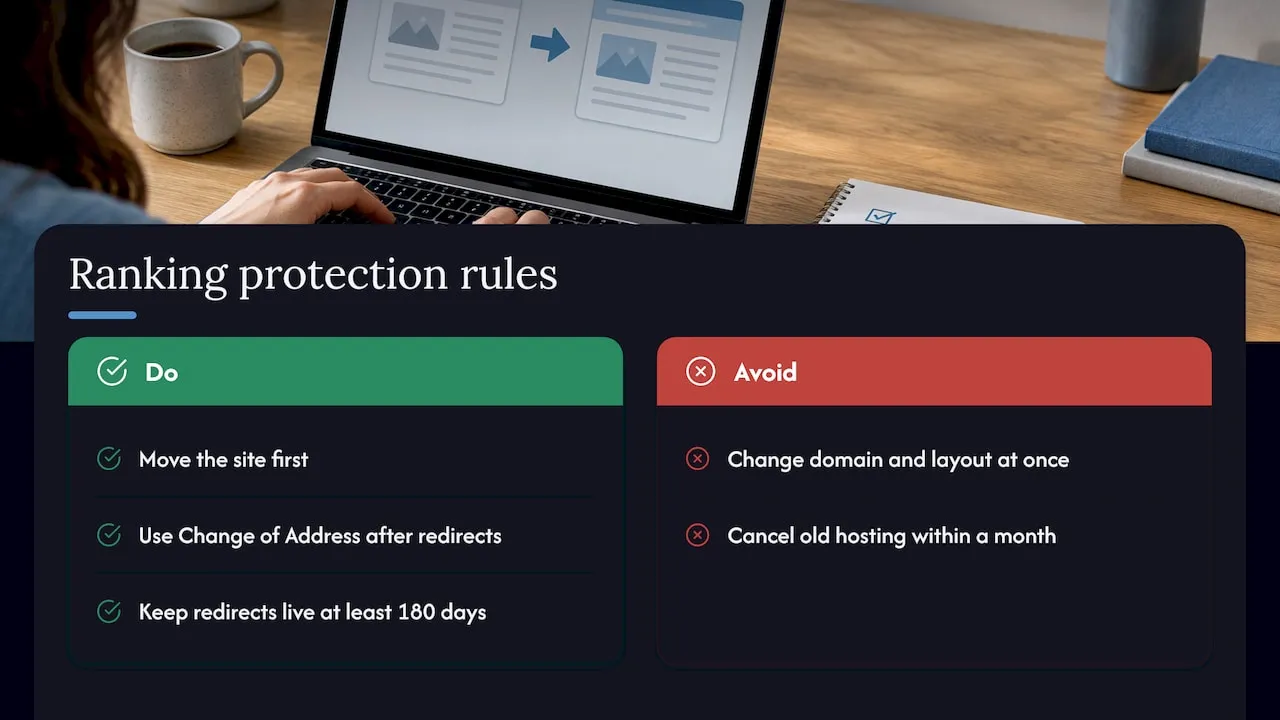
Change one major thing at a time. Google’s guidance says that moving domains and changing the layout at once makes it harder to tell what caused any change in performance. It suggests splitting large moves into smaller steps. A common sequence: move the site first, confirm traffic is stable, then redesign.
Use the Change of Address tool for domain moves. If your address changes, Google’s Search Console Change of Address tool tells Google about the move. You use it after you have moved and redirected the site. You must be a verified owner of both the old and new properties, and the tool works only at the domain level.
Keep redirects live. Google recommends maintaining redirects for at least 180 days after a domain move. Many owners cancel the old hosting account within a month and lose the redirects with it. Ask your provider who keeps the old domain pointing correctly, and for how long.
If you want the local side handled in the same project, the local SEO checklist for South Florida businesses covers your Google Business Profile and the consistency of your name, address and phone number. A new site address should match what your profile and directory listings say.
Free host migration vs. a migration service
Many hosting companies offer to move your site at no charge when you sign up. That is useful when you are changing servers and keeping the same site. It is a file transfer: your pages, database and email move to the new server.
A free transfer usually does not include:
- A full inventory of your pages and their search value
- A redirect map when addresses change
- A check that your quote forms, call tracking and lead routing still work
- Changes to design, structure or platform
- Monitoring against your old lead numbers
If your problem is that the site is slow, outdated or not producing leads, a host move leaves that problem exactly where it was. In that case the migration and the improvement are one project, and it is better to plan them together in stages.
Migration for a template site that has stopped working
Most South Florida small businesses that call us about migration are not moving for the sake of moving. Their site was built on a template or page builder years ago. It loads slowly, looks like every competitor’s, and sends leads to an inbox no one watches closely. They want out.
The temptation is to rebuild everything and launch in a single weekend. That is the riskiest approach. A staged plan looks like this:
- Audit what you have. Which pages bring in calls and form fills today? Those are the pages you protect first.
- Build the new site in a separate environment. The old site stays live while the new one is built and tested.
- Map every old address to a new one. Pages that rank keep their address where possible.
- Launch, then watch. Compare traffic, rankings and lead counts against the baseline.
- Improve in rounds. Once traffic is stable, refine layout, copy and calls to action.
Realtors and agencies with listing pages need extra care. Listing and neighborhood pages often hold the longest-standing rankings, and they change often. Make sure your provider knows which pages must keep their addresses and how new listings will be added after the move. A real estate practice in Boca Raton or Fort Lauderdale competes with dozens of nearby agents for the same search terms, so lost listing pages are hard to win back.
What a migration costs
Price depends on the number of pages, the source and destination platforms, how many redirects are needed, any forms or booking tools to rebuild, and how much SEO work is involved. A simple host move is a small job. A platform change with a redesign is a build project. Quotes that do not say which of these they are pricing cannot be compared.
When a migration includes a redesign, the budget should follow the redesign. We broke that down in website redesign cost in 2026. Ask each provider for a written scope that names the deliverables in this article, then compare scopes before you compare prices.
How to choose a migration provider
Use these questions in your first call. A provider who answers them clearly is likely to run a clean project.
| Question | A good answer includes |
|---|---|
| What do you do before moving anything? | Page crawl, ranking and traffic baseline, analytics annotation |
| How do you handle changed URLs? | A written redirect map, tested before launch |
| What do you test? | Forms, phone links, thank-you pages, lead delivery, mobile layout |
| What if launch fails? | A rollback plan with a named person and a time frame |
| What happens after launch? | Monitoring against the baseline, with a report |
| Who owns the site and logins at the end? | You do, with admin access handed over in writing |
| Who keeps the old domain redirecting? | A named owner and a duration of at least 180 days for domain moves |
Also ask who will actually do the work. A named person with a track record in your type of project matters more than an impressive sales deck.
If your site is tied to a CRM or email system, the migration touches more than pages. Leads flow from forms into follow-up. Our CRM migration plan shows how to check that flow before cutting over.
Protect the site after the move
A fresh site still needs care. Plugins, hosting and backups do not look after themselves, and a site that goes down on a weekend costs you leads you never see. Our website maintenance services are published at three levels: Managed Hosting at $99 per month, Webmaster at $250 per month, and Performance Plus at $750 per month. A written recovery plan is worth having too. Our website disaster recovery guide lays one out in plain steps.
Where we fit
We are a Delray Beach web design studio. We build fully custom-coded sites instead of using templates or page builders, so a migration with us is also a chance to leave a template behind. We work with service businesses and real estate agents across Delray Beach, Boca Raton, West Palm Beach and the rest of South Florida. Our web design and development services cover the new site, the CRM and email connections behind your forms, and the ongoing upkeep.

If you already have a site and are not sure whether it should be moved, rebuilt or left alone, start with what it does today: how many calls and form fills it produces, and which pages produce them. That tells you what to protect.
Our view on migrations
Most migrations fail in the planning, not the build. Someone moves the site, nobody records what was ranking, and three months later the phone is quieter with no way to find out why.
We treat the old site as an asset to be protected. Before we touch a page, we want to know which ones bring in business. Then we build the new site so those pages keep their strength.
We also think a migration is the best time to fix what is wrong. Moving a slow, template-based site to a new host only moves the problem. A custom-coded site built around how your business actually gets leads is a better destination, as long as the move is staged and measured.
Our background is in large-scale customer communication systems, so we pay attention to where leads go after the form is submitted. A site that looks good and routes leads to the wrong place has not been migrated well.
Jeremy
FAQ
How long does a website migration take?
It depends on the type. A host-to-host move can be quick, while a platform change with a rebuild is a project measured in weeks. After launch, Google says it can take a few weeks or more for a medium-sized site’s new URLs to replace the old ones in search results, so plan for a monitoring period.
Will I lose my Google rankings if I migrate?
Not necessarily. Permanent redirects do not cause a loss of PageRank, according to Google, and a redirect map plus testing is how you avoid the common losses. Rankings drop mostly when addresses change with no redirects, or when the domain, design and structure all change at once.
Do I need a migration service if my host offers a free move?
A free move is enough when you keep the same site on a new server. If you are changing platforms, domains or page structure, you also need a page inventory, redirects, testing and monitoring. Those are separate tasks that a file transfer does not cover.
What should I do before the migration starts?
Record your current traffic, rankings and monthly lead count. Make a list of every form, phone number and booking tool on the site. Confirm you own the domain and hosting logins, because you will need them for the move and for the Search Console tool if the domain changes.
How long should old redirects stay in place?
Google recommends keeping redirects for at least 180 days after moving a site to a new domain. Many owners keep them much longer, since old links on other sites and in email signatures continue to send visitors.
Want a clear read on your current site before deciding anything? Book the free website audit at forefrontindustries.io/website-audit.
Sources
- Website migrations: a plan to keep your traffic and SEO safe
- Website migration checklist: 11 steps for success
- The Complete Website Migration Checklist
- Site Moves and Migrations, Google Search Central
- Change of Address tool, Search Console Help