Custom Web Applications: What They Are, Cost and Uses

A custom web application is software that runs in a browser and is built around one business’s own workflow. It is not a website you read. It is a tool your staff or clients use: they log in, enter information, and the system acts on it. If your team still moves leads, quotes, bookings or client files between spreadsheets, inboxes and a CRM that does not fit, a custom web application is the fix. As a Delray Beach web design studio, we build these for service businesses across South Florida, and this guide explains what you are buying, what it costs and how to decide.
TL;DR
- A custom web application does a job (intake, quoting, scheduling, client portal, lead routing). A website mainly informs.
- It is built around your process, so staff stop working around software that was designed for someone else.
- US estimates run from about $10,000 for a simple first version to $150,000 or more for a full product. Scope drives the number.
- Start with one painful workflow, not a wish list. Plan for ongoing maintenance from day one.
- A free website audit shows where your current site and follow-up are losing leads before you scope anything.
Table of Contents
- What a custom web application is
- Web application vs. website
- Why service businesses outgrow off-the-shelf tools
- What a custom web application can do for your leads
- What custom web application development costs in the US
- How the build process works
- Is a custom web application worth it for you?
- A South Florida example
- Our perspective
- Work with a Delray Beach web design studio
- FAQ
- Get a free website audit
- Sources
What a custom web application is
A web application is software that runs in a web browser while a server does the processing behind it. AWS describes the pattern as a browser showing the screen while a web server handles requests, stores data and sends back responses. You do not install anything. Staff or clients open a link and sign in.
“Custom” means it was designed and coded for one organization’s process rather than sold to the general public. The screens, the rules and the data match how you actually work.
Practical examples for a service business:
- A client portal where customers upload documents, see job status and approve estimates.
- A quote builder that applies your pricing rules and sends a finished proposal.
- An intake form that scores a new inquiry, assigns it to the right person and starts follow-up.
- A scheduling and dispatch screen for crews or practitioners.
- A dashboard that shows revenue, open jobs and pending payments in one place. These financial dashboard examples for small businesses show what a purpose-built view can look like.
Web application vs. website
TechTarget draws the line between sites built to disseminate information and applications built for user interaction and functionality. Online banking is an application. A static blog is a website.
A simple test:
- If the main value is reading, it is a website.
- If the main value is doing something (submitting, tracking, approving, paying), it is a web application.
- Ask what happens after someone clicks submit. If an email lands in an inbox, you have a website with a form. If a record is created, routed to a person, tracked and timestamped, you have an application.
Most service businesses need both. The website brings people in. The application handles what happens next. When the two are built together, a lead that arrives on the site goes straight into your follow-up process with no copy and paste.
Why service businesses outgrow off-the-shelf tools
Packaged software is built for the average customer. It works well until your process has a step the software does not have. Then the workarounds begin.
Signs you have reached that point:
- Staff keep a spreadsheet next to the CRM because the CRM cannot hold what they need.
- New inquiries sit unanswered because nobody owns the first reply.
- The same client details are typed into three systems.
- You pay for features you never use and still lack the one you need.
- Reporting takes an afternoon of manual work every month.
Each of these costs money in a quiet way: slow replies lose leads, double entry wastes paid hours, and missing data hides what is working. A custom application removes the step that does not fit instead of asking your team to adapt around it.
That is also where our background comes in. Our founder spent years building enterprise CRM and lifecycle marketing systems at Amazon, Verizon and American Express. We apply the same thinking to local service businesses: map the real workflow first, then build only what supports it.
What a custom web application can do for your leads
For a business that lives on inquiries, the most valuable applications sit between the first click and the signed agreement.
Route and respond to leads
Lead routing means every new inquiry goes to the right person automatically, based on rules you set: service type, location, deal size, time of day. Speed matters here. A lead that gets a reply in minutes is far more likely to stay with you than one that waits until tomorrow. We build lead routing and internal workflow automation as part of our Email & CRM Development and AI Automation work.
Qualify before your team spends time
A well-designed intake flow asks the questions that separate a serious buyer from a casual browser. It can score the answers and send the best leads to your calendar first.
Keep clients informed without phone calls
A portal that shows project status, documents and invoices cuts the “where are we on this?” calls. For a real estate agent, it can be a private listing and showing portal for buyers and sellers. For a luxury home builder, it can be a client view of milestones and selections. For a med spa or wealth management firm, it can be secure booking and document exchange.
Automate the repeat work
Confirmation emails, reminders, review requests and reactivation messages should send themselves. Our AI automation and CRM engineering work, including enterprise platforms such as Salesforce Marketing Cloud and Braze, is built for exactly that.
What custom web application development costs in the US
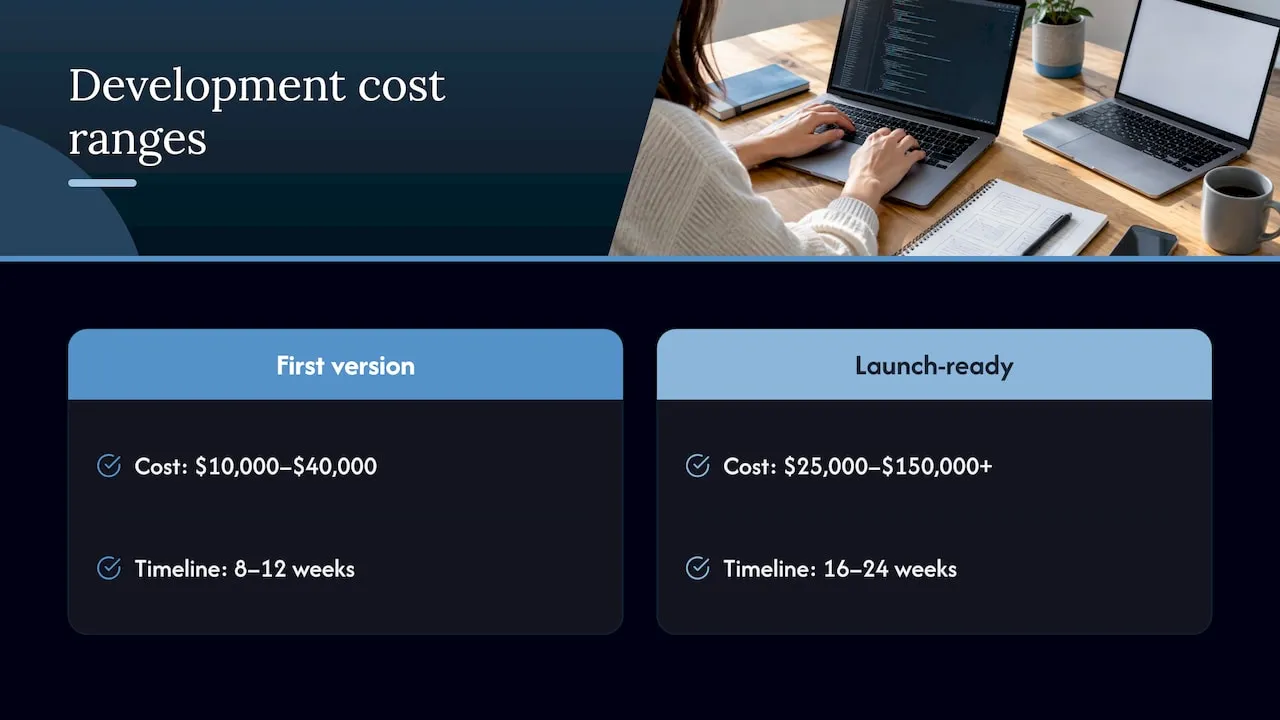
Price depends on scope, and anyone quoting a flat number before understanding your process is guessing. Published market estimates give a useful range. ProjectCostEstimator reports, based on project quotes, that US web app costs in 2026 run about $10,000 to $40,000 for a minimum viable first version and $25,000 to $150,000 or more for a launch-ready product. It lists US hourly rates of $101 to $225 and timelines of 8 to 12 weeks for a first version and 16 to 24 weeks for a fuller one.
Treat those as market context, not a quote. They come from a general estimator, and your project will land where its scope puts it.
What moves the price
| Factor | Why it changes the cost |
|---|---|
| User logins and permissions | Staff, clients and admins each see different things |
| Connections to other tools | Every CRM, payment or email system you link adds build and testing time |
| Number of screens and workflows | More steps to design, build and test |
| Reporting and dashboards | Custom views take extra design and data work |
| Hosting and upkeep | The application needs a home and regular care after launch |
How to keep the first version affordable
- Pick one workflow that loses you the most money or time.
- Build that first, put it in front of real users, then expand.
- Limit the number of outside tools it must connect to at launch.
- Decide who owns the application after launch, and budget for it.
Our Web Design & Development, Email & CRM Development and AI Automation & Consulting services have no published price because each project is scoped to the workflow. The ongoing care plans are published: Managed Hosting is $99 per month, Webmaster is $250 per month and Performance Plus is $750 per month. You can compare them on our website maintenance page.
How the build process works
A custom application should move through clear stages. Here is what each one asks of you and where projects go wrong.
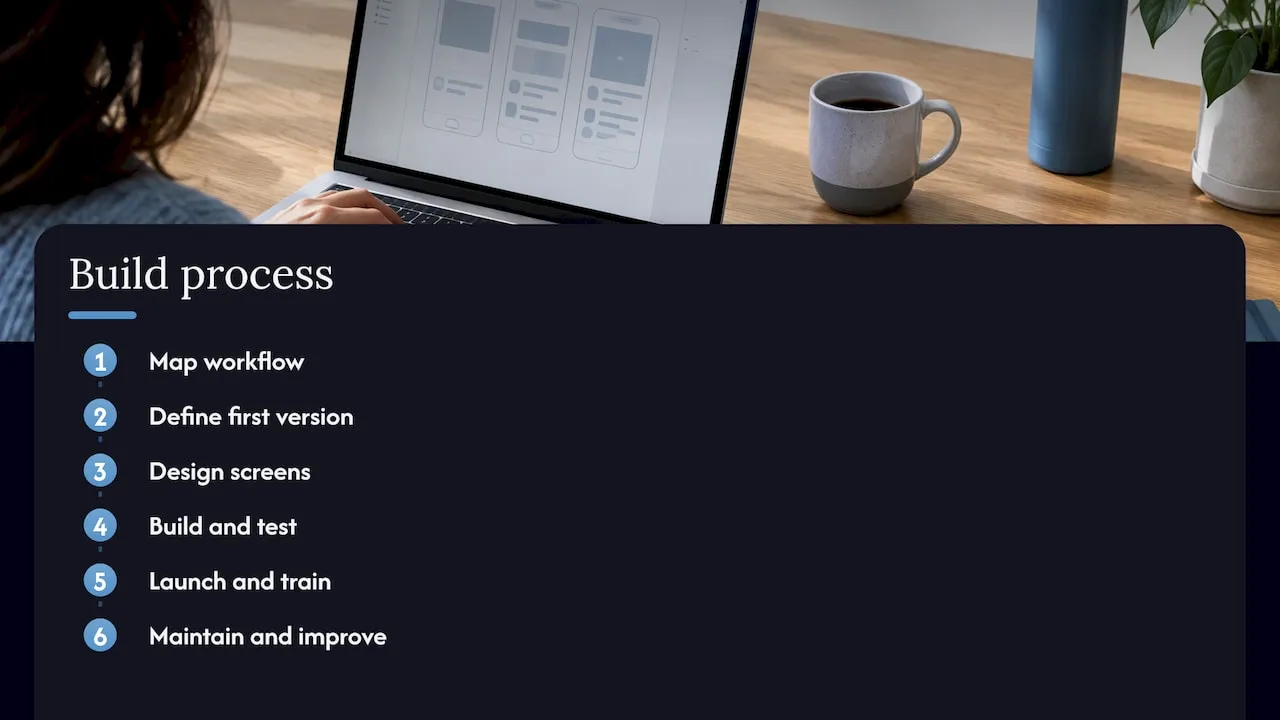
1. Map the workflow
Write down what happens today, from the first inquiry to the final payment. Who touches it? Where does it wait? Where does information get retyped? Projects go wrong here when the owner describes how work is supposed to happen rather than how it does. Talk to the people who do it daily. Our process starts with your actual workflows, not a generic template.
2. Define the first version
List what the application must do on day one and what can wait. Keep the day-one list short. Features added later cost the same or less than features crammed in now and never used.
3. Design the screens
The design should make the common task take the fewest clicks. Show it to the people who will use it before anything is coded. Fixing a sketch is cheap. Fixing finished code is not.
4. Build and test
The application is coded and tested against real situations: a lead that arrives at midnight, a client who uploads the wrong file, a staff member who is out sick. We code custom front ends rather than placing your business inside a page builder or template.
5. Launch and train
Move over one team or one service first. Give staff a one-page guide. Watch what they struggle with in the first two weeks and adjust.
6. Maintain and improve
An application is never finished. Browsers update, staff change, and your business adds services. Plan for hosting, performance checks and small improvements. Our maintenance plans exist for this stage.
Is a custom web application worth it for you?
Use these questions.
- Do you repeat the same manual task every day? If a task takes your team hours each week, automating it pays back quickly.
- Is your process a competitive advantage? If the way you quote, schedule or serve clients is what customers choose you for, software that matches it protects that edge.
- Are leads slipping? If inquiries wait or fall between systems, routing and follow-up automation have a direct revenue effect.
- Do you need clients to log in? Portals, bookings and document exchange are application work, not website work.
- Do you have a clear owner? Someone in your business needs to decide what the application should do and approve the result.
If you answered yes to two or more, a custom build is worth scoping. If your main problem is that the website itself does not bring in inquiries, fix that first. A high-converting custom website is often the right first project, and the application layer can follow.
A South Florida example
Think of a Boca Raton real estate agent who gets inquiries from a website, a portal and Instagram. Each lands in a different place. Replies depend on who sees them first. A custom application can collect all of them in one list, assign them by neighborhood or price range, send an instant acknowledgment, and remind the agent to follow up on day two and day five. The same idea fits a Fort Lauderdale contractor tracking estimates or a Miami wealth management firm handling client onboarding. The industry changes. The pattern stays the same: capture, route, follow up, report.
Our perspective
Most service businesses do not need a giant software project. They need the next step after the click to work every time.
We see the same pattern: a good business with a decent website, and a gap between the inquiry and the follow-up. Leads sit in an inbox. Staff re-enter data. Nobody can say which source brings the best clients.
Our approach is to start with the workflow, then build only what supports it. That is why we write custom code instead of fitting your business into a template, and why we bring enterprise CRM and lifecycle experience to a small business budget conversation. A system that matches how your team works gets used. One that does not gets ignored.
Start small, prove it on one workflow, then extend it. And budget for upkeep, because software that is cared for keeps earning.
Jeremy
Work with a Delray Beach web design studio
Forefront Industries is a Delray Beach web design studio that builds custom-coded websites, CRM and email systems, and workflow automation for service businesses. We serve clients in Delray Beach, Boca Raton, West Palm Beach and across South Florida. If you are weighing a custom application, our services page shows what we build, and our website maintenance plans cover hosting and upkeep once you launch.
For automation of lead handling, see our AI automation service.
FAQ
What is the difference between a custom web application and a website?
A website mainly gives information. A custom web application lets users do something: log in, submit data, track a job or approve a quote. If the main value is reading, it is a website. If the main value is acting, it is an application.
How much does custom web application development cost?
It depends on scope. Published US estimates for 2026 run from about $10,000 to $40,000 for a first version up to $150,000 or more for a launch-ready product. Starting with one workflow keeps the first investment smaller. We scope each project individually.
How long does it take to build?
Simple first versions are commonly estimated at 8 to 12 weeks, and larger builds at several months. Timing depends on how many workflows and user types it covers and how quickly you approve designs. A tight first scope is the best way to launch sooner.
Does a custom web application need ongoing maintenance?
Yes. It needs hosting, performance checks and occasional updates as your business changes. Our maintenance plans start at $99 per month for Managed Hosting, with Webmaster at $250 per month and Performance Plus at $750 per month.
Can a custom application work with the CRM I already use?
In most cases the application can pass information to and from your CRM, so leads and client records stay in one place. We build CRM and email systems on platforms like Salesforce Marketing Cloud and Braze, so this is part of how we scope projects.
Get a free website audit
Before you scope an application, find out where your current site and follow-up are losing leads. Request the free website audit at forefrontindustries.io/website-audit, or start from our free website audit page.
Sources
- What is a Web App? Web Application Explained, AWS
- What is web application (web apps) and its benefits, TechTarget
- Web App Development Cost 2026, MVP to Full Product, ProjectCostEstimator
- 3 Copy Ready Financial Dashboards for Small Businesses, ExpressPlanner