CRM Lead Management System: What It Is and How to Set One Up

A CRM lead management system is the software and the rules that catch every inquiry from your website, phone and ads, assign it to a person and track follow-up until it becomes a customer or a clear “no.” For a service business, the system only pays off if it is built around how your team actually works. A generic setup leaves leads sitting in an inbox.
We are a Delray Beach web design studio. We build custom websites and CRM and email systems for service businesses across South Florida. This guide explains the system in plain terms: what it includes, what to collect, how to follow up, and how to set it up.
TL;DR
- A lead management system has three parts: a place where lead information lives, rules for what happens to each lead, and a named person responsible at every stage.
- Speed decides outcomes. Harvard Business Review research found that companies contacting a lead within an hour were far more likely to qualify it than companies that waited longer.
- Your website form is the front door. Ask only for what you need to follow up, and route every submission to one owner automatically.
- Document your process on paper first, then build the system to match it. Do not pick software first and bend your process to fit.
- A free website audit shows where your site and follow-up are losing inquiries today.
Table of Contents
- What a CRM lead management system actually is
- CRM vs. lead management software: which one do you need
- Why speed matters more than features
- Step 1: Capture leads where they actually arrive
- Step 2: Qualify and sort without overcomplicating it
- Step 3: Assign every lead an owner
- Step 4: Follow up in a set rhythm
- Step 5: Measure what matters
- Real-life examples for South Florida businesses
- How to choose and set up a system
- Our point of view
- Where Forefront Industries fits
- FAQ
- Find out where your leads are slipping
- Sources
What a CRM lead management system actually is
CRM stands for customer relationship management. It is the database where you keep people, companies, conversations and next steps. A lead is simply someone who has shown interest in your business: a form submission, a call, a chat message, a quote request.
Lead management is what happens between that first contact and the sale. Put the two together and you have a system that answers five questions for every new inquiry:
- Who is this person, and what do they need?
- Are they already in the system (a duplicate)?
- Are they a good fit, or not right now?
- Who owns the follow-up?
- Has anyone responded, and how fast?
If your answer to the fifth question is “I think Maria called him,” you have a lead management problem, not a marketing problem.
The three layers
A working system has three layers, and missing any one of them is where leads leak.
- The platform. The software where each lead’s details, calls, emails and notes are stored in one record.
- The rules. How a lead moves from “new” to “contacted,” “qualified,” “booked” or “not a fit.” Who gets which lead. How quickly they must respond.
- The people. One named owner per lead. At a small firm that might be the owner and an office manager. At a larger one it could be a front desk, an estimator and a sales lead.
Most owners buy the first layer and skip the other two. The software then becomes an expensive address book.
CRM vs. lead management software: which one do you need
You will see “lead management software” and “CRM” used as if they were the same thing. They overlap, but they are not identical.
- Lead management tools focus on the top of the process: capturing inquiries, sorting them, assigning them and prompting follow-up.
- A CRM covers the whole relationship: quotes, appointments, repeat work, referrals, renewals and history over years.
For most service businesses, one CRM with good lead handling inside it is the right answer. A med spa, a law practice, a roofing company or a real estate team usually has one queue of inquiries and a handful of people handling them. Separate lead tools start to matter when you have many sources, several locations or complicated assignment rules, such as sending leads by territory, service type and who is on vacation.
The practical rule: start with one system that holds the full history of each person. Add complexity only when your volume forces it.
Why speed matters more than features
The most cited number in lead management comes from a Harvard Business Review study of online sales leads. It found that companies that responded to a lead within an hour were nearly seven times as likely to qualify it as those that waited just one more hour, and more than 60 times as likely as those that waited a day or longer. The study is from 2011 and looked at larger companies, but the lesson holds for a plumber in Fort Lauderdale or a realtor in Boca Raton: the first business to answer usually wins the conversation.
Think about how your own inquiries arrive. A homeowner fills out three forms on a Tuesday night. By Wednesday morning, one company has called, one has texted, and one has not replied. The third company never finds out it lost.
A lead management system exists to prevent that. It does three things automatically:
- Creates the record the moment the form is submitted.
- Assigns it to the right person.
- Alerts that person, and escalates to someone else if nobody acts.
We go deeper on the routing side in our guide to CRM lead routing.
Step 1: Capture leads where they actually arrive
Capture means getting every inquiry into one place. For a service business that usually means:
- Website forms (contact, quote request, booking request)
- Phone calls and missed calls
- Text and chat messages
- Google Business Profile messages and calls
- Ad and social media lead forms
- Referrals entered by hand
The most common failure is not a lack of leads. It is leads scattered across an email inbox, a voicemail box, a Facebook inbox and a notebook, with no single list.
What your form should ask
Keep the form short. Every extra field lowers the number of people who finish it. A practical minimum for a service business:
| Field | Why you need it |
|---|---|
| Name | To greet the person properly |
| Email or phone | A way to reach them. Ask for phone only if you will actually call |
| What they need | In their own words, so the first reply is specific |
| Service or location | To route to the right person |
| Preferred contact method | So you reach them the way they want |
The system should also record things the visitor does not type: the page they submitted from, the source (Google search, Google Business Profile, ad, referral) and the date and time. These tell you later which marketing is paying off.
Consent matters for email and text
If you will email leads, federal law applies. The FTC’s CAN-SPAM compliance guide states that the law covers all commercial email, including messages to business contacts, and requires accurate sender information, honest subject lines and a clear way to opt out. Your system should store each person’s opt-out status so a stopped contact is never emailed again. If you plan to text leads, ask a Florida attorney to review your consent wording before you start.
Step 2: Qualify and sort without overcomplicating it
Not every inquiry is a good fit. Qualification means deciding quickly which leads deserve a call today, which need a gentler follow-up, and which are not a match.
Big companies use scoring formulas with points for job title, company size and pages visited. A service business rarely needs that. A simple three-bucket sort works:
- Ready now: asked for a quote or appointment, in your service area, matches a service you offer. Same-day response.
- Not yet: interested but early, or asking general questions. Goes into a follow-up sequence.
- Not a fit: outside your area, wrong service, spam. Closed with a note.
Two quick checks catch most problems. First, does the person want something you sell? Second, are they in a place you serve? A Miami med spa and a West Palm Beach roofer will each have their own versions of these questions. Write yours down in two or three lines.
If you later want a more detailed approach, see how predictive lead scoring works and how AI lead qualification can handle the first pass of sorting. Our guide on lead quality improvement covers how to bring in fewer poor-fit inquiries in the first place.
Step 3: Assign every lead an owner
This is the step most small businesses skip, and it is the one that costs the most money. “The team” does not follow up. A person does.
Decide your assignment rules in plain language:
- Which person gets leads for which service?
- Which person gets leads for which city or office?
- Who covers when the owner is out?
- What happens if a lead is untouched after 15 minutes? After an hour?
A good system applies these rules by itself the moment the lead arrives. Nobody should have to read an inbox and forward things around. That is also where a custom build helps: your rules are specific to your business, and off-the-shelf defaults rarely match them.
Step 4: Follow up in a set rhythm
Follow-up is a pattern, not a single call. For a typical inquiry, a simple plan looks like this:
- Within minutes: an automatic confirmation (“We got your request and will contact you shortly”) so the person knows it landed.
- Within the hour, during business hours: a real call or text from the owner of the lead.
- Same day: if no answer, a short email with a direct way to book.
- Day 2 to 3: a second attempt by a different channel.
- Following week: a final check-in, then move the lead to a longer-term list.
Two cautions. Automatic messages should confirm and help, not pretend to be personal. And every message must respect opt-outs.
The system should log every attempt. When a lead calls back three weeks later, whoever answers sees the full history and does not start from zero.
Step 5: Measure what matters
The point of storing all this is to learn from it. Four numbers tell a service business most of what it needs:
- Leads by source: where inquiries come from (Google, Google Business Profile, referrals, ads).
- Response time: how long from submission to first real contact.
- Booked rate: the share of leads that became appointments or estimates.
- Won rate and value: the share that paid, and how much.
Once you see these, decisions get easier. If most of your booked jobs come from Google Business Profile and local search and your ads bring only price-shoppers, you know where to spend. A system that cannot show these four numbers is not doing its job.
Real-life examples for South Florida businesses
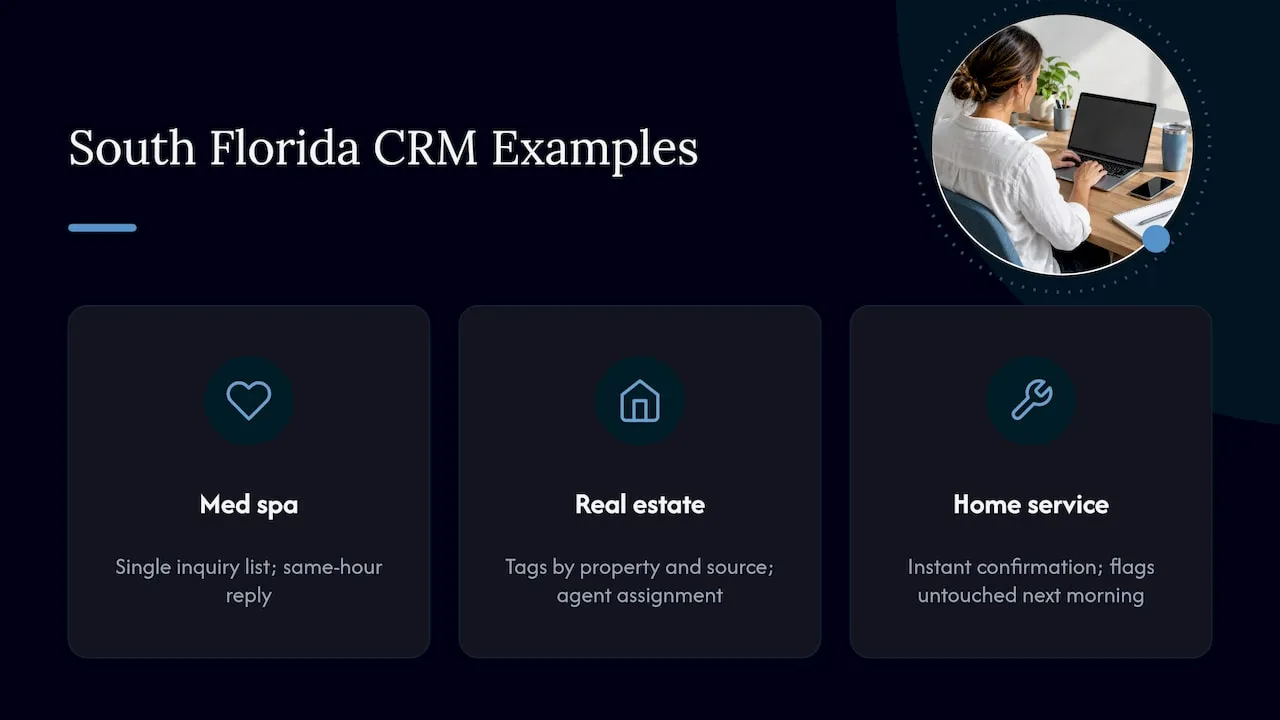
A med spa in Boca Raton. Inquiries arrive by website form, Instagram messages and phone. Without one system, the front desk checks three places. With one, every inquiry lands in a single list, the consultation request gets a same-hour reply, and a follow-up sequence reminds people who did not book. We have a page on website design for med spas that shows how the site side fits in.
A real estate agent in Miami. Listing inquiries come from the website, portals and open houses. The system tags each by property and source, assigns it to the agent, and keeps buyers warm with relevant listings instead of one generic newsletter.
A home service company in West Palm Beach. Quote requests come in at night and on weekends. The system sends an instant confirmation, assigns the lead to the estimator for that area, and flags anything untouched by the next morning.
These are illustrations of how the system works, not client results.
How to choose and set up a system
Follow this order. It saves money.
- Map your current process. On one page, write where leads come from, who touches them, and what “done” looks like. Include the messy parts.
- List what you must have. For most service businesses: one list for all sources, automatic assignment, follow-up reminders, templates for texts and emails, and a simple report on the four numbers above.
- Match size to need. A solo owner does not need the same setup as a 50-person firm. Buying a heavy platform for a small team is a common and expensive mistake.
- Connect your website. Every form should feed the system directly. If someone has to copy and paste submissions, leads will be missed.
- Test the full path. Submit a test inquiry and watch it: Was the record created? Was the right person alerted? Did the confirmation go out?
- Review monthly. Look at response time and booked rate. Adjust the rules.
The website matters more than most owners expect. If your form is slow, confusing or hard to use on a phone, the best CRM in the world never sees the lead. A site built to convert, connected to the system behind it, is the combination that works.
Our point of view
Most of the lead problems we see come down to the same gap: the website and the follow-up were built separately, by different people, and nobody owns the space between them.
Before building anything, we start from your actual workflow: who answers, how fast, and what happens when they do not. That is why we build custom-coded sites and CRM systems instead of dropping you into a template. The founder spent years building lifecycle and CRM systems at Amazon, Verizon and American Express, and brings that discipline to service businesses of every size.
Rules for routing, templates for follow-up and reports on what is working are built around your business, not around a software menu.
If you take one thing from this guide: write down your process, put a name on every lead, and make the first response fast. Everything else is detail.
Jeremy
Where Forefront Industries fits
We build the pieces of this system for service businesses: custom-coded, conversion-focused websites, email and CRM systems on platforms such as Salesforce Marketing Cloud and Braze, lead routing, follow-up automation and ongoing website maintenance. You can see everything on our services page.
If you are based in Palm Beach County, our Delray Beach Email & CRM Development | Forefront Industries explains how we work with local businesses, and our Boca Raton web design page covers the website side.

Once the system is live, the website still needs care. Our website maintenance plans keep the site fast and up to date so the front door of your lead system stays open.
FAQ
What is a CRM lead management system?
It is software plus a set of rules that captures every inquiry, stores it in one record, assigns it to a person and tracks follow-up until the lead becomes a customer or is closed. The rules and the named owner matter as much as the software.
What is the difference between lead capture and lead management?
Lead capture is getting the inquiry into your system, usually from a website form, a call or a message. Lead management is everything after that: sorting, assigning, following up and measuring. Capture without management leaves leads sitting unanswered.
How fast should I respond to a new lead?
As fast as you can. The Harvard Business Review study found that contacting a lead within an hour made a large difference in qualification rates compared with waiting longer. A good target is a confirmation in seconds and a real person within the hour during business hours.
Do I need a CRM if I only get a few leads a week?
Yes, in a simple form. Even a few leads a week are easy to lose when they arrive by phone, email and social media. One shared list with an owner and a next step for each lead is enough to start, and it grows with you.
What should a lead form ask for?
Name, a way to reach the person, what they need and the service or location. Ask for a phone number only if you will call. Short forms are completed more often.
Find out where your leads are slipping
If inquiries are arriving but not turning into customers, the cause is usually in the website, the follow-up, or the gap between them. Request our free website audit and we will show you where your site and lead handling can improve.
Sources
- The Short Life of Online Sales Leads, Harvard Business Review
- CAN-SPAM Act: A Compliance Guide for Business, Federal Trade Commission