Email Marketing Segmentation: A Guide for Florida Businesses

Email segmentation means splitting your contact list into smaller groups and sending each group the message that fits it. A past client who bought last month and a stranger who downloaded a price guide yesterday should not get the same email. For a service business, three to five well-built groups, fed by data you already collect, are enough to get most of the benefit. As a Delray Beach web design studio that also builds email and CRM systems, we see the same pattern: the list is not the problem, the single message sent to all of it is.
TL;DR
- Segmentation sorts your contacts by what they did, what they asked for and where they are in your sales process, so each group gets a relevant email.
- Start with 3 to 5 groups: new leads, active clients, past clients, quiet contacts and one group by service or property type.
- Behavior (a form submitted, a link clicked, a service booked) tells you more than guesses about age or job title.
- Every commercial email must follow the federal CAN-SPAM rules, including a working opt-out.
- Segments only work if they are updated. Review them every quarter.
Table of Contents
- What email segmentation is, in plain terms
- Why it is worth the effort
- The groups to build first
- Where the data comes from
- How to set up segments, step by step
- Do not over-segment
- The rules you have to follow
- When to get help
- Email segments start with your website
- FAQ
- Sources
What email segmentation is, in plain terms
Your email list is a mix of people at different stages. Some asked for a quote and never heard back. Some hired you two years ago. Some signed up for a newsletter and have not opened anything since.
Segmentation puts each of those people into a group, based on a fact you know about them. Then each group gets its own message, its own timing and sometimes its own offer. The same tool that sends your newsletter can usually do this. The work is deciding the groups and keeping the data behind them accurate.
You will see four kinds of segmentation in most guides:
| Type | What it uses | Example for a service business |
|---|---|---|
| Demographic | Who the person is | Homeowner vs. business owner |
| Location | Where they are | Boca Raton vs. Miami contacts |
| Behavioral | What they did | Opened the pricing email, clicked the booking link |
| Lifecycle | Where they are with you | New lead, current client, past client |
For most local businesses, behavioral and lifecycle groups do the heavy lifting. Demographic guesses are weaker, because what someone did is a clearer signal of what they want than a profile field.
Why it is worth the effort
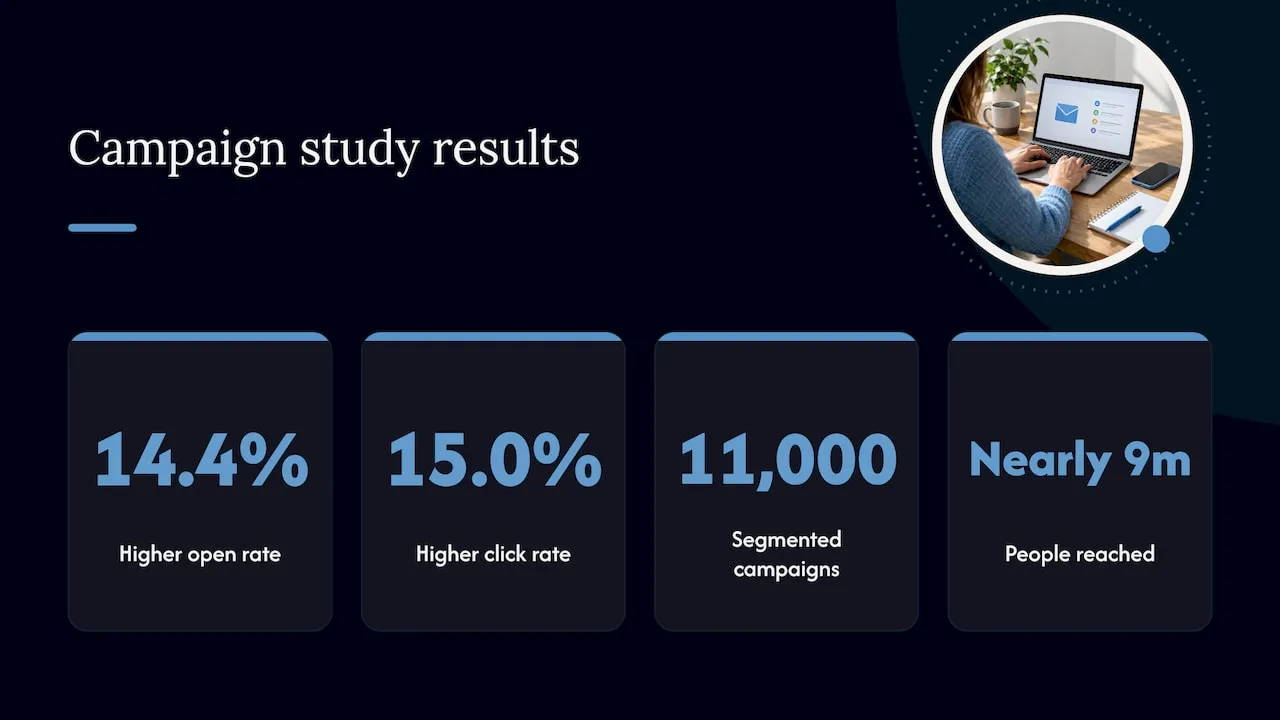
The oldest and most-quoted number comes from an analysis of 11,000 segmented campaigns sent to nearly 9 million people. It found segmented campaigns had a 14.4% higher open rate and a 15.0% higher click rate than campaigns that went to everyone. Bounces and spam complaints were lower too. That analysis was reported in 2013, so treat it as a direction, not a promise for your list.
The reason is simple. People open and click emails that look like they were written for them. When more people open and fewer complain, inbox providers see a sender people want to hear from, and your future emails are more likely to land in the inbox. If your messages already land in spam, our guide on fixing email deliverability first covers the order to work in.
For a small business the payoff is not a prettier open rate. It is fewer leads going cold. A person who requested a quote gets a follow-up that refers to the quote. A past client gets a check-in at the right time instead of a sale announcement meant for strangers.
The groups to build first
Do not copy a list of 50 segmentation ideas. Pick the groups that match how you make money. Here are the ones that fit most service businesses in South Florida.
1. New leads
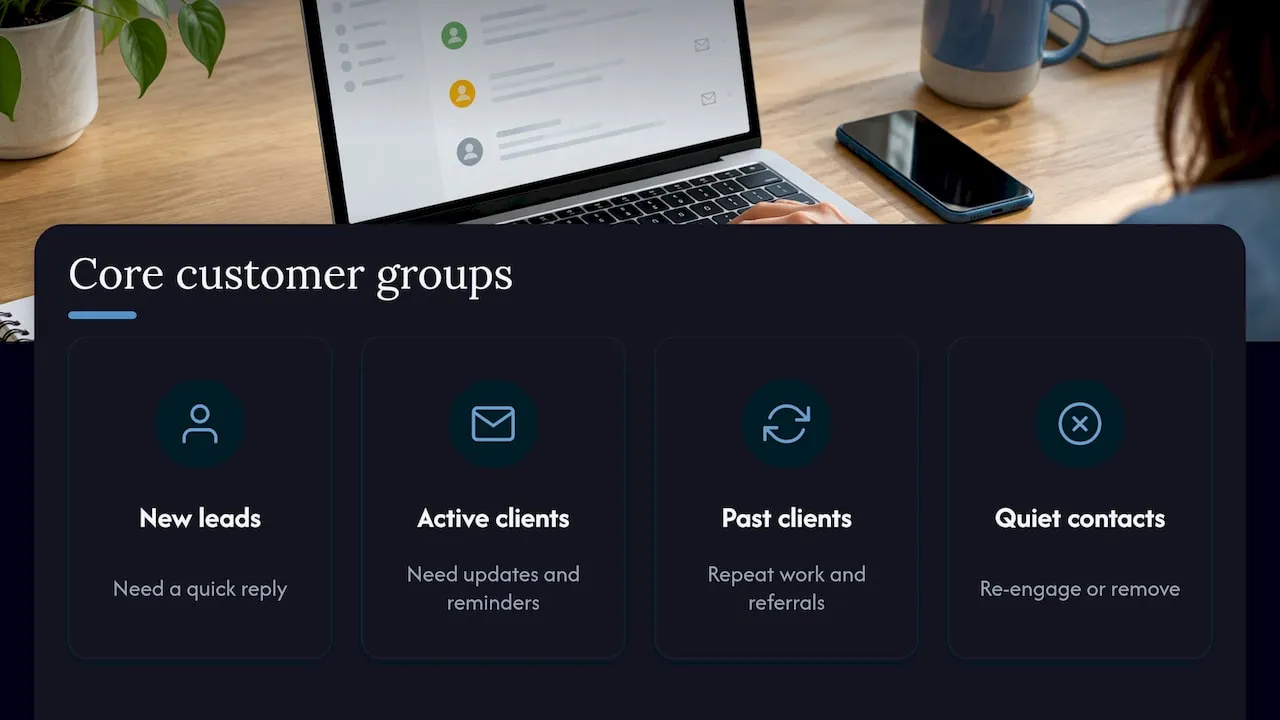
Anyone who filled out a contact form, called and was added, or downloaded something in the last 30 days. They need a quick reply and a short series that answers the questions they have before hiring: price range, timeline, what happens next.
2. Active clients
People you are working with right now. They should not receive sales emails for something they already bought. They need updates, next steps and reminders.
3. Past clients
People who finished a project or treatment. This is your best source of repeat work and referrals. Send them seasonal reminders, a review request and a note when you have something new.
4. Quiet contacts
People who have not opened an email in 90 to 180 days. Do not keep mailing them the same way. Send a short re-engagement series, then remove those who still do not respond. A smaller list of people who read your email is worth more than a large list that ignores it. We wrote three ready-to-use re-engagement sequences you can follow, including the CAN-SPAM details.
5. Contacts by service or interest
This group depends on your business. Examples:
- Real estate agents: buyers vs. sellers, and by price range or neighborhood. A buyer watching condos in Fort Lauderdale does not want a listing email about a single-family home in West Palm Beach.
- Med spas and aesthetic practices: by treatment interest, such as injectables or skin care, so a facial promotion does not go to someone who only asked about laser hair removal.
- Contractors and builders: by project type, such as remodel, new build or repair, and by timeline.
- Professional services: by the service page the person visited or the form they used.
6. High-value contacts (optional)
If you track what clients spend, mark your top clients. They get early access and a personal note, not a discount.
Where the data comes from
You do not need to buy data. Segments are built from information you already collect or can start collecting today:
- Signup and contact forms. Add one question that sorts people, such as “What do you need help with?” with a short list of choices. This is the cheapest and most accurate data you can get, because the person told you directly.
- Website activity. Which pages they viewed, which forms they submitted, which links they clicked in your emails.
- Your customer records. Services bought, dates, and amounts. This is usually in a CRM, which is the system that stores your contacts and their history.
- Preference choices. Let subscribers pick the topics and how often they hear from you. People who can adjust what they receive are less likely to unsubscribe entirely.
Tell people how you will use their information, ask only for what you will act on, and keep it current. A field you never use is a field you should remove from the form. A shorter form also gets more submissions.
The weak point for most small businesses is that these pieces live in different places: the website form in one tool, the client list in a spreadsheet, the emails in a third. When they do not talk to each other, segments go stale within weeks. That is a setup problem, and it is where custom website and CRM work pays off.
How to set up segments, step by step
Step 1: Decide what you want each group to do
Write one sentence per group. New leads: book a call. Past clients: leave a review or book a repeat service. Quiet contacts: respond or leave the list. If you cannot state the goal, you do not need that group.
Step 2: Choose the one fact that defines each group
Use a fact you can check, not a hunch. “Submitted the quote form in the last 30 days” works. “Seems interested” does not.
Step 3: Confirm the data is captured
Check that your website form actually sends the contact, and the answer to your sorting question, into your email system. A common failure is a form that emails you but never adds the person to a list. Test by submitting your own form and watching where the entry lands.
Step 4: Write one email per group first
Do not build ten campaigns. Write a single good email or short series for each group and send it. Compare what happens against your usual newsletter.
Step 5: Add automation for the groups that matter most
Automation means the email goes out by itself when a trigger happens: someone joins the list, submits a form, or goes quiet. Start with the basics:
- A welcome email when someone joins.
- A follow-up when someone requests a quote or consultation.
- A re-engagement series when someone goes quiet.
- A thank-you and review request when a job is finished.
These cover the moments where service businesses lose the most people. If you want formal training on building these first automated campaigns, there are email marketing course topics worth looking at.
Step 6: Review every quarter
Segments drift. People change phone numbers, finish projects, or lose interest. Check each group’s size and results every three months, fix the rules, and remove dead contacts.
Do not over-segment
More groups is not better. Each group needs its own message, and a small business cannot write twelve versions of every email. A good rule: if you cannot name who writes the email for a group and when, merge the group into another.
Start with three to five core groups. Add a new one only when you see a clear difference in how two sets of people behave and you have a distinct message for them. Groups with fewer than a few dozen people rarely give you results you can measure.
The rules you have to follow
Segmentation does not change the law. In the United States, the FTC’s CAN-SPAM rules apply to all commercial email, and the law makes no exception for business-to-business email. The FTC guide’s main requirements include:
- Accurate “From,” “To” and “Reply-To” information.
- A subject line that matches what is in the email.
- A clear notice that the message is an ad when it is one.
- Your valid physical postal address in each email.
- A clear way to opt out, honored within 10 business days.
Segments make this easier to follow, not harder. A person who opts out must come off every group, so your opt-out has to update your whole list, not just one campaign. If you have questions about how the law applies to your situation, ask a business attorney.
When to get help
If your list is a few hundred contacts and one form, you can set up the first groups yourself in an afternoon. Trouble starts when leads come from several places: your website, calls, a listing portal, referrals. Someone has to make sure each one lands in the right group, the right follow-up fires, and nobody gets emailed twice.
That is the work our team does. We build email and CRM systems for service businesses on platforms such as Salesforce Marketing Cloud and Braze, with modular email templates, lifecycle journey automation and lead routing. The same lifecycle thinking is covered in our piece on email that keeps customers coming back. Our founder previously built lifecycle email and CRM programs at Amazon, Verizon and American Express as an employee, and we bring that experience to Florida businesses of every size.
If you are in Palm Beach County, see our Delray Beach Email & CRM Development | Forefront Industries page. We also work with businesses in Miami and West Palm Beach.
Email segments start with your website
Every segment begins with a form, a page or a booking flow. If the website collects only a name and email, you can only build one kind of group. A custom-coded website from our studio is built around what you need to know about each visitor, so the sorting question and the follow-up are part of the design from the start. Our web design and development service covers that, and so do our email and CRM services.
Our view on segmentation
Most small businesses do not need a complicated email program. They need to stop losing the people who already raised their hand.
We have built lifecycle email and CRM systems where the stakes were large. The lesson that carries over to a Delray Beach dental practice or a Miami real estate agent is the same: know who the person is to you right now, and send the one email that fits that moment.
That is why we start with the website form and the follow-up, not the email design. If the right information is captured and routed to the right place, the segments build themselves. If it is not, no tool will fix it.
We build these systems custom, around how your business actually handles leads, not around a template. The goal is better-quality inbound leads and less manual follow-up for you.
Jeremy
FAQ
What is email marketing segmentation?
It is the practice of dividing your email list into smaller groups based on shared facts, such as what people bought, what they clicked or where they are in your sales process. Each group then receives emails that match its situation. The goal is more relevant messages and fewer people ignoring or unsubscribing from your emails.
What are the main types of segmentation?
The most common are demographic (who someone is), geographic (where they are), behavioral (what they did) and lifecycle (their stage with your business). Service businesses usually get the most from behavioral and lifecycle groups, because they show intent more clearly than profile details.
How many segments should a small business have?
Three to five is a good start. New leads, active clients, past clients and quiet contacts cover most of the ground, with one more group by service or interest if it applies. Add more only when you have a different message for each.
How often should I update my segments?
Check them at least every quarter. Review group sizes, open and click results, and the rules that put people into each group. Automatic rules, such as “no opens in 120 days,” keep many groups current without manual work.
Sources
Not sure where your leads are slipping through? Request a free website audit at forefrontindustries.io/website-audit and we will look at your site, your forms and your follow-up.