Website Lead Generation in Florida: A Plain Guide for Owners

A website generates leads when a visitor can quickly see what you do, trust you, and take one clear next step: call, book, or send a short form. If your site gets visits but few inquiries, the cause is usually one of five things: an unclear offer, a weak first screen, long forms, slow mobile pages, or slow follow-up. This guide covers each one for Florida service businesses, from a Boca Raton law office to a Miami home services company.
We are a Delray Beach web design studio. What follows is how we look at a site that is not producing inquiries.
TL;DR
- A lead is a person who shows interest in your services and is likely to become a paying customer. A website form is one of the most common ways to collect them (Google Analytics Help).
- One main action per page, visible trust signals, fast loading and a mobile-friendly layout do most of the work.
- Short forms with specific button wording get more completed inquiries than long forms that say “Submit.”
- Track calls, form fills, and how many of those become booked jobs. Traffic alone tells you little.
- Reply fast. A good site with slow follow-up still loses the lead.
Table of Contents
- What website lead generation means for a local business
- Why Florida websites stop producing leads
- Getting the right visitors first
- Designing forms and buttons that get used
- Tailoring the site to the inquiry you want
- Connecting the website to follow-up
- Numbers to watch
- Keep improving after launch
- Custom site or template: what changes for leads
- How we help
- FAQ
- Get a free website audit
- Sources
What website lead generation means for a local business
Lead generation is finding people who are likely to be interested in what you sell. On a website, that means turning a visitor into a name and a way to reach them. Google’s own analytics documentation describes a lead as someone who shows interest and is likely to convert into a customer, and names a website form that collects contact details as a common way to get more of them (Google Analytics Help).
For a service business, the lead usually takes one of four forms:
- A phone call from a mobile visitor.
- A short contact or quote form.
- A booking request for a consultation, estimate or appointment.
- A text or chat message.
A brochure site lists your services and your phone number and hopes. A lead generation site treats every page as a possible next step. Your roofing page, your listing page or your pricing page should each end with a clear action that fits that page, not send everyone to a generic contact page.
Why Florida websites stop producing leads
Most sites we review fail in predictable ways. Here are the common ones, in the order we check them.
The offer is not clear in five seconds
A visitor from Fort Lauderdale searching on a phone on a lunch break will not read three paragraphs to learn what you do. The top of the page should say what you do, who it is for, and where you work. “Full-service solutions for all your needs” says nothing. “Pool repair in Palm Beach County, same-week estimates” says a lot.
No single main action
Pages with six buttons, two forms and a newsletter pop-up split the visitor’s attention. Ahrefs recommends a clean layout with one main action, along with trust signals, persuasive copy, fast loading, mobile usability and SSL (Ahrefs). Pick the action you most want, make it obvious, and repeat it down the page.
Trust is missing
Visitors decide quickly whether you look real. Put these where they can be seen without scrolling far:
- Real photos of your team or work, not stock images.
- Reviews with names and the service performed.
- Licenses, insurance, and certifications you actually hold.
- Your address or service area, and a local phone number.
The site is slow or awkward on a phone
Most local searches happen on mobile. If buttons are small, text is cramped, or the page jumps while loading, people leave. This is one of the main differences between a template that was never tuned and a site built around how your customers actually browse.
The form asks too much
We cover this in detail below, because it is the easiest fix.
Nobody answers quickly
A website can do its job and the lead can still be lost. If an inquiry sits for a day, the visitor has often called someone else. More on this in the follow-up section.
Getting the right visitors first
A good page cannot convert people who never arrive. For Florida service businesses, the right traffic is local and specific: people searching for your service in your city or county.
The basics:
- Google Business Profile. Claim it, choose accurate categories, list your service area, add real photos, and keep hours current. Make sure the name, address and phone number match your website exactly.
- City and service pages. A single “Services” page rarely ranks for “AC repair Boca Raton” and “AC repair West Palm Beach” at the same time. A separate page for each core service and each main area, written with real detail, gives search engines and visitors something specific.
- Reviews. Ask every happy customer, and respond to each review.
- Language. South Florida has a large Spanish-speaking market. If you serve it, content in Spanish helps. Multilingual SEO content tools can speed up planning and publishing for those pages, though your service details should always be checked by someone who knows your business.
Once the right people arrive, the page has to convert them.
Designing forms and buttons that get used
Forms are where most lead loss happens on otherwise decent sites. The Nielsen Norman Group’s form usability guidance gives clear rules (NN/G):
- Remove unnecessary fields.
- Use a single-column layout.
- Group related labels and fields in a logical order.
- Avoid placeholder text as a substitute for labels.
- Mark optional and required fields clearly.
- Explain input requirements, such as phone format.
- Skip Reset and Clear buttons.
- Show visible, specific error messages.
How many fields?
Ask only for what you need to respond. For most service businesses that is name, phone or email, and a short description of the job. Everything else can be asked on the first call. If you need a service type or ZIP code to route the inquiry, a dropdown works better than a blank box.
Here is a quick comparison.
| Element | Weak version | Better version |
|---|---|---|
| Fields | Name, email, phone, company, address, budget, timeline, how you heard of us | Name, phone, what you need |
| Button text | Submit | Get my free estimate |
| After sending | Page reloads with no message | Thank-you page that says when you will call |
| Phone number | Image or hidden in footer | Tap-to-call at the top of every page |
| Layout | Two or three columns | One column |
Button wording matters
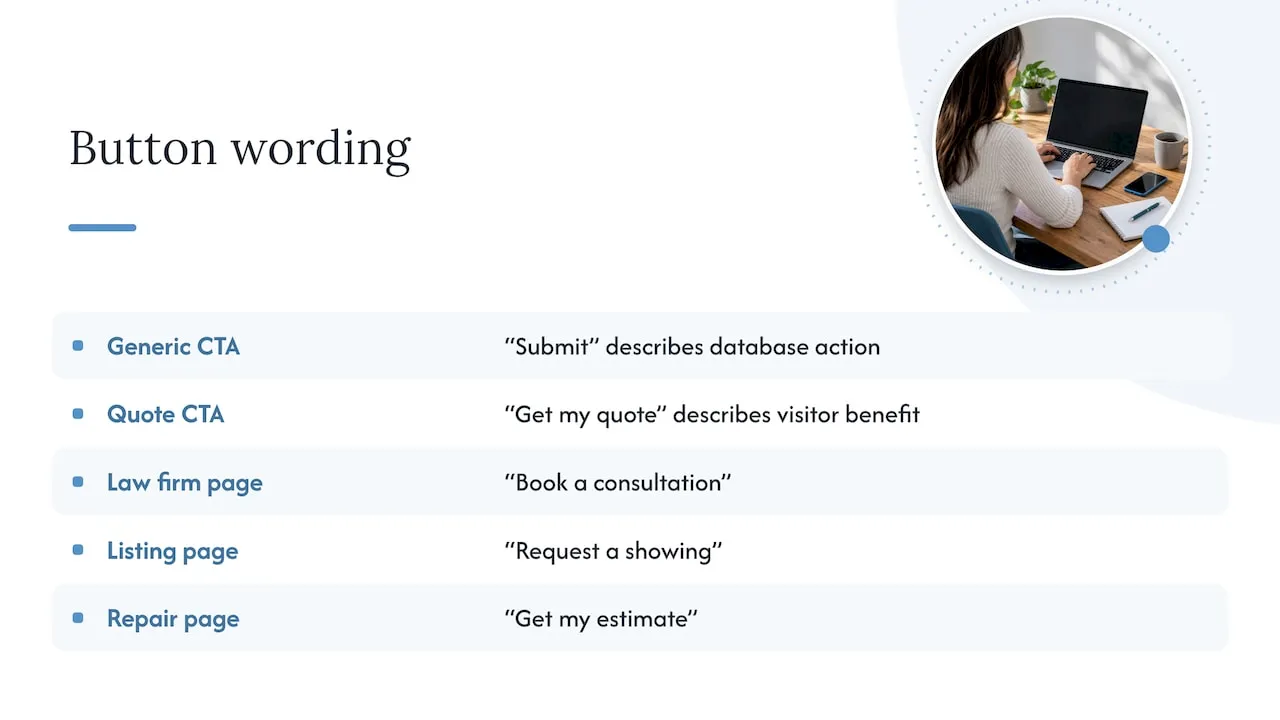
Omniconvert makes a useful point: the words on a call to action set the expectation of what happens next. “Submit” describes what the database does, while phrases like “Get my quote” describe what the visitor gets (Omniconvert). Match the button to the page: “Book a consultation” on a law firm page, “Request a showing” on a listing page, “Get my estimate” on a repair page.
The thank-you page
After someone sends a form, tell them what happens next and when. “We call within one business hour, Monday to Friday, 8 to 6” removes doubt. It also gives you a clean page to measure form completions.
Tailoring the site to the inquiry you want
A generic site attracts generic inquiries. Decide which jobs you want, then build the pages to filter for them.
Service businesses
If you want larger projects, say so. List the types of jobs you take, your typical range if you are comfortable sharing it, and the areas you cover. This discourages bad-fit inquiries and encourages good ones. A cleaning company that wants recurring commercial contracts should have a commercial page, not just a residential quote form.
Real estate agents
Agents in Miami or Fort Lauderdale compete on listings and on local expertise. Useful elements:
- Listing pages that load fast and have one clear action: schedule a showing.
- Neighborhood pages with real local knowledge.
- A “what is my home worth” form with few fields.
- A buyer path and a seller path that start from the home page.
Practices and professional offices
Owners and practice managers should make booking easy. Show insurance accepted, location, parking, and who the provider is. Offer a booking request or call button on every page.
Connecting the website to follow-up
A form that sends an email to a shared inbox is the weakest setup. Messages get buried, nobody owns them, and you cannot tell what happened afterward.
A better setup, in plain terms:
- Each inquiry lands in one place that records who asked, what for, and which page they came from.
- The right person is notified right away, by text or email.
- The visitor gets an automatic confirmation.
- A reminder fires if nobody has replied within a set time.
- Each lead is marked as booked, quoted, won or lost.
This is what a CRM does: it stores each lead and tracks the follow-up. Old or disconnected systems cause the usual problems: leads that never reach the right person, duplicate entries, no record of who called whom, and no way to tell which marketing brought in paying customers. If your current setup has any of these, the site is often not the real problem.
Follow-up rules that work
- Reply to every inquiry the same business day, ideally within the hour.
- Call first when a phone number is given, then send a text or email if there is no answer.
- Follow up more than once. A single attempt gives up too early.
- Keep a short script for the first call, so every lead hears the same clear next step.
Numbers to watch
Traffic is not the goal. You want to know whether the site produces qualified inquiries and whether those become revenue. Track these monthly:
| Number | What it tells you |
|---|---|
| Phone calls from the site | How many mobile visitors act |
| Form submissions | How well pages convert |
| Conversion rate (inquiries divided by visits) | Whether changes help |
| Inquiries by source (Google Business Profile, search, ads, referrals) | Where good leads come from |
| Qualified leads | Inquiries that fit the jobs you want |
| Booked jobs and revenue by source | Whether the site pays for itself |
Google Analytics lets you mark form submissions and other actions as key events, so you can count them (Google Analytics Help). Ask whoever manages your site to set this up, and to show you the numbers in plain language.
Keep improving after launch
A site is never finished. A simple monthly routine is enough:
- Review the numbers above.
- Pick the page with the most visits and the fewest inquiries.
- Change one thing: the headline, the button wording, the number of form fields, or the photo.
- Wait long enough to see a difference, then compare.
- Keep what worked and move to the next page.
Also keep the basics healthy: pages load fast, forms still send, the site stays secure, and the phone number is correct. A broken form can cost leads for weeks before anyone notices.
Custom site or template: what changes for leads
Templates and page builders can get a business online. The usual trouble is that they are built for everyone, so they carry extra code, generic layouts and forms that do not match how you take on work. A custom-coded site is built around your services, your service area, and the way you handle inquiries. Page structure, form logic, and what happens after a visitor submits can all follow your real process.
Our perspective
Most owners come to us after a site has quietly cost them leads for a year. The design is usually not the main problem. The problem is that the site, the forms, and the follow-up were never built as one system.
Our founder spent years building customer lifecycle and CRM systems at Amazon, Verizon and American Express. That work taught us that lead quality depends on what happens after the click as much as on the page itself. We bring that thinking to local businesses in Delray Beach and across Florida, with fully custom-coded sites instead of templates.
We build each site around your actual workflow: which inquiries you want, who answers them, and how fast. Better leads mean fewer wasted calls and more booked work.
Jeremy
How we help
Forefront Industries is a Delray Beach web design studio. We build custom websites for service businesses, set up the CRM and email systems that handle inquiries afterward, and automate repetitive follow-up work. See the full list on our services page.
After launch, our website maintenance plans keep the site fast, secure and working: Managed Hosting is $99 per month, Webmaster is $250 per month, and Performance Plus is $750 per month.
FAQ
How much does it cost to generate leads from a website in Florida?
It depends on the build and on how you attract traffic. Site builds are quoted per project. Ongoing upkeep is a separate monthly cost. Our maintenance plans run $99, $250 or $750 per month, and a new site or CRM project is quoted after we learn your workflow.
How long does it take for a website to start producing leads?
A fixed site with a clear offer and a short form can produce inquiries soon after launch if people already visit it. Ranking in local search for new pages usually takes longer, so build both the page and your Google Business Profile at once.
Do I need a blog to get leads?
Not first. Start with strong service pages, area pages, reviews and a working form. Add helpful articles once the core pages convert, to answer questions your customers ask before they call.
Why does my site get visits but no calls?
The usual causes are an unclear first screen, no obvious phone button on mobile, a long form, slow loading, or slow replies. Check them in that order, starting with how the page looks on your own phone.
What is the first thing to fix?
Shorten your form and change the button from “Submit” to what the visitor gets, such as “Get my free estimate.” Then make sure someone replies the same day.
Get a free website audit
If your Florida website is not bringing in the inquiries it should, we will look at it with you. Request the free website audit at forefrontindustries.io/website-audit and we will show you what is costing you leads and what to fix first.