Website A/B Testing: A Practical Guide for Marketers

Website A/B testing is a controlled experiment that shows two or more page variations to separate visitor groups and measures which one moves your target metric further. The objective is always a measurable lift, not a hunch confirmed. A test earns the “successful” label when it meets a short list of conditions:
- A single, clearly defined goal (one metric, one hypothesis)
- Enough traffic and conversions to reach statistical confidence, not just a visible trend
- Instrumentation that fires cleanly across browsers and devices, with no tracking gaps
- A pre-set stopping rule instead of a judgment call made mid-test
When the change touches revenue infrastructure, CRM logic, or a full redesign, and internal bandwidth is thin, that’s usually the point to bring in outside help rather than improvise the instrumentation yourself.
Key Takeaways
Reliable website A/B testing depends on a predefined stopping rule, adequate sample size, clean instrumentation, and a single measurable goal decided before launch, not after.
| Point | Details |
|---|---|
| Define one goal upfront | Pick a single metric and hypothesis before building any variant. |
| Calculate sample size first | Estimate required visitors per variant using your baseline conversion rate before launch. |
| Lock your stopping rule | Set test duration or sample size in advance and don’t stop early on a promising trend. |
| Protect SEO and privacy | Use canonical tags, 302 redirects, and proper consent handling per Google’s testing guidance. |
| Consider custom infrastructure | Forefront Industries builds testing-ready React frontends and CRM integrations for teams whose current site can’t isolate clean variants. |
Table of Contents
- What Is Website A/B Testing and Which Test Type Fits?
- Why Does A/B Testing Website Performance Matter?
- How Do You Prioritize Which Tests to Run First?
- What Metrics and Statistics Do You Need Before Testing?
- What Does a Complete A/B Test Runbook Look Like?
- How Should You Implement Tests Without Breaking Your Site?
- What SEO and Privacy Rules Protect Your Test?
- What Are the Most Common A/B Testing Mistakes?
- When Should You Hire an Agency vs. Run Tests In-House?
- What I’ve Learned From Watching Tests Succeed and Fail
- How Forefront Industries Speeds Up Reliable Experimentation
- Frequently Asked Questions
- Sources
What Is Website A/B Testing and Which Test Type Fits?
Classic A/B testing splits traffic between two versions of a page, typically 50/50, and measures which one wins on a single metric. A/B/n testing extends the same logic to three or more variants, useful when you have several credible headline or layout ideas and enough traffic to support them all. Multivariate testing combines multiple elements (headline, image, CTA color) at once to measure interaction effects between them, but it demands far more traffic to reach significance. Contentsquare’s guide on A/B versus multivariate testing notes that experiment design and data quality, not the test type itself, determine whether results hold up.
Server-side testing runs the logic on your application backend, avoiding visual flicker and giving you more control over complex logic like pricing tiers. Client-side testing runs in the browser via a script, which is faster to set up but can cause a brief flash of the original content before the variant loads.
| Test type | Traffic needed | Setup speed | Best fit |
|---|---|---|---|
| A/B | Moderate | Fast | Landing page headline or CTA copy |
| A/B/n | High | Fast | Comparing 3+ pricing layout concepts |
| Multivariate | Very high | Slow | Personalized feature rollouts with several interacting elements |
Why Does A/B Testing Website Performance Matter?
A test only earns its keep when it connects directly to a business outcome: more sign-ups, higher revenue per visitor, or better lead quality once those visitors convert. Structured testing is how a lead-quality gain on conversion-focused sites gets validated rather than assumed.
Concrete patterns worth testing for:
- CTA copy changes that lift click-through rate, which often cascades into more completed sign-ups downstream
- Pricing table layout changes that shift which plan visitors select, changing revenue per visitor even without new traffic
- Form-length changes on lead capture pages that trade quantity of leads for quality of leads
Beyond the metric win, testing forces you to learn who your visitors actually are and what they respond to, replacing internal debate with evidence.
How Do You Prioritize Which Tests to Run First?
Traffic is finite, so test selection matters as much as test execution. A simple ICE framework (Impact, Confidence, Ease) scores each idea on a 1 to 10 scale across all three dimensions, then multiplies them to rank candidates.
- Score potential impact: how much could this change plausibly move the target metric?
- Score confidence: how strong is the evidence (user research, analytics, past tests) behind the hypothesis?
- Score ease: how much engineering and design effort does the variant require?
- Multiply the three scores and rank ideas from highest to lowest.
A homepage CTA color test might score 4 (impact) × 6 (confidence) × 9 (ease) for a total of 216. A full pricing table redesign might score 8 × 5 × 3 for 120, even though it feels like the bigger swing. The CTA test wins the queue not because it matters more, but because it clears the bar faster and frees up traffic for the next idea.
Before any test makes the list, it needs to clear three gates:
- Minimum traffic threshold to reach significance within a reasonable window
- A single, measurable conversion goal already instrumented in analytics
- A change that’s causally isolated, meaning nothing else on the page or in the funnel shifts at the same time
What Metrics and Statistics Do You Need Before Testing?
Every test rests on a handful of core numbers: unique visitors per variant, conversions, conversion rate, the lift between variants, and the confidence interval around that lift. Web analytics fundamentals like session definitions and reporting caveats matter here because a miscounted session inflates or deflates your denominator and quietly corrupts the whole calculation.
Sample size is the piece most teams underestimate. To detect a relative lift with standard confidence, you typically need several thousand visitors per variant, depending on your baseline conversion rate. Run the numbers with a sample-size calculator before launch, not after you’ve already committed two weeks of traffic to an underpowered test.
Three statistical guardrails protect the result:
- Don’t peek at results daily and stop the moment a variant looks like it’s winning
- Report a confidence interval alongside any lift number, not just a single point estimate
- Watch for segmentation errors where a real device or channel split masquerades as a true page-level effect
Nielsen Norman Group frames A/B testing as a quantitative method best paired with qualitative research to explain why a variant won, not just that it did.
Pro Tip: Write your decision rule (sample size, test duration, and the exact metric that decides a winner) before launch, and treat it as locked. Deciding those thresholds after seeing early data is how teams talk themselves into false wins.
What Does a Complete A/B Test Runbook Look Like?
A test that survives scrutiny follows the same five stages every time, in order.
1. Plan. Define the goal, the single KPI that decides success, a written hypothesis (“changing X will increase Y because Z”), the variants to build, and a sample-size estimate based on your baseline conversion rate. Decide your randomization scheme now (cookie-based, session-based) so it doesn’t get improvised mid-build.
2. Build and QA. Instrument tracking for every variant before writing a line of variant code. Confirm the test renders correctly across major browsers and devices, and check that adding the test script hasn’t slowed page load enough to bias results on its own.
3. Run. Split traffic according to plan (50/50 for a standard A/B, weighted splits only when justified), and set your stopping rule before launch: either a fixed duration or a fixed sample size, never “whenever it looks done.” Plausible’s testing guide recommends running for at least one full business cycle, typically a full week or more, so day-of-week traffic patterns don’t skew the read.

4. Analyze. Check the primary metric against your pre-set significance threshold, then check whether the effect holds consistently across major segments (mobile vs. desktop, new vs. returning) rather than being driven by one subgroup. HubSpot’s setup walkthrough is a useful reference for the pre-launch checks worth running before you trust any result.
5. Rollout and monitor. Ship the winning variant to 100% of traffic, but keep monitoring the metric for a defined window afterward. Set a rollback trigger (a metric drop past a specific threshold) so a delayed negative effect gets caught instead of quietly eroding performance.
How Should You Implement Tests Without Breaking Your Site?
Client-side scripts are the fastest way to launch a test: drop a snippet into the page, define variants in a visual editor, and go live within a day. The tradeoff is a possible flicker of the original content before the script swaps it, and a script that’s too heavy can measurably slow page load, which itself skews your results.
Server-side testing and feature flags avoid the flicker problem entirely and give you more reliable data, especially for logic that touches pricing, personalization, or logged-in experiences. The cost is more development time and a dependency on your engineering team’s availability.
A short checklist before choosing a tool:
- Script size and whether it loads asynchronously, so it doesn’t block page rendering
- Integration depth with your existing analytics and CRM stack
- Built-in decision logging, so past test results and rationale don’t live in someone’s memory
- Privacy controls that let you manage consent and data collection per region
Lightweight tools built for smaller teams tend to favor single-snippet installs and small script footprints specifically to limit page-speed drag, a reasonable tradeoff when you’re testing copy rather than complex logic. Broader tool roundups are worth checking regularly, since the testing tool market shifts often (Google Optimize’s discontinuation is a recent example of a tool disappearing out from under teams that depended on it).
Pro Tip: Run new experiment code in staging or shadow mode, where it executes against real traffic patterns but doesn’t affect what visitors see, before flipping it live to your full audience. Catching a broken tracking call in shadow mode costs you nothing; catching it after two weeks of live traffic costs you the whole test.
What SEO and Privacy Rules Protect Your Test?
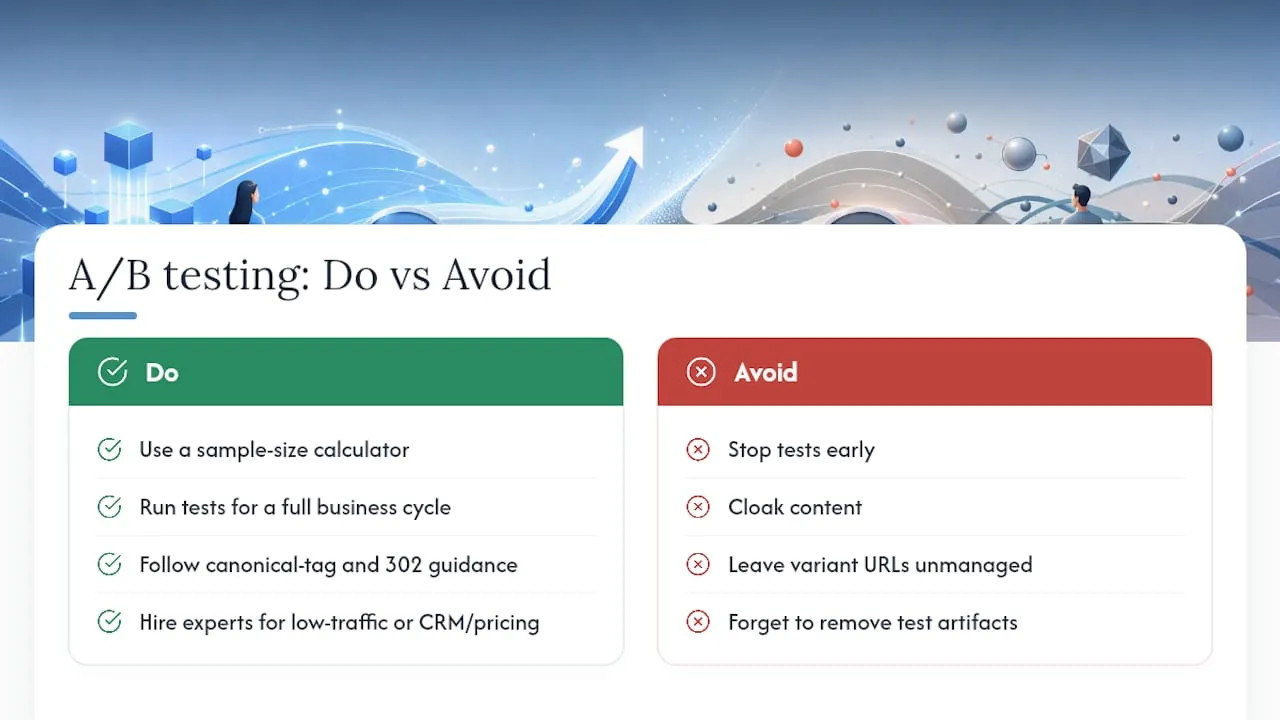
Search engines can misread a poorly built test as manipulative content, and Google’s own testing guidance is direct about what causes trouble: cloaking (showing search engines different content than visitors see), leaving variant URLs unmanaged, and forgetting to clean up test artifacts once a test ends.
The core SEO checklist:
- Never cloak. What you show search crawlers and what you show visitors during a test needs to match.
- Use
rel="canonical"on variant URLs so search engines credit the original page, not a duplicate. - Use 302 (temporary) redirects for test traffic, never 301, so search engines don’t treat the swap as permanent.
- Remove test code and redirect logic promptly once a test concludes.
Privacy needs its own pass: handle consent properly for the region you’re serving, avoid collecting personal data you don’t need for the test itself, and document your data-minimization approach for GDPR or CCPA compliance.
Pro Tip: Load your test script asynchronously and keep it as small as possible. A slow-loading test script is itself a confound. If a variant appears to underperform, check whether the script added latency before you credit or blame the design.
What Are the Most Common A/B Testing Mistakes?
Most failed tests fail for the same handful of reasons, and they’re avoidable once you know to look for them.
- Underpowered tests: launching without a sample-size estimate, then declaring a winner on too little data.
- Peeking: checking results daily and stopping the moment a variant pulls ahead, which inflates false positives.
- Instrumentation bugs: a tracking call that misfires on one browser or device, quietly corrupting the count.
- Seasonality: running a test across a holiday or promotional spike that distorts the baseline.
- Overlapping changes: running two tests on the same page simultaneously, so you can’t isolate which change caused the result.
The fix for most of these is procedural, not clever: predefine your stopping rule before launch, log test instrumentation the same way every time, run during representative traffic periods, and separate traffic sources so overlapping experiments don’t contaminate each other. A short QA pass across browsers before launch catches the majority of instrumentation bugs before they cost you a full test cycle.
When Should You Hire an Agency vs. Run Tests In-House?
The decision usually comes down to five factors: traffic volume, technical complexity, internal bandwidth, risk tolerance, and whether you need experimentation across multiple channels at once, not just the website.
- Traffic volume: low-traffic sites need longer test windows and more careful prioritization, which specialist experience can shortcut.
- Technical complexity: server-side tests touching CRM or pricing logic benefit from developers who’ve built that instrumentation before.
- Internal bandwidth: if your team can’t dedicate consistent time to QA and analysis, half-finished tests pile up.
- Risk tolerance: a test that could affect revenue infrastructure deserves more rigorous rollback planning than a marketing team may have in place.
A capable outside partner should deliver reproducible instrumentation, a documented experiment roadmap, decision logging that survives staff turnover, and a post-test action plan rather than just a report. In return, they’ll need access to your analytics, some development support, CRM hooks where relevant, and one clear stakeholder who owns final decisions.
What I’ve Learned From Watching Tests Succeed and Fail
The gap between a useful test and a wasted one almost never comes down to the tool. It comes down to whether the team wrote a stopping rule before launch and actually honored it. Every underpowered or peeked-at test I’ve seen started the same way: someone got excited by an early trend and called it early. The rule of thumb worth memorizing: if you wouldn’t trust a coin flip that showed heads three times in a row, don’t trust three days of promising conversion data either.
How Forefront Industries Speeds Up Reliable Experimentation
Running a rigorous A/B test takes clean instrumentation, and most service businesses discover mid-test that their existing site wasn’t built to support it. Forefront Industries closes that gap with custom-coded React frontends designed for accurate tracking from day one, not a template retrofitted with a testing script bolted on top.

Forefront Industries approaches testing as infrastructure, not button-color theater: event instrumentation, decision logging, CRM integrations with platforms like Salesforce Marketing Cloud and Braze, and lead-routing logic that stays intact when a test changes how visitors move through your funnel. That infrastructure background is shaped by in-house enterprise CRM and lifecycle marketing work at Amazon across Ring, Blink, and Audible, which helps tests produce evidence you can act on instead of numbers you have to second-guess. If your current site cannot isolate a clean variant without a developer rewriting half the page, that is the actual bottleneck to solve first. Explore Forefront Industries’ custom web development services if the testing layer needs a stronger technical foundation.
Frequently Asked Questions
What is the minimum traffic needed to run a website A/B test? It depends on your baseline conversion rate and the lift you want to detect, but most tests need several thousand visitors per variant to reach reliable significance. A sample-size calculator run before launch will give you an exact figure for your specific numbers.
How long should an A/B test run? Run for at least one full business cycle, usually a full week or more, so day-of-week traffic patterns don’t distort the result. Stopping early because a variant looks ahead is the single most common way tests produce false winners.
Can A/B testing hurt my SEO? It can, if you cloak content, leave variant URLs unmanaged, or forget to remove test artifacts after the test ends. Following Google’s canonical-tag and 302-redirect guidance avoids nearly all of the risk.
Should a small business run A/B tests in-house or hire help? Low traffic, limited internal bandwidth, or tests touching CRM and pricing logic are all signals that outside expertise pays off. Straightforward copy and layout tests on a well-instrumented site are reasonable to run internally.
What’s the difference between A/B and multivariate testing? A/B testing compares whole page variants against each other, while multivariate testing changes multiple elements at once to measure how they interact. Multivariate tests need substantially more traffic to reach the same confidence level.
Sources
- How to A/B test your website? - Plausible blog
- A/B Testing 101 - Nielsen Norman Group
- A Comprehensive Guide to A/B Testing - Contentsquare
- Run an A/B test on your page - HubSpot Knowledge Base