Four Choices Shape Service Page Structure for Better Leads

A high-converting service page follows one order: a hero that states what you do, who you serve, and the next step, followed by service offerings, benefits, proof, and a clear call to action. Every other element (pricing, process, FAQ) supports that sequence. We walk through why this order works and how to build each piece below.
TL;DR:
- Define one buyer, one outcome, and one primary action before design; use secondary options only for visitors not ready to commit.
- Usability tests found scannable formatting alone improved measured usability by nearly 60% in one comparison, without changing the underlying offer.
- Match page length to purchase complexity, but summarize the process in three to five brief steps rather than lengthy methodology paragraphs.
- Show a pricing range, a starting figure, or a clear contact path when scope varies; leaving pricing unaddressed can send visitors away.
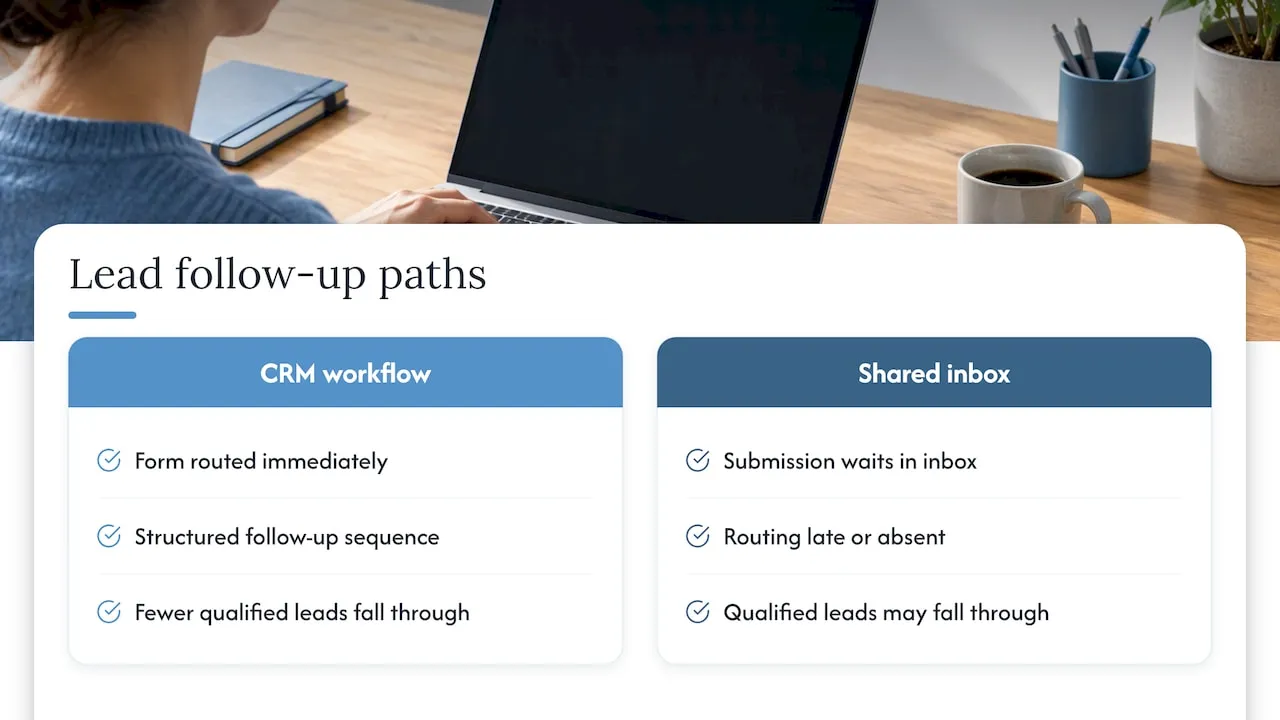
- Connect form submissions to immediate CRM routing and follow up; inquiries left in shared inboxes can arrive late or go unrouted.
Table of Contents
- Why service page structure determines lead quality
- Pick one audience, one outcome, one CTA before you design anything
- Essential elements of a high-converting service page
- Design and layout rules that support scanning and conversion
- Examples worth borrowing from
- What building these pages for service businesses has taught us
- The structural advice that gets overstated, and the part that doesn’t
- If you want help building this: what we offer
- FAQ
- Sources
Why service page structure determines lead quality
A service page carries a different job than a homepage or a landing page. Homepages orient new visitors across an entire site; landing pages isolate one offer for a paid campaign. A service page sits between the two: it answers “can you do this specific thing for me” for a visitor who already has intent, often arriving from search or a referral.
That intent makes the page’s job narrow. The visitor wants confirmation that this is the right provider, fast. A few metrics tell you if the page delivers that confirmation:
- CTA click-through rate: the share of visitors who engage the primary action.
- Form submissions: completed inquiries, not just started ones.
- Qualified leads: submissions that match your actual service criteria.
- Time to contact: how long after landing a visitor reaches out.
Research on how people read web pages found that scannable, concise, and objective copy produced measurably higher usability scores than dense, promotional writing, with combined changes to a page’s layout and language more than doubling usability in controlled tests. A service page competing for a skimming visitor’s attention needs that same scannability built in from the first draft, not added later.
Pick one audience, one outcome, one CTA before you design anything
Every strong service page starts with a decision, not a layout. Before you open a design tool, define three things in a single sentence: who you serve, what outcome you deliver, and what you want the visitor to do next.
- Write the value proposition first. State who you serve and what result you deliver in one sentence, something you could read aloud in under five seconds.
- Choose the primary CTA. Pick one action (book a call, request a quote, start an audit) and treat every other action as secondary.
- Define acceptable micro-conversions. A scheduler link, a checklist download, or a newsletter signup can capture visitors who aren’t ready to commit to the primary CTA.
- Let the goal set the length. A page selling a complex, high-ticket service needs more proof and more scroll; a simple, well-understood service needs less. Scannability rules apply regardless of length.
Skipping this step is why many service pages try to speak to everyone and end up convincing no one. A page built around one buyer and one outcome reads faster and converts more of the right visitors, because every sentence on it is doing one job instead of several.
Essential elements of a high-converting service page
Once you know your audience and your single CTA, build the page in this order. Each element has a specific job, and skipping one usually shows up as a drop somewhere in your funnel.
1. Hero area. Your headline states the outcome you deliver. Your subhead names who you serve. A one-line value proposition sits beneath both, and an immediate CTA or micro-step (a short form, a scheduler link) appears without requiring a scroll. Eyetracking and scrolling research found that visitors give the above-the-fold area disproportionate attention, and that strong information scent at the top is what convinces them to scroll further. If a visitor can’t tell what you do and who you serve within seconds, the rest of the page rarely gets read.
2. Service offerings. List each service with a short name, a one-line description, and a note on who it’s for. Avoid internal jargon: name the service the way your buyer searches for it, not the way your team talks about it internally.
3. Benefits and outcomes. Describe results in terms the buyer cares about, not features you built. “Faster turnaround” means less than “projects delivered in three weeks instead of six.”
4. Process or timeline. A three to five step overview sets expectations and reduces the uncertainty that stops visitors from reaching out. Keep each step to a phrase, not a paragraph.
5. Pricing. Show a range, a “starting at” figure, or a clear “contact for pricing” path when costs vary by scope. Either approach beats silence: visitors who can’t find any pricing signal often leave rather than ask.
6. Visuals. Feature real project images, short videos, or before-and-after examples where relevant. A results badge or metric next to a visual gives it more weight than the image alone.
7. Social proof. Short, specific testimonials outperform long narratives. Pair a quote with a quantified result, add client logos where you can, and link out to a fuller case study for visitors who want depth.
8. CTAs and lead capture. Keep one primary CTA repeated at logical intervals, and offer secondary micro-conversions, like a scheduler or a downloadable guide, for visitors not ready to commit.
9. Contact and trust signals. Visible phone numbers or emails, a response time promise, and basic credentials (licenses, certifications, years in the field) reduce the perceived risk of reaching out.
10. FAQ. Four to six short answers addressing the objections that actually stop your buyers: cost, timeline, process, and fit.
11. Footer links. Related services and internal links give visitors who aren’t ready to convert a next step that keeps them on your site instead of back in a search results page.
Pro Tip: Write your FAQ section from real sales call objections, not guesses. The questions prospects actually ask convert better than the ones you assume they’re thinking.
Design and layout rules that support scanning and conversion
Structure alone doesn’t convert if the layout buries it. A few rules, backed by usability research, keep your content accessible to a visitor who scans rather than reads line by line.
- Place what you do, who you serve, and the next step above the fold, in that order.
- Use subheads that describe the content beneath them, not clever labels.
- Write one idea per paragraph and keep lists to single-sentence items.
- Apply consistent CTA styling (same color, same shape) so the action is recognizable anywhere on the page.
- Use whitespace and contrast to separate sections rather than relying on borders or boxes.
One of the clearest findings in usability testing: research comparing scannable and non-scannable versions of the same content found measured usability gains of nearly 60% and just under 50% from concise, scannable formatting changes alone, without altering the underlying offer.
Page length should match the complexity of what you sell. A straightforward service can convert on a short page; a high-consideration purchase usually needs more scroll to build confidence. Either way, scannability matters more than length. Accessibility basics (readable contrast ratios, alt text on images, keyboard-navigable forms) and fast load times affect conversions directly: a visitor who can’t read your text or waits too long for the page to render leaves before reaching your CTA.
Examples worth borrowing from
A few structural patterns show up repeatedly on pages that convert well, and each is easy to copy without copying the business itself.
- Hero copy formula: “We help [who] achieve [outcome] through [method].” Swap in your own specifics and keep it to one sentence.
- Testimonial placement near the CTA: putting a short, quantified quote directly above a contact form reduces the hesitation that shows up right before someone commits.
- Process steps as a numbered row: three to five short labels (Consult, Design, Build, Launch) read faster than a paragraph describing the same thing.
A service page for a regulated or high-consideration field, like wealth management, typically leans harder on credentials and trust signals than a page for a lower-stakes service. A page for a visual, high-ticket service, like luxury home building, leans harder on project photography and before-and-after proof.
Test these in an A/B experiment: hero headline phrasing, CTA button copy (“Request a Quote” versus “Get Started”), testimonial placement, and whether pricing appears as a range or as “contact for pricing.”
What building these pages for service businesses has taught us
Working on custom-coded sites and integrated CRM and email systems for service businesses shows that a page often generates inquiries, but leads may arrive disorganized, routed late, or not routed at all. The page did its job. The system behind it didn’t.
A service page connected to a proper CRM and lead-routing workflow closes that gap. When form submissions trigger immediate routing and a structured follow-up sequence instead of sitting in a shared inbox, fewer qualified leads fall through. Across site and CRM engagements built this way, clients report gains in inbound lead quality after integrating the site and CRM systems. Structure on the page matters, but what happens to a lead in the five minutes after they submit a form often matters just as much.
The structural advice that gets overstated, and the part that doesn’t
Most service page guidance spends too much time on pricing tables and testimonial carousels and not enough on the hero. If a visitor can’t tell what you do and who you serve within a few seconds, nothing below the fold gets read, no matter how well-built it is. That’s the part conventional advice underweights: the hero isn’t decoration, it’s the filter that decides whether the rest of the page gets a chance.
The part that’s overrated is exhaustive process detail. Buyers don’t need six steps explained in paragraphs; they need enough structure to believe you have a repeatable method, then a reason to pick up the phone. A long methodology section reads like reassurance to the writer and friction to the reader.
If you do one thing differently after reading this, rewrite your hero first. Everything else on the page, including pricing and proof, only matters once that sentence earns a scroll.
- Jeremy
If you want help building this: what we offer
We build custom-coded service pages instead of starting from a template, because a page built around your actual offer and buyer converts better than one built around a theme. Our Web Design & Development, Email & CRM Development, and AI Automation & Consulting services cover the page itself and the systems behind it.

- Need a page redesigned around one clear offer and CTA: our design and development work starts there.
- Need leads routed correctly once they submit a form: our CRM and email engineering connects your page to your sales process.
- Need the page maintained, fast, and secure over time: our Managed Hosting, Webmaster, and Performance Plus maintenance plans cover that ongoing work.
If your current page is generating traffic but not qualified leads, request a site audit and we’ll walk through what’s holding it back.
FAQ
What should a service page include?
A service page should include a hero stating what you do, who you serve, and the next step, followed by service offerings, benefits, a process overview, pricing information or a path to request it, social proof, and a clear call to action. Supporting elements like an FAQ and contact details round out the structure.
What are the four P’s of service design?
Definitions of the four P’s vary by discipline, but a common service marketing version refers to Product, Price, Place, and Promotion, adapted from the original marketing mix. For a service page specifically, the more useful framework is the conversion structure covered above: hero, offerings, benefits, proof, and CTA.
How do you design a service page?
Start by defining one audience, one outcome, and one primary call to action, then build the page in order: hero, offerings, benefits, process, pricing, visuals, proof, and CTA. Keep copy scannable with subheads and short paragraphs, since usability research confirms that visitors scan rather than read pages in full.
What are the main components of a web page?
A typical web page includes a header or navigation, a hero or primary content area, a body with supporting sections, calls to action, and a footer with secondary links. A service page follows this same structure, with the hero and CTA carrying extra weight because conversion is the page’s main job.
How long should a service page be?
Length should match the complexity of the service: simple offers can convert on a shorter page, while high-consideration purchases usually need more scroll to build trust through proof and detail. Scannable formatting matters more than total length for keeping visitors engaged either way.