Modular Email Templates: A Reusable System for Growth Teams

A modular email template is a single layout built from a fixed library of interchangeable content blocks: hero, text, product grid, CTA, footer. Swap the blocks, keep the structure, ship faster.
The primary value lies in speed with consistency. Once the module library exists, a campaign build drops from hours to minutes, and every send inherits the same brand rules and rendering behavior. That consistency is what makes modular systems compatible with automation platforms like Braze and Salesforce Marketing Cloud (SFMC), where journeys fire dozens of variants without a designer touching each one.
Before building anything, take these steps:
- Audit recent sends and identify a shortlist of starter modules based on recurring layouts.
- Identify which ESP or content-block system will host the library.
Key Takeaways
Modular email templates work because they separate a locked structure from editable content fields, which cuts campaign build time while keeping every send on-brand and automation-ready.
| Point | Details |
|---|---|
| Start small | Audit six months of sends and build 8 to 12 starter modules covering most regular campaigns. |
| Lock structure, open content | Restrict marketers to editable fields only; keep spacing, color, and type as fixed tokens. |
| Test modules, not templates | QA each module in isolation once, then trust it across every campaign that reuses it. |
| Govern before you scale | Assign naming, ownership, and version control before rolling out to a full team. |
| Get enterprise help when needed | Forefront Industries builds custom SFMC and Braze modular systems for teams outgrowing DIY templates. |
Table of Contents
- What Are Modular Email Templates, Exactly?
- Why Marketing Teams Are Standardizing on Modular Systems
- Which Modules Should You Build First?
- Design Tokens and the Accessibility Checklist Your Modules Need
- Coding Modules for Braze, SFMC, and Beyond
- How Do You Roll Out a Modular System Without Disrupting Campaigns?
- What Enterprise Email Work Teaches About Modular Systems
- What I’ve Learned Watching Teams Adopt Modular Systems
- Build Your Modular System With Forefront Industries
- Sources
What Are Modular Email Templates, Exactly?
A one-off email is custom HTML built for a single campaign, then discarded or forked for the next one. An ESP drag-and-drop builder gives you flexibility, but every marketer can rearrange, resize, or restyle anything, which is exactly how brand drift happens. A modular email template splits the difference: the outer structure is locked, and only specific fields inside each block are editable.
Modular Mail’s breakdown of the format describes it as a small library of approved blocks that snap together to assemble a campaign.
Common modules and their editable fields:
- Hero – headline, subhead, background image, single CTA link.
- Centered text – body copy, optional eyebrow label.
- Image and text – image, headline, body copy, CTA link.
- Product grid – product image, name, price, link, repeated per item.
- Promo banner – headline, discount code, expiration date.
- Footer – social icons, address, unsubscribe link.
Modular is the right call for newsletters, lifecycle journeys, and promotional cadences where volume and speed matter more than novelty. A one-off still makes sense for a flagship product launch or a rebrand announcement where the visual concept genuinely won’t repeat.
Why Marketing Teams Are Standardizing on Modular Systems
The time savings show up on a delay, not immediately. Building the first module library takes longer than a single campaign build, usually a few weeks of design and development work. After that, campaign assembly time drops sharply because designers and marketers are arranging pre-tested blocks instead of writing new markup for every send.
Consistency is the second payoff, and it matters more than most teams expect. When every hero module pulls from the same color tokens and type scale, brand governance stops depending on a single designer’s memory. A junior marketer building a campaign in Braze or SFMC can’t accidentally ship an off-brand headline color, because the field simply doesn’t expose that choice.
Pro Tip: Lock structural properties like margin, column width, and font family at the module level. Leave only content fields open, so a marketer editing copy can’t accidentally break layout on mobile.
QA time drops too, because you’re testing a fixed set of modules once instead of testing a new layout every campaign. A rendering bug found in the product grid module gets fixed once and stays fixed everywhere that module appears.
The operational gains break down into a few concrete areas:
- Faster builds. Assembling a campaign from pre-approved blocks is materially quicker than coding from scratch.
- Fewer rendering surprises. Testing happens once per module, not once per campaign.
- Better personalization support. Automation platforms can swap module content per segment without touching structure.
- Lower onboarding cost. New team members learn a small block library instead of a sprawling codebase.
A practical rule of thumb from modular email builders holds that auditing six months of sends typically reveals enough repetition to cover most regular campaigns with 8 to 12 modules, which keeps the starter library intentionally small.
Which Modules Should You Build First?
Start with the modules that show up in almost every campaign type: newsletters, promotions, and lifecycle sends alike. Building too many modules on day one is the most common mistake teams make, because it delays launch without adding proportional value.
A workable starter set:
- Hero – headline, subhead, hero image, primary CTA button.
- Centered text – short paragraph, optional label above the headline.
- Image and text (left/right variants) – image, headline, body, CTA link.
- Two-up image block – two images side by side, each with a caption and link.
- Product grid – product photo, name, price, CTA link, repeatable 2, 3, or 4 across.
- Promo banner – bold headline, promo code, expiration date, background color token.
- CTA block – single headline, button text, button link.
- Social row – icon set linking to social profiles.
- Footer – company address, unsubscribe link, preference-center link.
- Divider – spacing element with adjustable height, no copy.
Every one of these needs a defined field schema before development starts. A product grid module, for example, needs a price field with a stated currency and format, an alt text field for each image, and a maximum character count for the product name so long titles don’t wrap awkwardly.
Variant planning matters as much as the module list itself. Decide upfront whether the image-and-text block supports both left-aligned and right-aligned image variants, whether the product grid supports 2-column and 3-column layouts, and what image dimensions each variant requires. Undefined variants are how “modular” systems quietly turn into ten near-duplicate modules within six months.
Pro Tip: Name variants by function, not appearance. “Product-grid-3col” survives a rebrand. “Product-grid-blue” does not.
Design Tokens and the Accessibility Checklist Your Modules Need
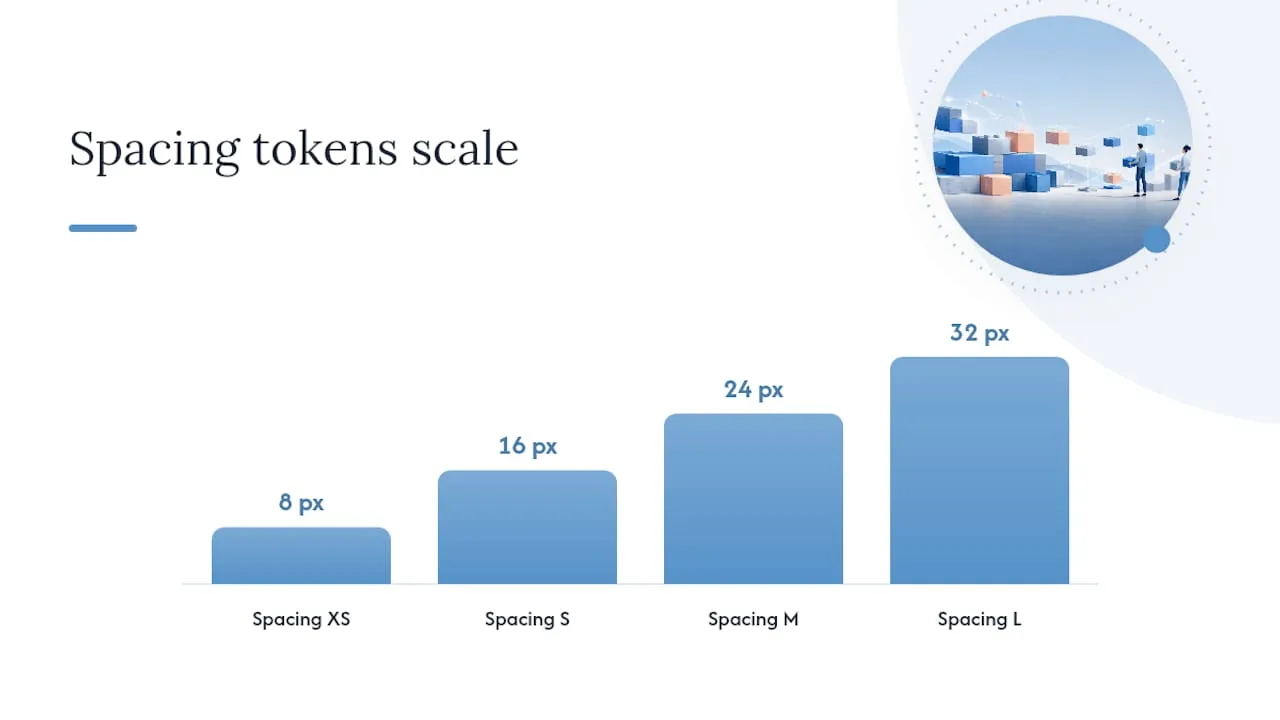
Tokens are the named values, colors, spacing units, type sizes, that every module pulls from instead of hardcoding. Change the token once, and every module that references it updates. Design-system kits built for email commonly standardize on a 600px safe width and a 6-column grid, a structure narrow enough to render cleanly across Outlook, Gmail, and mobile clients without triggering horizontal scroll.
Lock down these token categories before any module gets built:
- Color tokens – primary, secondary, background, text, and link colors as hex values.
- Type tokens – font family, font weights, and a size scale for headline, subhead, and body.
- Spacing tokens – a fixed scale (8px, 16px, 24px, 32px) applied consistently between and inside modules.
- Grid tokens – column count and gutter width for multi-column modules like the product grid.
Stacking rules prevent the most common rendering failure in modular systems: spacing collapsing or doubling when modules are reordered. Assign padding ownership to the module itself rather than the page wrapper, which keeps spacing predictable no matter what order modules appear in, a practice Litmus recommends specifically to avoid inter-module rendering issues in Outlook.
Accessibility has to be a checklist, not an afterthought bolted on after launch. Accessible-email covers the baseline every module should meet:
- Descriptive alt text on every image, never left blank on decorative images without a null alt attribute.
- Color contrast ratios that meet WCAG AA for body text and buttons.
- Semantic heading structure inside the HTML, not just visual size differences.
- Logical tab order for any interactive element, including CTA buttons.
Coding Modules for Braze, SFMC, and Beyond
Build each module as an isolated, independently tested block of HTML rather than one long page of nested tables. Isolation means a bug in the product grid module can’t cascade into the footer, and it means a developer can update one module without regression-testing the entire template.
- Mark editable regions explicitly. Use clear comment markers or data attributes (something like
data-editable="headline") so both humans and content-block systems know exactly which nodes are safe to change. - Keep platform logic out of the base HTML. Avoid embedding ESP-specific scripting directly in the module markup. Use placeholder tokens that get replaced during upload or through a thin integration layer, which keeps the same module exportable to multiple platforms.
- Scope styles at the module level. Inline or scoped CSS per module prevents style bleed between blocks, a known source of Outlook-specific rendering bugs.
- Export through the right channel. Some teams export clean, static HTML per campaign; others push modules directly through a content-block API for reuse across templates.
Braze’s own documentation describes templates and content blocks as reusable fields marketers can drop into a drag-and-drop or HTML editor, and Braze automatically enforces required elements like unsubscribe footers during template creation, worth knowing before you design your footer module so it doesn’t conflict with platform requirements. SFMC’s content-block model works similarly: content blocks live in a shared library and get referenced across multiple templates, so naming conventions matter more than they might on a smaller platform.
Pro Tip: Build a “kitchen sink” test template that stacks every module in sequence, then run it through Litmus previews across the widest client list you support before your first real campaign ships.
A developer QA checklist should confirm rendering across major clients (including Outlook desktop, which still uses a Word-based rendering engine), verify every link carries correct tracking parameters, and confirm personalization tags resolve correctly with both real and fallback data. Litmus’s module-testing guidance covers the table-based versus row-based markup tradeoffs that affect how reliably a module survives across clients.
How Do You Roll Out a Modular System Without Disrupting Campaigns?
Rolling out a module library works best as a staged process, not a single cutover weekend.
- Audit the last six months of sends. Catalog every layout used and flag which ones repeat across three or more campaigns. This is where your 8 to 12 starter modules come from, not from guessing.
- Define the field schema. For each module, write out every editable field, its character limit, and whether it’s required or optional.
- Assign naming and ownership. Every module gets a stable name and an owner responsible for approving changes to its structure.
- Build in a staging environment. Developers build and test modules against real content before anyone assembles a live campaign.
- Run a pilot cohort. Launch the new modules on a small subset of campaigns, one newsletter segment or one lifecycle stage, before full rollout.
- Expand to full production once QA passes.
Governance is what keeps the system from decaying six months after launch. Without it, you end up right back where you started: a dozen near-duplicate modules and no one sure which one is current.
- Use role-based permissions so only approved editors can change structural properties.
- Version every module change and keep a changelog visible to the whole team.
- Establish a bulk-update procedure so a token change (a new brand color, for instance) propagates across every template at once instead of requiring manual edits.
- Set a recurring training cadence, quarterly works for most teams, so new hires and occasional builders don’t fall back on old habits.
Locking the template structure while leaving content fields open is the core mechanism that prevents accidental brand drift once multiple non-technical marketers are building campaigns from the same library.
What Enterprise Email Work Teaches About Modular Systems
Forefront Industries builds custom-coded modular template systems for service businesses running SFMC and Braze at scale, drawing on enterprise CRM and lifecycle marketing experience with brands including Ring, Blink, and Audible during in-house enterprise work at Amazon. That background shapes a specific point of view: a module library only earns its keep when it’s engineered to survive automation, not just campaign design.

The CK Millworks engagement illustrates the pattern. Custom digital infrastructure, built to replace outdated systems that were losing leads, produced measurable gains once the underlying components were rebuilt around a maintainable structure rather than one-off pages.
Lessons that carry over directly to enterprise SFMC and Braze integrations:
- Content-block naming conventions matter more at scale, when dozens of marketers touch the same library.
- Personalization tags need fallback values tested before a journey goes live, not after.
- A module library built for one ESP should still be structured so its HTML can migrate to another platform without a full rebuild.
What I’ve Learned Watching Teams Adopt Modular Systems
Modular templates are the right call the moment more than one person builds campaigns, or the moment your send volume makes hand-coding every email a bottleneck. Below that threshold, the overhead of building and governing a module library can outweigh the benefit.
The trade-off people underestimate is creative range. A locked structure is what makes governance possible, but it also means your boldest, most visually ambitious campaign ideas won’t fit cleanly into the system. Keep a lane open for true one-offs, a major launch, or a seasonal flagship rather than forcing every send through the same eight modules. Trying to modularize everything is how libraries balloon into unmanageable variant sprawl.
For teams running this at enterprise scale on SFMC or Braze, the harder problems are usually integration and governance, not design. That’s worth a conversation with Forefront Industries before you commit to an architecture you’ll be living with for years.
- Jeremy
Build Your Modular System With Forefront Industries
Forefront Industries builds enterprise-grade modular email systems for teams running SFMC or Braze, custom-coded, not templated, so your component library actually holds up under automation volume rather than breaking the first time a journey scales past a handful of segments.
The service covers the full stack a marketing team actually needs: custom email component development, direct SFMC and Braze integration, and AI-driven workflow automation that connects your module library to lifecycle journeys instead of leaving it sitting in a design file. That’s the gap most agencies leave open, they’ll hand you a Figma kit and call it done, but a token system only pays off once it’s wired into the platform sending your emails.
If your team is past the point of hand-coding every campaign and needs a system engineered for scale, start with a custom web development consultation to scope what a modular build looks like for your stack.
Sources
- Modular Email Templates Explained | Modular Mail
- Email Templates and Content Blocks
- Email Modules: Your Secret to Working Smarter - Litmus
- Accessible Email Guidance
- Free Email Design System and UI Kit for Figma and Sketch