CRM Data Hygiene: A Practical Guide to Cleaner Customer Data

CRM data hygiene is the ongoing process that keeps your CRM accurate, complete, consistent, and current. It never finishes; it’s maintenance, not a one-time project. If you do one thing after reading this sentence, run a duplicate and missing-contact-info check on your active pipeline records today.
That single check surfaces the two problems most likely to cost you closed revenue this quarter: contacts you’re chasing twice, and deals with no phone number or email attached to the primary contact record.
- Pull active opportunities and flag records missing email, phone, or company field
- Run your CRM’s built-in duplicate report against open pipeline only (not the full database yet)
- Note the count of affected records - this is your baseline
Data quality problems in enterprise CRMs are severe enough that Harvard Business Review found only about 3% of company data meets basic quality standards. Your pipeline is where that decay hurts most, because it’s the data your reps and automation touch every single day.
Key Takeaways
CRM data hygiene succeeds when teams pair a quarterly audit cadence with entry-point prevention, clear field-level ownership, and a tracked Data Quality Score.
| Point | Details |
|---|---|
| Audit active pipeline first | Run duplicate and missing-field checks on open deals before tackling the historical backlog. |
| Track five quality dimensions | Score accuracy, completeness, consistency, uniqueness, and timeliness separately, not as one metric. |
| Follow a quarterly core cadence | Run full audits every quarter with lighter weekly or monthly duplicate and bounce checks between them. |
| Assign clear ownership | RevOps owns the system, reps own entry quality, and automation owns enforcement at scale. |
| Consider managed remediation | Forefront Industries rebuilt one client’s CRM standards and automation, producing a significant lift in inbound lead quality. |
Table of Contents
- What Is CRM Data Hygiene, Exactly?
- Why CRM Data Hygiene Matters for Revenue
- What CRM Data Problems Should You Look For First?
- How Dirty Data Breaks Sales and Marketing Execution
- The Best Practices Playbook: Define, Audit, Fix, Prevent, Monitor
- How Often Should You Audit CRM Data?
- Who Owns CRM Data Hygiene on Your Team?
- Choosing Tools for CRM Deduplication and Enrichment
- A Real Remediation Example: Fixing CRM Data at Scale
- What New Client Onboardings Taught Me About Data Hygiene
- How Forefront Industries Helps Fix and Maintain CRM Data
- Key Takeaways
- Sources
What Is CRM Data Hygiene, Exactly?
CRM data hygiene means keeping customer and prospect records accurate, complete, consistent, unique, and current enough to trust for decisions. Five dimensions define whether a record is “clean,” and most CRM audits skip at least two of them.
- Accuracy - does the field reflect reality (correct title, current phone number)?
- Completeness - are required fields populated, not left blank or filled with placeholder text?
- Consistency - does “CA” always mean California, never “Calif.” in one record and “California” in another?
- Uniqueness - is each person or account represented by exactly one record?
- Timeliness - was the record touched or verified recently enough to still be reliable?
Data decays whether you maintain it or not. B2B contact data degrades at roughly 2.1% per month, or about 22.5% annually, as people change jobs, phone numbers, and titles. A database you cleaned in January is already meaningfully stale by September. That’s why hygiene isn’t a spring-cleaning event. It’s a cadence, and the section below on audit frequency gives you the actual schedule.
Hygiene also sits next to two adjacent disciplines that people often confuse it with. Enrichment adds new information to a record (firmographic data, intent signals, updated titles). Governance is the policy layer that decides who can edit what, what fields are required, and how exceptions get approved. Data hygiene is the maintenance work that keeps records true; enrichment makes them richer; governance is the rulebook that prevents both from drifting. You need all three, but they’re not interchangeable, and a governance policy with no hygiene process behind it is just a document nobody follows.
Why CRM Data Hygiene Matters for Revenue
Bad data doesn’t just look sloppy in a report. It changes what leadership decides to fund, staff, and forecast. Gartner has found that poor data quality drives financial exposure into the multi-million-dollar range for large organizations, once you count wasted outreach, missed renewals, and bad forecasting decisions built on inflated or duplicated pipeline.
Forecasting is usually the first place the damage shows up. Duplicate opportunity records inflate pipeline value. Stale close dates push accurate quarter-end predictions further out of reach. A sales leader reviewing a pipeline report riddled with duplicate accounts is effectively forecasting against fiction, and the further that forecast travels up the chain to the board, the more expensive the correction becomes.
Automation and personalization break next. Lifecycle emails triggered off a lead-status field mean nothing if that field is inconsistently populated. Journey builders in platforms like Salesforce Marketing Cloud or Braze route contacts based on segment logic, and segment logic depends entirely on clean, standardized field values. Feed it “Manager,” “Mgr,” and “mgr.” as three different job titles, and your personalization engine treats them as three different audiences instead of one.
- Duplicate accounts artificially inflate total pipeline value
- Inconsistent lead-status values break automated nurture and scoring
- Stale email addresses raise bounce rates and threaten sender reputation
- Bad segmentation data wastes ad spend targeting the wrong audience twice
The trust cost compounds all of this. Once a sales team catches the CRM reporting duplicate deals or wrong contacts more than a few times, they stop trusting the dashboard and start keeping their own spreadsheets, which defeats the entire purpose of the system.
What CRM Data Problems Should You Look For First?
Four problems account for most of the damage in a typical CRM: duplicates, incomplete fields, inconsistent formatting, and stale records. Here’s how to find each one without waiting for a full-scale audit.
- Duplicate records. Run a report matching on email domain plus last name, then a second pass matching on phone number. Native duplicate rules in Salesforce catch obvious matches but miss fuzzy variants like “Bob Smith” versus “Robert Smith” at the same company.
- Incomplete fields. Filter your contact and account objects for blank values in your five or six most critical fields (usually email, phone, industry, and lead source). Anything above 10 to 15% blank on a required field is a signal your entry process, not just your data, needs fixing.
- Inconsistent formatting. Scan state, country, and industry picklists for free-text variants. If your state field allows typed entry instead of a restricted picklist, you’ll find “NY,” “N.Y.,” and “New York” all representing the same value.
- Stale records. Cross-reference contacts with no activity logged in 12 months against your email platform’s bounce and unsubscribe list. A contact with a hard bounce and no sales activity in a year is functionally dead weight.
Pro Tip: Run the duplicate check on closed-won accounts from the last 12 months first. If your cleanest, most cared-for records still show duplicate or incomplete data, your intake process has a structural problem, not just a backlog problem.
How Dirty Data Breaks Sales and Marketing Execution
Data problems don’t stay abstract for long. They show up as specific, expensive failures inside the sales and marketing motion, usually the same week they happen.
Lead routing rules typically fire off fields like territory, industry, or company size. When those fields are blank or inconsistent, leads route to the wrong rep, or nowhere at all, and sit unassigned until someone notices. Two reps calling the same prospect because a duplicate record split the activity history is one of the most common complaints RevOps teams field, and it makes the sales org look disorganized to the exact buyer you’re trying to win.
- Misrouted leads: fix by making routing-critical fields required at entry, not optional
- Duplicate outreach: fix by running a dedupe pass before any outbound campaign export
- Broken attribution: fix by standardizing UTM and lead-source values at the point of capture
- Wrong forecasts: fix by excluding unverified or duplicate opportunities from forecast rollups until reviewed
Marketing waste follows the same pattern on a bigger scale. Attribution reporting suffers worst of all: if lead-source values are inconsistent, marketing can’t prove which channels actually produced revenue, and that ambiguity tends to get resolved in budget meetings by whoever argues loudest, not by whoever has the best data.
The Best Practices Playbook: Define, Audit, Fix, Prevent, Monitor
Hygiene programs that stick follow a repeatable loop rather than a one-time cleanup sprint. The sequence that works: detect, prioritize, fix, prevent, monitor, and then repeat on a fixed cadence.
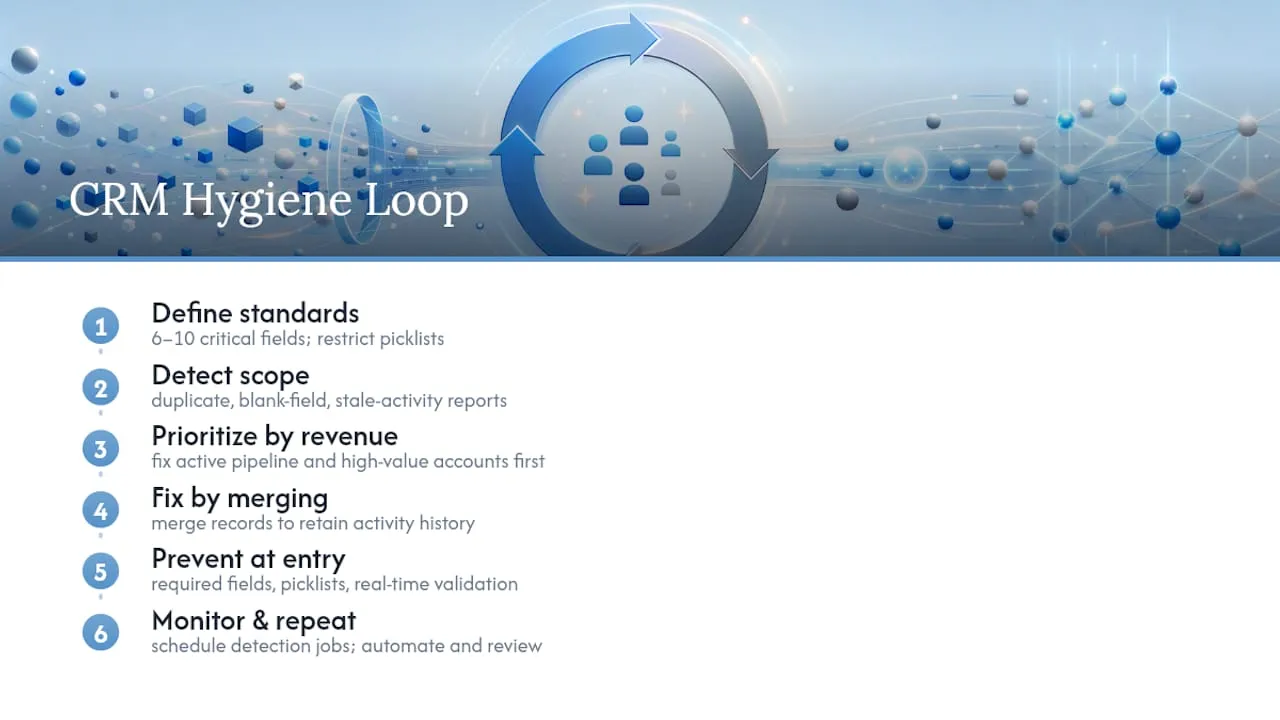
1. Define your standards before you touch a single record. Decide which fields are critical (usually 6 to 10 fields across contact and account objects), and write down the accepted format for each. Convert free-text fields to restricted picklists wherever the values are finite, like state, industry, or lead source. This single change eliminates most future formatting drift.
2. Detect the scope of the problem. Run duplicate reports, blank-field reports, and stale-activity reports across your full database, not just active pipeline this time. Export the results into a simple scorecard so you know the size of the backlog before you start fixing anything.
3. Prioritize by revenue impact, not by ease. Active pipeline and your highest-value account tier come first. A duplicate sitting in a closed-lost record from three years ago matters far less than a duplicate splitting activity on a $200,000 open opportunity. Fix the pipeline first, then work backward into the historical backlog once prevention controls are live.
4. Fix by merging, not deleting. Deleting a duplicate destroys the activity history attached to it. Merge tools in Salesforce and most modern CRMs let you pick a surviving record and roll historical activity, notes, and opportunities into it. Where native merge tools hit their limits on volume or cross-object matching, large Salesforce orgs typically need a third-party matching tool or a pre-load ETL transformation rather than relying on native duplicate rules alone.
5. Prevent recurrence at the point of entry. Required fields, restricted picklists, and real-time validation rules stop most quality problems before they ever reach the database. A dashboard that flags new records breaking a validation rule the same day they’re created is worth more than any quarterly cleanup.
6. Automate what you can, then monitor what you automate. Schedule a recurring duplicate-detection job (weekly for high-volume orgs, monthly for smaller ones) and pair it with an enrichment workflow that refreshes firmographic data on a rolling basis rather than all at once.
Pro Tip: Before you run your first org-wide dedupe pass, export a full backup. Merge operations are largely irreversible, and a bad matching rule run against 50,000 records without a backup is the kind of mistake that ends up in a postmortem.
How Often Should You Audit CRM Data?
Run a full data-quality audit every quarter, with lighter checks weekly or monthly in between. That quarterly-plus-lightweight-checks cadence is the practical backbone of a sustainable hygiene program, because it’s frequent enough to catch decay before it compounds but not so frequent that it becomes its own burden.
The quarterly cycle should cover the full database: complete duplicate detection, a field-completeness scan across all critical fields, and a review of picklist consistency. Between quarters, run lighter checks that take an analyst an hour or two, not a full week.
| Cadence | Check | What it catches |
|---|---|---|
| Weekly | Duplicate alert scan on new records | New duplicates created since last check |
| Weekly | Bounce and unsubscribe sync | Contacts that just became unreachable |
| Monthly | Field-completeness spot check on pipeline | Missing data on records actively being worked |
| Quarterly | Full database duplicate and merge pass | Historical duplicates across the entire CRM |
| Quarterly | Data Quality Score recalculation and trend review | Whether hygiene is improving or slipping over time |
A Data Quality Score works best as a simple weighted average of your five dimensions (accuracy, completeness, consistency, uniqueness, timeliness), scored per field or per object, then rolled up into one number you can trend quarter over quarter.
- Track duplicate rate as a percentage of total records, not a raw count
- Track field completeness per critical field, not as one blended average
- Track bounce rate separately for cold versus engaged segments
- Present the Data Quality Score trend to leadership as a single chart, not a spreadsheet
When you present results upward, lead with the business metric the fix protected, not the technical detail. “We reduced duplicate pipeline records by cutting forecast inflation on the enterprise segment” lands with a VP of Sales. “We ran a fuzzy-matching dedupe job” does not.
Who Owns CRM Data Hygiene on Your Team?
Hygiene programs fail most often not from lack of tools but from lack of clear ownership. Three groups need distinct, non-overlapping responsibilities.
RevOps owns the system. This team sets the field standards, builds the validation rules, configures the dedupe automation, and owns the quarterly audit calendar. If nobody outside RevOps knows the audit even happened, that’s a governance gap, not a RevOps failure. Publish results.
Sales and CS reps own entry quality. Every rep who creates or edits a record is responsible for filling required fields accurately at the point of entry. This only works if the fields you require are genuinely necessary. Require twelve fields and reps will fabricate values just to save the record; require five and compliance goes up on its own.
Automation owns scale. Once prevention rules and dedupe jobs are configured, they enforce standards on every record, every time, without needing a human to remember. This is where a policy actually becomes durable instead of aspirational.
- Write a merge-rule policy: which record survives when two duplicates conflict (usually most-recently-active or most-complete)
- Define required fields per object, and review that list every two quarters, not just once
- Build an exception workflow for edge cases, so reps have a path besides leaving a field blank
- Include a hygiene walkthrough in new-hire onboarding, not just a link to a policy document
Training matters more than most teams admit. A rep who was never shown why the industry picklist matters will keep typing free text into it no matter how many emails you send about the policy.
Choosing Tools for CRM Deduplication and Enrichment
Five tool categories cover most of the CRM data hygiene loop, and understanding what each one actually does prevents you from buying overlapping capability or missing a gap entirely.
- Validation and entry tools enforce required fields, restricted picklists, and format rules at the moment a record is created or edited.
- Deduplication engines run fuzzy matching across contact and account objects to find duplicates native rules miss, especially at high volume or across objects.
- Enrichment platforms append firmographic, technographic, or intent data to existing records on a scheduled refresh.
- ETL and integration tools move and transform data between your CRM and other systems (marketing automation, data warehouse, billing) without corrupting formats in transit.
- Monitoring and scorecard tools track your Data Quality Score and alert on breaches, so problems surface before a quarterly audit finds them.
When evaluating any tool in these categories, weigh four criteria: how well it automates merges rather than just flagging duplicates for manual review, whether it matches across objects (contact to account, not just contact to contact), how deep its integration surface goes with your existing CRM and email platform, and whether it keeps an audit trail of what changed and when.
Native CRM tools are usually enough for organizations under roughly 50,000 contact records with a single primary object structure. Past that volume, or once you’re managing multiple business units feeding one CRM, native matching and duplicate rules hit real limits, and a specialist matching tool or ETL layer becomes worth the investment. Standardized tracking plans at the point of data capture, the kind Twilio and Segment recommend, also cut down on the integration errors that create hygiene problems downstream in the first place. Enterprise teams running large-scale data platforms alongside their CRM should also look at how their data warehouse layer handles matching and governance; Microsoft Fabric consulting services address that integration layer for organizations managing data at that scale.
Pro Tip: *Before buying a dedicated dedupe tool, calculate your current duplicate rate as a percentage.
A Real Remediation Example: Fixing CRM Data at Scale
Forefront Industries took on a CRM remediation engagement for a service business client whose inbound pipeline was suffering from years of unstandardized entry, duplicate accounts, and inconsistent lead-source tagging. The fix wasn’t cosmetic. It rebuilt entry standards, deduplicated the active pipeline first, and layered in automated validation and lifecycle routing on top.
The levers that mattered most:
- Standardized lead-source and industry fields into restricted picklists before touching historical data
- Deduplicated active pipeline records first, historical backlog second
- Built validation rules so new records couldn’t bypass required fields
- Connected the CRM to lifecycle automation so clean data actually drove routing and personalization, not just reporting
Teams onboarding a new client or business unit can reuse that same order of operations, starting with standards, then pipeline, then automation.
What New Client Onboardings Taught Me About Data Hygiene
The biggest mistake I see teams make isn’t skipping audits. It’s auditing the wrong records first. Teams love to run a full-database dedupe sweep before they’ve touched active pipeline, which means the deals actually closing this quarter stay dirty while everyone celebrates a cleaner historical archive nobody’s using for anything.

Start where the money is. A duplicate sitting in a closed opportunity from two years ago costs you a reporting inconvenience. A duplicate splitting activity on an open $150,000 deal costs you a forecast error a VP repeats to the board.
The practical tip I give every new client onboarding: before writing a single validation rule, pull last quarter’s closed-won deals and check how clean those records were. If your best deals still have gaps, your entry process, not your database, is the actual problem.
How Forefront Industries Helps Fix and Maintain CRM Data
Forefront Industries builds the entry-point controls and lifecycle automation that keep clean data clean, on platforms like Salesforce Marketing Cloud and Braze, instead of leaving your team to run manual dedupe passes every quarter with no system backing them up.

DIY hygiene works fine for a CRM under a few thousand active records with one team touching it. It stops working once you’re routing leads across multiple business units, running lifecycle automation off inconsistent fields, or managing a merge backlog too large for native tools to handle cleanly. That’s the point where a managed engagement pays for itself faster than another internal audit cycle.
Forefront’s Email & CRM development work covers exactly this: standardizing entry fields, building validation and merge rules, and connecting clean data to the lifecycle journeys that actually drive revenue. If your pipeline data is costing you forecast accuracy or wasted outreach, explore Forefront Industries’ full services and get a plan for what a managed cleanup and prevention build would look like for your team.
Key Takeaways
Clean CRM data is a maintenance discipline, not a project, and the teams that treat it that way protect forecast accuracy and revenue every quarter.
| Point | Details |
|---|---|
| Start with pipeline, not the archive | Audit active deals for duplicates and missing fields before touching historical records. |
| Prevent before you clean | Required fields and restricted picklists stop most errors before they enter the CRM. |
| Merge, never delete | Preserve activity history by merging duplicates instead of deleting the losing record. |
| Publish a Data Quality Score | Track it quarterly as a trend so leadership sees improvement, not just a one-time cleanup. |
| Bring in managed help at scale | Forefront Industries rebuilds entry standards and automation for teams past the DIY threshold. |
Sources
- What Is Data Hygiene?: Why You Need It & How to Do It Right | HubSpot
- How to Improve Data Quality in Salesforce | DQS Resources
- Gartner - Data quality topic page
- Only 3% of a Company’s Data Meets Basic Quality Standards | HBR