Email Template Design: A Practical Guide for Business Owners

A good email template is a fixed layout that holds your brand, puts one clear action in front of the reader, and renders correctly on a phone, in Gmail and in Outlook. You build it once, then reuse it for every welcome email, promotion, appointment reminder and follow-up. This guide covers what to put in the template, what to leave out, how to test it, and when a custom build pays off. We are a Delray Beach web design studio, and we build email systems for service businesses across South Florida.
TL;DR
- Start with one goal per email. Decide what the reader should do, then design everything around that action.
- Use a single-column layout, a 600 to 800 pixel width, real text (not text inside images) and one prominent button.
- Build a master template with reusable modules: header, hero, body, button, footer. Swap modules per campaign instead of redesigning.
- Test in the major inboxes and on a phone before every send, and check contrast, alt text and link wording.
- Template tools are fine for newsletters. A custom-built system makes sense when email drives leads, bookings or sales.
Table of Contents
- What an email template actually is
- Start with the goal, not the layout
- Email design principles that hold up
- Responsive email: how it works and how to test it
- Template types a business should prepare
- Building a reusable system, not a pile of emails
- Template tool or custom build?
- Our perspective
- Where we can help
- A short checklist before you approve any template
- FAQ
- Sources
What an email template actually is
An email template is the reusable frame around your message. It fixes the parts that should not change: logo, colors, fonts, button style, footer and legal text. It leaves slots for the parts that do change: headline, copy, image, offer.
Three things it does for a business:
- Keeps the brand consistent. Every email looks like it came from the same company.
- Saves production time. A new email takes minutes, not a design project.
- Cuts errors. Approved colors, fonts and footers are locked in, so nobody improvises a broken layout.
Most free template galleries stop at the look. The harder part is the structure behind it: which modules exist, how they stack, and how they behave on small screens.
Start with the goal, not the layout
Before you pick colors, write one sentence: after reading this email, the recipient should do X. Email marketing specialist Kath Pay, in Econsultancy’s layout and creative guidance, recommends beginning template design from the goal: what the recipient should do, think and feel. Then you rank every element by how well it supports that goal.
The same guidance lists the usual failures:
- unclear message
- confusing hierarchy
- clutter
- a call to action that is hard to spot
- links that are hard to tap
- poor rendering
A practical example. A Boca Raton dental practice sends a reminder for a teeth-whitening consult. The goal is a booked appointment. The template needs the offer in the first line, one “Book your visit” button, the office phone number and nothing else competing for attention. A three-article newsletter layout would work against that goal.
The UK Home Office, in its email design pattern, gives a rule that applies to any business: say right away why the person got the email, what they need to do, and where to get help. It also advises keeping content to the essentials.
Email design principles that hold up
Keep it scannable
People skim. Litmus reports an average email viewing time of 8.97 seconds, and recommends headings, bullets and typography as visual anchors so longer emails can be scanned. Adobe’s design guide puts it in a similar range: nearly 40% of emails are viewed for about eight seconds or fewer.
What that means in the template:
- Headline that states the point.
- Two or three short paragraphs at most.
- Bullets for lists.
- One primary button, visible without scrolling on a phone.
Use one column
A single-column layout is the safest choice. Princeton’s digital accessibility guidance says single-column, left-aligned layouts without tables are the most likely to stay legible across platforms and devices, and to keep their basic accessibility when forwarded. Bird’s template guidance also recommends a visually simple, responsive single-column layout, personalization placeholders, concise copy and one clear primary call to action.
Two-column and zig-zag layouts exist, and they suit product catalogs. For a service business sending appointment, quote or follow-up emails, one column is usually the better call.
Make text readable
Princeton’s guidance gives concrete numbers worth copying into your template rules:
- Text and background contrast of 4.5:1 or better.
- Sans-serif fonts, no smaller than 14 points.
- Left-aligned text.
- Vertical spacing between blocks.
- Real headings and lists, not bold text pretending to be a heading.
Salesforce’s design tips recommend web-safe fonts such as Arial, Tahoma, Helvetica and Times New Roman, because email apps do not load every custom font. Pick a web-safe fallback that sits close to your brand font.
Do not hide the message in an image
Many email apps block images by default. If your offer, date or phone number lives only inside a picture, some readers see an empty box. Keep the key information as text. The Home Office pattern advises against decorative images and screenshots of text, and recommends alt text for images that carry meaning. Adobe suggests web-optimized images, generally no wider than 800 pixels, with descriptive alt text and restrained animation.
Size the button for a thumb
Salesforce recommends mobile call-to-action targets of at least 44 by 44 pixels. Make the button a solid color with high contrast, put verbs on it (“Book a consult”, “Get my quote”) and repeat it once at the bottom of a longer email.
Write links that make sense alone
“Click here” tells a screen reader user nothing. Use link text that names the destination: “View your estimate”. Both Princeton and the Home Office recommend meaningful link text.
Responsive email: how it works and how to test it
A responsive template adapts to screen size so the email stays readable on a phone, a tablet and a desktop. MailerLite’s guide explains the idea in plain terms. Email is harder than web design because every inbox renders code differently.
Adobe Journey Optimizer’s documentation gives the baseline for building one:
- Simple table-based layouts.
- Inline CSS.
- Web-safe fonts.
- A width between 600 and 800 pixels.
- No JavaScript, forms or embedded video, since many email apps do not support them.
The same page explains why simplicity matters: forwarding, Gmail on mobile web, Outlook on mobile web and each client’s own CSS handling can all change how a message looks.
A pre-send test routine
Run this list on the master template, and again on any email that changes the layout:
- Send a test to a Gmail account, an Outlook account and an Apple Mail account.
- Open each on a phone. Check that the button is tappable and the text does not need zooming.
- Turn images off. Is the message still clear?
- Check the subject line and preview text.
- Click every link.
- Check contrast and alt text.
- Confirm the footer has your business name, address and unsubscribe link.
Automated checks help. The Email Markup Consortium analyzed 409,357 emails in 2024 and found that 99.97% contained serious or critical accessibility issues. Almost every email has problems, so a short accessibility check in your routine puts you ahead of most senders.
Template types a business should prepare
Econsultancy’s guidance recommends a master template with reusable modules for welcome, promotional, transactional and other emails. You arrange or remove modules to fit the campaign goal and what readers are likely to do next.
For a service business, a starter set looks like this:
| Template | Goal | Typical modules |
|---|---|---|
| Welcome / new inquiry | Confirm you got the request, set expectations | Logo, short greeting, what happens next, phone number |
| Appointment confirmation and reminder | Reduce no-shows | Date and time, location, reschedule button, map link |
| Quote or proposal follow-up | Move the lead to a decision | Summary, one button, contact person |
| Promotion or seasonal offer | Drive bookings | Headline, offer, button, deadline note |
| Newsletter | Stay known to past clients | Headline, two short items, button |
| Review request | Collect Google reviews | One sentence, one button to your review link |
| Post-service thank-you | Keep the relationship | Thanks, care tips, referral note |
A real estate agent in Fort Lauderdale, for example, needs a new-listing alert, an open-house invitation and a showing follow-up. Each uses the same header, footer and button style, with different body modules.
Building a reusable system, not a pile of emails
A design system for email is a short rulebook plus the modules that follow it. You do not need a big team to have one. You need decisions made once:
- Colors: your brand colors with their exact hex values, and which one is the button color.
- Type: one web-safe font stack, sizes for headline, body and fine print.
- Spacing: the same gap between blocks every time.
- Button: shape, color, text style.
- Footer: legal text and contact details, locked.
- Modules: hero, text block, two-item row, image with caption, button, divider.
Litmus recommends a flexible framework with optional modules, which is the same idea. When all your recurring campaigns share one frame, readers learn to recognize you. If you are still choosing where to send from, this overview of email marketing platform options shows what to compare when you want brand consistency across recurring campaigns.
How enterprise platforms handle it
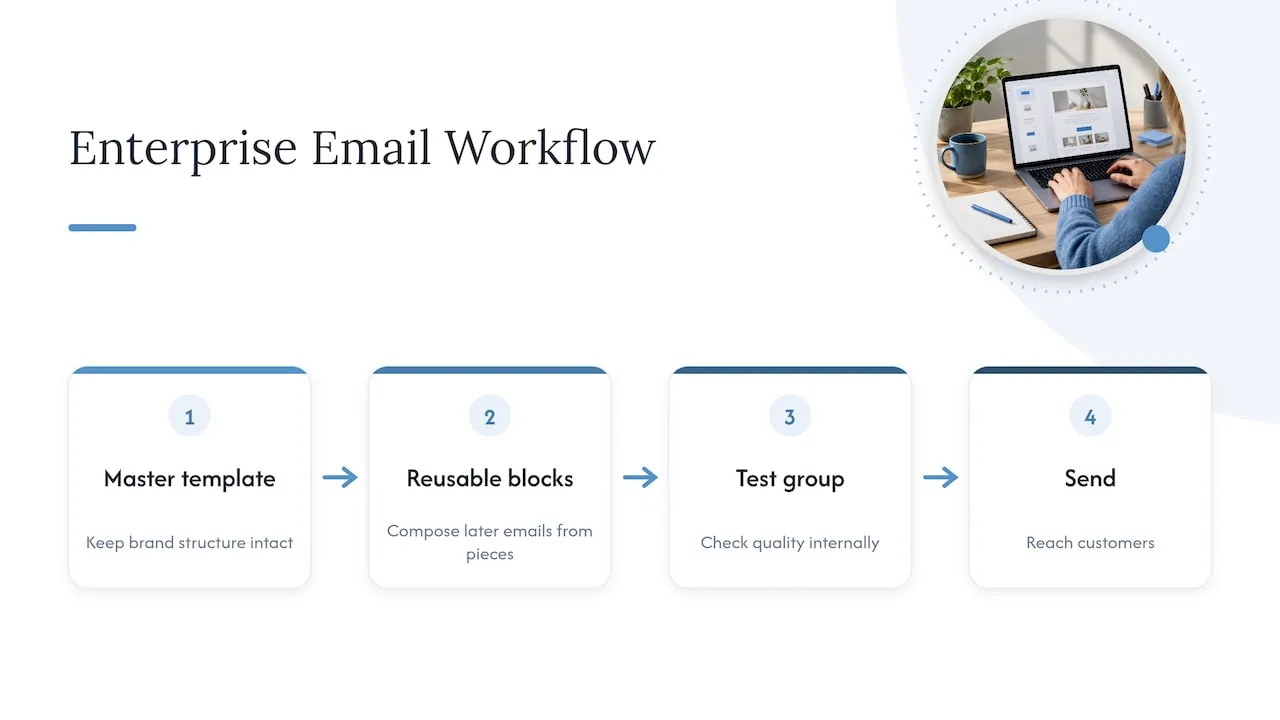
Larger platforms, Braze among them, are built on this same idea. Braze’s email templates and content blocks course walks through finding existing templates in the drag-and-drop editor, building a brand master template, creating reusable content blocks, and composing later emails from those pieces. The course frames it as a way to reduce repeated production work while keeping brand structure intact.
In Braze’s email documentation, customization options include templates, custom HTML templates, editor blocks and subscription groups. The same page describes seed groups, which send copies of a campaign to internal people for quality checks before it reaches customers. That is the same test routine from above, built into the sending tool.
For a small business, the lesson is not to buy an enterprise platform. The lesson is to work the same way: master template, reusable blocks, a test group, then send.
Template tool or custom build?
Both are legitimate. The question is how much email contributes to revenue.
| Ready-made template tool | Custom-built template system | |
|---|---|---|
| Setup | Hours | Weeks |
| Look | Common layouts, light branding | Matches your site and brand exactly |
| Flexibility | Limited to the tool’s blocks | Modules built around your actual emails |
| Best for | Occasional newsletters | Lead follow-up, reminders, booking flows, repeat sales |
| Risk | Looks like everyone else | Needs a skilled builder |
A gallery template is fine if you send a monthly newsletter. If email is how leads get followed up, how appointments are confirmed, or how past clients come back, the emails are part of your sales process. They deserve the same care as your website.
Our perspective
Most small business emails we see fail for the same reason: the template was chosen for how it looks in a gallery, not for what the email needs to do. The result is a pretty message with three buttons, an image holding the offer, and a footer that breaks on a phone.
We approach it the other way around. First, we map the emails that matter to revenue: the inquiry reply, the quote follow-up, the reminder. Then we build a small set of modules that serve those emails and match the website. Our founder spent years building enterprise CRM and lifecycle email programs at Amazon, Verizon and American Express, and the main lesson carried over to small businesses: a few well-built, reusable pieces beat dozens of one-off designs.
The other lesson is speed. A lead who gets a clear, on-brand reply in minutes is far more likely to stay engaged than one who hears back in two days. A template only helps if it is connected to a follow-up process that sends it.
- Jeremy
Where we can help
If your emails look inconsistent, break on phones or sit unused because they take too long to make, we build the system for you. Our email and CRM development service covers template design, reusable modules and follow-up automation. If you use Klaviyo for ecommerce or client retention, see our Klaviyo email development page.

Email works best when it matches your website. As a Delray Beach web design studio, we design both together, so the page a reader lands on from your email looks and works like the email that sent them. Our Delray Beach web design page shows how we work with South Florida service businesses.
A short checklist before you approve any template
- One goal written at the top of the brief.
- One primary button, at least 44 by 44 pixels on mobile.
- Single-column layout, 600 to 800 pixels wide.
- Body text at 14 points or larger, contrast of 4.5:1 or better.
- Key information in text, not only in images.
- Alt text on meaningful images.
- Link text that names the destination.
- Footer with business name, address and unsubscribe link.
- Tested in Gmail, Outlook and Apple Mail, on a phone.
- Saved as a master template so the next email starts from it.
FAQ
What size should an email template be?
Keep the width between 600 and 800 pixels, which is the range Adobe’s email design documentation recommends. Keep images web-optimized and generally no wider than 800 pixels. On phones, the layout should collapse to one column that fills the screen.
How many calls to action should one email have?
One primary action. Bird’s template guidance recommends a single clear primary call to action, and the Home Office advises limiting content to essentials. If you need a second link, such as a phone number, make it visually quieter than the main button.
Do I need a developer to build an email template?
Not for a simple newsletter, since most email tools include editors with ready blocks. You do want a specialist when the template must match a custom brand, work with a CRM, or trigger automatically after a lead fills out a form. That is where mistakes in rendering and routing cost you leads.
Why does my email look different in Outlook than in Gmail?
Each email app interprets code differently. Adobe’s documentation notes that forwarding, mobile web versions and client-specific CSS handling can all change rendering. Simple layouts, inline styling and web-safe fonts reduce the differences, and a test send to each major inbox catches the rest.
What can I do to make my email accessible?
Use real headings and lists, left-aligned text, strong contrast, alt text and descriptive links, and keep important information as text. Princeton’s guidance covers each of these. An automated check before sending catches what you miss.
Sources
- Email Marketing Best Practice: Layout and Creative, Econsultancy
- Send users an email, Home Office User-Centred Design Manual
- Email Marketing Design: Best Practices for Better Engagement, Litmus
- Tips and best practices for email design, Adobe
- Write Email and Newsletters, Princeton University
- Anatomy of a Great Email Template, Bird
- Email Design Best Practices, Salesforce
- How to create a responsive email template from scratch, MailerLite
- Design emails, Adobe Journey Optimizer
- Accessibility Report 2024, Email Markup Consortium
- Email Templates and Content Blocks, Braze Learning
- Email, Braze documentation
- Email marketing platform options comparison
Want to know whether your website and emails are costing you leads? Request the free website audit at forefrontindustries.io/website-audit and we will show you what to fix first.