MQL vs SQL: Definitions, Scoring, and Handoff Rules

An MQL (marketing qualified lead) has engaged with your content, but hasn’t been vetted for fit or intent. An SQL (sales qualified lead) has cleared both a fit check and a buying intent signal, and sales has accepted the lead as worth pursuing. MQLs live in the awareness and interest stages; SQLs sit at the decision stage, right before a sales conversation starts.
The single highest-leverage move available to most teams: align your MQL and SQL definitions in writing, then set a service-level agreement (SLA) governing response time and acceptance. Teams that formalize this handoff see materially higher acceptance and conversion rates than teams running on informal agreement.
Do this now:
- Write a one-sentence definition of MQL and a one-sentence definition of SQL, and get both teams to sign off on them.
- Set a maximum response window for sales to act on a new SQL, ideally measured in hours, not days.
- Track your MQL→SQL conversion rate monthly, segmented by channel.
Pro Tip: If marketing and sales can’t agree on your MQL definition in one meeting, that disagreement is probably your biggest conversion leak, not a scoring problem.
Key Takeaways
Aligning MQL and SQL definitions, enforcing a written SLA, and scoring leads on fit plus intent together are what actually move MQL-to-SQL conversion rates.
| Point | Details |
|---|---|
| Define both terms in writing | MQLs are marketing-engaged; SQLs are sales-vetted through fit and intent, and both teams must agree on the line. |
| Score fit before intent | Require a minimum fit score before intent signals count, so low-fit prospects never inflate your MQL total. |
| Enforce a response SLA | Set a maximum first-contact window for sales, since faster response consistently lifts conversion. |
| Segment benchmarks before comparing | Match your MQL definition and channel mix to any published rate, whether that’s 13% blended or the 26% to 51% channel range, before judging performance. |
| Automate routing, not judgment | A custom CRM system, like those Forefront Industries builds on Salesforce Marketing Cloud or Braze, can apply fit and deal-size rules instantly while humans still review edge cases. |
Table of Contents
- What Counts as an MQL vs SQL in Practice
- Where MQL and SQL Sit on the Funnel Timeline
- Building a Lead Score That Combines Fit and Intent
- The MQL-to-SQL Handoff: SLA, Routing, and Acceptance Rules
- How to Calculate and Benchmark Your MQL-to-SQL Rate
- Common Handoff Mistakes and a Fast Audit Checklist
- Real-World Evidence: What Fixing the Handoff Actually Produces
- Operational Lessons From Building High-Conversion Lead Systems
- Get Your MQL-to-SQL Handoff Built Right the First Time
- Frequently Asked Questions
- Sources
What Counts as an MQL vs SQL in Practice
The cleanest way to tell an MQL from an SQL is to look at the action, not the intention behind it. An MQL raises their hand through content engagement. An SQL raises their hand by asking, directly, “can this solve my problem, and can I afford it?”
MQL behaviors typically include:
- Downloading a gated asset like a pricing guide or template.
- Attending a webinar or product demo video in full.
- Visiting pricing or product pages three or more times in a short window.
- Opening and clicking through multiple nurture emails.
SQL behaviors typically include:
- Requesting a live demo or sales call.
- Asking a specific pricing or contract question.
- Passing a fit check against your ideal customer profile (company size, industry, budget signals).
- Getting referred internally by an existing champion or decision-maker.
Two quick scenarios make the line concrete. A marketing manager downloads your “2026 Automation Buyer’s Guide,” opens your next four emails, and visits your pricing page twice. That’s a textbook MQL: engaged, curious, not yet vetted. A week later, the same manager books a 30-minute call and asks whether your platform integrates with Salesforce Marketing Cloud. That single action, paired with the fit signal of working at a company in your target segment, converts them to an SQL. HubSpot’s framework draws this same distinction: MQLs are marketing-engaged, SQLs are sales-vetted.
Where MQL and SQL Sit on the Funnel Timeline
MQLs map to the awareness and interest stages of the funnel. SQLs map to the decision stage, immediately before a sales-led evaluation begins. This isn’t a cosmetic distinction. It determines who owns the lead, what content they receive, and how fast someone should respond.
The gap between becoming an MQL and converting to an SQL varies enormously by channel and deal complexity, and pretending otherwise is where most benchmarking goes wrong.
- Inbound organic and referral leads tend to move fastest, often within days, because the visitor arrived already searching for a solution.
- Paid social and top-of-funnel content leads often take weeks, since the initial engagement reflects curiosity more than urgency.
- Enterprise buying committees can stretch the MQL-to-SQL window to a month or more, since multiple stakeholders need to align before anyone books a call.
Annual contract value (ACV) is the other variable that resets expectations. A self-serve SaaS tool with a $50 monthly price point can convert an MQL to an SQL in a single session, because the buyer doesn’t need internal sign-off. An enterprise deal worth six figures a year involves procurement, legal, and multiple department heads, so conversion naturally slows as buying complexity rises. If you’re comparing your numbers against a generic industry average without adjusting for ACV, you’re comparing against the wrong yardstick.
Building a Lead Score That Combines Fit and Intent
Most lead-scoring systems fail for one reason: they score intent alone and ignore fit, which floods sales with MQLs that were never going to buy. A prospect who downloads five e-books but works at a five-person company with no budget authority isn’t sales-ready, no matter how many points your CRM assigns them.
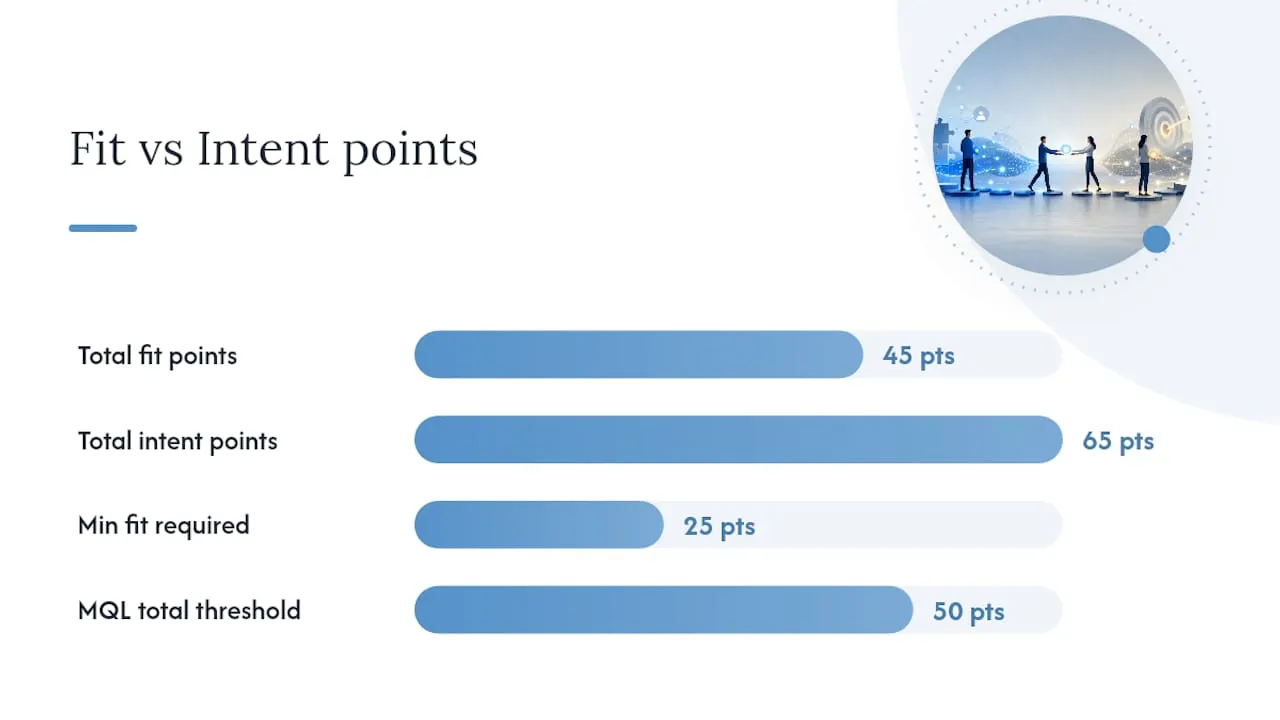
The fix is a two-gate model. Fit measures whether a lead resembles your ideal customer profile: company size, industry, job title, geography, tech stack. Intent measures behavior: page visits, content downloads, email engagement, time on pricing pages. A lead only becomes a true MQL when it clears both gates, not just one.
Here’s a scoring structure that works for most B2B teams:
- Assign fit points first. Job title match (+20), company size in target range (+15), industry match (+10). Anything below a threshold, say 25 points, disqualifies the lead from MQL status regardless of behavior.
- Layer intent points on top. Pricing page visit (+15), demo request (+30), webinar attendance (+10), repeat visits within 7 days (+10).
- Set the MQL threshold above both gates. Require a minimum fit score and a minimum combined score, for example 25+ fit points and 50+ total points, before a lead qualifies as an MQL.
- Automate the flag, not the judgment. Let your CRM apply the score automatically, but have a human spot-check a sample weekly to catch scoring drift.
Pro Tip: If your MQL volume looks great but your SQL conversion rate is falling, the problem usually isn’t sales being too picky. It’s marketing counting intent without checking fit.
Implementing this in your CRM doesn’t require an enterprise platform. Most systems, including Salesforce Marketing Cloud and Braze, support custom scoring fields and automated workflows that apply fit and intent rules the moment a new behavior fires. The output should be a single, unambiguous “MQL” flag that both teams trust, rather than five competing scores that nobody checks anymore.
The MQL-to-SQL Handoff: SLA, Routing, and Acceptance Rules
The handoff between marketing and sales is where most pipeline value gets lost, and it’s also the easiest part of this whole system to fix. A written SLA turns a vague expectation (“sales will follow up soon”) into an enforceable standard both teams can be held to.
Core SLA elements to put in writing:
- Response time. Define the maximum window for a sales rep to make first contact with a new SQL. Speed matters more than most teams assume: research on lead response consistently shows that contacting a lead within minutes rather than hours produces a meaningfully higher conversion rate. A separate look at home-service lead response backs the same pattern: the businesses that call fastest close more, regardless of industry.
- Acceptance criteria. Spell out exactly what fit and intent thresholds a lead must clear before sales is obligated to work it. This is the same fit-plus-intent gate from your scoring model, written into the agreement itself.
- Return-to-marketing rules. Define what happens when sales rejects a lead. Does it go back into a nurture track? Get reassigned? Get logged with a rejection reason? Without this step, rejected leads vanish and nobody learns why.
Routing rules that reduce friction:
- Route by territory first, so leads land with the rep who owns that account or region.
- Route by ICP tier next, sending high-fit leads to senior reps and lower-fit leads to junior reps or an SDR queue.
- Route by deal size last, flagging anything above a set ACV threshold for manager visibility before first contact.
Automated routing through your CRM, whether that’s Salesforce Marketing Cloud, Braze, or a comparable platform, removes the manual triage step that slows most teams down. A custom-built CRM and lead-routing system can apply territory, fit, and deal-size rules the instant a lead clears the MQL threshold, cutting the gap between qualification and first contact from hours to minutes.
The final piece is discipline, not technology: hold a weekly acceptance review. Pull every lead sales rejected that week, log the reason (bad fit, bad timing, duplicate, unresponsive), and look for patterns.
How to Calculate and Benchmark Your MQL-to-SQL Rate
The calculation itself is simple: divide the number of MQLs that became SQLs in a given period by the total number of MQLs generated in that same period, then multiply by 100. If you generated 200 MQLs in a quarter and 30 converted to SQLs, your rate is 15%.
Interpreting that number correctly is where teams go wrong. A widely cited average for B2B SaaS sits around 13%, but that blended figure hides enormous channel variance, and treating it as a universal target misleads more than it helps.
Before comparing your rate to any published number, match your MQL definition to theirs. A strict, intent-based definition will naturally produce a smaller MQL pool and a higher conversion percentage than a loose definition that counts every email opener. Neither approach is wrong, but comparing them against each other produces a false read on performance.
- Segment your own conversion rate by channel before drawing any conclusion about “good” or “bad” performance.
- Recalculate benchmarks whenever you tighten or loosen your MQL definition, since the two numbers aren’t comparable across a definition change.
- Weight enterprise and SMB pipelines separately if you run both, since blending them will understate one and overstate the other.
Common Handoff Mistakes and a Fast Audit Checklist
Most low conversion rates trace back to a handful of repeat offenders, not a mysterious market problem.
- Loose MQL definitions. Counting every content download as an MQL, with no fit gate, inflates volume and buries sales in low-quality leads.
- Mixed funnel stages. Treating a newsletter subscriber the same as a demo requester erases the entire point of the MQL/SQL split.
- Slow or missing SLAs. No agreed response window means leads sit for days while intent cools.
- No rejection logging. Without tracking why sales rejects leads, marketing keeps making the same targeting mistakes.
Run a 7 to 14 day audit: pull your last 100 MQLs and tag each one against your fit and intent gates. One audit approach found that 30% to 50% of recent MQLs failed one or both gates, which means tightening your existing definition often lifts conversion faster than adding new lead sources.
Real-World Evidence: What Fixing the Handoff Actually Produces
Theory only earns its keep when it moves a number.
The gain didn’t come from generating more leads. It came from tightening the definition of a qualified lead and routing the right ones to sales faster, so fewer high-intent prospects went cold waiting for a response.
Three quick wins any team can start this week:
- Run a definition audit. Get marketing and sales in one room and write down the current MQL and SQL definitions each team is actually using, since they’re rarely identical.
- Segment your lead pool. Split MQLs by fit tier before routing, so sales sees the highest-value leads first.
- Automate the boring parts. Use CRM workflows, whether in Salesforce Marketing Cloud, Braze, or a comparable platform, to apply scoring and routing rules the moment a lead clears threshold, so no one has to remember to do it manually.
Forefront’s work on projects like CK Millworks shows how a rebuilt lead-capture and routing system translates directly into cleaner pipeline data and faster sales response.
Operational Lessons From Building High-Conversion Lead Systems
The biggest mistake teams make isn’t scoring leads wrong. It’s scoring them precisely and routing them slowly. A lead that clears every fit and intent gate still goes cold if it sits in an inbox for two days waiting for a rep to notice it. Speed and accuracy have to move together, or the accuracy doesn’t matter.
Automation earns its place once your definitions are stable. Automate too early, before marketing and sales agree on what a fit lead even looks like, and you’ll just automate the disagreement at scale. Human review still has a job in the first few weeks of any new scoring model, catching the edge cases a rule set can’t anticipate yet.
Start with the audit. Tag your last 100 MQLs against fit and intent honestly, and you’ll usually find the fix before you finish the spreadsheet.
Get Your MQL-to-SQL Handoff Built Right the First Time
Most teams patch this handoff with spreadsheets, manual tagging, and a Slack channel nobody checks consistently. Forefront Industries builds the infrastructure instead: custom CRM systems on Salesforce Marketing Cloud or Braze that apply fit-and-intent scoring automatically, route qualified leads by territory and deal size in real time, and log rejection reasons so marketing can fix targeting instead of guessing at it.

This isn’t a template plugin bolted onto your existing stack. It’s a custom-built system designed around how your sales team actually works, connected to a website architecture built to capture the right leads in the first place. If your MQL volume looks healthy but your SQL conversion keeps disappointing the pipeline report, the fix usually lives in the routing and scoring layer, not in generating more traffic. Explore Forefront’s CRM and automation services and book a scoping conversation to see where your current handoff is losing leads.
Frequently Asked Questions
What is the main difference between MQL and SQL? An MQL has engaged with marketing content but hasn’t been vetted for fit or buying intent. An SQL has cleared a fit check and shown a clear buying signal, like a demo request, and sales has accepted the lead.
What is an MQL, in simple terms? An MQL is a prospect who has shown enough interest through marketing touchpoints, downloads, webinar attendance, repeat site visits, to be worth nurturing further, but who hasn’t yet indicated readiness to buy.
How do you calculate MQL to SQL conversion rate? Divide the number of MQLs that became SQLs in a given period by the total MQLs generated in that period, then multiply by 100.
What is a good MQL to SQL conversion rate? It depends entirely on your channel mix and deal size.
When should a lead move from MQL to SQL? When it clears both your fit gate (matches your ideal customer profile) and shows a genuine intent signal, such as a pricing question or demo request, and sales formally accepts it under your SLA.
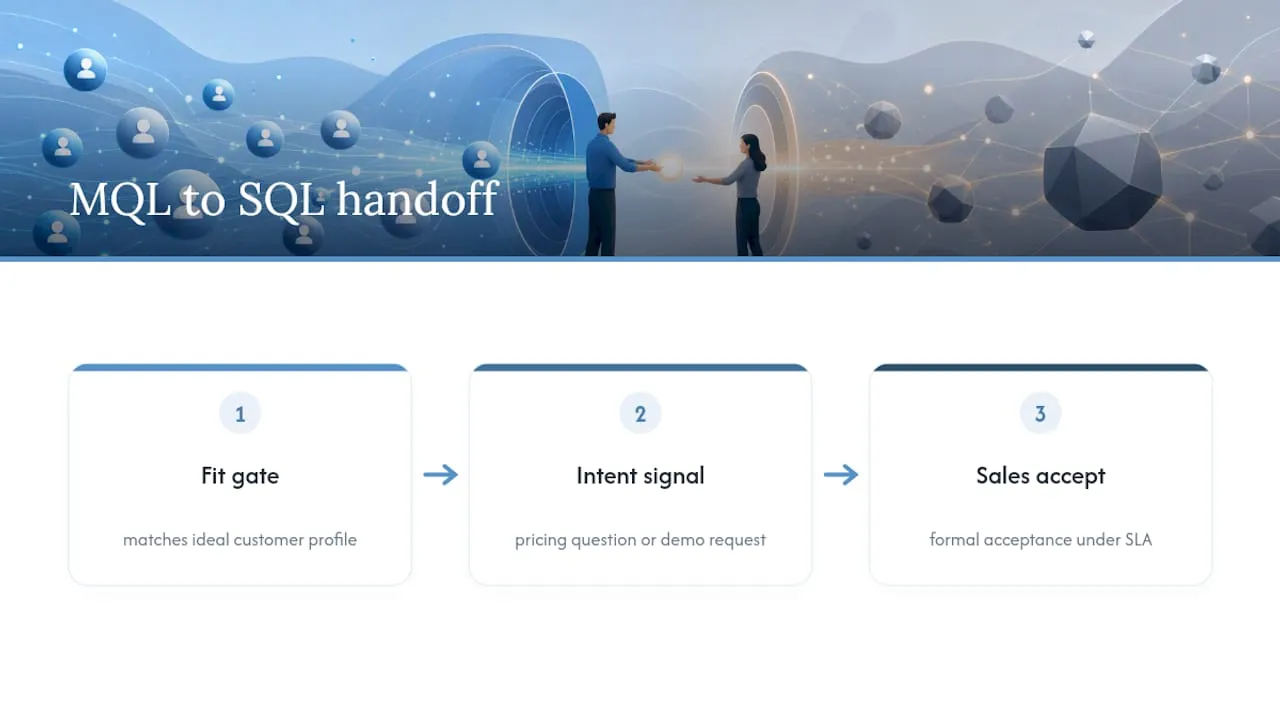
Why do MQL to SQL conversion rates vary so much between reports? Definition strictness explains most of the gap. A broad MQL definition that counts every content download produces a lower conversion rate than a strict, intent-based definition applied to a smaller pool of leads.
Sources
- MQL vs. SQL: What Are They? How Do They Help You Sell? - HubSpot
- MQL to SQL conversion rate benchmarks - Understory Agency
- MQL to SQL Conversion: 2026 Benchmarks for B2B Teams - DemandGenInsider
- MQL to SQL conversion rate by industry - First Page Sage