AI Sales Automation for Small Service Businesses: What to Automate First

AI sales automation is software that handles the repetitive parts of selling: answering new inquiries, sorting leads, sending follow-ups, logging notes and booking calls. Unlike older automation, it can read a message and adjust. For a service business in Delray Beach, Boca Raton or Miami, the safest first targets are lead follow-up, lead sorting and scheduling. Pricing, negotiation and relationships stay with you.
This guide is written for owners and practice managers, not for IT staff. It covers what AI sales automation does, what the research says about results, which tasks to automate first, what to keep human, and how to tell whether it is working.
TL;DR
- AI sales automation reads and responds to leads. Old automation only follows fixed if/then rules.
- Start with speed to first reply, lead sorting, follow-up and scheduling. Keep pricing talks and relationships human.
- Clean data and a clear process matter more than the tool. Automating a broken process only speeds up the break.
- Email rules apply. Automated messages need accurate sender details and an opt-out.
- Measure booked calls, win rate and cost per qualified lead, not message volume.
Table of Contents
- What AI sales automation actually is
- Why service businesses look at it
- Where a service business should start
- What to keep human
- Fix the process before you automate it
- Rules you must follow
- How to tell if it is working
- Our approach to AI sales automation
- Getting help setting it up
- A simple first month
- Mistakes that waste money
- FAQ
- Sources
What AI sales automation actually is
Traditional sales automation is rule-based. A form is submitted, the system sends template email #1. Three days later it sends template email #2. It cannot read a reply or change course.
AI sales automation adds judgment. According to a company-published guide on AI sales automation, the difference is that AI can classify what a lead wrote, adapt the copy to that lead and change follow-up timing based on engagement.
In plain terms, here is the difference for a service business:
| Situation | Rule-based automation | AI sales automation |
|---|---|---|
| New web inquiry arrives | Sends the same confirmation to everyone | Reads the request, tags it (urgent repair, quote, general question) and replies to match |
| Lead replies “Can you do Thursday?” | Nothing happens until a person notices | Understands the question and offers open slots |
| Lead goes quiet | Sends step 3 on day 7, no matter what | Changes timing based on whether the lead opened or clicked |
| Sorting leads | Fixed score: form field A = 10 points | Weighs behavior, such as pricing page visits, and past wins |
The tool matters less than the setup behind it. AI needs to see your lead data and know your process. If the data is scattered or the process is unclear, the AI inherits both problems.
Why service businesses look at it
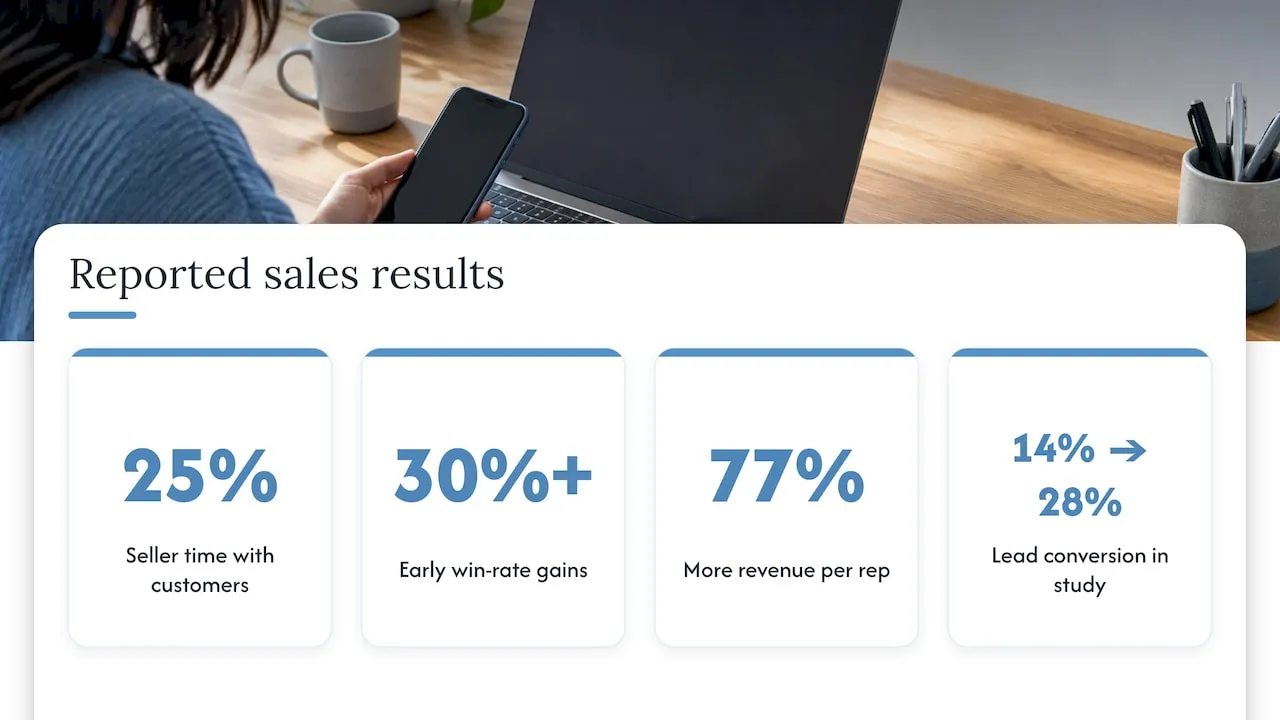
The pull is time. Selling is a small share of the week for most sales staff. The rest goes to admin, notes, chasing and scheduling. A 2025 technology report from Bain & Company says AI could double the 25% of time sellers actually spend with customers.
If you run a small team, that sentence describes your week. The person who should be quoting jobs is answering the same five questions by email.
The same Bain report says early successes show win rates improving by 30% or more. Treat that as the upside of a well-run rollout at companies with dedicated sales teams, not a promise for a five-person shop. A 2026 academic study by Dr. Munyaradzi Chikwama, published in the International Journal of Advanced Research in Science and Technology, reported AI-enabled sales teams generating 77% more revenue per rep, with lead conversion doubling from 14% to 28%. These are results from studied teams. Your results depend on your starting point.
The common thread in the numbers is not cleverness. It is speed and consistency. A lead who gets a useful reply in minutes is more likely to book than one who hears back tomorrow.
Where a service business should start
Do not buy a platform that promises to replace a salesperson. Start with the tasks that cost you leads today. Rank them in this order.
1. First reply to every new inquiry
A lead fills out your form at 8 p.m. The first business to answer usually wins the conversation. Automation can acknowledge the request in seconds, ask one or two qualifying questions and offer a time to talk.
Write those messages yourself. The AI adapts them. It should not invent them.
2. Lead sorting and routing
Not every inquiry is equal. A homeowner in West Palm Beach asking for an emergency estimate is different from someone browsing prices. AI can read the message, tag it and send the hot ones to the right person with a text alert.
This is the step many owners skip, and it is where leads go cold. Sorted leads get handled in order of value. Unsorted leads get handled in order of arrival.
3. Follow-up that does not depend on memory
Most deals need more than one touch. A follow-up sequence that adjusts to whether the lead opened, clicked or replied keeps you in the conversation without a person tracking it in a notebook.
A short sequence beats a long one: a same-day reply, a next-day check, a reminder before the quote expires. Stop the sequence the moment the lead replies or books.
4. Scheduling
Back-and-forth over appointment times wastes days. Let the system offer open slots from your real calendar and confirm automatically.
5. Notes and record keeping
AI can log call details, summarize conversations and update the lead’s status. This saves the most time for owners who currently skip notes because they are busy. Those skipped notes are why follow-up falls apart later.
A website assistant can also take on first-line questions and pass the lead into your CRM. This write-up on chatbot and CRM connection shows how field mapping works so captured leads land in the right place instead of a dead-end inbox.
What to keep human
AI is good at repetitive, rules-adjacent work. It is weak where judgment and trust carry the sale.
Keep these with a person:
- Pricing conversations and negotiation. The customer wants a person who can make a call.
- Relationships with referral partners. A realtor, property manager or past client expects a human voice.
- Sensitive situations. Complaints, billing disputes and urgent problems need a person.
- Deciding which deals deserve your time. AI can rank. You decide.
A good test: if a mistake would embarrass you in front of the customer, a person reviews it first. Many setups use a review step for the first month, then relax it for low-risk messages only.
Fix the process before you automate it
The Bain report makes a point owners should hear before spending money. Applying AI to an existing process often gives only small gains, because new bottlenecks appear and companies end up automating inefficiencies instead of removing them. The report names data cleanup, a standard process and changed ways of working as the biggest hurdles.
For a small business, that translates to a short checklist:
- Where do leads come from? List every source: website form, phone, Google Business Profile messages, referrals, social media.
- Where does each one land? If the answer is “an inbox, a sticky note and someone’s phone”, fix that first.
- Who responds, and how fast? Write down the real answer, not the goal.
- What happens after the first reply? Map the steps up to a signed job.
- Where do leads drop off? That is where automation pays first.
The academic study above also found that data quality and siloed systems (78%) and high implementation costs (71%) were the main adoption barriers. Both are solvable by starting small and connecting your lead sources to one system before adding AI.
A site that does not capture leads cleanly gives automation nothing to work with. If your website form emails a person who forwards it by hand, start there. Tools sit on top of the website, so a slow or outdated site limits everything after it.
Rules you must follow
Automated email is still commercial email. The FTC’s CAN-SPAM compliance guide states that each separate email in violation can carry penalties of up to $53,088. Automation makes this matter more, because a faulty template goes out to hundreds of people at once.
In practice:
- Use accurate sender name and address information.
- Write subject lines that match the content.
- Include a working way to opt out and honor it quickly.
- Do not let an AI write claims you cannot back up, such as guarantees or fake urgency.
AI can also produce wrong or made-up details. Give it your approved facts, such as service areas, hours and starting prices, and have a person check anything that touches pricing or promises. Client data deserves care too: keep customer details out of tools you have not vetted. This piece on AI-assisted proposal writing walks through checking AI output and protecting client information, which applies to quotes and follow-ups alike.
How to tell if it is working
Volume is the wrong measure. AI can send unlimited messages, so “emails sent” says nothing. Track outcomes against a baseline you record before turning anything on.
| Measure | What it tells you | How to check |
|---|---|---|
| Time to first reply | Whether speed improved | Compare timestamps on inquiries and responses |
| Inquiry-to-booked-call rate | Whether the follow-up works | Booked calls divided by inquiries |
| Win rate | Whether the right leads reach you | Jobs won divided by quotes sent |
| Sales cycle length | Whether deals move faster | Days from inquiry to signed job |
| Cost per qualified lead | Whether spend is justified | Monthly tool and setup cost divided by qualified leads |
Record the numbers for 30 to 60 days before the change. After launch, compare the same measures over the same length of time. Change one thing at a time so you know what caused the difference.
Be realistic about what a vendor’s case study tells you. Published figures come from different industries and company sizes. Use them to decide what to try, then trust your own before-and-after numbers.
Our approach to AI sales automation
We are a Delray Beach web design studio, and we build this for service businesses in a particular order. Website first, lead capture second, follow-up third, AI last.
The reason is simple. AI sorts and answers leads that already exist. If your site is slow, built on a template that hides the contact path, or sends form entries to an inbox nobody checks, the AI has little to work with. We build fully custom-coded sites designed to convert, then connect them to a CRM with lead routing and follow-up sequences built around your real workflow.
Before joining Forefront Industries, our founder spent years building CRM and lifecycle marketing systems at large consumer brands including Amazon, Verizon and American Express. Those were employers, not clients. What carries over is the discipline: map the journey, clean the data, automate the repeatable steps and measure outcomes.
That is our own reported result, and it came from better capture and routing, not from adding more messages.
Start with one workflow, such as the first reply to a new inquiry. Prove it, then add the next.
Jeremy
Getting help setting it up
If you would rather not wire this together yourself, we handle it as a Delray Beach web design studio working with service businesses across South Florida. Our AI automation and consulting service covers workflow automation, lead routing and CRM and email systems, built on top of a website designed to convert.
Automation depends on a site that stays fast, secure and current. Our website maintenance plans are published: Managed Hosting at $99 per month, Webmaster at $250 per month and Performance Plus at $750 per month.
A simple first month
Here is a plan a small team can run without hiring anyone.
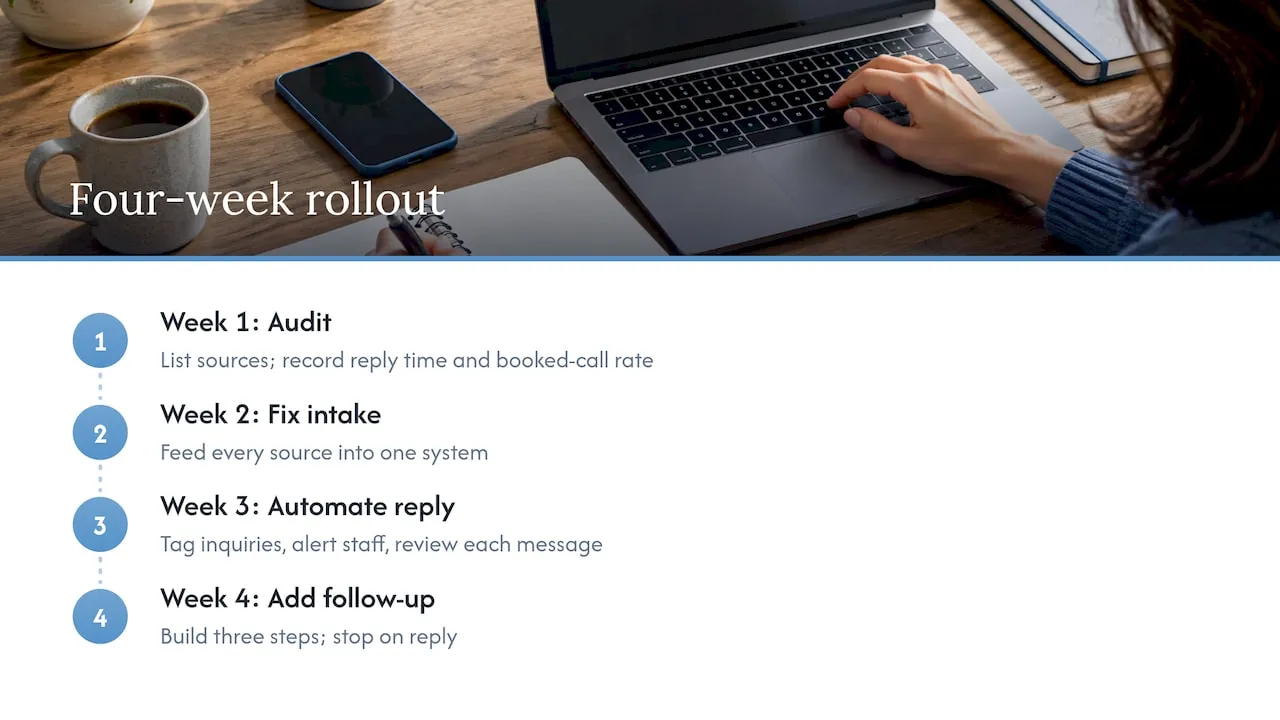
Week 1: Audit. List lead sources, where they land and who answers. Record your current reply time and booked-call rate.
Week 2: Fix the intake. Make sure every source feeds one system. Add a clear form and a click-to-call button to your site. Check your Google Business Profile messages and phone number for consistency.
Week 3: Automate the first reply. Write the message. Let the system tag the inquiry and alert the right person. Review every message by hand.
Week 4: Add follow-up. Build a three-step sequence that stops on reply. Compare your numbers with week 1.
If reply time dropped and booked calls rose, add scheduling and note logging next. If not, look at the message, the offer or the site before adding more tools.
Mistakes that waste money
- Buying an outbound tool first. Cold outreach platforms suit companies with sales teams and long lists. Most local service businesses get more from handling inbound leads well.
- Skipping the data. Duplicate contacts and missing fields lead to wrong messages.
- No stop rule. A lead who booked should not get step 3 of a sequence.
- Counting activity. More messages is not more revenue.
- Removing people from the wrong steps. Automate admin. Keep people on trust.
Gartner-style forecasts about AI agents multiplying across sales teams make the headlines, but for a small business the practical risk is simpler: tools piling up that nobody manages. One system, one owner, one set of numbers.
FAQ
How do I use AI to automate sales?
Start with inbound leads. Connect your website form and other lead sources to one system, then automate the first reply, lead tagging, follow-up and scheduling. Review messages by hand at first. Add more once your numbers improve.
Can AI replace a salesperson at a small business?
No, and it should not try. AI handles repetitive work such as replies, reminders and notes. A person still handles pricing, trust and relationships. The goal is more time for the work only you can do.
What should I fix before adding AI?
Fix where leads land and how fast someone replies. A clear website form, one place for all leads and a written process give the AI something reliable to work with. Without those, it speeds up existing problems.
Is automated follow-up email legal?
Yes, if it follows the rules. Under CAN-SPAM, messages need accurate sender information, honest subject lines and a working opt-out. Violations can carry penalties of up to $53,088 per email, so check your templates before sending.
How do I know if it is working?
Compare numbers from before and after: time to first reply, booked calls, win rate and cost per qualified lead. Record the baseline for 30 to 60 days first. Ignore message counts.
Sources
- Bain & Company: AI Is Transforming Productivity, but Sales Remains a New Frontier (Technology Report 2025)
- Transforming Sales Strategies Through Artificial Intelligence (International Journal of Advanced Research in Science and Technology, 2026)
- AI sales automation: definition and guide
- FTC: CAN-SPAM Act compliance guide for business
Want to know where your website is losing leads before you automate anything? Request the free website audit at forefrontindustries.io/website-audit.