Build Production Ready Service Area Pages for Service Businesses

Service area pages are dedicated local landing pages built for businesses without a storefront to win area-specific organic queries. They work for home services, mobile pros, and hybrid businesses that travel to customers. Build them only when each page can carry real, localized evidence: specific neighborhoods, actual project details, local proof. A templated page with a swapped city name produces the opposite result.
TL;DR:
- Building fewer, high-quality service area pages with unique local content and proof improves search rankings and conversions more than publishing many thin, templated pages.
- Use URL structures like “/services/[service]/[city]” and ensure each SAP includes genuine local details, testimonials, and area-specific project examples to avoid Google penalties.
- Only create location pages for physical storefronts with separate Google Business Profiles; for travel-based services, use SAPs with accurate coverage maps and internal links to neighboring areas.
- Incorporate schema markup reflecting actual service zones, and avoid overstating coverage or creating duplicate profiles, as policy violations risk domain suspension or ranking drops.
- Focus on less but better SAPs, and consult experienced developers for custom schema, canonicalization, and lead routing to ensure compliance and maximize local search impact.
Table of Contents
- What are service area pages and who should create them
- Service area pages vs location pages: which to build
- Google rules and doorway page risk: how to stay compliant
- Core on-page best practices for SAPs that rank and convert
- Technical SEO and site architecture for SAPs
- Practical templates, example snippets, and a publish checklist
- Measure, test, and iterate: how to know SAPs are working
- Forefront Industries’ approach to production-ready service area pages
- Prioritize fewer, higher-quality service area pages
- How Forefront Industries helps build compliant, high-converting SAPs
- Sources
- FAQ
What are service area pages and who should create them
A service area page (SAP) is a standalone URL built to rank for a specific city, region, or neighborhood when the business has no public storefront there. This is different from a generic “areas we serve” list, which names territories but gives search engines nothing substantive to index per location. An SAP earns its own ranking because it contains unique content: local project examples, area-specific service notes, and proof that the business actually works there.
Three business types benefit most. Home service providers (plumbers, electricians, roofers, HVAC technicians) who drive to the customer rather than hosting visits. Mobile professionals (mobile notaries, pet groomers, personal trainers, photographers) whose entire delivery model is location-independent. Hybrid businesses that keep one physical office but serve a wider surrounding radius, such as a law firm with a single location that represents clients across several counties.
SAPs are built to intercept queries structured around location plus service: “emergency plumber in [neighborhood],” “mobile dog groomer near [suburb],” “HVAC repair [city].” These searches carry commercial intent and tight geographic specificity. A generic homepage rarely ranks for them because it lacks the local signal search engines look for. A well-built SAP gives that signal directly, provided the content underneath is specific enough to matter.
Service area pages vs location pages: which to build
The distinction comes down to one question: does a physical, visitable address exist at that location? If yes, build a location page tied to that storefront, complete with its own Google Business Profile and address-based schema. If no, and the business only travels there to deliver service, an SAP is the correct structure.
Separate Google Business Profiles are appropriate only when a business genuinely operates distinct physical locations with staff or service counters. A single service-area business should run one profile and list multiple service areas within it, not create duplicate profiles to chase rankings in each city, a practice that violates Google’s representation guidelines.
Grouping matters as much as the storefront question. Rather than building a separate page for every small suburb or zip code, local-SEO practitioners recommend clustering smaller neighborhoods into logical groups built around natural commuting or service radii. A county-wide electrician might group twelve small towns into three pages organized by drive-time zone, each with distinct local detail, rather than publishing twelve thin pages that compete with each other.
Google rules and doorway page risk: how to stay compliant
Google’s spam policies classify pages built primarily to rank for a search query, with little unique value for the visitor, as doorway pages. The classic example in local SEO is a template with one swapped city name per page and otherwise identical text, service lists, and testimonials. Google’s detection has grown more sensitive to exactly this pattern, and a site full of near-duplicate SAPs risks a manual action or an algorithmic ranking suppression that affects the whole domain, not just the offending pages.
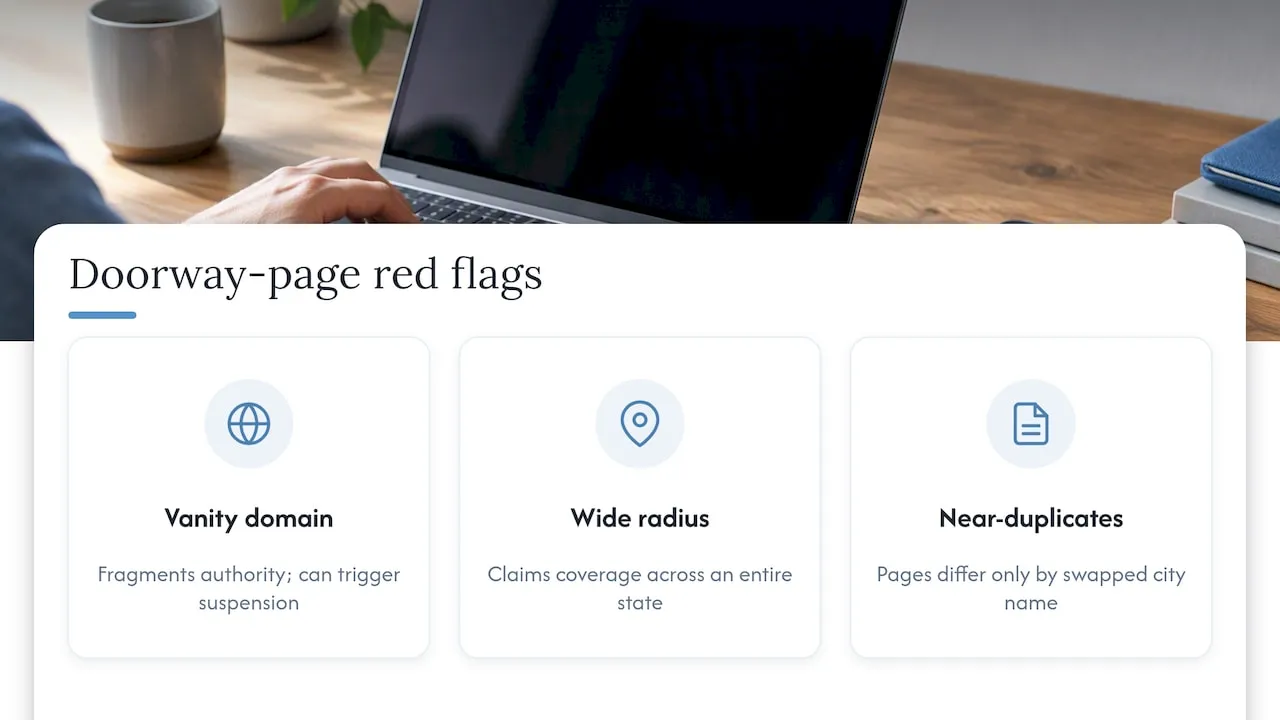
Google Business Profile’s service-area rules give businesses without a storefront a legitimate way to claim local relevance: a single profile can list up to 20 service areas, and the business address can be hidden from public view if there is no walk-in location. The profile still requires an accurate base location and honest area definitions. Overstating a service radius, such as a one-person handyman business claiming coverage across an entire state, is both a policy risk and a trust problem for visitors.
Watch for three practical red flags. First, a separate “vanity” or alternate domain built just to rank a cluster of city pages, which practitioners widely warn against because it fragments authority and can trigger suspension when linked from a Google Business Profile. Second, service areas that stretch implausibly far from the business’s real operating base. Third, pages where the only difference between them is a find-and-replace city name.
Core on-page best practices for SAPs that rank and convert
A service area page earns its ranking and its lead the same way: specificity. Generic copy ranks poorly and converts worse, because visitors scanning for a local provider can tell within seconds whether a page was written for them or assembled from a template.
- Write localized narrative content. Name actual neighborhoods, landmarks, or service zones within the area, and describe real project types completed there.
- Tune service descriptions to local conditions. A roofer serving a coastal town should mention salt-air corrosion; a landscaper in a dry region should address drought-tolerant planting.
- Add area-specific trust elements. Local testimonials, before-and-after photos tied to actual jobs in that area, and current service availability all signal that the page reflects real work, not a placeholder.
- Place the CTA where intent peaks. A booking widget or local phone number belongs near the top of the page and repeated after the service detail, not buried at the bottom.
- Link SAPs into a topical hub. Connect each service area page to the relevant service category page and to neighboring area pages, so search engines and visitors can both navigate the full coverage map.
BrightLocal’s guidance puts it directly: write as if by a person who lives in that community. That single framing shift, from “we serve [city]” boilerplate to specific local detail, is the difference between a page that reads as a doorway and one that reads as useful.
Local phone numbers deserve particular attention. A business that answers with a local area code, even when calls route to a central dispatch team, reinforces the local-presence signal that both visitors and Google’s local algorithms respond to. Pairing that with a visible service radius or coverage map on the page (not just in the Google Business Profile) gives visitors an immediate answer to “do they actually come here.”
Internal linking between SAPs and service pages also prevents a common failure mode: pages that rank but convert poorly because the visitor lands on a thin local page and then has to hunt for actual service details. A hub structure, where each SAP links out to the full service description and every service page links back into its coverage area pages, keeps both ranking signals and user experience intact.
Pro Tip: Write one SAP fully, with real local detail and proof, before building a second. A single strong page outperforms five thin ones, both in search results and in the time it takes to notice which pages actually convert.
Technical SEO and site architecture for SAPs
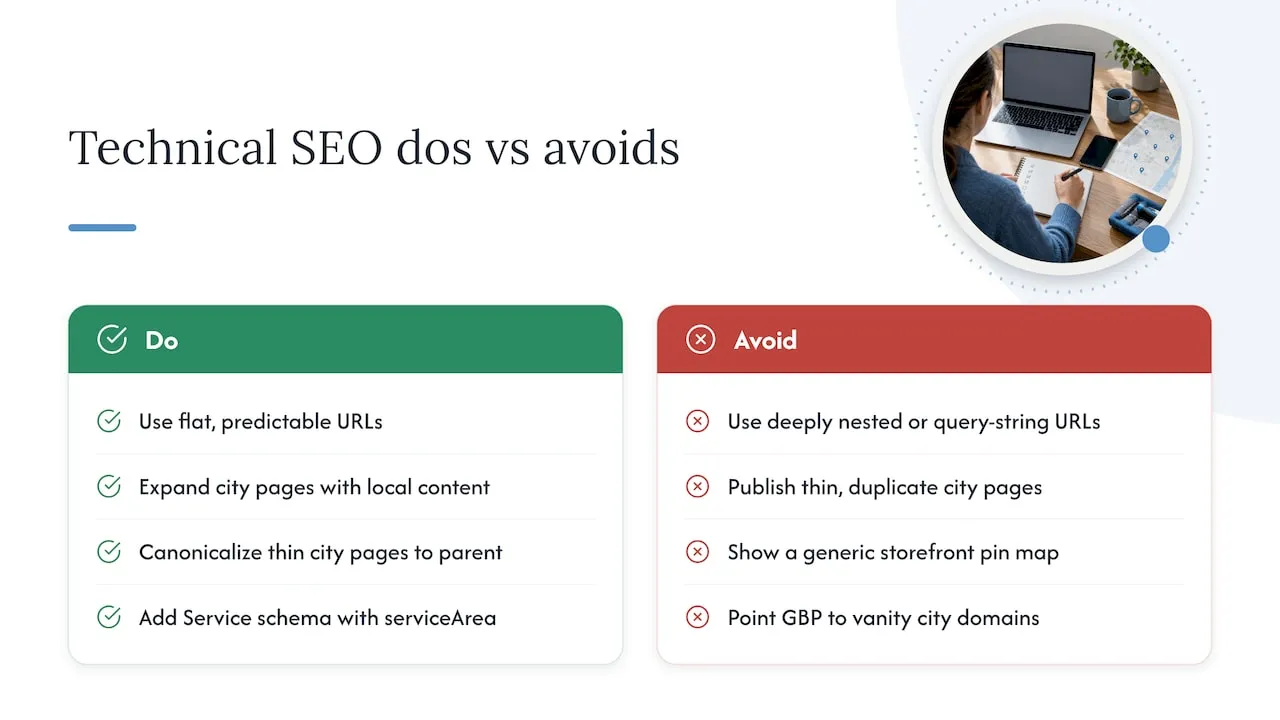
URL structure should be flat and predictable: a pattern like /services/[service]/[city] or /locations/[city] keeps the site’s hierarchy legible to both crawlers and visitors comparing pages. Avoid deeply nested paths or query-string-based location pages, which complicate indexing and make canonical management harder.
Canonicalization becomes an issue when an SAP’s content overlaps heavily with a broader service category page. If a city page says little beyond what the main service page already covers, either expand the city page with genuinely new local content or canonicalize it to the parent page rather than let two thin, competing pages fight for the same ranking.
Schema markup matters here. Schema lets a site specify service area, name, and contact details in a format search engines parse directly. For a true service-area business, the areaServed property should reflect the actual coverage zone, and the address field should be handled carefully: a hidden or non-public business address should not appear in visible schema markup if it is hidden on the Google Business Profile.
For maps, embed an actual coverage area or service radius map directly on the page rather than a generic storefront pin, since there usually is no public storefront to show. The Google Business Profile’s website field should point to the primary domain’s relevant landing page, never to a separate city-specific vanity domain, which keeps the profile’s trust signals aligned with the indexed site.
Practical templates, example snippets, and a publish checklist
A short-form SAP template works for lower-priority or clustered areas:
- H1: [Service] in [Area Name]
- Opening paragraph: what the business does there and the primary problem it solves locally
- H2: Local service details specific to that area’s conditions
- H2: Proof section (testimonial, photo, or project note)
- CTA block with local phone number and booking link
A longer-form template fits priority cities where the business has deeper history:
- H1: [Service] in [City]
- Intro paragraph with neighborhood names and service radius
- H2: Common [service] issues in [city] (tied to local conditions, climate, or housing stock)
- H2: Recent work in [city] (specific project types, not generic claims)
- H2: What to expect (process, timeline, pricing approach)
- Embedded coverage map
- Local FAQ block
- CTA with phone number and booking widget
An example of localized sentence construction: “In the Riverdale corridor, older homes with cast-iron plumbing often need pipe camera inspection before any trenchless repair, a step we build into every estimate.” That single sentence does more ranking and conversion work than a paragraph of generic service copy.
Before publishing, confirm:
- Unique local content exists beyond a swapped city name.
- At least one area-specific proof point (testimonial, photo, or case note) is included.
- LocalBusiness or Service schema is present and accurate.
- The Google Business Profile lists this URL, not a separate vanity domain.
- Internal links connect the page to its parent service and neighboring areas.
- The page loads quickly and renders cleanly on mobile.
Measure, test, and iterate: how to know SAPs are working
Google Search Console is the first place to check. Filter queries containing the city or neighborhood name tied to each SAP, then watch impressions, click-through rate, and ranking position over several weeks. A page with rising impressions but flat clicks usually has a title or snippet problem, not a content problem.
Conversion signals matter as much as rankings. Track phone calls (via call tracking numbers specific to the page where possible) and form submissions, and attribute them back to the landing page whenever the CMS or analytics setup allows it. A page that ranks well but converts poorly often has a weak or buried CTA, not a traffic problem.
Worthwhile experiments include testing title tag phrasing (service-first versus location-first), moving the CTA higher on the page, and swapping in a different local proof point to see if trust signals move conversion rate. Give any single change four to six weeks before judging it. Local rankings move slower than national ones, and a change evaluated after one week usually just reflects normal ranking volatility.
Forefront Industries’ approach to production-ready service area pages
Some agencies treat SAP builds as an evidence-collection problem first and a coding problem second. Discovery may start with gathering local proof such as project photos, client quotes, and specific service details tied to each target area before building pages. That evidence then gets handed to development with a clear technical brief: URL pattern, canonical rules, schema fields, and the local assets each page needs.
An enterprise CRM and lifecycle marketing background, sometimes developed through client work with major consumer brands, can shape how routing and lead capture are integrated into each page rather than bolted on afterward.
Pro Tip: Ask any developer or agency building your SAPs for the schema fields and canonical plan in writing before the build starts, not after the pages go live.
Prioritize fewer, higher-quality service area pages
The instinct to publish twenty thin city pages because a competitor has fifty is the most common SAP mistake, and it works against the business, not for it. A handful of pages with real local evidence will outrank and out-convert dozens of templated ones, and they carry far less policy risk. SAPs are one input in a local acquisition stack that also includes the Google Business Profile, citations, and reviews. They are never a replacement for any of those.
Scale up only when a signal justifies it: an existing SAP is ranking and converting, and the business has genuine new project history in an adjacent area to draw on. Scaling before that evidence exists just multiplies thin pages.
- Jeremy
How Forefront Industries helps build compliant, high-converting SAPs
Service businesses often reach the limits of what a template builder or a generic agency can do once SAPs need real schema work, CRM-connected lead routing, and ongoing technical upkeep. Forefront Industries builds fully custom-coded sites rather than template-based ones, which matters for SAPs specifically because each page’s structure, schema, and internal linking can be built to the business’s actual service areas instead of forced into a generic page builder’s layout.

Forefront’s relevant services include custom Web Design & Development, Email & CRM Development for routing local leads to the right team, and ongoing website maintenance through plans like Managed Hosting, Webmaster, or Performance Plus. When requesting a proposal for SAP work, ask specifically for a schema and canonical plan, a local evidence-collection step before copywriting begins, and CRM-connected lead routing from each page’s CTA.
Readers ready to move past templated area pages can request a consultation through Forefront’s services overview to scope a custom SAP build.
Sources
- Spam policies - Google Search Central
- How to Do Service Area Page SEO for Local Search Visibility - BrightLocal
FAQ
What are service area pages?
Service area pages are dedicated landing pages built to rank for a specific city, neighborhood, or region when a business has no public storefront there. They differ from a generic “areas we serve” list because each page contains unique, localized content such as project examples and area-specific service details.
Is SEO dead or evolving in 2026?
SEO is not dead, it continues to evolve, with search engines placing more weight on genuinely useful, specific content over keyword-matched templates. For service area pages specifically, Google’s spam policies show this shift clearly: generic, templated local pages face more scrutiny than pages with real local evidence.
How do I optimize service pages for SEO?
Optimize service pages by pairing each one with accurate LocalBusiness schema, a clear URL structure, and internal links connecting service pages to their relevant area pages. Add local proof such as testimonials or project photos, and place CTAs with local contact information near the top of the page.
What is the 80/20 rule in SEO?
In the context of service area pages, the principle points to prioritizing a smaller number of well-built, evidence-backed pages over a large volume of thin, templated ones. A handful of SAPs with real local content and proof tend to outperform dozens of near-duplicate pages, while also carrying lower risk of doorway-page penalties.
How do service area pages differ from location pages?
A location page represents a real, visitable address and typically has its own Google Business Profile, while a service area page represents a zone the business travels to without a storefront there. The choice depends on whether a physical, staffed address actually exists in that area.