Marketing Automation Audit: 15 Steps to Find Revenue Risk for Managers

A marketing automation audit is a focused, evidence-based review of tracking, workflows, data quality, and compliance that exposes revenue and operational risk. The single first action is a brief health check covering tracking fidelity, top-performing flows, and suppression lists. The output is a prioritized remediation roadmap that links each fix to revenue impact, risk level, and effort.
TL;DR:
- Regularly verify that tracking pixels, UTM parameters, and conversion events function correctly to ensure accurate attribution and data integrity.
- Reconcile platform-reported conversions with CRM data monthly to identify discrepancies caused by duplicate contact records or field mapping issues.
- Review lead scoring rules and routing logic at least quarterly to ensure they reflect current buyer behavior and correct sales handoffs.
- Conduct deliverability checks by testing email templates across multiple clients and devices, ensuring unsubscribe links and personalization tokens work properly.
- Prioritize remediation items based on revenue impact and operational effort, assigning owners and success metrics for effective follow-up and continuous improvement.
Table of Contents
- A 15-point checklist to scope the audit fast
- A step-by-step framework for a complete audit
- Why platform attribution numbers need a second look
- Checking lead scoring, qualification, and the sales handoff
- Protecting inbox placement with deliverability and template checks
- Turning findings into a prioritized remediation roadmap
- How often to audit and what triggers an immediate review
- Templates that make the audit repeatable
- What makes an audit worth the time
- Getting help from Forefront Industries with your audit
- FAQ
- Sources
A 15-point checklist to scope the audit fast
Before any deep testing begins, scope the territory. This checklist groups the essentials into five domains so a marketing manager can start today without waiting on a formal project kickoff.
Inventory essentials:
- List every active template, form, segment, and list, with a named owner for each.
- Document all third-party integrations feeding or pulling data from the automation platform.
- Flag any workflow with no clear owner or unclear purpose.
Tracking and attribution:
- Confirm tracking pixels and SDKs fire once per event, not zero or multiple times.
- Verify UTM parameters are applied consistently across campaigns.
- Check that conversion events map to defined lifecycle stages.
Data quality and suppression:
- Spot-check field mapping between the automation platform and the CRM for mismatches.
- Review suppression and opt-out lists for recent, accurate entries.
- Audit for duplicate contact records created by inconsistent identity rules.
Top workflows to validate:
- Trace the welcome series end to end, checking triggers, content, and exit logic.
- Test the highest-volume top-of-funnel flow for broken links or stalled steps.
- Confirm handoff flows pass leads to sales with the right data intact.
Compliance essentials:
- Verify every commercial email includes a valid physical postal address and a working opt-out link, a requirement the FTC’s CAN-SPAM compliance guide applies to B2B email as well as consumer messages.
- Confirm opt-out requests are processed and suppressed promptly.
- Check that subject lines and sender information accurately reflect message content.
A step-by-step framework for a complete audit
A full audit runs in six phases. Each phase produces an artifact the next phase depends on, so skipping ahead creates gaps the final report will miss.
- Stakeholder alignment and artifact collection. Gather platform access, past campaign reports, and current goals from marketing, sales, and revenue operations leaders before touching any system.
- System and asset mapping with owners. Build a visual map of every form, workflow, integration, audience, and handoff, with a named owner attached to each node, a practice MarTech’s audit guidance recommends over relying on the platform’s own interface.
- Technical tests. Fire test events through each tracking pixel and SDK, confirm field sync between systems, and log any event that fires more than once or not at all.
- Logic tests. Walk through workflow exit conditions, segmentation rules, and scoring thresholds to confirm they still match current business logic rather than settings from a prior campaign.
- Measurement checks. Reconcile platform-reported conversions against CRM-recorded opportunities and revenue, flagging any gap larger than what normal data lag explains.
- Deliverability and template verification. Run seed-list tests across major inbox providers and check templates for broken tokens, missing unsubscribe links, and accessibility issues.
Pro Tip: Run Phase 3 technical tests before Phase 4 logic tests: broken tracking will make workflow logic look wrong when the real fault is upstream.
Document every test with its expected result and actual result side by side. That pairing becomes the evidence base for the remediation roadmap built in a later phase, and it gives a consultant or new hire a record of what was checked and when.
Why platform attribution numbers need a second look
Platform-reported attribution tells you what the system credited, not what actually caused a conversion. MarTech’s 2026 measurement guidance treats platform attribution as directional and recommends validating it with reconciliation, incrementality testing, or marketing-mix modeling depending on the decision at stake.
Common data failures to check:
- Conversion events firing more than once, inflating reported volume.
- Contact-to-opportunity links breaking when records merge or transfer between systems.
- Field mapping drifting after a CRM or platform update goes unnoticed.
- Duplicate records splitting a single buyer’s activity across two profiles.
Statistic Callout: Attribution answers credit, not causation. MarTech’s measurement guidance recommends defining the decision the measurement must support before choosing attribution, incrementality, or marketing-mix methods, since no single method answers every question.
Reconciliation between the marketing automation platform and the CRM should happen on a recurring schedule, not just during an audit. Pull conversion counts from both systems for the same date range and investigate any variance beyond normal reporting lag. When a decision carries real budget weight, such as reallocating spend across channels, incrementality testing or marketing-mix modeling gives a sounder answer than attribution reports alone.
Checking lead scoring, qualification, and the sales handoff
Scoring and routing logic decays quietly. A model built two years ago may still assign points for form fills that no longer correlate with buying intent, and nobody notices until pipeline quality slips.
- Review every score input, decay rule, and threshold to confirm they still reflect current buyer behavior rather than legacy assumptions.
- Confirm scoring thresholds map cleanly to the lifecycle stages sales and marketing have jointly agreed on, not a stage definition one team changed unilaterally.
- Audit routing rules and fallback assignments, including what happens when a rep is unavailable or a territory rule has no match.
- Run sample leads through the full funnel manually and confirm each one lands in the CRM with the correct score, owner, and lifecycle stage attached.
A routing rule with no fallback is a common failure point: leads silently stall when the primary assignment condition fails to match. Testing a handful of edge cases, like a lead with a missing field or an unusual territory, often reveals gaps that standard QA never catches.
Protecting inbox placement with deliverability and template checks
Deliverability problems compound. A single broken template or a neglected suppression list can quietly drag inbox placement down for every send that follows.
- Verify SPF, DKIM, and DMARC records are correctly configured for every sending domain, and confirm the domain strategy matches current sending volume.
- Run seed-list tests to check inbox placement and rendering across major email clients and devices before relying on a template for live sends.
- Check every template for broken personalization tokens, missing alt text, and a functioning unsubscribe link.
- Audit suppression lists, including any vendor-managed sends, to confirm opted-out contacts are excluded everywhere, not just in the primary platform.
Pro Tip: Test rendering on at least one webmail client and one mobile client for every active template; a layout that breaks on one combination often breaks for a meaningful share of your list.
MarTech’s email-audit guidance recommends testing one flow at a time across devices and clients, including suppression handling, before marking any fix complete.
Turning findings into a prioritized remediation roadmap
A list of defects is not a deliverable. The audit’s real output is a roadmap that ranks findings by what they cost the business and how hard they are to fix.
- Score each finding on business impact, implementation effort, and risk level to sort issues into priority bands.
- Assign an owner, list dependencies, and define a success metric for every item on the roadmap before work begins.
- Retest one flow at a time, confirming the full path end to end rather than spot-checking a single step.
- Confirm the downstream CRM handoff works correctly before declaring any workflow fix complete.
MarTech’s guidance on email-automation audits recommends building this exact kind of prioritized remediation roadmap rather than a flat defect list, ranking each issue by impact, risk, effort, owner, and success metric. A step-by-step audit checklist for SMBs covers similar ground for smaller teams building their first version of this process.
How often to audit and what triggers an immediate review
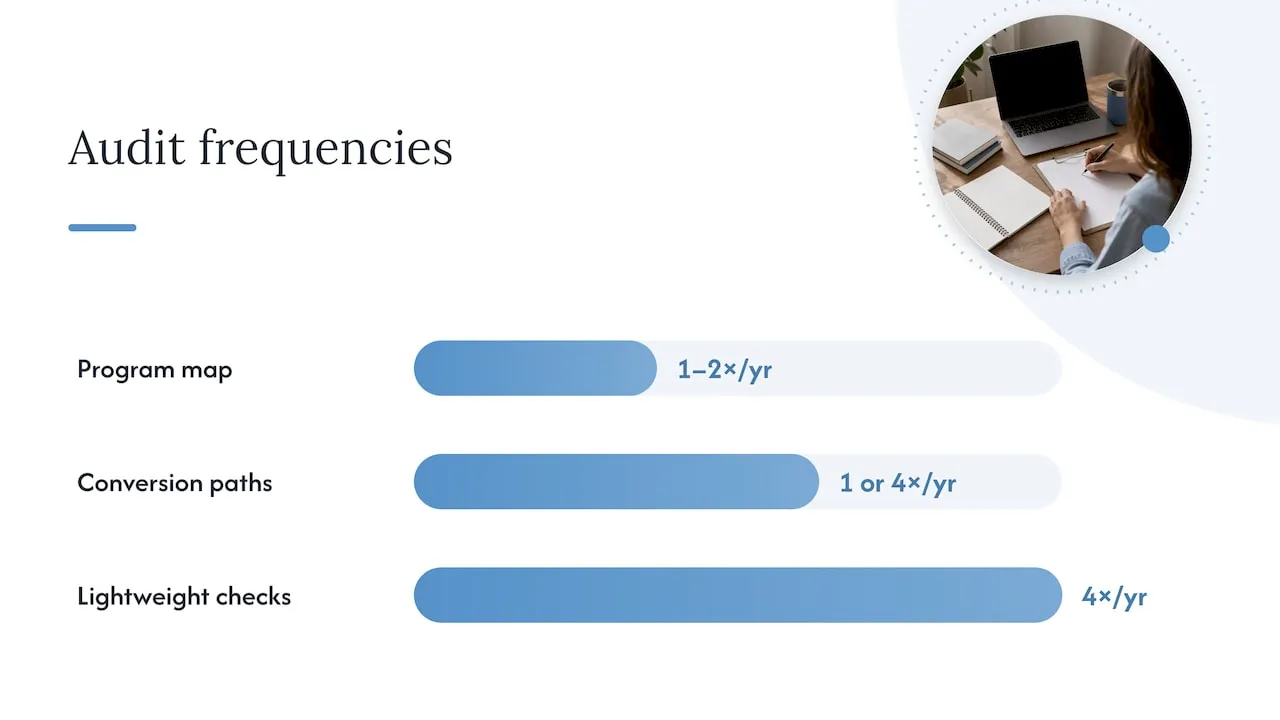
Regular audits help keep programs honest, with more frequent checks recommended for fast-changing environments.
Certain events call for an audit regardless of schedule:
- A platform migration or major integration change.
- Significant staff turnover on the marketing operations team.
- An unexplained drop in conversion or deliverability performance.
- A regulatory change or the activation of new AI-driven features.
MarTech’s audit guidance recommends revisiting the program map once or twice a year and testing conversion paths annually or quarterly, with an immediate review after any of the triggers above. A lightweight quarterly check should cover tracking fidelity, suppression list accuracy, and the top three revenue-driving workflows.
Templates that make the audit repeatable
Three artifacts turn a one-time audit into a repeatable practice.
- A system map documenting every form, workflow, integration, owner, trigger, and exit condition, updated whenever a major change occurs so orphaned automations stay visible.
- A maturity scorecard that bands programs into stages, such as foundational, developing, and optimized, for quick triage; treat the score as directional and pair it with the technical tests above rather than as proof on its own.
- A test plan listing each test case, expected result, actual result, owner, and retest date, so the next audit starts from documented history instead of memory.
We build system maps and test plans as a standard part of CRM and lifecycle marketing engagements, a practice carried over from building similar systems for large consumer brands. The same documentation habit applies whether the audit covers a single email platform or a full enterprise CRM stack.
What makes an audit worth the time
Most audits fail for one reason: they produce a long list of minor fixes and no clear sense of what actually matters. A scoring model that is two points off on lead quality is not the same problem as a suppression list silently ignoring opt-outs, and treating them the same wastes the findings.
The fix is to grade every issue by revenue or compliance impact before anything else, assign a named owner to each one, and document the fix so the same problem does not resurface after the next staff change. An audit that produces evidence and a ranked list beats one that produces a long spreadsheet nobody acts on.
- Jeremy
Getting help from Forefront Industries with your audit
Audits surface problems. Fixing them is a separate project, and that is where most internal teams run out of time or technical depth. Forefront Industries builds and repairs the systems an audit typically flags: Email & CRM Development for broken workflows and scoring logic, AI Automation & Consulting for governance and decision-logic gaps, and Website Maintenance for the tracking and performance issues that undercut attribution.

An engagement usually starts with a discovery call to review your current stack, followed by scoping and a prioritized roadmap similar to the one an internal audit would produce, built from direct experience engineering CRM and lifecycle systems for large consumer brands. Ongoing remediation and monitoring runs through Managed Hosting, Webmaster, or Performance Plus, with current prices available on the pricing page. Review the full service lineup to see where a fit makes sense.
FAQ
What does marketing automation do?
Marketing automation software runs repetitive marketing tasks, such as sending emails, scoring leads, and triggering workflows, based on rules and audience behavior. It connects to a CRM to track each contact’s journey and hand qualified leads to sales at the right moment.
Can ChatGPT do a social media audit?
A tool like ChatGPT can help organize findings, draft audit checklists, or summarize patterns in exported data, but it cannot pull live platform metrics or verify tracking accuracy on its own. A thorough audit still needs direct access to the platform’s analytics and a human reviewing the actual workflows and data.
Can you give me an example of marketing automation?
A common example is a welcome email series triggered automatically when someone fills out a signup form, with each message sent on a set schedule based on whether the contact opens or clicks the previous one. Lead scoring and automatic routing to a sales rep based on that score is another standard example.
How much does a social media audit cost?
Pricing for a social media audit varies widely based on scope and whether it is done internally or through an outside consultant, and no single published figure applies across providers. Businesses considering one should request a scoped quote based on the number of accounts, channels, and depth of review needed.