Avoid Runtime Lookups: AMPscript Examples for Developers

AMPscript is the server-side scripting language built into Salesforce Marketing Cloud. This article provides copy-paste examples for personalization, data retrieval with Lookup and LookupRows, conditional logic, loops, and error handling. Each snippet is written for Content Builder code snippet blocks and tested with send performance in mind.
TL;DR:
- Using pre-merged data extensions for lookup results reduces processing time and avoids multiple database calls during send campaigns.
- Prefer LookupRows over multiple Lookup calls when retrieving several fields from the same row to improve send speed and accuracy.
- Place AMPscript code within Code Snippet blocks for cleaner rendering and easier debugging, especially before a live send.
- Always test with representative data, including edge cases like zero-row lookups, to ensure conditional logic and links function correctly.
- Keep AMPscript logic simple and shallow, avoiding nested conditionals, and comment frequently to facilitate troubleshooting at scale.
Table of Contents
- AMPscript syntax forms and variable basics
- Basic personalization examples: greetings, case, and dates
- Data retrieval with Lookup() and LookupRows()
- Conditional logic and loops: IF, ELSE, and FOR
- Utilities and error handling: RaiseError, TreatAsContent, RedirectTo
- Performance and testing best practices for send-time AMPscript
- Where to place AMPscript in Content Builder
- Practitioner notes on building reliable AMPscript
- Getting help with AMPscript-heavy campaigns
- Sources
- FAQ
AMPscript syntax forms and variable basics
AMPscript runs in three syntax forms: inline, block, and script tags. Inline expressions handle a single output. Block syntax groups multiple statements, including variable declarations and assignments, according to Trailhead’s AMPscript documentation.
Inline example:
%%=Lowercase(FirstName)=%%
Block example:
%%[ VAR @name SET @name = AttributeValue("FirstName") ]%%
A few rules keep syntax predictable:
- Variables always start with an @ character and are declared with VAR before use.
- Assignment uses SET, and expressions are wrapped in parentheses.
- Attribute names with spaces or special characters should sit inside bracket notation to avoid parsing errors.
- Use Code Snippet blocks in Content Builder for raw AMPscript; use HTML blocks only when AMPscript is mixed directly into markup.
Place block logic above the HTML it supports, so variables are already set by the time inline expressions reference them.
Basic personalization examples: greetings, case, and dates
Personalization snippets are the most common AMPscript use case, and most follow a defensive pattern that checks for missing data before falling back to a default. Personalized email content tends to perform better than generic copy, which is why a safe greeting matters more than it looks.
- Defensive greeting:
%%[ VAR @fname SET @fname = AttributeValue("FirstName") IF Empty(@fname) THEN SET @fname = "there" ENDIF ]%%Hi %%=v(@fname)=%%, - Case formatting: use
ProperCase()for names pulled from inconsistent data sources,Lowercase()for email addresses, andUppercase()for promo codes that need visual emphasis. - Date formatting:
%%=FormatDate(Now(), "MMMM D, YYYY")=%%renders the current send date in a readable format for US audiences. - Currency-style formatting: combine
Format()with a numeric attribute, such as%%=Format(OrderTotal, "C")=%%, to render a dollar amount consistently across an email.
Each of these examples returns plain text, so they drop directly into subject lines, preheaders, or body copy without extra markup.
Data retrieval with Lookup() and LookupRows()
Single values and multi-row results use different functions, and picking the right one affects both accuracy and send speed. Lookup() returns a single column value and works best against a unique identifier like a subscriber key or order ID.
- Single value:
%%=Lookup("Orders", "Status", "OrderID", @orderID)=%%returns the status for one specific order. - Multiple rows:
%%[ SET @rows = LookupRows("Orders", "SubscriberKey", @subKey) SET @rowCount = RowCount(@rows) ]%%retrieves every matching order for a subscriber. - Rendering rows: loop through
@rowswith FOR, pulling fields withField(Row(@rows, @i), "ProductName")inside the loop body. - Always check
@rowCountbefore looping. A zero-row result should trigger fallback content instead of an empty table.
LookupRows() returns an unordered rowset of up to 2,000 rows, so field names must match the data extension exactly, including case. Where the same fields are needed across every send, pre-merging them into a sendable data extension avoids repeated lookups entirely.
Conditional logic and loops: IF, ELSE, and FOR
IF/ELSEIF/ELSE blocks control which content a subscriber sees, and FOR loops repeat that content across a rowset. Both follow the block syntax covered earlier.
- Minimal IF/ELSE:
%%[ IF @loyaltyTier == "Gold" THEN ]%%You get early access.%%[ ELSE ]%%Check back next week.%%[ ENDIF ]%% - FOR loop over a rowset:
%%[ FOR @i = 1 TO @rowCount DO SET @row = Row(@rows, @i) SET @product = Field(@row, "ProductName") ]%%%%=v(@product)=%% %%[ NEXT @i ]%%renders one line per item, such as a product or order list. - Keep nested conditionals shallow. Two levels of IF inside a FOR loop is usually the practical limit before the code becomes hard to trace.
- Comment liberally and name variables for what they hold, not for their data type. Readable AMPscript is easier to audit months later.
Utilities and error handling: RaiseError, TreatAsContent, RedirectTo
Defensive code matters as much as personalization logic once a campaign scales past a handful of sends.
- RaiseError stops processing for a recipient or for an entire send, depending on the flag passed, and is the standard way to log and control failures during a send:
%%[ IF Empty(@email) THEN RaiseError("Missing email address", false) ENDIF ]%% - TreatAsContent() renders a stored string as live content, which is useful for dynamic blocks, but it should only run against sanitized, trusted fields since it will execute any HTML or AMPscript the string contains.
- RedirectTo builds trackable links safely:
%%=RedirectTo(CloudPagesURL(123, "orderID", @orderID))=%%keeps click tracking intact while passing parameters.
Performance and testing best practices for send-time AMPscript
Every Lookup call during a send adds processing time across the full subscriber list, so the fewer database calls per recipient, the faster the send completes. Pre-merging data into a sendable data extension before the send converts many runtime lookups into simple attribute reads.
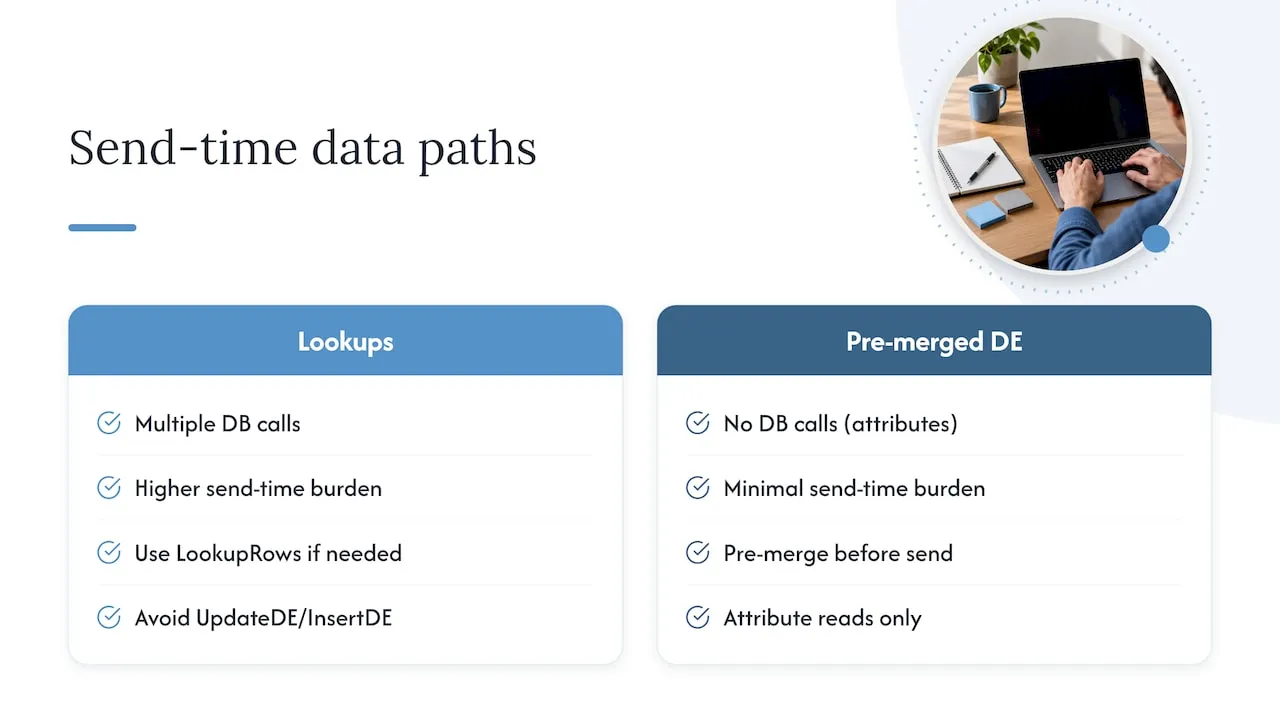
Favor LookupRows over several single Lookup calls when more than one field is needed from the same row, and avoid UpdateDE or InsertDE calls inside the send path unless the use case truly requires them.
Pro Tip: Test with a data extension that includes at least one record for every RowCount branch, including a zero-row case, before scheduling a live send.
Where to place AMPscript in Content Builder
Code Snippet blocks preserve raw AMPscript without wrapping it in extra HTML, which avoids the rendering issues that come from AMPscript sitting inside an HTML block’s table structure.
A short pre-send checklist keeps surprises out of production sends:
- Load representative test data, including edge cases like empty fields and zero-row lookups.
- Preview with multiple subscriber records, not just one, to confirm conditional branches render correctly.
- Verify every RedirectTo link resolves and tracks as expected.
- Inspect rendered output on a CloudPage when using script tags, since Content Builder previews do not always match CloudPage execution.
- Remember that date functions like Now() use Marketing Cloud system time, which may not match the recipient’s local time zone.
Practitioner notes on building reliable AMPscript
The strongest AMPscript habit is pre-merging lookup data before the send rather than resolving it per recipient at send time. This single change removes most of the performance risk in a large campaign. Consistent naming, inline comments, and strict use of Code Snippet blocks catch more bugs than any amount of after-the-fact debugging. Experience building CRM and lifecycle email systems for enterprise clients reflects this same discipline: fewer runtime dependencies, cleaner code, and data architecture that holds up at scale.
- Jeremy
Getting help with AMPscript-heavy campaigns
We build and audit CRM and email systems, including Salesforce Marketing Cloud implementations where AMPscript carries the personalization logic.

- Email & CRM Development covers build-outs, code audits, and send-performance fixes for existing AMPscript templates.
- Engagements typically address code hygiene, pre-merged data architecture, and the lookup patterns that slow sends down.
- AI Automation & Consulting extends the same systems thinking into broader workflow automation beyond the inbox.
Readers who want a second set of eyes on an AMPscript-heavy template or a full CRM build can start with the Email & CRM Development services page.
Sources
- Write AMPscript - Trailhead (Salesforce)
- Lookup() - AMPscript Data Extension reference (Salesforce Developer)
FAQ
How do you use AMPscript in Marketing Cloud?
AMPscript is written inside Content Builder, typically in a Code Snippet block, using inline (%%=Function()=%%), block (%%[ ... ]%%), or script tag syntax, as described in Salesforce’s AMPscript documentation. It pulls subscriber attributes and data extension fields to personalize content before the email or page renders. Most implementations start with a simple inline expression and expand into block syntax as logic grows more complex.
What is AMPscript?
AMPscript is a proprietary, server-side scripting language built into Salesforce Marketing Cloud for dynamic personalization, data retrieval, and send-time logic, according to the AMPscript function reference. It runs when content is rendered, not in the recipient’s browser, which lets it query data extensions and apply conditional rules per subscriber.
How do you write an if-else statement in AMPscript?
An if-else statement uses block syntax: %%[ IF condition THEN ]%%content if true%%[ ELSE ]%%content if false%%[ ENDIF ]%%. Additional conditions can be chained with ELSEIF before the final ELSE. This structure is what controls which version of a message a subscriber sees based on an attribute or lookup value.
What does the LookupRows() function do in AMPscript?
LookupRows() returns an unordered rowset of up to 2,000 matching rows from a data extension, according to the LookupRows() reference. It is typically paired with RowCount, Row, and Field inside a FOR loop to render multiple items, such as order histories or product lists, in a single email.
Where should AMPscript be placed in Content Builder?
AMPscript should go in a Code Snippet block rather than an HTML block whenever possible, since Code Snippet blocks preserve the raw code without adding extra HTML wrappers that can interfere with rendering. Script tags and more complex logic are easier to debug when tested on a CloudPage preview before the final send.