Revenue Teams: Sales Process Automation Roadmap for AI Enabled Pilots

Sales process automation uses software and workflow logic to remove repetitive admin work so reps spend more time selling and deals close faster. The core action item: pick one high-impact process, usually speed-to-lead response, and map its triggers, filters, and actions before you touch any tool. That single exercise clarifies more than a week of vendor demos.
TL;DR:
- Prioritizing speed-to-lead routing can significantly increase conversion rates by reducing response times to within minutes after qualification.
- Automated workflows that handle stage updates, reminders, and data enrichment improve pipeline accuracy and allow scaling without proportional hiring.
- Building narrow, high-impact automations first - such as lead routing or scheduling - makes testing easier and provides faster ROI than broad, complex platforms.
- Ensuring triggers, filters, and actions are carefully planned prevents workflow failures, especially in handling exceptions or incomplete data that require human review.
- Regularly measuring key metrics like speed-to-contact, sales cycle length, and automation exception rates helps identify workflow gaps and validates automation effectiveness.
Table of Contents
- What Is Sales Process Automation and How Does It Work?
- What ROI Can You Expect From Automating Your Sales Process?
- Which Sales Automations Should You Build First?
- How Do Triggers, Filters, and Actions Work Together?
- How Should Automation Connect to Your CRM and Tech Stack?
- What Does a Sales Automation Implementation Roadmap Look Like?
- Which Metrics Prove Your Automation Is Working?
- What Are the Biggest Automation Pitfalls to Avoid?
- How Does Forefront Industries Approach Sales Automation Builds?
- Where Does Automation End and Human Selling Begin?
- Ready to Build Your Own Automated Sales Workflow?
- Sources
- FAQ
What Is Sales Process Automation and How Does It Work?
Sales process automation is the use of software rules and AI logic to execute repeatable sales tasks without manual input, freeing reps to focus on conversations that require judgment. It differs from marketing automation in scope: marketing automation nurtures unknown or early-stage contacts toward interest, while sales process automation takes over once a prospect enters a rep’s active pipeline, handling routing, follow-up, scheduling, and data entry.
The logic acts at specific points in the funnel:
- Capture: a form fill, chat message, or inbound call creates a record automatically instead of waiting for manual entry.
- Qualify: scoring rules or AI models rank the lead based on fit and behavior signals.
- Engage: sequences trigger emails, texts, or call tasks within minutes of qualification.
- Handoff: the system routes the opportunity to the right rep with context already attached.
Modern platforms extend well past simple if-then rules. AI-enabled agents can now transcribe sales calls, extract action items, enrich contact records with firmographic data, and recommend the next best step for a rep to take, according to Highspot’s analysis of AI-driven sales workflows. That shift matters because it moves automation from executing fixed scripts to reasoning through variable situations, which is closer to how a good sales operations manager actually thinks.
What ROI Can You Expect From Automating Your Sales Process?
The most direct benefit is time. Sellers spend roughly 28% of their week actually selling, according to Salesforce research cited by IBM, with the rest consumed by data entry, scheduling, and internal coordination. Automating even a portion of that administrative load gives reps meaningfully more selling hours without adding headcount.
Statistic Callout: Sellers spend only about 28% of their time on core selling activity. The remaining 72% goes to logging calls, updating records, and chasing internal approvals, according to IBM.
Beyond time recovery, automation changes outcomes in three measurable ways:
- Faster response wins more deals. Leads have a narrow window of responsiveness, and automated routing shortens the gap between inquiry and contact, a pattern documented in Harvard Business Review’s research on online sales leads.
- Pipeline hygiene improves. Automated stage updates and reminders reduce the stale, half-updated deals that make forecasting unreliable.
- Scale without proportional hiring. A workflow that routes and qualifies leads automatically absorbs volume increases that would otherwise require adding sales development reps.
IBM also points to a concrete case: Avid Solutions cut customer onboarding time by 25% after implementing an orchestration tool to automate handoffs and setup tasks, an example worth studying if onboarding friction is costing you deals after the contract signs.
Which Sales Automations Should You Build First?
Not every automation deserves equal priority. Some changes move revenue within weeks; others just save a rep a few clicks. Building in the wrong order wastes budget and, worse, burns internal trust in the whole initiative before it proves itself.
- Speed-to-lead routing. Route and notify the assigned rep the instant a lead qualifies, since response speed has an outsized effect on conversion, per HBR’s lead response research.
- Automated meeting scheduling. Replace back-and-forth emails with a scheduling link triggered right after qualification, cutting days off the path to a first call.
- Follow-up sequences. Build multi-touch cadences that fire automatically when a prospect goes quiet, instead of relying on a rep’s memory.
- Enrichment and AI lead scoring. Pull firmographic and behavioral data automatically so reps prioritize the accounts most likely to close.
- Call transcription and task extraction. Use AI to capture commitments made on a call and auto-create the follow-up tasks, removing a step reps routinely skip.
- Templated follow-ups and auto-tagging. Lower-effort wins that still cut minutes of admin per deal, useful once the higher-impact automations are live.
Pro Tip: Build the highest-impact automation first, but keep it narrow. A speed-to-lead workflow for one lead source is easier to debug and prove than a company-wide rollout, and a working pilot builds the internal case for the next one.
Each of these maps to a specific outcome: faster first contact, higher stage-to-stage conversion, or fewer hours lost to manual data entry. Treat that mapping as your justification, not the automation itself.
How Do Triggers, Filters, and Actions Work Together?
Every reliable automated sales workflow reduces to three components: triggers, filters or conditions, and actions, a framework laid out clearly by Kixie’s workflow planning guide. Skipping the filter step is the most common reason automations misfire.
- Triggers are the event that starts the workflow: a form submission, a deal stage change, a pricing page visit, or an inbound call.
- Filters and conditions decide whether the trigger actually warrants action. A form submission from a competitor’s domain, for instance, should not enter the same sequence as one from a qualified buyer.
- Actions are what the system does once conditions are met: assign an owner, send an email, create a task, or update a field.
Branching logic is where most workflows break. A deal that skips a stage, a lead with a missing email address, or a duplicate record can send an automation into a loop or a dead end if you have not planned for it. Document the fallback for every trigger: what happens when a required field is empty, and at what point a human needs to review the record before the workflow proceeds. Reserve human approval gates for anything with financial or contractual weight, like a discount request or a custom contract term, rather than letting an action fire unsupervised.
Common actions worth building into most workflows include record updates, task creation, notification pings to Slack or email, and sequence enrollment. Each one needs an error path. If an enrichment API fails to return data, the workflow should flag the record for manual review instead of silently leaving it incomplete.
How Should Automation Connect to Your CRM and Tech Stack?
Your CRM has to stay the system of record, full stop. Every automation that touches a contact, deal, or task should write back to the CRM immediately, not to a spreadsheet or a side tool that someone has to reconcile later. Pipedrive’s pipeline management guidance makes the case plainly: clean pipeline stages and consistent field usage are prerequisites for any automation to work, not an afterthought you fix later.
Three integration patterns cover most situations:
- Direct/native integrations work well for a small number of well-supported tools with a documented API, such as a calendar app or an email platform.
- iPaaS (integration platform as a service) centralizes logic when you are connecting five or more tools, avoiding a tangle of point-to-point connectors that break independently. Swan’s approach to sales workflow automation shows how a connected orchestration layer reduces the brittle failures that plague ad hoc integrations.
- Custom middleware makes sense when your data model or approval logic is specific enough that off-the-shelf connectors cannot express it, which is common for enterprise sales teams with multiple product lines.
Data hygiene rules matter more than any tool choice. Set canonical field names before you build a single automation. Run deduplication on a schedule, not just at import. Set an enrichment cadence, weekly or monthly, rather than letting contact data go stale between manual updates. Teams that build custom CRM and email system architecture around clean field mapping avoid most of the breakage that plagues bolted-together stacks.
What Does a Sales Automation Implementation Roadmap Look Like?
A working rollout follows four phases, and skipping any of them is how automation projects stall after an enthusiastic launch.
- Discovery. Map your current process end to end, including every manual handoff. Pick one pilot process with a clear, single KPI, such as reducing time to first contact. Avoid picking your most complex process first.
- Build and test. Build the automation with the smallest scope that still proves the concept: one lead source, one territory, or one product line. Define a rollback plan before launch, so a broken workflow can be switched off without disrupting live deals.
- Measure. Set a fixed time window, typically two to four weeks, and track the KPI you defined in discovery against a baseline period. Resist the urge to declare victory before the window closes.
- Scale and govern. Once the pilot proves out, expand it to additional segments and add it to an automation registry with a named owner and a change log. Every future edit should go through that owner, not whoever touched the workflow builder last.
Pro Tip: Treat your first automation like a product launch, not an IT ticket. A minimal viable workflow that you can measure beats a fully-featured one that takes three months to ship, a principle Kixie’s planning framework reinforces throughout its workflow guidance.
IBM’s Avid Solutions case is worth revisiting here: the 25% onboarding time reduction came from a single orchestration workflow, not a company-wide automation overhaul. Some pilots can go live within minutes on connected platforms, according to Swan’s product documentation, though the build speed matters less than whether you have defined what success looks like before you flip the switch. A structured automation checklist can help revenue operations teams avoid skipping the governance step once early wins create pressure to move fast.
Which Metrics Prove Your Automation Is Working?
Four numbers tell you almost everything you need to know:
- Speed-to-contact: the time between lead capture and first outreach attempt.
- Conversion rate by stage: whether automation actually moves more deals forward, not just faster admin.
- Sales cycle length: whether automation shortens the path from first contact to closed deal.
- Automation exception rate: how often a workflow fails to match conditions and requires manual handling, a signal of workflow design gaps.
Statistic Callout: Recovering even a fraction of the time lost to manual tasks compounds quickly. If automation gives each rep back five hours a week and their fully loaded hourly value is $50, that is $250 per rep per week in reclaimed selling capacity, before counting any conversion lift.
Set a baseline before you launch anything, then run a simple cohort comparison: leads or deals that went through the automated path versus a control group that did not, over the same time window. AI-driven pipeline tools can also flag stalled deals automatically, according to monday.com’s pipeline management research. This gives you a second data point beyond conversion alone.
What Are the Biggest Automation Pitfalls to Avoid?
Automation fails when it tries to replace judgment instead of removing repetition. Do not automate discount approvals, contract term negotiations, or any moment where a prospect needs to feel heard rather than processed.
- Never let a workflow execute a discount or contract change without a human approval gate.
- Keep a governance checklist: a named owner for every automation, a change log, a test sandbox separate from production, and a documented rollback plan.
- Review automation exception rates monthly. A rising rate usually means your filters need tightening, not that the tool is broken.
- Avoid automating anything that touches an at-risk or high-value account without a human check first.
How Does Forefront Industries Approach Sales Automation Builds?
The company provides custom CRM and email systems on platforms like Salesforce Marketing Cloud and Braze, paired with AI workflow automation designed around each client’s actual sales process rather than a generic template. The background includes enterprise-level CRM and lifecycle marketing experience that shapes how pilots get scoped for smaller service businesses.
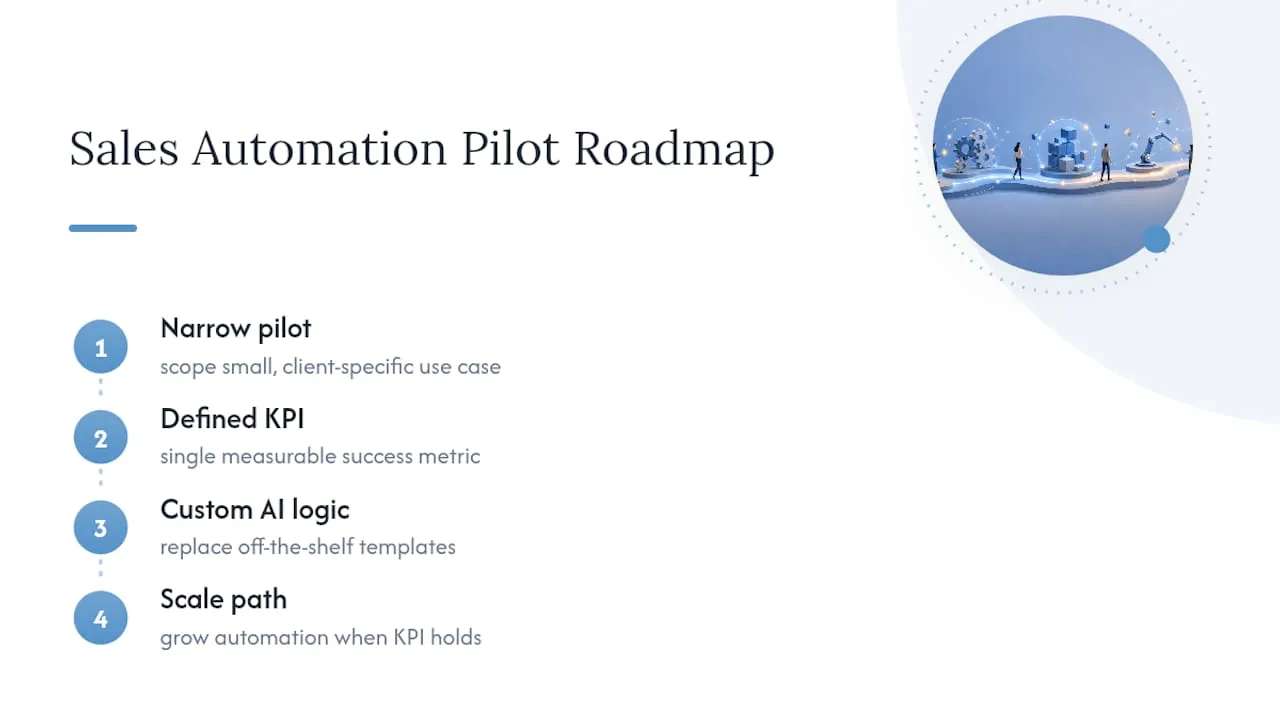
The approach mirrors the roadmap above: a narrow pilot, a defined KPI, and a built-in path to scale once the numbers hold up. Custom-coded AI automation work replaces the guesswork of off-the-shelf workflow templates with logic built for the specific way a given sales team actually sells.
Where Does Automation End and Human Selling Begin?
Automation multiplies what a good rep already does. It does not replace the judgment a complex deal requires, and treating it as a replacement is where most rollouts lose trust internally.
Keep reps in control of message content and timing on any account that matters strategically. Automate the routing and reminders, not the relationship. Escalate to a human the moment a deal involves a nonstandard request, a stalled negotiation, or a prospect who has gone unusually quiet. Judgment calls belong to people. Repetition belongs to the workflow.
- Jeremy
Ready to Build Your Own Automated Sales Workflow?
The company builds custom CRM and email architecture to help make automation reliable instead of brittle. Where off-the-shelf platforms force your process into their template, custom solutions write the field mapping, trigger logic, and integration layer around how your sales team actually works.

A typical engagement starts with a discovery call to map your current process, identify the single highest-impact automation, and scope a pilot with a defined KPI and timeline, the same discovery-to-pilot structure outlined earlier in this guide. From there, the build covers everything from CRM field architecture to AI-enabled lead scoring and routing, backed by the full services catalog covering custom web development, CRM engineering, and AI automation. If your sales process still runs on manual handoffs and spreadsheet follow-up, start a discovery conversation and get a scoped pilot plan back before committing to anything larger.
Sources
- What is sales automation? - IBM
- The short life of online sales leads - Harvard Business Review
- How to plan an automated sales workflow - Kixie
- Sales workflow automation: How AI streamlines selling - Highspot
- Sales pipeline management: A complete guide - Pipedrive
- AI sales workflow automation that keeps your pipeline moving - Swan
FAQ
What Is Sales Process Automation?
It is the use of software and workflow logic to handle repetitive sales tasks, like lead routing, follow-up, and data entry, without manual rep input, freeing time for actual selling.
What Is the Sales Order Automation Process?
It typically covers the steps from a confirmed deal through order entry, contract generation, and handoff to fulfillment or onboarding, automated to remove manual paperwork and reduce errors.
What Is an SFA Tool?
An SFA (sales force automation) tool is software that automates day-to-day sales tasks like contact management, activity logging, and pipeline tracking, usually built into or connected to a CRM.
What Is an Example of Process Automation in Sales?
Speed-to-lead routing is a clear example: the moment a lead fills out a form, the system scores it, assigns an owner, and triggers an outreach task within minutes instead of hours.
How Do You Know if a Sales Automation Pilot Is Working?
Track speed-to-contact, conversion rate by stage, and sales cycle length against a baseline period before automation, and watch the automation exception rate to catch workflow design gaps early.