DNS and SSL Basics: Avoid the CNAME Trap, Then Enable HTTPS

DNS finds the server; TLS (often called SSL) encrypts and verifies the connection. DNS translates a domain name into the IP address a browser needs to locate a website’s server. TLS then builds an encrypted, authenticated connection between the browser and that server, confirming the site is who it claims to be. Together, these two systems get a visitor from typing a domain name to a private, verified session.
TL;DR:
- Certificate files may still carry the SSL label, but configure servers for TLS 1.2 or 1.3, with TLS 1.3 recommended.
- Use A or AAAA records for the bare domain because a CNAME there conflicts with required zone records; use a CNAME for www.
- DNS based certificate validation requires a TXT record, while CAA records restrict eligible authorities; propagation delays can interrupt issuance or renewal.
- After changes, verify DNS externally, confirm the certificate matches the domain and remains valid, then check for mixed content or redirect loops.
- Handle simple shared hosting yourself, but choose managed support for custom servers, complex DNS, email routing, uptime demands, or compliance needs.
Table of Contents
- How DNS Works: The Resolution Process Step by Step
- Common DNS Record Types Beginners Should Know
- What SSL/TLS Is and How It Secures Website Connections
- SSL vs TLS: The Short Clarification Beginners Need
- How DNS and SSL/TLS Interact During Issuance and Operation
- Beginner Checklist: Point Your Domain and Enable HTTPS
- Overview of Common DNS and SSL Misconfigurations and How to Troubleshoot Them
- DNSSEC and Its Role Alongside SSL/TLS
- Certificate Authorities and the Trust Chain
- Tools and Resources to Test and Verify DNS and SSL Configurations
- When to DIY Versus Hire Professional Managed Hosting or Maintenance
- Managed Hosting and Maintenance That Handles DNS and Certificates for You
- FAQ
- Sources
How DNS Works: The Resolution Process Step by Step
When a browser requests a domain, it does not know the server’s address. It asks a recursive resolver, usually run by an internet service provider or a service like Google or Cloudflare, to find it. The resolver queries a chain of servers: root servers point to the correct top-level domain (TLD) server, the TLD server points to the domain’s authoritative name server, and that authoritative server returns the actual IP address. This lookup process converts a hostname into the IP address a browser needs to load a site, as Cloudflare explains.
The resolver caches that answer for a period set by the record’s TTL (time to live), so repeat visits skip the full lookup until the cache expires.
- The browser asks a recursive resolver for the domain’s address.
- The resolver checks root, then TLD, then authoritative servers.
- The authoritative server returns the A or AAAA record with the IP address.
- The resolver caches the result for the TTL duration.
DNS queries typically run over UDP or TCP on port 53, the long-standing standard for DNS traffic, though newer transports like DNS over TLS (port 853) and DNS over HTTPS encrypt the lookup itself.
Common DNS Record Types Beginners Should Know
A DNS zone holds several record types, and each one tells resolvers something different. Cloudflare’s overview of DNS records describes these as instructions that live on authoritative servers, each serving a distinct purpose with its own TTL controlling how long resolvers cache it.
- A records map a domain name to an IPv4 address.
- AAAA records map a domain name to an IPv6 address.
- CNAME records alias one name to another, often used for subdomains like
www. - NS records delegate a domain to its authoritative name servers.
- MX records route email to the correct mail servers.
- TXT records hold verification strings, SPF, and DKIM data.
- CAA records restrict which certificate authorities may issue certificates for the domain.
A CNAME generally should not sit at the zone apex (the bare domain, like example.com) because it conflicts with required records such as NS and SOA; a plain A or AAAA record covers that spot instead.
Pro Tip: Lower a record’s TTL before making a change, wait for it to propagate, then raise it again once the new setting is confirmed.
What SSL/TLS Is and How It Secures Website Connections
A TLS certificate is a small file containing a public key and identity information for a domain, issued by a certificate authority and installed on the hosting server. When a browser connects to a site over HTTPS, the server and browser perform a handshake: the server presents its certificate, the browser verifies it, both sides agree on a shared session key, and all further traffic travels encrypted under that key.
Transport Layer Security is the modern cryptographic protocol behind this process, providing three guarantees:
- Confidentiality, through encryption that keeps data unreadable to anyone intercepting it.
- Integrity, through checks that detect if data was altered in transit.
- Authenticity, through the certificate proving the server is who it claims to be.
TLS 1.2 and TLS 1.3 are the versions in active use today. TLS 1.3 is the current recommended version, offering a faster handshake and stronger default cipher suites than earlier revisions. Older SSL versions (SSL 2.0 and 3.0) are deprecated and considered insecure, which is why “SSL” now functions mostly as a familiar name for what is technically a TLS connection.
SSL vs TLS: The Short Clarification Beginners Need
SSL is the legacy protocol; TLS is the one actually running behind nearly every HTTPS connection today. AWS describes SSL as the historical protocol that TLS replaced, noting that people still say “SSL” out of habit even though certificate files and browser connections now rely on TLS.
- Prefer servers configured for TLS 1.2 or TLS 1.3.
- Expect certificate files to still be labeled “SSL certificates” by habit, even though they enable TLS.
- Ask a host to confirm TLS 1.3 support, or accept host-managed defaults if unsure.
How DNS and SSL/TLS Interact During Issuance and Operation
Certificate authorities need proof a domain belongs to the person requesting a certificate, and DNS often provides that proof. The DNS-01 challenge method, used by automated authorities, asks the requester to publish a specific TXT record; once the authority confirms that record exists, it knows the requester controls the domain and issues the certificate.
CAA records add another layer of control. IBM notes that CAA records let a domain owner restrict which CAs may issue certificates for that domain, and if no CAA record exists, any authority can theoretically issue one.
DNS and certificates intersect at renewal time too. If a DNS record change has not propagated yet, a renewal attempt using DNS-01 can fail until the update settles. Let’s Encrypt issues short-lived, automatically renewed certificates and supports DNS-01 challenges specifically for wildcard certificates, which cannot be validated any other way.
- DNS-01 challenges use a TXT record to prove domain control.
- CAA records limit which authorities can issue a certificate for a domain.
- DNS propagation delays can block both issuance and renewal.
Pro Tip: Add DNS and CAA records for a certificate well before a renewal deadline, since propagation can take minutes to hours depending on TTL settings.
Beginner Checklist: Point Your Domain and Enable HTTPS
- Confirm you have access to both your domain’s DNS control panel and your hosting dashboard.
- Create or update A and AAAA records to point the domain to your server’s IP address.
- Add a
wwwCNAME (or a separate A/AAAA record) so both versions of the domain resolve. - Add any TXT records your certificate authority requires for DNS-01 verification, and a CAA record if you want to restrict issuing authorities.
- Install a TLS certificate, either through host-managed certificates or Let’s Encrypt automation, then load the site over HTTPS.
- Check for mixed-content warnings (HTTP resources loading on an HTTPS page) and update any outdated links.
- Set up automatic renewal or a website maintenance plan so the certificate never lapses.
Pro Tip: Most browsers show a padlock icon with certificate details when clicked; use it to confirm a new certificate actually installed before telling anyone the site is live.
Overview of Common DNS and SSL Misconfigurations and How to Troubleshoot Them
A handful of mistakes account for most beginner DNS and TLS problems. A missing or incorrect A record leaves a domain unreachable; a typo in a CNAME target breaks a subdomain silently. Forgetting to update DNS after switching hosts is common, since the old server keeps answering requests until records change and propagate.
On the certificate side, mixed content is the most frequent issue: a page loads over HTTPS but still references an image, script, or stylesheet over plain HTTP, which browsers flag or block. Expired certificates cause outright connection warnings and usually trace back to a missed renewal rather than a technical failure.
CAA misconfiguration can quietly block issuance: if a CAA record only allows one certificate authority and a renewal request goes through a different one, the request fails until the record is corrected. DNS-01 challenge failures often come down to propagation timing: the TXT record exists but has not yet reached the resolver the certificate authority queries.
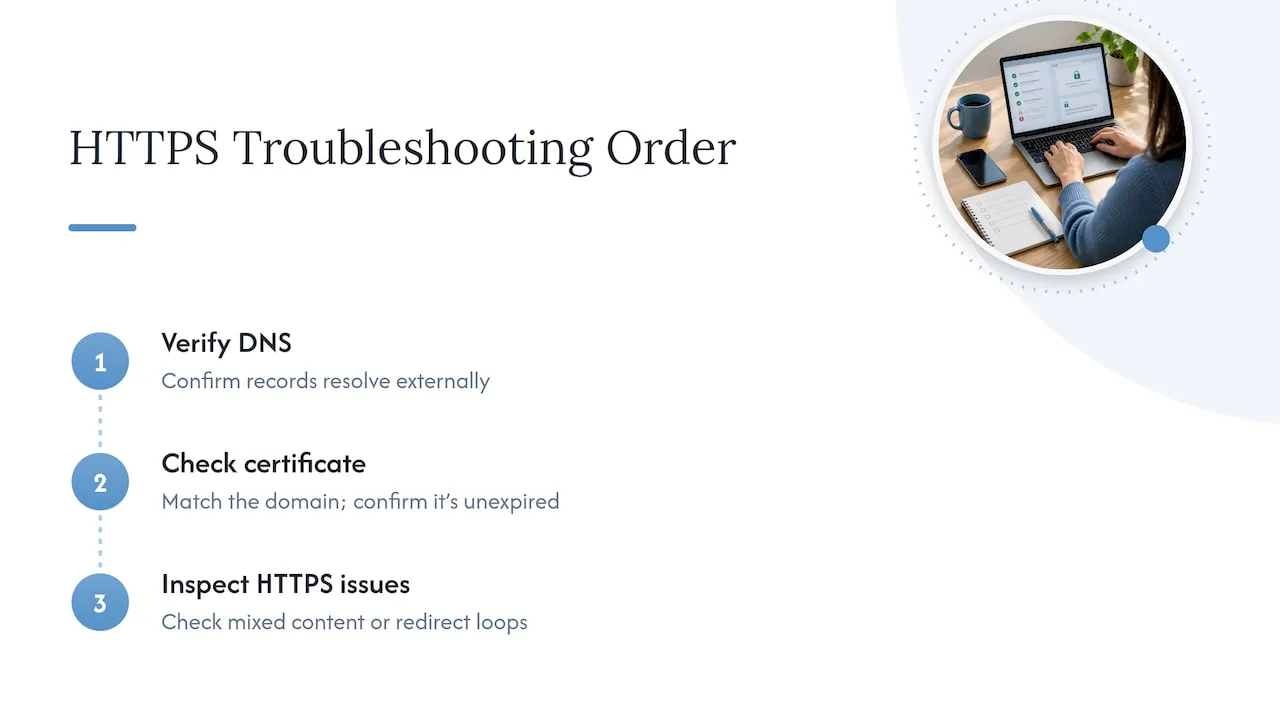
Troubleshooting generally follows the same order: confirm the DNS record resolves correctly from an external lookup, confirm the certificate matches the domain and has not expired, then check for mixed content or redirect loops if the padlock still will not show. Most issues resolve once the DNS record settles and the TTL window passes.
DNSSEC and Its Role Alongside SSL/TLS
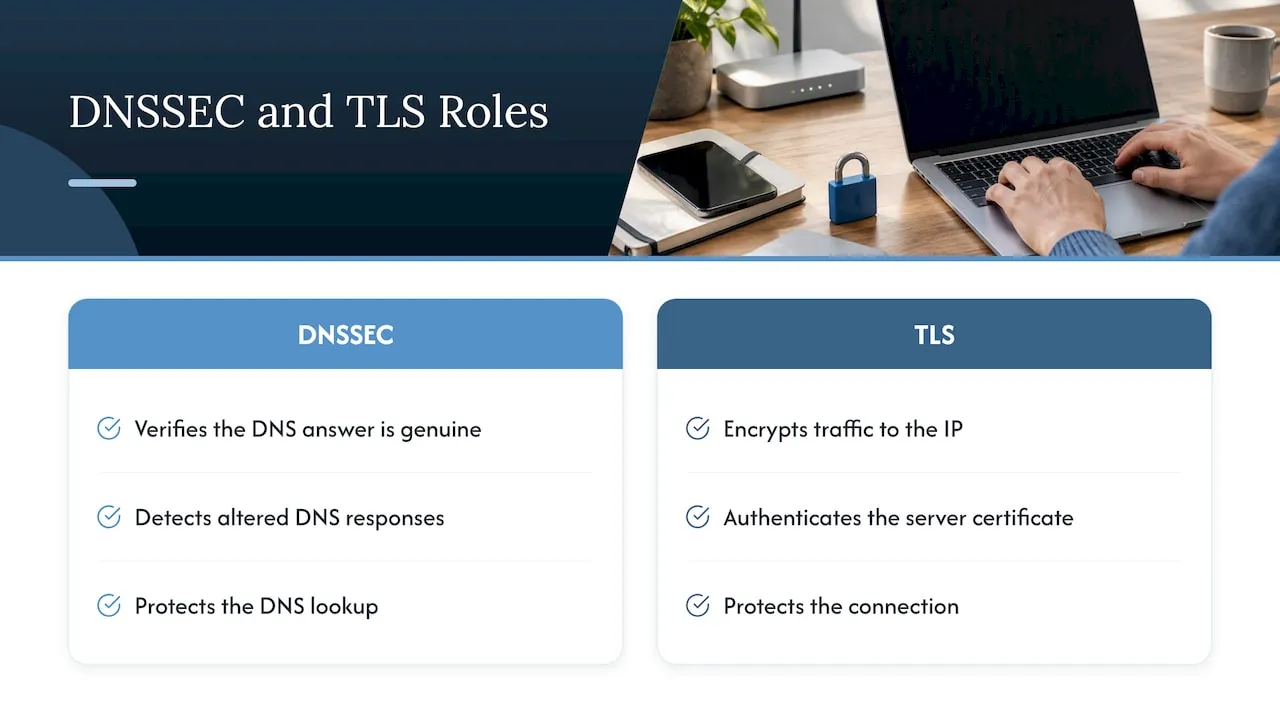
DNS Security Extensions, or DNSSEC, add a layer of cryptographic signing to DNS responses so a resolver can verify that an answer actually came from the correct authoritative source and was not altered in transit. Without DNSSEC, DNS responses have no built-in way to detect tampering, which leaves room for attacks like cache poisoning, where false records get inserted into a resolver’s cache.
DNSSEC and TLS solve different problems. DNSSEC protects the DNS lookup itself, confirming the IP address returned is genuine. TLS then protects the connection to that IP address, encrypting traffic and authenticating the server through its certificate. Neither replaces the other: a domain can run TLS without DNSSEC, and a domain with DNSSEC still needs a certificate to encrypt its HTTPS traffic.
Enabling DNSSEC usually means generating a signing key through a DNS provider or registrar and publishing the resulting records, a process most managed DNS panels now handle with a single toggle. It adds a meaningful layer of trust for domains handling sensitive traffic, though it is not a substitute for installing and maintaining a TLS certificate.
Certificate Authorities and the Trust Chain
A certificate authority (CA) is an organization that verifies domain ownership and issues TLS certificates browsers are configured to trust. That trust does not happen in isolation. Each certificate links back through a chain: the server’s certificate is signed by an intermediate certificate, which is in turn signed by a root certificate that browsers and operating systems ship with built in.
If every link in that chain checks out, the browser trusts the connection and shows the padlock without interruption. If an intermediate certificate is missing or a root is not recognized, the browser shows a warning instead, even if the underlying encryption is working correctly. Certificate authorities operate under requirements set by the CA/Browser Forum, an industry group that sets baseline rules for how certificates get issued and validated.
Validation level varies by certificate type. Domain Validation (DV) certificates confirm only that the requester controls the domain, which is why Let’s Encrypt and most automated CAs issue DV certificates by default. Organization Validation (OV) and Extended Validation (EV) certificates require manual verification of the business behind the domain and suit organizations that need that extra layer of identity confirmation, though they are not automated the way DV certificates are.
Tools and Resources to Test and Verify DNS and SSL Configurations
Confirming a configuration actually works beats assuming it does. A handful of tools cover the basics a beginner needs:
- Command-line lookups like
digornslookupshow exactly what a DNS record returns from a given resolver. - Online DNS propagation checkers show whether a record change has reached resolvers in different regions yet.
- SSL Labs’ server test grades a live TLS configuration and flags outdated protocol versions or weak cipher suites.
- Browser developer tools reveal mixed-content warnings and certificate chain details directly in the console.
Running a quick check after any DNS or certificate change catches most issues before a visitor ever sees them, and takes only a few minutes.
When to DIY Versus Hire Professional Managed Hosting or Maintenance
A straightforward shared-hosting setup with a guided host interface is reasonable to manage yourself once the checklist above makes sense. Custom servers, complex DNS configurations, email routing, uptime requirements, or compliance needs call for managed hosting or maintenance instead, since those situations reward ongoing monitoring and faster troubleshooting. Managed plans typically cover renewals and security configuration without the owner tracking deadlines manually.
- Jeremy
Managed Hosting and Maintenance That Handles DNS and Certificates for You

We build and maintain the digital infrastructure behind service business websites. Our Managed Hosting, Webmaster, and Performance Plus plans are available through our website maintenance service. Our website maintenance service is available to businesses that prefer maintenance rather than self-management.
FAQ
What are the three types of SSL certificates?
The three common validation levels are Domain Validation (DV), Organization Validation (OV), and Extended Validation (EV). DV confirms only domain control and is the type most automated certificate authorities issue, while OV and EV require manual verification of the organization behind the domain, according to the CA/Browser Forum.
What are DNS requirements?
A working DNS setup requires at least one authoritative name server delegation (NS records) and an A or AAAA record pointing the domain to a server’s IP address. Additional records like MX, TXT, or CAA are added depending on whether a domain needs email routing, verification, or certificate authority restrictions, as described in Cloudflare’s DNS records guide.
Is DNS port 853 a TCP or UDP port?
Port 853 is used for DNS over TLS, which runs over TCP since TLS requires a reliable connection to perform its handshake. This differs from standard DNS lookups, which commonly use UDP or TCP on port 53.
Is 1.1.1.1 and 1.0.0.1 DNS safe?
Cloudflare’s public DNS resolver service is offered as an alternative to a default ISP resolver. Safety depends on trusting the operator’s privacy practices, since any public resolver works the same way functionally.
What is the difference between DNS and SSL?
DNS translates a domain name into the IP address needed to locate a server, while SSL, now technically TLS, encrypts and authenticates the connection to that server once found. Wikipedia’s overview of DNS describes this as a union: DNS handles locating the server, and TLS handles securing the session, and without a TLS certificate that connection cannot be encrypted at all.