Website Speed and Conversion: What the Data Shows

Faster pages convert better. The effect is real, but it is smaller and more conditional than most blog statistics suggest. Research ties even tenths of a second to measurable changes in bounce rate and conversions, and the effect is strongest on mobile and at checkout-type steps. This guide covers what the evidence says, how to measure your own site, which fixes come first, and how to prove a speed change moved your numbers.
TL;DR
- Speed affects conversion, bounce rate and search visibility. No single load-time cutoff applies to every site, so treat speed as a continuous target.
- A Deloitte study of 37 brands tied a 0.1-second mobile improvement to higher conversions and lower bounce rates.
- Measure with both lab tools and real-user (field) data, and tie the numbers to leads, not just scores.
- Start with images, JavaScript, third-party scripts and render-blocking assets.
- Confirm results with an A/B test. Do not credit speed for a conversion change without one.
Table of Contents
- 1. What the research says about speed and conversion
- 2. How fast is fast enough
- 3. Speed, SEO and bounce rate
- 4. Lead-generation sites versus online stores
- 5. How to calculate website conversion rate
- 6. How to check the speed of a website
- 7. What slows a site down, and what to fix first
- 8. Our perspective
- 9. How to prove a speed fix raised conversions
- 10. Keeping a fast site fast
- Work with Forefront Industries
- FAQ
- Sources
1. What the research says about speed and conversion
Several independent sources point the same way. Treat each figure as evidence about its own sample, not a law.
- Academic: A 2022 study in Operations Research found sizable adverse effects of website slowdowns on online sales, and found customers more sensitive to slowdowns at checkout.
- Professional: Deloitte’s Milliseconds Make Millions covered 37 retail, travel, luxury and lead-generation brands across Europe and the US. It reported that a 0.1-second mobile-speed improvement was associated with an 8.4% increase in retail conversions and a 10.1% increase in travel conversions. On lead-generation informational pages, it was associated with an 8.3% reduction in bounce rate.
- Google: Google’s Mobile Site Speed Playbook reported that a 1-second mobile delay can affect conversion rates by up to 20%. It also described a retailer case where a 20% cut in page-load time accompanied a 10% conversion-rate increase.
- Bounce behavior: Google and SOASTA’s 2016 mobile research found that bounced sessions had DOM-ready times 55% slower than non-bounced sessions, and median full-page load times about 2.5 seconds slower.
Note the wording: “associated with” and “up to.” These are observational studies across many sites. They show a consistent direction. They do not promise that your site gains 8% from the same change.
Where the effect is largest
The pattern across these sources:
- Mobile. Both the Deloitte and Google studies measured mobile speed, because mobile connections and devices are the slowest part of the audience.
- Late-funnel steps. The Operations Research study found greater sensitivity to delays at checkout. For a service business, the equivalent is the quote form, the booking step or the consultation request.
- Entry pages. A slow landing page loses visitors before they see an offer. That is a bounce problem first and a conversion problem second.
2. How fast is fast enough
There is no magic number. Nielsen Norman Group’s review of the research says there is no single load-time threshold and that each incremental improvement can help. Its cited evidence includes Akamai’s 2017 retail analysis, where pages loading in under two seconds had the highest conversion rates.
Statistics roundups often quote hard cutoffs such as “under 3 seconds.” Use them as rough orientation only. A page that loads in 2.8 seconds but responds slowly to taps can still feel broken. MDN makes this point: performance is broader than initial load, and slow interaction or janky rendering can reduce interest and trust even after the page has loaded.
Core Web Vitals as working targets
Google publishes thresholds for three user-experience metrics. Per web.dev’s Web Vitals guidance:
| Metric | Measures | “Good” threshold |
|---|---|---|
| Largest Contentful Paint (LCP) | Loading | Within 2.5 seconds |
| Interaction to Next Paint (INP) | Interactivity | 200 milliseconds or less |
| Cumulative Layout Shift (CLS) | Visual stability | 0.1 or less |
The same page recommends judging these at the 75th percentile of page loads, segmented across mobile and desktop. That means three out of four real visits should meet the threshold, not just your own fast office connection.
3. Speed, SEO and bounce rate
Speed also feeds the traffic side of the equation. MDN states that site speed affects search-engine ranking as well as bounce rate, conversion, revenue and user satisfaction. A faster site can earn more qualified visits and convert a larger share of them.
For a service business the sequence looks like this:
- A prospect searches for a provider.
- The result loads, or it does not.
- If it loads quickly, the prospect reads the offer and acts.
- If it stalls, the prospect returns to the results and picks the next listing.
Step 4 costs you the lead and you never see it. Bounces rarely appear in a CRM. This is why speed problems stay hidden for years on sites that otherwise look healthy.
4. Lead-generation sites versus online stores
Most published speed statistics come from retail. A service business has a different conversion event: a form submission, a phone call, a booking. Three differences matter.
- Fewer conversions, so noisier data. A store may record hundreds of orders a week. A law firm or contractor may record ten inquiries. Small samples hide real effects.
- Higher value per conversion. One extra qualified lead can be worth far more than one extra retail order. A small percentage gain can still pay back.
- Trust is part of the page. Visitors judging a high-ticket provider read slowness as a signal about the business. A site that stutters undermines the premium image it is meant to support.
The Deloitte lead-generation result (a lower bounce rate on informational pages) is the most relevant finding here. It says speed helps people stay long enough to read, which is the precondition for any inquiry.
On a related point, response time after the inquiry matters too. The idea of speed to lead in B2B is that a fast page only helps if the follow-up is also fast, so plan the form, the routing and the first reply as one system.
5. How to calculate website conversion rate
Before you change anything, you need a baseline. The formula, as Shopify’s guide defines it, is total conversions divided by total website visits, multiplied by 100.
Worked example, following Search Engine Land’s illustration: 12 conversions from 1,000 visitors is 12 ÷ 1,000 = 1.2%.
Three rules keep the number honest:
- Define the conversion. For a service business, count a submitted quote request or booked call. Do not mix in newsletter signups.
- Pick a denominator and keep it. Nielsen Norman Group says either unique visitors or visit counts work, provided you apply the same definition in every period.
- Use a sensible period. The same guidance recommends a month as a general measurement period: long enough to smooth random swings, short enough to act on.
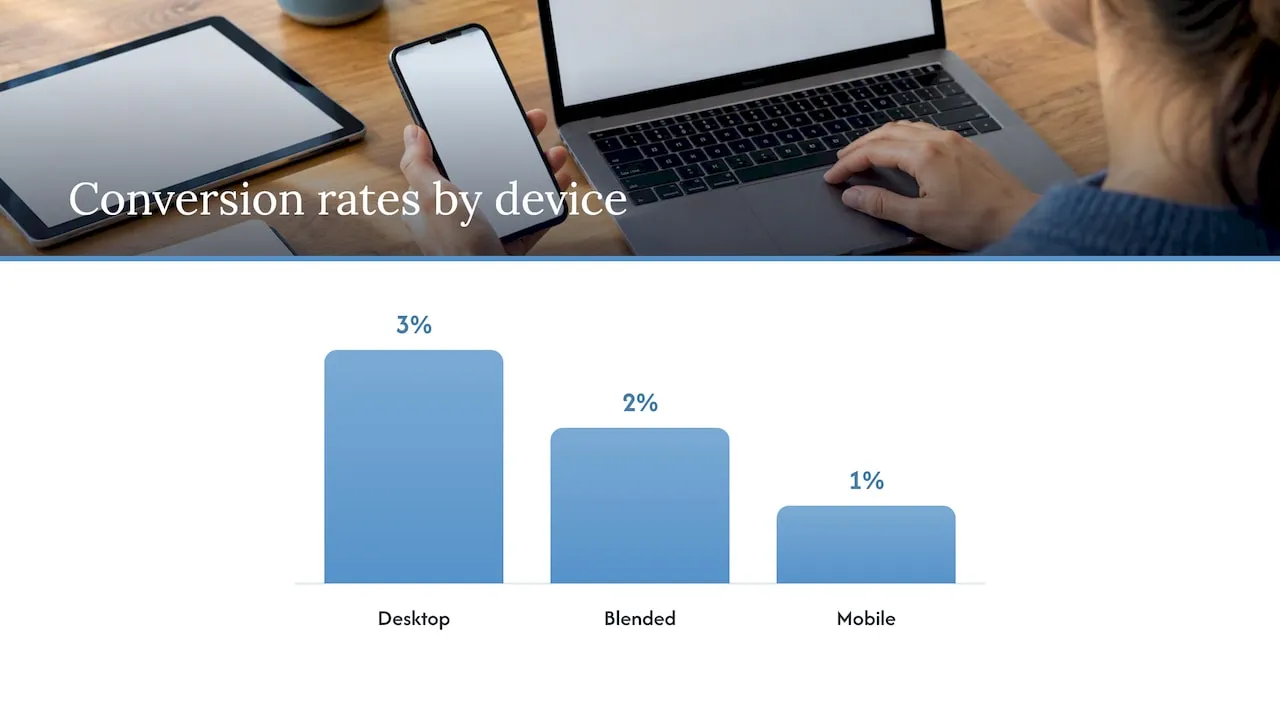
Segment by device. A blended 2% can hide 3% on desktop and 1% on mobile, and mobile is where speed usually bites.
6. How to check the speed of a website
Use two kinds of measurement.
Lab tests
Lab tools load a page in a controlled setting and give repeatable results. MDN names PageSpeed Insights and WebPageTest as testing tools, and browser network monitors for examining downloaded assets and waterfall timings. A typical speed test, as Cloudflare describes, reports load time, time to first byte, request count, first contentful paint, page size and render-blocking resources.
Field data
Lab results show what could happen. Field data shows what did happen. web.dev recommends measuring in both the lab and the field, with real user monitoring reflecting actual experiences. It suggests starting with Core Web Vitals and connecting them to business outcomes such as conversion, bounce, exit or funnel progression.
Audit checklist
web.dev’s performance audit guide gives a repeatable routine:
- Record baseline results before any change.
- Disable the browser cache to test a first visit.
- Check resource counts and sizes.
- Audit JavaScript, CSS, images, fonts and render-blocking resources.
- Test mobile devices under low-bandwidth, high-latency conditions.
Step 5 is the one most owners skip. Test on a mid-range phone over a throttled connection, not your laptop on office wifi.
7. What slows a site down, and what to fix first
MDN identifies latency and resource loading as the core concerns, and recommends optimizing the critical rendering path, lazy-loading noncritical resources, reducing media bytes and improving JavaScript, HTML and CSS performance.
The usual audit targets, per web.dev, are large JavaScript bundles, unused JavaScript and CSS, oversized images, inefficient image formats, missing responsive images, web fonts and render-blocking assets.
A priority order that fits most service-business sites:
- Images. Resize to display size, use modern formats, serve responsive versions, lazy-load anything below the fold. Hero images are the most common LCP culprit.
- Third-party scripts. Google’s research found DOM-ready time was the strongest predictor of bounce rate among the speed attributes it examined, and that blocking JavaScript from third-party ads, analytics and social widgets is one cause. Remove tags nobody reads reports from.
- JavaScript weight. Ship only what the page needs. Heavy page builders and plugin stacks tend to load code for features the page never uses.
- Fonts. Limit families and weights. Load them without blocking text.
- Redirects and page structure. Google’s 2016 guidance also recommends a performance budget, fewer third-party files and avoiding redirects.
- Hosting and caching. Slow server response delays everything after it. Good caching and hosting set the floor for every other fix.
For a practical walkthrough aimed at small and mid-sized businesses, see these ways to boost website speed.
Set a performance budget
A budget is a written limit, for example a maximum page weight or a maximum LCP. It turns speed from a one-time cleanup into a release rule. When a new script or image would break the budget, someone has to justify it.
8. Our perspective
We build service-business sites and CRM systems, and we see the same pattern. Sites slow down gradually. A template, a page builder, three analytics tags, a chat widget, a booking plugin. Each addition is reasonable alone. Together they produce a page that takes seconds to become usable.
Our view:
- Architecture sets the ceiling. You can compress images on a bloated template, but the template’s code weight remains. This is why we hand-code React frontends instead of assembling pages from builders.
- Speed is part of conversion design. Layout, copy, form length and load behavior act together. Treat them as one problem.
- The lead is not the end. Our background is enterprise CRM and lifecycle marketing, including work at brands such as Amazon and Verizon. A fast page that feeds a slow, manual follow-up process wastes the gain. Lead routing and automation belong in the same plan.
- Measure outcomes, not scores. A perfect Lighthouse score with flat inquiries is not a win. Track inquiries and lead quality.
We do not attribute that to speed alone. It came from rebuilding the site and the systems behind it around how the business actually works.
- Jeremy
9. How to prove a speed fix raised conversions
A conversion rise after a speed project does not prove the project caused it. Seasonality, ad spend and campaigns all move the numbers. web.dev recommends an A/B test that compares a faster page with the current version, while measuring real-user performance and business metrics. It also suggests an A/A test if you suspect the testing mechanism itself is faulty.
If traffic is too low for a split test, use a before-and-after comparison with caution:
- Record four weeks of baseline conversion rate by device.
- Ship the speed change alone, with no copy or design edits.
- Record four more weeks.
- Compare mobile and desktop separately, and note any campaign changes in the window.
Google’s business-oriented guide suggests checking conversion rate, exit page and bounce rate to see whether performance affects the user journey. It also notes that speed work is easier to prioritize when tied to outcomes stakeholders already value, such as leads and completed journeys. Report in those terms: “quote requests per month,” not “LCP in milliseconds.”
10. Keeping a fast site fast
Speed decays. Plugins update, marketing adds tags, images get uploaded at full size. A site tuned once and left alone slides back within months. Recurring work includes:
- Monthly lab tests on the key landing and form pages
- Field-data review for Core Web Vitals
- Script and plugin audits
- Security and dependency updates
- Image checks on new content
We offer this as website maintenance plans: Managed Hosting at $99 per month, Webmaster at $250 per month and Performance Plus at $750 per month.
Work with Forefront Industries
If your site loses leads to slow pages, outdated forms or a disconnected CRM, we can audit it and rebuild what is holding it back. We deliver fully custom-coded sites, conversion-focused UX, SEO architecture, CRM and email engineering, and lead routing automation for service businesses. See our web design and development services, or look at how we approach a high-ticket niche such as cosmetic dentistry and implant practices.
FAQ
Does website speed really affect conversions?
Yes, the research consistently shows a link. Deloitte’s 37-brand study tied a 0.1-second mobile improvement to higher conversions, and an academic study found sizable negative effects from slowdowns on online sales. The size of the effect depends on your site, audience and conversion event, so test it on your own data.
What is a good page load time for conversions?
No universal cutoff exists. Nielsen Norman Group notes that each improvement can help, and cites retail data where pages loading in under two seconds had the highest conversion rates. Use Google’s Core Web Vitals thresholds (LCP within 2.5 seconds, INP at 200 milliseconds or less, CLS at 0.1 or less) as working targets.
How do I check the speed of my website?
Run a lab test with a tool such as PageSpeed Insights or WebPageTest, then compare it with field data from real visitors. Test on mobile with a throttled connection. Record a baseline before you change anything.
How do I calculate my website conversion rate?
Divide conversions by visits for the same period and multiply by 100. For example, 12 conversions from 1,000 visitors is 1.2%. Define the conversion and the denominator once, and keep them the same across periods.
Does page speed affect SEO?
Yes. MDN states that site speed affects search-engine ranking as well as bounce rate, conversion, revenue and satisfaction. Speed is one ranking factor among many, so a fast page with weak content will not rank on speed alone.
Sources
- Need for Speed: The Impact of In-Process Delays on Customer Behavior (Operations Research, 2022)
- Milliseconds Make Millions (Deloitte)
- Mobile Site Speed Playbook (Think with Google)
- Mobile page speed and load time research (Think with Google)
- Why marketers should care about mobile page speed (Think with Google)
- Time is money: 3 steps to a faster site (Google)
- The Need for Speed, 23 Years Later (Nielsen Norman Group)
- Conversion Rate: Definition as used in UX and web analytics (Nielsen Norman Group)
- The “why” of web performance (MDN)
- Measuring performance (MDN)
- Web performance (MDN)
- Web Vitals (web.dev)
- Relating site speed and business metrics (web.dev)
- Use tools to measure performance (web.dev)
- How to Test the Speed of a Website (Cloudflare)
- Calculate Conversion Rate: Formula and Tips (Shopify)
- How to measure and optimize conversion rate (Search Engine Land)