Web Analytics for Lead Gen: Track Leads, Not Just Traffic

Web analytics for lead generation means recording every lead as a named event, tied to the source that produced it, and passing that record into your CRM. Page views and sessions are inputs. A form submission, a call, or a booked consultation is the output. If your analytics cannot report those outputs by channel, it cannot guide your budget.
This guide covers the minimum working setup: which events to define, how to track form submissions in GA4, how to keep first-touch source data, how to choose tools, and where consent rules apply.
TL;DR
- Track leads as events, not page views. GA4 has a recommended
generate_leadevent that feeds its built-in Lead acquisition report. - Default enhanced measurement is not enough for forms. Use Google Tag Manager with explicit triggers.
- Store first-touch source (referrer, UTM parameters, landing page) in hidden form fields so the CRM keeps it.
- Pick the tool by the question you need answered, not by the number of dashboards.
- Keep a provable consent record for every lead. In US lead generation, enforcement turns on consent and disclosure.
Table of Contents
- 1. What lead gen analytics must answer
- 2. Define the lead funnel in GA4
- 3. Track form submissions the reliable way
- 4. Keep the source of every lead
- 5. Choose tools by the question
- 6. Metrics worth reporting
- 7. Our perspective
- 8. Consent and compliance
- 9. A 30-day implementation plan
- 10. Where we fit
- FAQ
- Sources
1. What lead gen analytics must answer
A lead analytics setup answers four questions:
- Which channels and campaigns produce leads?
- Which pages and forms convert visitors into leads?
- Which leads become qualified, and which become customers?
- Which of those leads can we legally contact, and how?
Most small service sites answer only the first one, and only partly. They report traffic by channel but cannot say which channel produced a signed client. The gap sits between the website and the CRM. Closing it is the main job of lead gen analytics.
For a service business, a lead is rarely a purchase. It is one of these:
- Contact or quote form submission
- Consultation booking
- Phone call from a tracked number or click-to-call link
- Chat or text inquiry
- Downloaded resource with contact details
Each one needs its own event name, so reports can separate a low-intent download from a high-intent quote request.
2. Define the lead funnel in GA4
Google Analytics 4 gives a structured model for this. According to Google’s documentation, the lead acquisition report is populated by the lead generation recommended events. It reports new leads, qualified leads and converted leads, plus a user key event rate. It starts from the first time a potential customer visits your site.
The three events:
| Event | Meaning | When it fires |
|---|---|---|
generate_lead |
New lead | A visitor submits a form or a request for information |
qualify_lead |
Qualified lead | Your team marks the lead as a fit |
close_convert_lead |
Converted lead | The lead becomes a customer |
The first event comes from the website. Google lists generate_lead among its recommended events as the event for a form or information request submission. The second and third events happen in your CRM or sales process. They reach GA4 only if you send them back, for example through the Measurement Protocol or an integration from the CRM. That return path is what turns a form-fill count into a revenue-linked report.
A practical sequence:
- Fire
generate_leadfrom the site on every form submission. - Pass a lead ID with the event and store the same ID in the CRM record.
- Send
qualify_leadandclose_convert_leadwhen the CRM status changes. - Mark
generate_leadas a key event in GA4 so it appears in conversion reporting.
On step 4: in GA4, go to Admin, then Events, and star the event once it appears in the recent events list. Analytics Mania explains that the event must have been received first, and that the key event status applies to new data going forward.
3. Track form submissions the reliable way
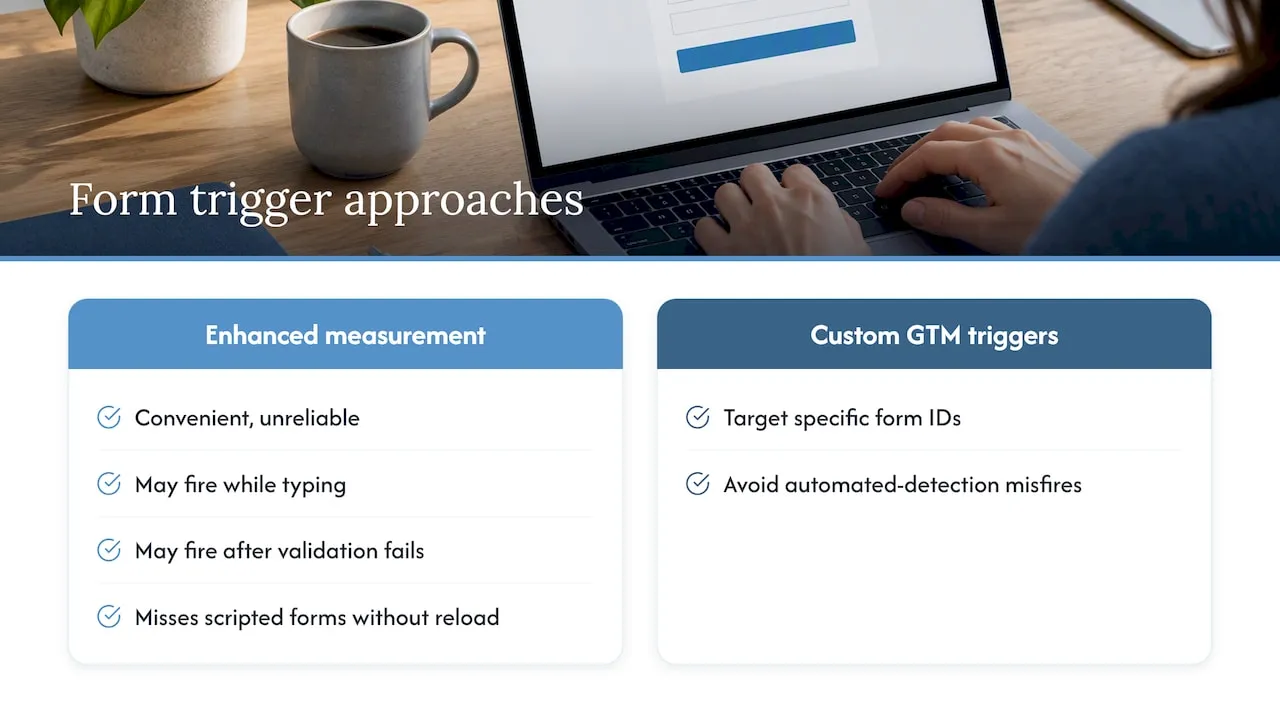
GA4’s enhanced measurement includes a form interaction event. It is convenient and unreliable for business reporting. It can fire when a visitor starts typing, or when validation fails, and it misses forms that submit through scripts without a page reload.
Practitioners at Measure School recommend Google Tag Manager with custom triggers, such as specific form IDs, so that lead events are not subject to misfires from automated form detection. We agree with that approach.
There are three common trigger methods. Choose by how your form behaves after submission.
Thank-you page view
The form redirects to a confirmation URL such as /thank-you. Create a page view trigger on that path and fire generate_lead from it. This is the simplest and most accurate method. Google’s older lead measurement guidance also begins with tracking the submission action, and notes the method depends on how the confirmation appears.
Watch for two failure modes: visitors who reload the thank-you page (duplicate leads) and pages indexed in search that people reach without submitting anything. Add a noindex tag to the page and consider a once-per-session rule.
Form submission trigger
GTM has a built-in Form Submission trigger. It works on standard HTML forms that reload the page. Restrict it by Form ID or Form Classes, and enable the option that waits for tags and checks validation. Without those settings it can count failed submissions.
Custom event from the form code
For AJAX forms, React components and embedded scheduling tools, the form should push a custom event to the data layer after the server confirms success. GTM listens for that event and fires generate_lead. Analytics Mania’s form tracking guide covers several variants, including AJAX forms, and suggests adding a parameter such as a form ID or form name to the event.
This is the most dependable pattern because the event fires only after a real success response. It requires a developer to add one line to the form handler.
Parameters to send with every lead event
form_idorform_namepage_locationof the form- Service line or inquiry type (for example, “kitchen remodel” or “estate planning”)
- Lead ID, matched to the CRM record
With those in place you can answer which form, on which page, for which service, is producing leads. Without them, you only know that “a form” was submitted.
Test before you trust it
- Open GTM Preview and submit the form with valid data. Confirm one
generate_leadfires. - Submit with an empty required field. Confirm nothing fires.
- Open GA4 DebugView and confirm the parameters arrive.
- Check Realtime reports, then the Events list the next day.
- Compare GA4 lead counts with CRM lead counts for one week. They should be close. A large gap means a broken trigger, blocked scripts, or leads entering from another source.
4. Keep the source of every lead
A lead count by channel is only useful if the channel is correct. GA4 will attribute the event to the session’s source. The CRM, however, often records only the final touch, or nothing.
VisiTrack’s B2B guidance is specific on this: capture the first-touch source, meaning referrer, UTM parameters and landing page, and pass it into hidden form fields. Otherwise the CRM record reflects only the last touchpoint, which can lead to wrong budget decisions. The same source reports that top-of-funnel channels such as LinkedIn can generate about three times more leads than last-click models suggest.
A hidden-field setup for a service business:
| Hidden field | Value captured | Why it matters |
|---|---|---|
first_source |
utm_source or referrer domain |
Original channel |
first_medium |
utm_medium |
Paid, organic, email, referral |
first_campaign |
utm_campaign |
Specific campaign |
landing_page |
First URL in the visit | Which page started the relationship |
ga_client_id |
GA4 client ID | Joins CRM and analytics records |
Store these values in a first-party cookie or session storage on the first visit. Write them into the form fields at submit time. Do not overwrite them on later visits.
Then apply a naming standard for UTM parameters: lowercase only, one spelling per channel, no spaces. Facebook, facebook and fb become three separate sources in a report.
Phone calls need the same treatment. Use call tracking numbers per channel, or at least a click-to-call event in GA4, and log the source in the CRM when staff answer.
5. Choose tools by the question
No single tool is the right answer. Venture Lab’s 2026 comparison makes the point that you should choose by the business question, not by dashboard breadth. Funnel-heavy teams suit product analytics platforms. Teams that need privacy-first, simple reporting suit lightweight tools. Teams that want GA4-style depth without Google suit self-hosted options.
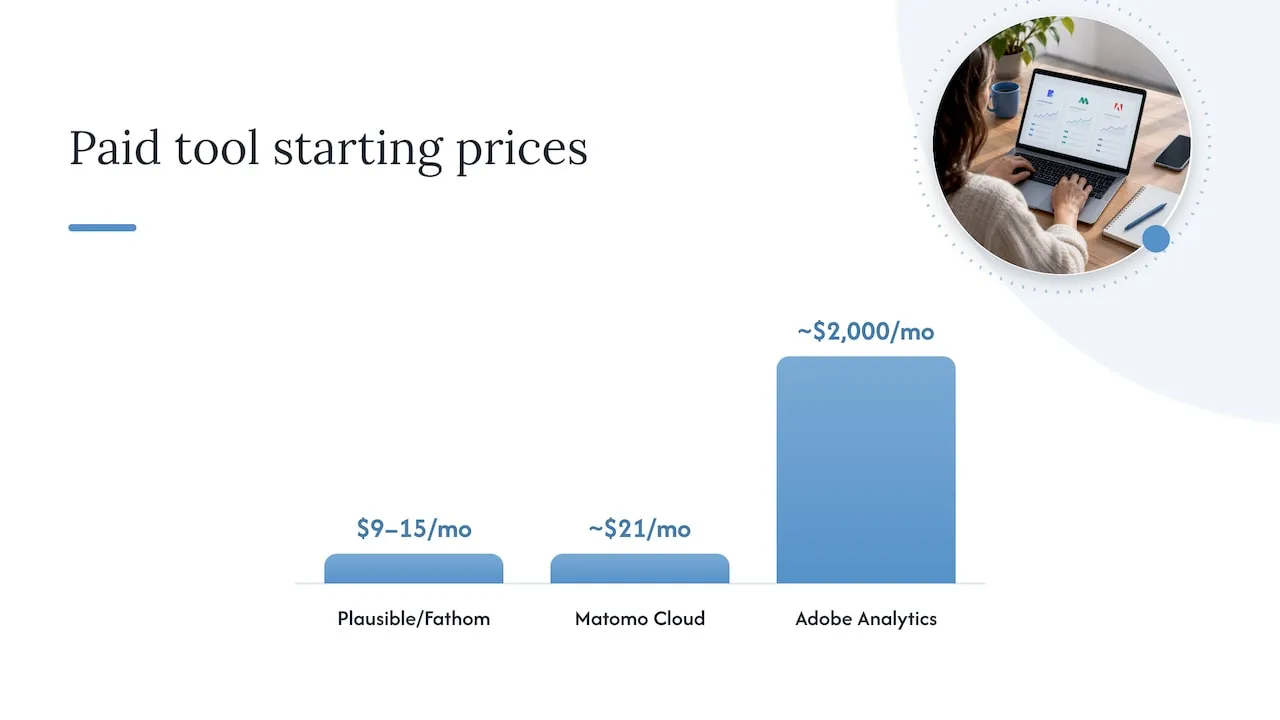
Pricing varies widely. According to Lead Forensics’ roundup of web analytics tools, GA4 is free, Microsoft Clarity is free with no traffic limits, Matomo cloud plans start near $21 per month, Plausible and Fathom start at $9 to $15 per month, and Adobe Analytics starts around $2,000 per month. Treat those as starting prices that change.
For most service businesses, the working stack is:
- GA4 for traffic, events and the lead acquisition report.
- Google Tag Manager to manage triggers without code deploys.
- A session recording and heatmap tool to see where visitors abandon forms.
- The CRM as the record of truth for qualification and revenue.
If your content program feeds the funnel, it also helps to measure content against leads, not just rankings. This overview of analytics for content marketing is a useful reference when deciding which content metrics belong next to your lead events.
6. Metrics worth reporting
Lead Forensics lists 16 lead generation metrics. For a service business, a monthly report needs only these:
- Leads by source and medium. First-touch and last-touch side by side.
- Lead conversion rate by landing page. Leads divided by sessions on that page.
- Cost per lead by channel. Spend divided by leads, for paid channels.
- Qualified lead rate. Qualified leads divided by all leads, by source.
- Lead to customer rate. Closed clients divided by leads, by source.
- Speed to first response. Minutes between submission and first contact. This comes from the CRM, not GA4.
- Revenue per lead source. The metric that settles budget arguments.
A worked example, with invented numbers for illustration only. Channel A sends 200 leads at $40 each. Channel B sends 50 leads at $120 each. On cost per lead, A wins. If A’s qualified rate is 5% and B’s is 40%, A produces 10 qualified leads at $800 each, and B produces 20 qualified leads at $300 each. Without the qualify_lead event, you would cut the wrong channel.
7. Our perspective
We build websites and CRM systems together, and most lead problems we see are handoff problems. The form works, the analytics fires, and then the lead lands in an inbox or a CRM field with no source, no service line and no owner.
Our background is enterprise CRM and lifecycle marketing, including work with brands such as Amazon and Verizon. That work taught one rule that applies at any size: define the data model first. Decide which fields a lead must carry, which statuses it moves through, and which events report each status back. Then build the form, the tracking and the automations to match.
Three positions we hold:
- Tracking belongs in the build. Events, data layer pushes and hidden fields are far cheaper to include while the site is coded than to bolt on after launch.
- The CRM is the source of truth. GA4 is good at traffic and attribution patterns. Qualification and revenue live in the CRM and should flow back to analytics, not the reverse.
- Fewer events, named well. Ten clean events beat sixty noisy ones. Every event should map to a decision someone will make.
Lead quality improved because the site, routing and CRM were designed around how the client’s team actually qualified leads, not because of a reporting trick.
- Jeremy
8. Consent and compliance
Lead tracking collects personal data, so legal handling is part of the setup. Lead generation is legal in the US. What is regulated is how you collect data and how you contact people. Quantic Data’s legal overview notes that nearly every enforcement action turns on consent, disclosure or fee sharing, not on finding prospects.
Practical points for your forms and records:
- Calls and texts. LegalClarity summarizes that TCPA violations can carry statutory damages of $500 to $1,500 per message or call. If your form lets people opt in to texts, the consent language must be clear and stored.
- Email. The same source cites CAN-SPAM penalties of up to $53,088 per non-compliant email. Honor unsubscribes and identify your business plainly.
- Purchased leads. Prospeo reports that under the 2025 FCC one-to-one consent rule, one opt-in cannot be shared across multiple marketing partners, and that a vendor’s word is no defense. If you buy leads, request the consent chain: form snapshot, timestamp and IP.
- Your own forms. Record the consent text shown, the time, the page URL and the IP address with each lead. This is the audit trail.
This is general information, not legal advice. If you run SMS campaigns, buy leads, or operate in a regulated field such as healthcare or financial services, have a attorney who handles TCPA and privacy law review your consent language before launch.
9. A 30-day implementation plan
Week 1: Audit and define.
- List every form, phone number and booking tool on the site.
- Define lead types and event names.
- Document the CRM fields and statuses.
Week 2: Build tracking.
- Add data layer pushes to each form’s success handler.
- Configure GTM triggers and GA4 event tags with parameters.
- Add hidden fields and first-touch capture.
Week 3: Connect the CRM.
- Map hidden fields to CRM properties.
- Send qualification and conversion statuses back to GA4.
- Add consent text and consent logging to forms.
Week 4: Verify and report.
- Compare GA4 and CRM lead counts.
- Fix duplicates and gaps.
- Build one dashboard with the metrics in section 6.
10. Where we fit
If your site is built on a template and your CRM does not receive source data, the fix usually involves both. We build custom-coded sites with conversion-focused UX and SEO architecture, and engineer the CRM, email and lead routing behind them. See our web design, CRM and automation services for the full list.
After launch, tracking breaks quietly: a plugin update changes a form ID, a script gets blocked, a tag is removed. Our website maintenance plans cover upkeep at $99 per month for Managed Hosting, $250 per month for Webmaster and $750 per month for Performance Plus. If your lifecycle email runs on Klaviyo, our Klaviyo email development service connects those flows to the same lead data.
FAQ
How do I track form submissions in GA4?
Send a generate_lead event when the form succeeds. The most reliable methods are a thank-you page trigger or a data layer event fired from the form code, both managed in Google Tag Manager. Then mark the event as a key event in GA4 and test it in DebugView.
Why don’t my GA4 lead counts match my CRM?
Common causes are ad blockers and consent banners that suppress tags, duplicate fires from reloaded thank-you pages, forms that bypass the tracked path, and leads entered manually from calls or email. Compare counts weekly and investigate any gap larger than a few percent.
Is lead generation legal?
Yes, in the US. The rules govern consent, disclosure and how you contact people, through laws such as the TCPA and CAN-SPAM. Keep a record of consent for every lead, and consult an attorney if you send texts or buy leads.
What is the best web analytics tool for lead generation?
For most service businesses, GA4 with Google Tag Manager, paired with your CRM, covers the need at no software cost. Add a heatmap tool to diagnose forms. Choose a privacy-focused or self-hosted tool only if data ownership or consent constraints require it.
Sources
- Lead acquisition report, Google Analytics Help
- Recommended events, Google Analytics Help
- Measure lead generation, Google Analytics Help
- Track Key Events with Google Analytics 4, Analytics Mania
- Google Tag Manager Form Tracking with GA4, Analytics Mania
- Form Tracking with Google Tag Manager and GA4, Measure School
- B2B Lead Generation Analytics, VisiTrack
- Best analytics tools 2026, Venture Lab
- Top web analytics tools, Lead Forensics
- Lead generation metrics, Lead Forensics
- Is Lead Generation Legal?, Quantic Data
- Lead generation legal rules, LegalClarity
- Lead Brokers, Prospeo