React Website Benefits: Compiler 1.0 Does Not Replace SSR

React is a strong choice for interactive, scalable websites, provided you pair it with server-aware rendering such as streaming SSR or static generation. Web and the React Compiler now make that setup far easier to get right. At Forefront Industries, we build production React sites for service businesses.
TL;DR:
- Keep field LCP within 2.5 seconds, INP at or below 200 milliseconds, and CLS at or below 0.1; use static or streaming server rendering.
- Server rendered or statically generated HTML gives crawlers content immediately; verify indexed pages with a live crawl and monitor Core Web Vitals using field data.
- Choose a static generator or server rendered templates for a small brochure site with little interactivity; React pays off for quoting, portals, or CRM integrations.
- React Compiler 1.0 automates memoization, but it works best with idiomatic declarative code; keep the stack small and document routing, data fetching, and state ownership.
Table of Contents
- Key React benefits at a glance
- How React boosts developer productivity and team velocity
- Performance realities: rendering strategies that make React fast
- SEO and discoverability for React websites
- Maintainability and scaling: architecture choices and long-term costs
- When React might be overkill
- Why we choose React for conversion-focused service sites
- How we can help you build or optimize your React website
- FAQ
- Sources
Key React benefits at a glance
When you weigh React against other ways to build a website, a handful of practical advantages decide most projects:
- Component reusability: you build a button, form or pricing card once and reuse it everywhere, so the interface stays consistent and duplication shrinks.
- Developer productivity: small, isolated components let teams change one piece of the interface without breaking the rest, which shortens iteration cycles.
- Predictable updates: React’s declarative model means you describe what the interface should look like for a given state, and React handles the DOM changes, so fewer UI bugs slip through.
- A large ecosystem: routing, forms, data fetching, testing and component documentation tools all exist and are widely used. Statista tracks framework usage among developers, and React is one of the frameworks it follows.
- Dynamic, interactive UX: dashboards, quote calculators, booking flows and filtered listings are exactly what React was designed for. Its original rationale was to make reactive UI updates simple.
Each of these benefits has a condition attached, and the sections below cover them in turn.
How React boosts developer productivity and team velocity
React’s component model gives each piece of the interface a clear owner, a clear input and a clear output. That structure makes components easier to test in isolation and easier to hand from one developer to another. JSX keeps markup and logic in the same file, so a designer and a developer can review a single component together instead of chasing behavior across templates and scripts.
Standardization is where teams see the biggest gains over time:
- Shared component libraries keep spacing, color and typography identical across pages.
- Storybook documents each component in isolation, so nobody rebuilds something that already exists.
- Linting rules catch common mistakes before they reach review.
- React Compiler handles performance work you used to do by hand.
That last point is recent. The React team recommends React Compiler for automatic optimization. Version 1.0 automates memoization and adds diagnostic passes that can reduce manual useMemo and useCallback work. It also exposes latent bugs through linting. It works best with idiomatic, declarative code, which means clean components get faster without extra effort. The React Conf 2025 recap describes integration paths with Vite, Next.js and Expo.
Developers are also changing how they work. Stack Overflow’s 2025 survey coverage notes growing use of AI tools among front-end and full-stack developers, alongside lingering concerns about accuracy. Clear component boundaries make AI-generated code easier to review, because each change stays small and testable.
Pro Tip: Choose a minimal, supported stack, such as Next.js with React Compiler and one shared component library, and resist adding tools until a real problem demands them.
Performance realities: rendering strategies that make React fast
React is not automatically fast or slow. Speed depends on where and when your HTML gets built. Here are the four approaches that matter:
- Client-side rendering (CSR): the browser downloads JavaScript, then builds the page. It is simple, but the main thread does the heavy lifting, which hurts first paint on slower devices.
- Server-side rendering (SSR): the server sends finished HTML, so users see content sooner and the browser does less work up front.
- Static rendering: pages are built ahead of time and served as files. This is the fastest option for content that does not change per visitor.
- Streaming SSR: the server sends HTML in chunks as it becomes ready. As web.dev explains, streamed HTML can be parsed and rendered incrementally and yields to the main thread, which helps INP and LCP compared with heavy client-side rendering.
web.dev’s rendering guidance recommends prioritizing server-side rendering and streaming over pure client-side rendering for performance-critical sites. It also says React Server Components and server-aware rendering can deliver performance comparable to traditional server-rendered sites, because less JavaScript ships to the browser and more rendering happens off the main thread.
Recent React releases add more tools. React 19.2 brings partial pre-rendering, Web Streams support for streaming SSR and new DevTools performance tracks for diagnosing slow work. Combined with the compiler’s automatic memoization, you get fewer wasted re-renders without hand tuning.
To apply this on a real site:
- Use static or streaming SSR for public content pages.
- Split code by route and lazy-load anything below the fold.
- Keep the DOM small, since large trees create long tasks.
- Consider partial pre-rendering for pages that mix static shells with dynamic sections.
For priorities beyond these, web.dev’s list of effective Core Web Vitals fixes helps you pick realistic changes first.
Target: Core Web Vitals guidance recommends LCP within 2.5 seconds, INP at or under 200 milliseconds and CLS at or under 0.1, measured at the 75th percentile. Measure these in the field with the web-vitals library and the Chrome UX Report, not only in lab tests.
SEO and discoverability for React websites
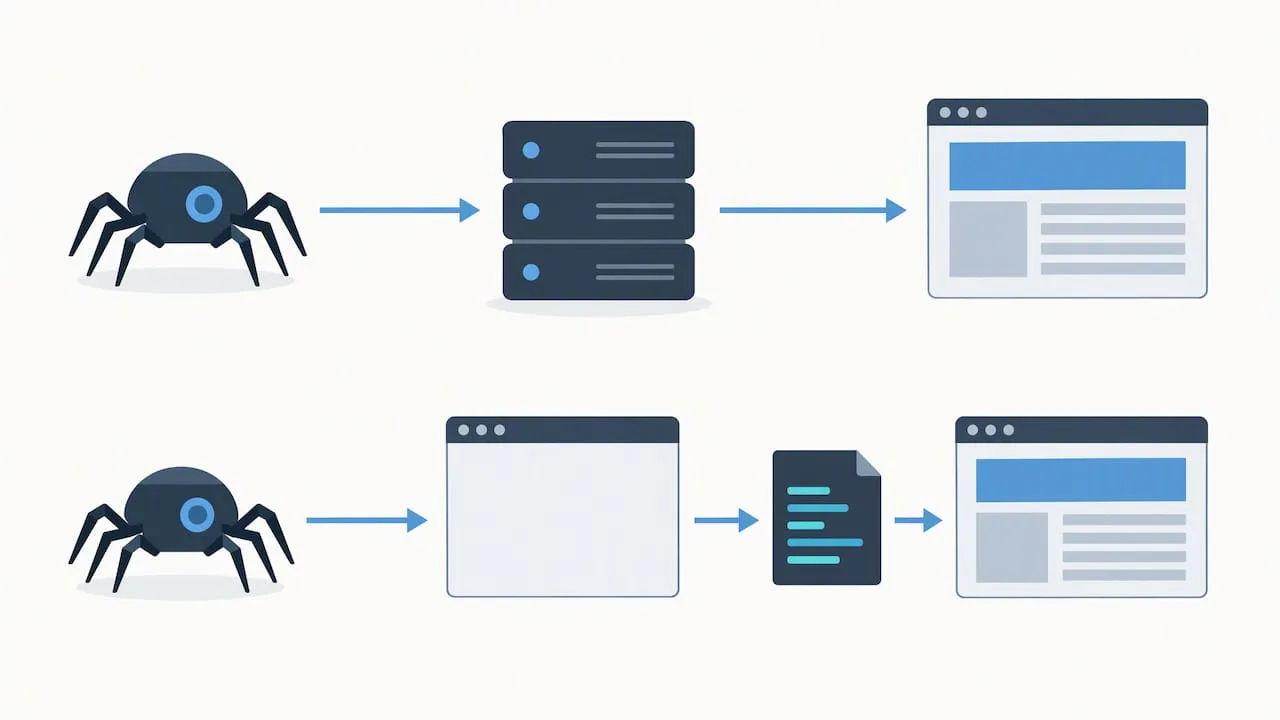
Search visibility depends on what a crawler sees when it first requests your page. Server-rendered or statically generated HTML is the safest path, for both search engines and social link previews, because the content is already in the response.
Client-rendered content can still be indexed, but it adds risk. You may need prerendering or streaming SSR, and you should test what crawlers actually receive instead of assuming. Single-page apps also face a measurement problem. web.dev notes that new performance APIs for soft navigations are narrowing the gap between SPA and multi-page measurement.
Once pages are live, validate with real users. Web Vitals guidance points to field data from the Chrome UX Report and the web-vitals library as the reliable measure.
A practical checklist:
- Statically generate marketing and service pages.
- Server-render personalized pages and cache their HTML.
- Check indexed content with a live-crawl tool, not just your browser.
- Track LCP, INP and CLS in production and watch for regressions after each release.
Technical SEO is a team sport, and architecture is only one part of it. This guide on scalable SEO and site architecture is a useful complement to the rendering advice here.
Maintainability and scaling: architecture choices and long-term costs
React is a library, not a full framework. As Next.js’s React Foundations course explains, that gives teams architectural flexibility but requires them to choose their own routing and data fetching, which is why many adopt a higher-level framework for more structure.
That flexibility is a cost if nobody owns the decisions. Maintainability comes from a few habits:
- Clear component boundaries: small components with explicit inputs are easy to change and easy to test.
- A shared design system: one source for buttons, forms and layout stops visual drift and cuts technical debt.
- Standard stacks: use the compiler’s diagnostics and linting to catch latent bugs early.
- A short tool list: Stack Overflow’s 2025 survey analysis warns that tool sprawl remains common and that reducing complexity improves developer experience and site performance.
Strict conventions pay off once more than a couple of developers touch the codebase or the site has multiple page types. Early on, a lighter touch is fine, as long as you write down the few rules that matter.
Pro Tip: Write a one-page architecture note covering routing, data fetching and state before the second developer joins, and review it every quarter.
When React might be overkill
React solves problems of interactivity and scale. If you do not have those problems, you pay for its complexity without the return.
- Mostly static marketing content: a handful of pages with a contact form rarely need a component framework. A static site generator or server-rendered templates will ship less JavaScript and be easier to host.
- Small teams with limited JavaScript bandwidth: every dependency needs updates and security attention. Fewer moving parts means fewer surprises.
- Heavy interactivity on the roadmap: if you plan calculators, portals, dashboards or filtered search, React usually pays back its cost, so start with it instead of migrating later.
Use this quick checklist before you commit:
- How interactive will the site be in the next two years?
- Does your team already know React, or would it need to learn it?
- Who will maintain dependencies after launch?
- Will content editors need to publish without developer help?
If most answers point to simple, static pages, choose the simpler tool. If they point to dynamic experiences that tie into CRM and automation, React is the better fit.
Why we choose React for conversion-focused service sites
We build custom-coded React frontends for service businesses, and we connect them to enterprise CRM and email systems so leads route correctly and lifecycle automation keeps running after the form submit. A fast page matters little if the lead lands in the wrong place.
Our rule of thumb is simple. If a site needs interactive quoting, personalized content, gated resources or deep CRM integration, we recommend React with server rendering. If a client needs a small brochure site with no integrations, we say so and suggest a lighter build. The decision follows interactivity, team skills and the long-term roadmap, not trend.
Our background is in enterprise CRM and lifecycle marketing, with brands including Ring, Blink, and Audible during in-house enterprise work at Amazon, and that shapes how we judge a front end: by what it does for lead quality and workflow, not only by how it looks. We use inbound lead quality as one measure of the business outcomes we aim to improve with our work. You can see how we apply the same thinking by vertical on our pages for wealth management firms and private aviation.
- Jeremy
How we can help you build or optimize your React website
If you decide React fits your project, we can take it from discovery to launch and keep it fast afterward. Our services cover the full path:
- Custom web design and development: fully custom-coded React sites built around conversion, not templates.
- Performance engineering: rendering strategy, code-splitting and Core Web Vitals tuning.
- Managed hosting: our Managed Hosting plan is $99 per month.
- Website maintenance: our Webmaster plan is $250 per month and Performance Plus is $750 per month, both on our website maintenance page.
We start every engagement with an audit. You get a performance baseline, a clear list of priorities and a recommended rendering approach for your pages, so you know what to fix first and why.

Ready to see where your site stands? Request your audit and we will map out the next step.
FAQ
Is React overkill for a website?
It can be. For a small, mostly static site with little interactivity, a static site generator or server-rendered templates is simpler to run. React earns its place when you need dynamic features, shared components or deep integrations.
Is Netflix built using React?
We do not cite a source on Netflix’s current stack here, so we will not confirm it. What matters more for your decision is that React’s rendering strategy, not the library itself, determines speed, as web.dev’s rendering guidance explains.
Is React still relevant today?
Yes. The React team shipped React Compiler 1.0 and React 19.2 in October 2025, adding automatic memoization, partial pre-rendering and new performance tooling.
Why is React better than HTML?
They do different jobs. Plain HTML is ideal for static content, while React helps you build interfaces that change with user input and reuse components across pages. For content-only pages, plain HTML is often enough.
Does React hurt SEO?
Not if you render on the server or at build time. Server-rendered or statically generated HTML gives crawlers your content immediately, and you can confirm results with field data from the Chrome UX Report and the web-vitals library.