Preference Center Design: Structure, UX and Data Model

A preference center is the page where a subscriber controls what a brand sends, how often, and through which channel. Good preference center design does three things: it offers controls narrower than “unsubscribe from everything,” it applies changes reliably in the CRM, and it meets legal and accessibility requirements. This guide covers each layer in order: controls, layout, compliance, data model, and rollout.
TL;DR
- Offer topic, frequency and channel controls. Keep a clear “stop all marketing” option on the same page.
- Make the page work with one visit and no login. The FTC rejects extra steps and extra data for opt-outs.
- Label every control, group related controls, and announce saves to assistive technology.
- Keep the source of truth for preferences in a central profile or CRM layer, not inside one email tool.
- Launch a minimum version for one brand or market, then expand.
Table of Contents
- 1. What the page has to do
- 2. Controls to include
- 3. Layout and UX
- 4. Compliance requirements (US)
- 5. Accessibility
- 6. Data model and architecture
- 7. Perspective
- 8. Rollout plan
- 9. Common mistakes
- 10. Building it with Forefront
- FAQ
- Sources
1. What the page has to do
The page has one job: let a person change what they receive without leaving the brand. The global unsubscribe should be the last resort, not the only exit. Practitioners describe the goal as retaining users who feel overwhelmed by email volume, using content-based and cadence-based controls.
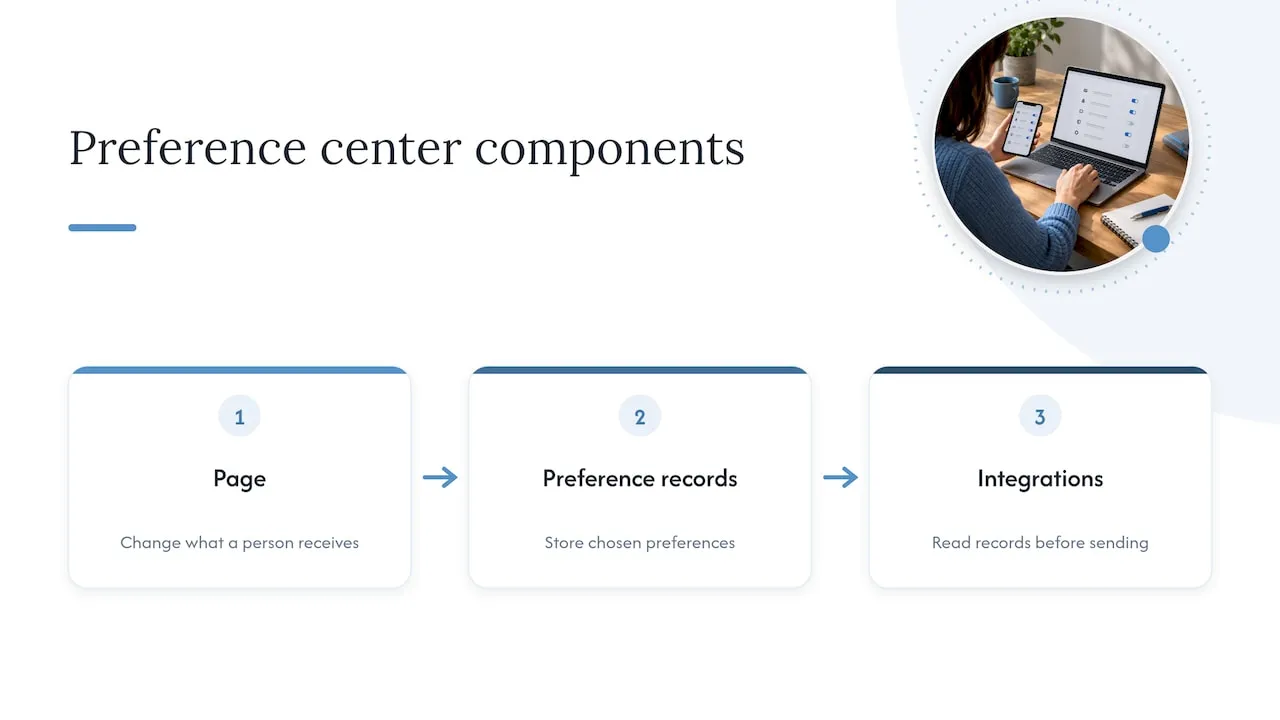
This changes how you scope the work. A preference center is not a form bolted onto the footer. It is a front end (the page), a data model (the preference records), and a set of integrations (the systems that read those records before sending). Weakness in any one of the three breaks the whole.
There is a measurable case for the effort. A 2025 technical paper on consent and privacy in CRM reports that well-designed preference centers can reduce unsubscribe rates by up to 30%. Treat that as an industry-reported figure, not a guarantee. Your result depends on list quality, send volume and how well the options match what subscribers want.
2. Controls to include
Start with the smallest set of controls that covers real subscriber needs. Each control must map to something your team can actually send or suppress.
2.1 Topic controls
Let subscribers choose content types: promotions, newsletters, product or service updates, appointment reminders. Relevance drives retention. Someone who signed up for offers and receives only blog digests will leave.
Rules for topic lists:
- Use names a customer would use, not internal campaign names.
- Add one short line under each topic describing what arrives and how often.
- Limit the list. Five to eight topics is usually enough; more produces choice overload and a data model nobody maintains.
- Keep transactional messages (receipts, security notices) outside the list and say so on the page.
2.2 Frequency controls
Frequency is the control that most often saves a subscriber. Options to consider:
- All emails
- Fewer emails (a weekly or monthly digest)
- Pause for a set period
One published roundup of preference center examples notes that some brands let subscribers pause email for 30 or 60 days, which suits people in a temporary situation such as a move. A pause needs a re-activation date stored on the profile and a send-time check against it.
2.3 Channel controls
If you send by email and SMS, or email and direct mail, show channel choice per topic. A grid works well: topics as rows, channels as columns. Do not default SMS on. Consent rules for text messages differ from email rules and need separate review with counsel.
2.4 The “stop all” option
Keep a plain “Unsubscribe from all marketing” control on the same page, visible without scrolling on desktop. Hiding it is a legal risk (see section 4) and a trust problem.
3. Layout and UX
3.1 Page structure
A reliable top-to-bottom order:
- Heading and one sentence stating what the page controls.
- Email address, shown read-only, so the person knows which profile they are editing.
- Topic list with toggles or checkboxes.
- Frequency selector.
- Channel options, if applicable.
- Primary button: “Save preferences.”
- Secondary control: “Unsubscribe from all marketing.”
- Confirmation state.
3.2 Entry points
The link usually sits in the email footer, but it also belongs in the account area, in the welcome email, and on the unsubscribe landing page. When someone clicks “unsubscribe,” show the preference options first, with the full opt-out one click away. That sequence gives you a chance to retain the subscriber without blocking the exit.
3.3 Form patterns
| Control | Use for | Notes |
|---|---|---|
| Checkbox group | Topics, multiple choice | Wrap in a fieldset with a legend |
| Radio group | Frequency, single choice | Default to the current value |
| Toggle switch | On/off per channel | Show state in text, not only color |
| Dropdown | Pause duration | Avoid for fewer than four options |
| Button | Save, unsubscribe all | Use verbs; avoid “Submit” |
3.4 Copy
Write labels in plain words. Avoid terms like “opt-out of data processing” or “communication vectors.” State what changes: “You will get one email a week, on Mondays.” After saving, repeat the result: “Saved. You will receive: Product updates, monthly.”
3.5 Mobile
Most preference center visits begin from an email opened on a phone. Use a single-column layout, touch targets large enough for a thumb, and no horizontal scroll. Test the page from a real email client link, not only in a desktop browser.
3.6 Brand consistency
The page should look like the rest of the site: same typefaces, same color tokens, same button styles. A generic hosted page with a different look reads as a third-party form and lowers trust. A custom-coded page built from your own component library avoids this.
4. Compliance requirements (US)
This section covers US federal rules for commercial email. Other regions, and state privacy laws, add requirements. Have counsel review the final design.
The FTC’s CAN-SPAM compliance guide sets out the opt-out rules that affect page design:
- The opt-out mechanism must be clear and conspicuous and easy for an ordinary person to understand.
- You may offer a menu of message types, but you must also offer a way to stop all marketing messages from you.
- You cannot charge a fee, require information beyond an email address and the person’s preference choices, or require more than a visit to a single web page.
- You must honor the request within 10 business days.
Design consequences:
- No login wall. Use a signed, per-recipient link that opens the page already tied to the profile.
- No extra fields. Do not ask for name, phone number or a reason as a condition of saving.
- No multi-page flow for the stop-all request. One page, one action.
- Process faster than the limit. Ten business days is a legal maximum. Apply the change to the sending list immediately where your systems allow it.
5. Accessibility
A preference center is a form, and forms fail accessibility checks in predictable ways. The U.S. Access Board’s web forms baseline tests for labels and instructions on every form component, and it references WCAG 2.2 techniques for describing changes and grouping controls.
Build checklist:
- Every input has a visible label tied to it in code, not placeholder text alone.
- Related controls (topics, frequency) sit inside a fieldset with a legend. This is technique H71, listed in the baseline’s guidance.
- State is not conveyed by color alone. A toggle needs a text or icon state.
- Saving changes context: show a status message and expose it to screen readers, for example with an ARIA live region.
- Keyboard order matches visual order. Focus is visible.
- Error messages name the field and say how to fix it.
- Text and control contrast meets WCAG 2.2 thresholds. Check hex values for both default and disabled states.
Test with keyboard-only navigation and at least one screen reader before launch.
6. Data model and architecture
The page is the visible part. The data model decides whether preferences are respected.
6.1 Where the truth lives
Guidance on zero-party data architecture advises against storing the source of truth for preference data inside an email platform or an onsite personalization tool, because those systems are volatile and hard to govern at scale. Use a centralized profile service or a dedicated CRM profile layer, and sync outward.
In practice:
- The preference center writes to the central profile.
- The profile service publishes changes to the email platform, the CRM, the SMS tool and the ad audience syncs.
- Every send checks the profile (or a synced suppression list) before dispatch.
- Each change is logged with timestamp, source (page, email link, support agent) and previous value.
6.2 Suggested fields
| Field | Type | Purpose |
|---|---|---|
topic_{name} |
boolean | Subscription to each topic |
frequency |
enum | all, digest_weekly, digest_monthly |
pause_until |
date | Temporary suppression |
channel_email / channel_sms |
boolean | Channel consent |
global_opt_out |
boolean | Stop all marketing |
consent_source |
string | Where the choice was made |
updated_at |
timestamp | Audit trail |
6.3 Edge cases to handle
- Subscriber sets “fewer emails” but is in an active lifecycle journey. The journey must respect the new frequency.
- A pause expires: restore the previous settings automatically, and say so in the last email before the pause ends.
- Two systems disagree on a status. Define which wins; the global opt-out should always win.
- A person has several email addresses. Decide whether preferences attach to a person or an address, and document it.
7. Perspective
We build lifecycle and CRM systems, and the pattern we see is consistent: teams design the page first and the data second. The page then looks right and fails in production, because the send logic never reads the new fields.
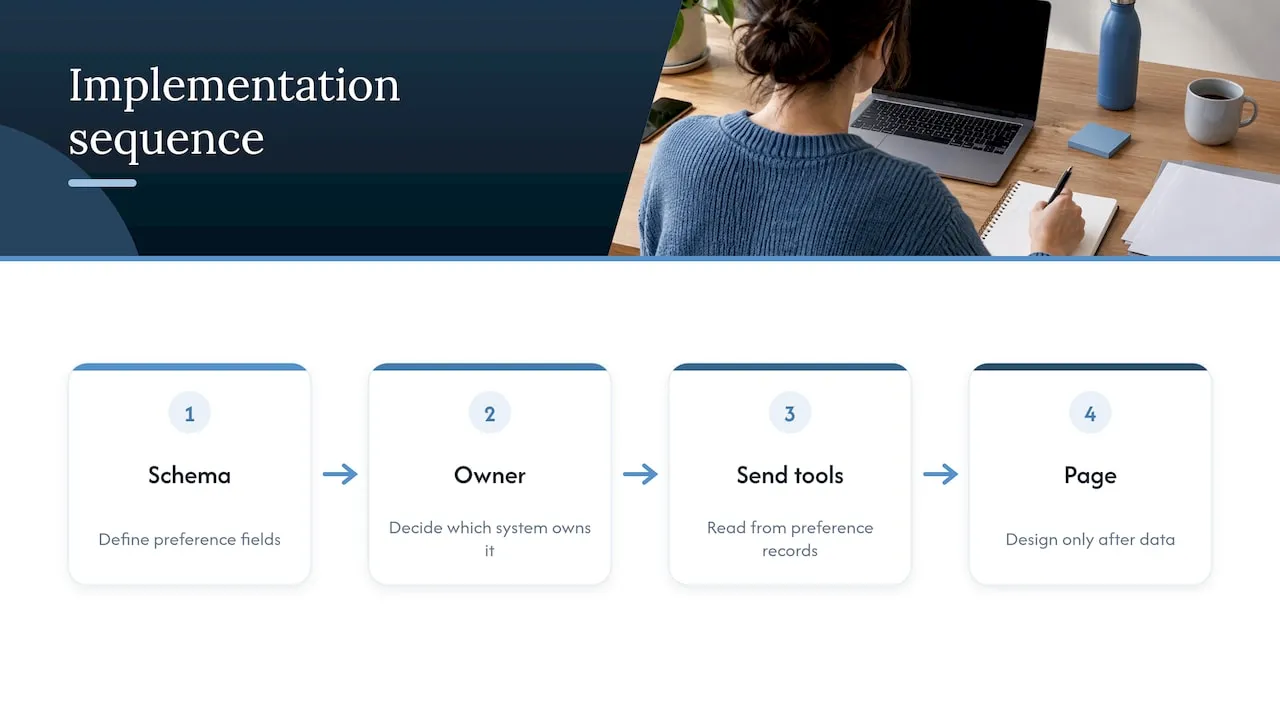
Our order is the reverse. Define the preference schema. Decide which system owns it. Make every sending tool read from it. Only then design the page. That sequence is slower for one week and faster for the next year.
We also push back on the idea of preferences as a compliance checkbox. A subscriber who says “monthly, product news only” is giving you zero-party data that no behavioral model matches. Segments, journey triggers and lead routing can use that answer directly. For service businesses, the same logic applies to inquiry follow-up: let the person choose how they want to hear from you, and route accordingly.
Finally, scope tightly. Start with one brand or market, test it with real users, and expand once the model holds.
- Jeremy
8. Rollout plan
Practitioners working on enterprise deployments recommend a minimum viable version focused on a single market, brand or entity before scaling globally. The same advice fits smaller businesses.
- Inventory messages. List every recurring email and text, its owner and its audience.
- Group into topics. Merge overlapping streams into five to eight customer-facing topics.
- Define the schema. Fields from section 6.2, plus the system of record.
- Build the integration. Write to the profile, sync to sending tools, add suppression checks.
- Design and code the page. Apply sections 3 and 5.
- Test. Send test emails, change every control, confirm the next send honors it. Run accessibility checks.
- Launch quietly. Link from footers first, then promote it in the welcome email.
- Measure. Track unsubscribe rate before and after, share of visitors who save changes versus stop all, and complaint rate.
Review topic names and frequency options every quarter against send data.
9. Common mistakes
- Making “unsubscribe from all” hard to find.
- Requiring a login or password.
- Asking for extra personal data on the opt-out page.
- Listing 20 topics with internal names.
- Saving without confirmation.
- Storing preferences only in the email tool, then losing them in a migration.
- Skipping accessibility testing.
- Treating the page as finished at launch, with no review of the data.
10. Building it with Forefront
We design and code preference centers as part of custom sites and CRM builds: a React front end matched to your brand, and the email and CRM engineering behind it so each choice changes what is sent. See our Email & CRM development and web design services, or the page on Klaviyo email development if your sending runs there. After launch, our website maintenance plans cover performance and security upkeep for the page and the site around it.
FAQ
What should an email preference center include?
At minimum: topic choices, a frequency option, and a visible way to stop all marketing email. Add channel controls if you message by SMS or other channels. Keep transactional messages out of the list and say so on the page.
Does a preference center satisfy CAN-SPAM?
Only if it follows the opt-out rules. Under the FTC guide, the mechanism must be easy to understand, offer a stop-all option, require nothing beyond an email address and choices, and be honored within 10 business days. Ask counsel to review your final flow.
Should subscribers need to log in?
No. Use a unique link in each email that opens their profile directly. A login requirement conflicts with the FTC’s limit on steps beyond visiting a single web page, and it increases abandonment.
Where should preference data be stored?
In a central profile service or CRM profile layer, synced to your email, SMS and advertising tools. Storing it only in one email platform makes governance and migration harder.
Sources
- CAN-SPAM Act: A Compliance Guide for Business, Federal Trade Commission
- 10. Forms (Web), U.S. Access Board ICT Baseline
- Mastering Data Privacy and Security in CRM with AI: A Technical Perspective
- Zero-Party Data Strategy 2025
- Preference Center Design: Best Practices for Engagement
- Best Email Preference Centers: 11 Examples & Proven Tips
- Preference management case study, PossibleNOW