Marketing Teams: Build These 5 Prioritized Lifecycle Automation Flows
Lifecycle marketing automation automatically moves each customer through the right message at the right moment based on their behavior, not a calendar, to lift activation, retention, and lifetime value. It runs on a unified customer profile built from first-party data inside a CRM or CDP. Forefront Industries builds this infrastructure for service businesses whose lead systems have outgrown static campaign tools.
TL;DR:
- Building effective lifecycle automation requires a unified customer profile with real-time behavioral, transactional, and preference data to trigger relevant messages.
- Prioritizing onboarding and activation flows provides the highest impact with the lowest effort, while expanding to retention and expansion flows should happen gradually over months.
- Data quality, system integration, and accurate customer identity management are critical; poor data hygiene limits automation effectiveness regardless of platform choice.
- Automation success depends on mapping each flow to a specific lifecycle stage with clear KPIs, cohort tracking, and rigorous testing before full deployment.
- Incorporating AI decisioning enhances personalization and automation responsiveness but requires careful setup, monitoring, and guardrails to prevent over-messaging or errors.
Table of Contents
- What Is Lifecycle Marketing Automation, Really?
- What Are the Six Customer Lifecycle Stages?
- Which Lifecycle Automations Should You Build First?
- What Technology and Data Do You Need to Run This?
- How Do You Measure Whether Lifecycle Automation Is Working?
- How Do You Roll Out a Lifecycle Automation Program?
- What Does AI Decisioning Add to Lifecycle Automation?
- Forefront Industries: What Practitioner-Built Lifecycle Systems Look Like
- What Should Marketing Leaders Prioritize This Quarter?
- Why Most Lifecycle Programs Underperform, and What Actually Fixes It
- Ready to Build a Lifecycle System That Actually Holds Up?
- Sources
What Is Lifecycle Marketing Automation, Really?
A scheduled campaign sends the same email to your entire list on a Tuesday. A lifecycle flow sends a different message to each person depending on what they just did, whether that’s abandoning a cart, hitting day 14 without logging in, or renewing a contract three days early. That distinction is the whole concept in one sentence.
Lifecycle marketing treats customer engagement as a continuous relationship, using behavior-driven data to personalize messaging and timing from first touch to loyalty. Campaign based automation, by contrast, is still fundamentally a broadcast: you pick an audience, schedule a send, and move on. Lifecycle automation instead asks a standing question about every customer, every day: what stage are they in, and what does that stage require from us right now?
That shift matters because customers don’t experience your business in campaign-sized chunks. Someone who signs up on Monday and abandons onboarding by Thursday shouldn’t wait for next month’s newsletter to hear from you again. Automation is the operational backbone of lifecycle marketing: it triggers a welcome sequence the moment someone converts, pauses promotional sends once a purchase happens, and reactivates dormant accounts on a schedule tied to their own behavior, not yours.
None of this works without a unified customer profile. If your CRM doesn’t know that a lead requested a demo, your CDP doesn’t sync purchase history in real time, or your email platform can’t see support tickets, your “lifecycle automation” is just guessing with better branding. Effective programs depend on first-party behavioral, transactional, and preference data combined with real-time triggers across every channel a customer touches.
What separates a mature lifecycle program from a basic drip sequence:
- Triggers fire on behavior (page view, purchase, support ticket), not just a calendar date
- One customer record feeds every channel: email, SMS, in-app, ads
- Messaging logic accounts for what stage the customer is actually in
- Flows suppress or adjust automatically when a customer’s status changes
- Data flows in near real time, not on a weekly batch import
What Are the Six Customer Lifecycle Stages?
Every automation you build should map to a specific stage and a specific job. Skip this mapping and you end up with automations that technically fire but don’t move any metric that matters.
- Acquisition. The job is converting an unknown visitor into an identified lead. Core KPI: cost per qualified lead. Typical automation: a lead-capture form triggering an instant confirmation and a scored follow-up sequence.
- Activation/onboarding. The job is getting the customer to their first real value moment fast. Core KPI: activation rate (percentage reaching that moment within a defined window). Typical automation: a welcome series that adapts based on which features the user has or hasn’t touched.
- Value realization/engagement. The job is turning first value into a habit. Core KPI: engagement frequency or feature adoption rate. Typical automation: usage-based nudges when adoption stalls.
- Retention. The job is keeping the relationship active past the renewal or repurchase point. Core KPI: retention rate or repeat purchase rate. Typical automation: renewal reminders sequenced against actual contract or subscription dates.
- At-risk/win-back. The job is catching disengagement before it becomes churn, and recovering it after. Core KPI: churn rate and win-back conversion rate. Typical automation: a behavior-triggered flow when usage or purchase frequency drops below a threshold.
- Loyalty/advocacy. The job is converting satisfied customers into referrers or expansion revenue. Core KPI: referral rate or expansion revenue per account. Typical automation: a loyalty trigger fired after a milestone purchase or NPS score.
B2B programs usually stretch the activation and retention stages over months, tied to contract cycles and multiple stakeholders. B2C and product-led businesses compress those same stages into days, often triggered by a single usage event rather than a sales conversation.
Which Lifecycle Automations Should You Build First?
Build order matters more than build volume. A five-flow program sequenced correctly will outperform a fifteen-flow program launched all at once with no testing discipline. Here’s the priority order and what each one requires.
Welcome and onboarding flows come first because they touch every single customer and typically show the fastest lift. Objective: get new customers to first value. Trigger: signup or first purchase. Required data: signup source, plan type, initial preferences. Common pitfall: sending generic welcome content that ignores what the customer actually signed up for. Test idea: run a holdout group receiving no welcome series and compare 30-day activation rates.
Activation nudges follow immediately behind. Objective: push stalled users past the first-value moment. Trigger: inactivity after signup, typically 3 to 7 days. Required data: feature usage events, last login timestamp. Common pitfall: nudging too aggressively and triggering unsubscribes instead of activation. Test idea: A/B two nudge cadences (day 3 vs. day 7) against activation rate.
Transactional lifecycle flows cover order confirmations, shipping updates, and renewal notices. Objective: reduce support volume and reinforce trust. Trigger: order, shipment, or billing events. Required data: transaction status, delivery estimates. Common pitfall: treating transactional emails as promotional real estate and burying the actual information.
Retention and win-back sequences activate once engagement drops below a defined threshold. Objective: recover at-risk accounts before churn. Trigger: usage decline or missed renewal window. Required data: historical engagement baseline, renewal date. Common pitfall: waiting until the account has already churned to start the sequence.
Expansion and cross-sell flows round out the list. Objective: grow revenue per existing account. Trigger: usage milestones or complementary purchase history. Required data: product usage depth, purchase category. Trigger-based onboarding, automated expansion plays, and churn-prevention sequences form the core of most effective B2B lifecycle programs.
Pro Tip: Sequence your build in phases: month 1 is welcome and onboarding only, month 2-3 adds activation and transactional flows, month 4+ is where retention, win-back, and expansion come online. Trying to launch all five categories simultaneously is the single most common reason lifecycle programs stall before they produce results.
What Technology and Data Do You Need to Run This?
Four systems have to work together, and confusing their roles is where most lifecycle programs break down. Your CRM owns the account and relationship record: who the customer is, what they’ve bought, who owns the account internally. Your CDP (if you have one) unifies behavioral and transactional data across every touchpoint into one profile. Your orchestration platform, whether that’s Salesforce Marketing Cloud, Braze, or a comparable system, decides who gets what message and when. Your delivery channels, email, SMS, push, and in-app, execute the send.
The data layer underneath all four needs to include:
- Identity data: email, phone, account ID, cross-device matching
- Event data: page views, feature usage, cart actions, support interactions
- Transaction data: purchase history, contract value, renewal dates
- Preference data: channel opt-ins, frequency caps, declared interests
Freshness matters more than most teams assume. Identity and preference data can tolerate a daily sync. Event and transaction data that feed real-time triggers, like an abandoned cart flow or a churn-risk alert, need near-real-time delivery, ideally under 15 minutes, or the trigger fires too late to matter.
Integration typically runs through three patterns: REST APIs for on-demand lookups, webhooks for event-driven pushes, and streaming pipelines for high-volume behavioral data. Consent and governance sit underneath all of it. Every trigger needs to respect the customer’s actual opt-in status per channel, not a blanket assumption that “customer” means “subscribed to everything.” A custom-engineered CRM and email integration avoids the brittle, half-connected systems that cause lifecycle triggers to fire on stale or incomplete data.
How Do You Measure Whether Lifecycle Automation Is Working?
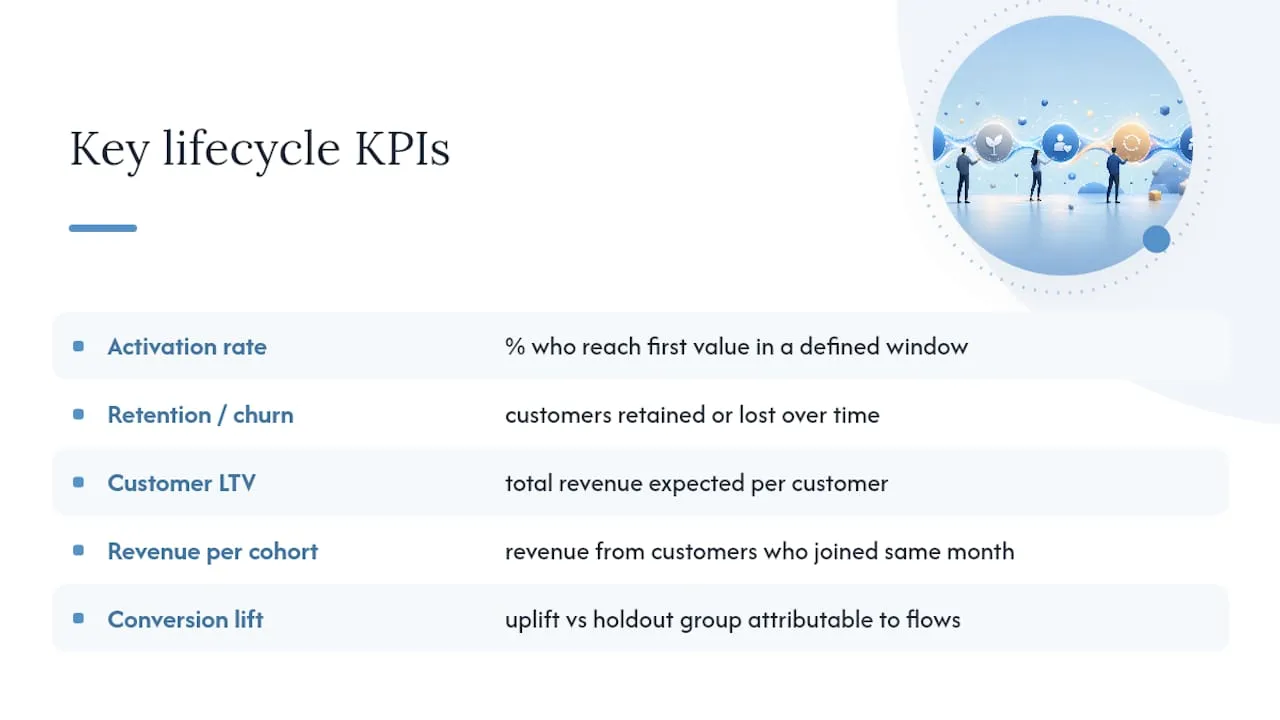
Five KPIs cover most lifecycle programs: activation rate (percentage of new customers reaching first value within a defined window), retention/churn rate, customer lifetime value, revenue per cohort, and conversion lift attributable to the automation itself.
Structure your reporting by cohort and time window rather than by campaign. A cohort report tracks everyone who joined in a given month against 30-day, 90-day, and 365-day checkpoints, so you can see whether a change you made in March actually improved outcomes for the customers who came in that month.
Automated flows that trigger on real behavior, like a welcome series fired at signup, consistently outperform static, one-size-sends when it comes to conversion rates in early lifecycle stages, which is exactly why activation rate belongs at the top of your dashboard.
For attribution, the simplest reliable method is a holdout comparison: hold out a small percentage of eligible customers from a given flow and compare their 90-day outcomes against the group that received it. Build your dashboard around four widgets: activation rate by cohort, retention curve by stage, revenue per cohort over time, and flow-level conversion lift. Review it monthly with stakeholders, weekly with the team actually running the flows.
How Do You Roll Out a Lifecycle Automation Program?
- Audit what you have. Map every current campaign and flow against the six lifecycle stages. Check data quality: are events tracked consistently, is your customer ID unified across systems, where are the tech gaps between your CRM, CDP, and delivery channels?
- Prioritize with an impact-times-effort matrix. Score each candidate automation on business impact and build effort. Welcome and onboarding flows typically score high on impact and low on effort, which is why they belong first regardless of company size.
- Build to a standard, not a one-off. Use modular content blocks and reusable templates so the fifth flow takes a fraction of the time the first one did. QA every trigger condition before launch, not after.
- Test before you scale. Run every automation on a subset of the audience first; automating a broken process just amplifies the error faster. Where sample sizes are too small for a clean A/B split, use staggered rollouts and watch engagement signals instead of chasing statistical significance you can’t actually reach.
- Monitor and alert. Set up regression alerts on your core KPIs so a broken trigger or a data sync failure gets caught in hours, not discovered a month later in a quarterly report.
Pro Tip: Run your audit against a documented checklist. Map each stage, identify the moment each stage’s “first value” actually happens, review your welcome sequence line by line, and set numeric thresholds for what counts as “at risk.” Teams that skip this step almost always end up automating around gaps they never noticed.
What Does AI Decisioning Add to Lifecycle Automation?
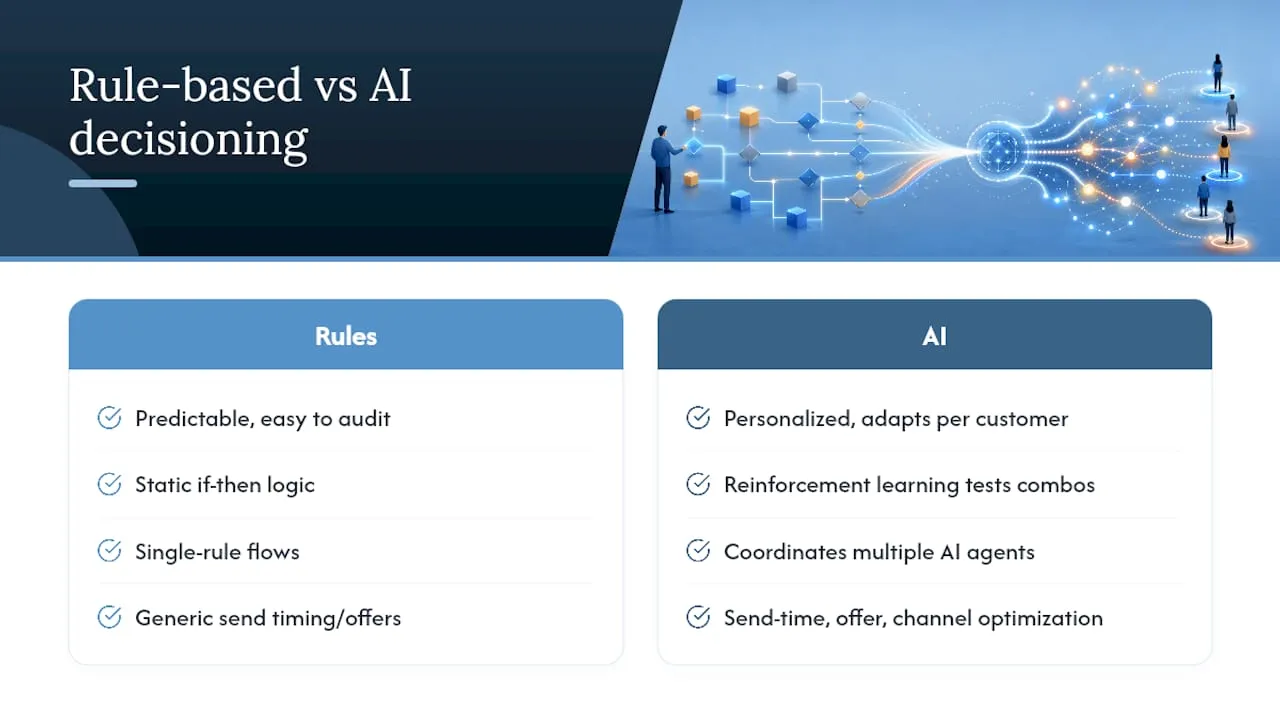
Rule-based flows follow logic you write: if X happens, send Y after Z days. They’re predictable and easy to audit, but they can’t adapt to an individual customer’s patterns. AI decisioning and next-best-action models flip that. Reinforcement learning models can continuously test combinations of message, channel, timing, and offer to learn what actually moves each customer, rather than applying one rule to everyone.
Practical use cases include send-time optimization (learning when each customer actually opens messages), offer selection (which discount or bundle converts this segment), and channel selection (email vs. SMS vs. push, weighted by individual response history). Autonomous marketing platforms now coordinate multiple AI agents to generate content, activate across channels, and adjust in near real time.
Guardrails matter here more than the technology itself. Define your reward signal carefully (revenue and retention, not just opens), monitor for unintended behavior like over-messaging high-value accounts, and review model output regularly rather than treating it as a set-and-forget system.
Forefront Industries: What Practitioner-Built Lifecycle Systems Look Like
Forefront Industries builds custom web infrastructure, CRM and email systems on platforms like Salesforce Marketing Cloud and Braze, and AI workflow automation for service businesses. That work draws on enterprise-level CRM and lifecycle marketing experience with brands including Ring, Blink, and Audible during in-house enterprise work at Amazon, the kind of scale where a broken trigger affects millions of records, not a few hundred leads.
Template-based platforms tend to break down exactly where lifecycle logic gets complex, at the integration points between CRM, web forms, and delivery channels. Custom-built systems close those gaps directly.
What Should Marketing Leaders Prioritize This Quarter?
The biggest mistake I see is automating a process that was already broken. The second mistake is skipping data hygiene: launching a churn-risk flow on top of a customer ID that’s duplicated across three systems produces alerts nobody trusts.
If you’re starting this quarter, focus on three things: audit your welcome sequence first, unify your customer identity across CRM and email, and hold back 10% of your audience from any new flow until you’ve confirmed it works. If your current systems can’t support that basic discipline, a technical audit is worth the time before you build anything new.
Why Most Lifecycle Programs Underperform, and What Actually Fixes It
Most teams treat lifecycle marketing automation as a tooling decision: pick a platform, import contacts, turn on some flows. That’s backwards. The platform is the least important variable in whether a lifecycle program works. What matters is whether your customer data is trustworthy enough for a trigger to fire on the right person at the right moment, and most companies never fix that before they start building.
I’d also push back on the idea that more automation is inherently better. A five-flow program built on clean data and tested sequencing will beat a fifteen-flow program built on stale event syncs and no holdout testing, every time. The instinct to automate everything at once is understandable and almost always counterproductive. Start narrow, prove the lift, then expand.
The gap between what lifecycle automation promises in a vendor demo and what it delivers in production almost always traces back to data architecture, not campaign creativity. Fix the plumbing first.
- Jeremy
Ready to Build a Lifecycle System That Actually Holds Up?
Forefront Industries is the alternative to bolting another automation tool onto systems that were never built to talk to each other. Instead of a templated CRM setup that breaks the moment your lifecycle logic gets complex, Forefront engineers custom email and CRM systems on Salesforce Marketing Cloud and Braze, builds AI automation for lead routing and internal workflows, and codes the full-stack web infrastructure that captures the data your triggers depend on.
A typical engagement starts with a technical audit of your current CRM, email, and web data flow, moves into a pilot covering your highest-impact flows (usually welcome and onboarding), then scales into retention and expansion automation once the pilot data proves out. Service businesses get a system built around how their actual customers move, not a generic template retrofitted to fit.
If your lead capture, CRM, or email systems feel like they’re fighting your lifecycle strategy instead of running it, explore Forefront’s email and CRM development services or check out Forefront’s full service offering to scope out what a starter engagement would look like for your business.
Sources
- What Is Lifecycle Marketing? A Complete Guide | Braze
- Customer Lifecycle Automation: A Practical Guide | Omnisend
- Marketing automation strategy (IBM Think)
- 4 Lifecycle Marketing Automations: B2B Playbook & Guide
- Autonomous marketing | ActiveCampaign