Copyable Lead Generation Website Design Templates for Service Businesses

A lead generation website has one job: turn a qualified visitor into a single obvious next step. The highest-leverage fix is message match above the fold, a headline and subhead that mirror what the visitor was already looking for, paired with one primary call to action instead of five competing ones. Everything below explains the elements, templates, and benchmarks that make that fix work.
TL;DR:
- Using a single, highly relevant offer with a clear headline, benefit-driven CTA, and minimal navigation increases conversion by reducing decision fatigue.
- Optimizing for speed, mobile usability, and specific trust signals like quantifiable testimonials significantly impacts visitor engagement and lead quality.
- Building dedicated, focused landing pages with the exact message and always-visible forms outperforms homepage traffic for paid campaigns, boosting conversion rates beyond 3 to 5 percent.
- Proper CRM integration, fast response times, and qualification fields that filter out unfit leads improve lead quality more than simply increasing raw lead volume.
- Conducting qualitative audits and fixing obvious friction points typically yields faster, more measurable results than slow iterative A/B testing on low-traffic pages.
Table of Contents
- What Makes Lead Generation Website Design Actually Convert?
- Real Website Patterns Worth Copying
- How Do You Build a High-Converting Lead Generation Page?
- What B2B Website Conversion Rates Should You Expect?
- How Should You Run Conversion Rate Optimization for a Low-Traffic B2B Site?
- Where Forefront Industries Fits Into This Picture
- Connecting Lead Capture to a CRM System
- SEO Practices Built Specifically for Lead Generation Pages
- Using Personalization to Improve Lead Quality
- Why Qualification Usually Beats Volume for Service Businesses
- Get a Custom Lead Generation Website Built to Convert
- Sources
What Makes Lead Generation Website Design Actually Convert?
Visitors decide whether a page is worth their time in under eight seconds. Google’s UX research on clarity and time to understand shows that pages communicating their core value fast see lower bounce rates and higher engagement. That window is the entire argument for why hero design, CTA placement, and form length aren’t cosmetic decisions. They’re the mechanism that determines whether a visitor becomes a lead at all.
The hero has four jobs, not one
A hero section that tries to say everything says nothing. The four elements that belong above the fold are a headline that names the outcome, a one-line value proposition, a supporting subhead that adds specificity, and exactly one CTA. Skip the stock photo of people pointing at laptops. If your visitor arrived from a Google search for “commercial HVAC maintenance contracts,” your headline should echo that phrase almost verbatim. Message-match alignment between the traffic source and the landing page is one of the strongest levers in B2B conversion, often outweighing design polish entirely.
CTA rules that actually move the needle
“Learn More” and “Submit” are conversion killers disguised as buttons. A CTA works when it’s specific, benefit led, and repeated at natural scroll points rather than crammed only in the header.
- Name the outcome, not the action: “Get My Free Site Audit” outperforms “Submit”
- Repeat the same CTA at the top, middle, and bottom of long pages
- Keep visual weight consistent: one color, one shape, no competing secondary buttons nearby
- Never stack two CTAs with equal visual weight in the same viewport
Form design: qualification versus friction
Every field you add is a small tax on conversion. But the fix isn’t always “fewer fields.” It’s the right fields. Cutting a form from six fields to three can meaningfully increase submissions, but only if the fields you cut weren’t the ones sales actually uses to qualify a lead. A “company size” dropdown might feel like friction, yet it’s often the exact field that lets sales skip a discovery call. For higher-ticket services, a multi-step form (contact info first, qualifying details second) frequently beats a single long form because it reduces the perceived commitment at the point of first contact.
Pro Tip: If your sales team complains about unqualified leads, the fix usually isn’t a shorter form. It’s the wrong fields on the form you already have.
Trust signals need specificity, not volume
Vague testimonials (“Great service, highly recommend!”) do almost nothing. Social proof that includes real numbers and named clients performs measurably better, especially when placed above the fold rather than buried in a footer carousel.
Statistic Callout: A one-second delay in page load measurably reduces the odds a visitor converts, and mobile-specific UX friction is one of the most common reasons mobile conversion rates trail desktop. If your lead gen site loads slowly on a phone, you’re losing leads before your copy even gets read.
Speed, mobile, and the friction nobody notices
Most service-business traffic now arrives on a phone, often from a paid ad or a Google Business Profile click. That means your mobile experience isn’t a secondary concern, it’s the primary one. Thumb-friendly tap targets, forms that don’t require pinch-zooming, and sub-three-second load times aren’t nice extras. They’re table stakes. Microcopy matters here too: a small line under the form (“We respond within one business day, no spam”) reduces the anxiety that stops someone from hitting submit.
Real Website Patterns Worth Copying
Rather than naming specific companies (most of what’s held up as “great lead gen design” online is a moving target anyway), here are the patterns that consistently show up on pages with strong qualified-lead conversion, and the tactical takeaway from each.
-
The single-offer consulting page. One service, one price range hinted at, one form. No navigation menu at the top. The takeaway: when a page has no escape routes, visitors either convert or leave, and that concentration usually raises conversion, not lowers it.
-
The “book a call” B2B SaaS pattern. Headline states the outcome (“Cut onboarding time in half”), subhead states the mechanism, and the CTA is a calendar embed instead of a form. The takeaway: removing the wait between submission and human contact shortens the sales cycle and reduces drop-off.
-
The vertical-specific service page. A law firm or med spa page that speaks directly to that one audience instead of a generic “we serve all industries” pitch. The takeaway: specificity in headline copy signals relevance faster than any design element can.
-
The price-anchor service page. A visible starting price or range on a professional services page. Adding a price anchor helps self-disqualify low-fit visitors, which sounds counterintuitive until you realize fewer, better-fit leads beat a bigger pile of mismatched ones.
-
The case-metric hero. Instead of a generic tagline, the H1 area includes a specific client result (“Helped a regional plumbing company add 22 qualified jobs a month”). The takeaway: proof doesn’t have to live in a separate testimonials section. It can do double duty as the headline.
-
The “three qualifying questions” intake flow. Before showing a contact form, the page asks the visitor to self-select (business size, timeline, budget range) via clickable cards. The takeaway: this pattern trades a slightly longer initial interaction for a much higher-quality lead on the back end.
-
The demo request with embedded video. A short, 60 to 90 second product walkthrough sits beside the form instead of behind a separate “watch demo” click. The takeaway: reducing the number of clicks between curiosity and conversion consistently helps.
-
The stripped agency portfolio page. Instead of a sprawling case study library, the page shows three tight before-and-after examples with numbers attached. The takeaway: fewer, sharper proof points beat a long scroll of logos.
-
The sticky mobile CTA bar. A persistent “Call Now” or “Get Quote” bar fixed to the bottom of the screen on mobile, present through the entire scroll. The takeaway: mobile visitors rarely scroll back up to find a CTA they skipped past.
-
The FAQ-as-objection-handler section. Instead of generic FAQs, the page answers the top three reasons a prospect might hesitate (“Do you work with businesses our size?”). The takeaway: objection handling belongs on the page itself, not just in a follow-up sales call.
-
The local-service area map block. For service businesses tied to geography, a simple map or list of covered zip codes near the form. The takeaway: confirming service availability before the form removes a common last-second bounce reason.
None of these require a redesign from scratch. Most are single-section changes you can test against your current page within a week.
How Do You Build a High-Converting Lead Generation Page?
A template only works if the order of elements matches how a visitor actually reads. Here’s the sequence that holds up across most service and B2B pages, followed by the two patterns you’ll choose between depending on the page’s job.
Homepage hero pattern (multi-goal page):
- Headline naming the core outcome, subhead adding proof or mechanism
- Single primary CTA, repeated at two more scroll points
- Logo bar or case-metric strip immediately below the fold
- Service or product overview section (three to four items max)
- Deeper proof section: one detailed case study with numbers
- Final CTA block, same wording as the hero CTA
Single-offer landing page pattern (paid traffic):
- Headline that mirrors the ad or search query exactly
- One benefit-focused subhead, no secondary navigation at all
- Form or calendar embed visible without scrolling
- Three tight proof points beneath the fold
- One objection-handling block
- Repeat CTA, same button copy as the top
Landing pages built around one audience and one action outperform multi-goal pages precisely because they remove the decision fatigue a homepage naturally carries. If you’re running paid traffic to your homepage instead of a dedicated landing page, that’s usually the first fix, not the copy.
Form placement follows a simple rule: on a homepage, the form can wait until the second or third scroll. On a paid landing page, it needs to be visible without scrolling, or right next to a calendar embed that skips the form entirely.
Pro Tip: If you only have the budget to build one new page this quarter, build the single-offer landing page for your highest-intent paid campaign before you touch the homepage. It’s the page most likely to show a measurable lift fast.
Accessibility isn’t optional polish either. Tap targets need at least 44 pixels of height, form labels need to stay visible (not just placeholder text that vanishes on click), and color contrast on CTA buttons needs to hold up against Web Content Accessibility Guidelines standards. These aren’t just compliance boxes. Visitors with poor contrast or cramped tap targets on mobile abandon forms at a noticeably higher rate.
What B2B Website Conversion Rates Should You Expect?
Numbers without context are useless, so here’s the range that matters. Typical B2B demo or contact pages convert between 2% and 5%, while single-CTA landing pages built for one offer often reach 3% to 5% or higher.
Benchmark Callout: A typical website converts 1% to 4% of visitors overall. Segment that number by page type, though, and a well-built landing page with one CTA regularly outperforms a generic homepage by two to three times.
The metrics worth tracking, in priority order:
- Visitor-to-lead rate, segmented by traffic source and page type, not blended into one site-wide number
- MQL-to-SQL rate, which tells you whether the leads you’re generating are actually sales-ready
- Time-to-contact, how fast a lead hears back after submitting, since delay kills conversion further down the funnel
- Lead quality score, whatever combination of firmographic and behavioral data your CRM uses to rank incoming leads
Instrumentation matters as much as the metrics themselves. Set up GA4 events for form starts, form completions, and CTA clicks separately, not just a single “form submit” goal. Map form fields directly to CRM properties so a lead’s source page and campaign travel with them into your sales pipeline. Session recording tools round out the picture by showing where visitors hesitate before a field they never fill in.
How Should You Run Conversion Rate Optimization for a Low-Traffic B2B Site?
Most B2B sites don’t have the traffic volume for classic A/B testing. A page getting 400 visits a month won’t reach statistical significance on a headline test for months, if ever. That’s why the workflow needs to start with diagnosis, not experimentation.
- Diagnose the funnel gap. Multiply traffic by current conversion rate to see where the real leak sits, then use heatmaps and session recordings to watch why visitors actually leave.
- Talk to sales. Ask what objections show up on discovery calls that the website never addressed. This qualitative input often surfaces fixes no analytics dashboard would show.
- Prioritize by traffic times potential lift times effort. A high-traffic page with an obvious fix (broken form field, confusing CTA) beats a low-traffic page with a speculative redesign.
- Fix the obvious friction first, before testing anything. Qualitative diagnosis, session recordings and sales feedback, typically matters more than formal A/B testing when B2B sample sizes are small.
- Test one variable at a time only on your highest-traffic remaining pages, once the obvious friction is gone.
- Scale what works and measure MQL-to-SQL, not raw form volume, since a spike in form submissions means nothing if none of them turn into real opportunities.
Pro Tip: Before you touch a single headline, pull ten session recordings of visitors who reached your form but didn’t submit. You’ll usually spot the same friction point in at least six of them.
Full-funnel audits that follow this sequence typically surface three to five fixable conversion leaks within a matter of weeks, which is a far more realistic timeline than waiting on a slow A/B test to reach significance.
Where Forefront Industries Fits Into This Picture
Forefront Industries builds fully custom-coded websites for service businesses, not templated ones, because the template constraints that make page builders fast are often the same constraints that cap conversion. The team’s background sits in enterprise CRM and lifecycle marketing work for organizations like Amazon and Verizon, which shapes how a custom web development engagement gets structured: message match, form logic, and CRM integration built in from the start rather than bolted on later.
The typical starting point is an audit: identify the two or three highest-leverage fixes on an existing site before recommending a full rebuild. A bespoke build becomes the right call once the underlying site architecture, not just the copy, is the thing limiting growth. Vertical-specific work, like sites built for med spas and aesthetic practices, shows how that translates into industries with their own qualification needs.
Connecting Lead Capture to a CRM System
A form that isn’t wired into a CRM is just a digital suggestion box. Every field on a lead capture form should map to a corresponding property in your CRM, whether that’s Salesforce Marketing Cloud, HubSpot, or another platform, so that a lead’s source page, campaign, and submitted answers travel with them automatically instead of getting typed in manually by someone on your team.
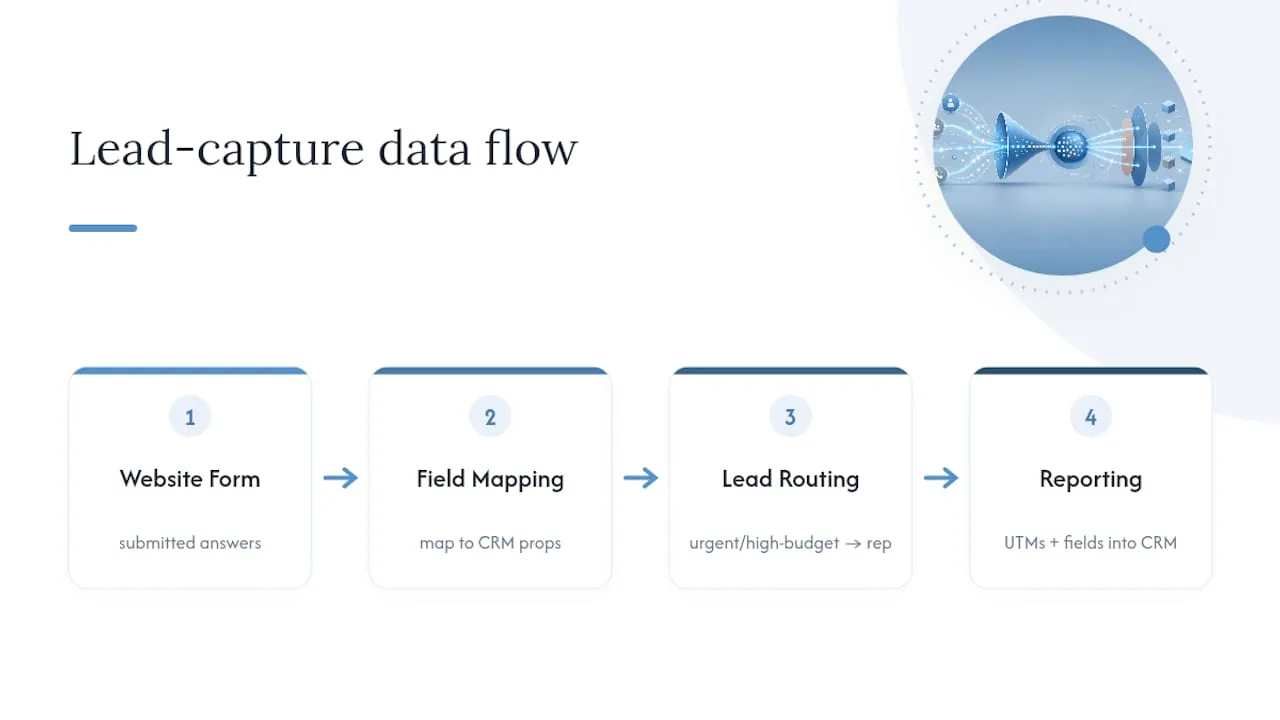
Lead routing rules matter as much as the integration itself. A lead that mentions “urgent” or selects a high-budget range on an intake form should route differently than a general inquiry, ideally to a specific rep or queue within minutes, not whenever someone next checks a shared inbox. Delay is one of the most underrated conversion killers in the entire funnel; a lead who hears back in five minutes behaves very differently from one who waits two days.
Double-check that UTM parameters and form fields pass cleanly into your CRM’s reporting layer. Without that link, you’ll know your visitor-to-lead rate but have no idea which channel actually produced the leads that turned into revenue. That gap is where a lot of marketing budget gets misallocated, not because the channel was wrong, but because the CRM never got the data needed to prove it right.
SEO Practices Built Specifically for Lead Generation Pages
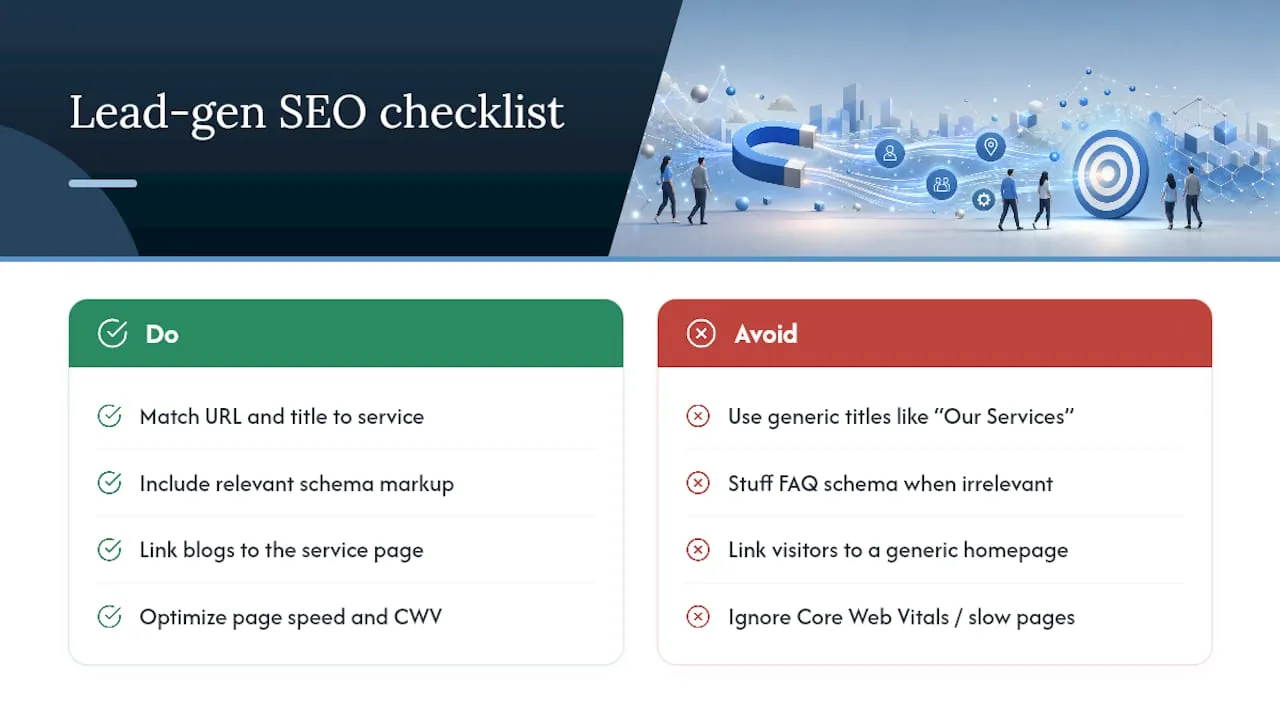
Ranking a lead generation page requires a slightly different approach than ranking a blog post, because the page needs to satisfy both search intent and conversion intent at once. Start with the URL and title tag matching the specific service and, where relevant, the geographic area you serve, since generic titles (“Our Services”) rarely compete against more specific ones.
Structured data matters more here than on informational content. Adding schema markup for services, local business details, or FAQ content (where genuinely relevant, not stuffed in for SEO) helps search engines understand what the page offers and can improve how it appears in results.
Internal linking should point from top-of-funnel content, blog posts, guides, resource pages, toward the specific service or landing page that matches that content’s topic. A visitor reading about “commercial roof maintenance schedules” should land one click away from a roofing service page, not a generic homepage. Keep page speed and Core Web Vitals in check too; Google’s ranking signals and visitor conversion behavior both penalize slow pages, so speed optimization does double duty as an SEO and CRO fix. Professional services firms have found the same pattern holds in fields like legal marketing, where conversion-focused SEO work on law firm websites follows nearly identical principles.
Using Personalization to Improve Lead Quality
Personalization on a lead generation site doesn’t need to mean a complex recommendation engine. The simplest version, dynamic headline text that changes based on the visitor’s traffic source or the search term that brought them in, often produces the biggest lift because it reinforces message match at the exact moment a visitor lands.
Behavioral personalization can go further: showing a returning visitor a different CTA than a first-time one, or surfacing a case study relevant to the industry a visitor’s IP or referral source suggests. None of this requires guessing. It requires tracking the data you likely already have in GA4 and your CRM, then using it to adjust what a specific segment sees.
Form personalization deserves its own mention. Pre-filling known information for a returning visitor, or adjusting which qualifying questions appear based on an earlier answer, reduces friction without lowering the qualification bar. The goal isn’t to make the page feel clever. It’s to make the page feel like it already understands what the visitor needs, which is a subtle but real difference in how trustworthy a form feels to fill out.
Why Qualification Usually Beats Volume for Service Businesses
Most service businesses don’t have a lead volume problem. They have a lead quality problem dressed up as a volume problem. A form that generates 200 submissions a month sounds impressive until sales tells you 180 of them were never a fit. Qualification fields, budget range, timeline, business size, aren’t friction to remove. They’re the mechanism that keeps sales focused on leads worth their time.
Volume matters more only in specific cases: early-stage businesses still validating demand, or businesses selling a low-cost, high-frequency service where the sales cycle doesn’t need much qualification at all. Watch for red flags that your site needs structural work rather than a copy tweak: sales complaining about the same mismatch every week, a bounce rate that spikes specifically on the form step, or a visitor-to-lead rate that looks fine while MQL-to-SQL quietly craters.
- Jeremy
Get a Custom Lead Generation Website Built to Convert
Most agencies hand you a templated site and call it “custom” because they swapped a few colors. Forefront Industries builds fully custom-coded sites from scratch, which means the message match, form logic, and CRM wiring covered throughout this guide get built into the architecture instead of hacked on top of a theme.

The team’s work spans custom web design and development, CRM and email system engineering on platforms like Salesforce Marketing Cloud and Braze, and AI-driven workflow automation for lead routing and lifecycle follow-up, all aimed at service businesses whose current site is quietly leaking qualified leads. If your site’s conversion rate looks fine on paper but your sales team keeps complaining about lead fit, that gap is usually structural, not cosmetic.
The first step doesn’t have to be a full rebuild. Start with a site audit to find the two or three highest-leverage fixes, then decide from there whether a custom build makes sense. Visit Forefront Industries to get that audit started.
Sources
- What Is a Good Conversion Rate for B2B Websites? - Lead Forensics
- What is a good conversion rate for B2B websites? (Lucky Orange summary)
- B2B Website Conversion Rate Optimization: The Playbook