Finance Teams: CRM Implementation Cost From $18,000 to $471,000

Total first-year CRM investment typically runs from moderate to high amounts depending on company size, with average enterprise implementation costs notably higher than for smaller firms, reflecting a significant industry-wide implementation spend. ZoomInfo’s analysis provides detailed figures on these costs. The license fee is just one line on that invoice. Configuration, data migration, integrations, and training usually cost more than the software itself.
TL;DR:
- Implementation costs can range from one to three times the first-year license fee for small businesses, and even higher for mid-market and enterprise levels.
- Integration complexity, data migration, and customization significantly inflate total costs beyond basic license fees, especially in larger deployments.
- A typical CRM project for a mid-market company may cost around $138,000 over four to five months, while an enterprise deployment can reach nearly $471,000 over eight to eleven months.
- Budgeting should include detailed phase-based estimates, with contingency buffers of 10-20 percent, and should be tailored by accurately mapping user roles and data needs.
- Cost-saving strategies include staggering integrations, opting for quick-start packages, cleaning data beforehand, and negotiating multi-year licenses or support agreements.
Table of Contents
- What Drives Crm Implementation Cost By Company Size?
- How Do Licenses, Migration, And Training Break Down On The Invoice?
- What Do Real First-Year CRM Budgets Look Like?
- How Do You Build Your Own CRM Cost Estimate?
- How Can You Lower Your CRM Implementation Cost?
- The Custom Engineering Question: When Off-The-Shelf Stops Winning
- How Forefront Industries Helps You Control CRM Costs From Day One
- Primary Sources And Further Reading
- Sources
What Drives Crm Implementation Cost By Company Size?
License quotes might initially seem simple, but actual project costs depend heavily on configuration needs, data cleanup, and integration complexity, which are not reflected in per-user pricing alone. Company size changes every one of those variables, and it changes the timeline just as much as the price.
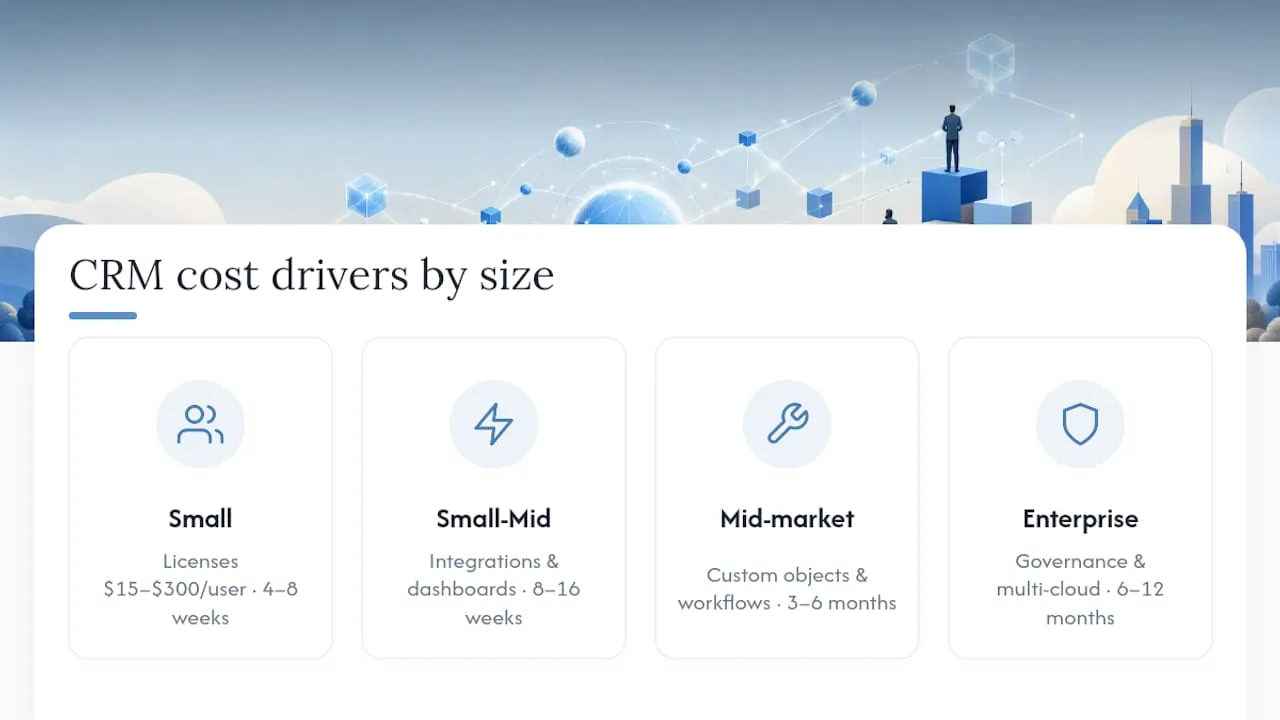
Small business (25 users or fewer). Expect license costs on the low end of the $15 to $300 per user per month range, plus a modest implementation engagement focused on basic pipeline setup, a handful of automation rules, and one or two integrations (usually email and a calendar tool). Most small teams finish in four to eight weeks. Add ons tend to be limited to a support plan and maybe a lead-scoring module.
Small to mid ($25 to $100 users). Costs climb because these companies usually want at least one meaningful integration (accounting software, a helpdesk, or a marketing platform) and custom reporting dashboards. Hidden costs show up here more than anywhere else: unplanned data cleanup, extra sandboxes for testing, and change requests once staff actually start using the system. Timelines stretch to eight to sixteen weeks.
Mid-market (100 to 500 users). This is where custom objects, multi-department workflows, and layered integrations start inflating cost well past the license line. A company running sales, service, and marketing on the same instance needs role-based permissions, approval flows, and often a dedicated integration layer. Three to six months is a realistic build window.
Enterprise (500-plus users). Multi-cloud deployments, formal governance committees, and organization-wide change management dominate the budget. Microsoft’s own configuration documentation illustrates how much setup work sits behind features like approval workflows and automated agents. Enterprise rollouts commonly take six to twelve months and involve parallel workstreams for data, security, and training.
A durable rule of thumb: SMB implementation cost typically runs one to three times the first-year license cost; mid-market and enterprise deployments often see that multiplier climb higher as integration and governance work scale up.
How Do Licenses, Migration, And Training Break Down On The Invoice?
Every CRM budget is really seven separate line items pretending to be one number. Here’s how each one behaves.
Licenses. Per-seat pricing dominates the market, with published rates spanning $15 to $300-plus per user per month depending on tier and feature set. Flat, unlimited-user pricing exists on some platforms and can flip the math entirely for larger teams. To baseline your cost, multiply seat count by monthly rate by twelve, then check whether any users need premium tiers for advanced automation or forecasting.
Implementation and professional services. This is where phase splits matter. A typical distribution looks like:
- Discovery and requirements: 10% to 15% of the services budget
- Configuration and customization: 35% to 50%
- Data migration: 15% to 25%
- Integrations: 15% to 30%
- Testing and training: 5% to 10%
Those percentages come from phase-based implementation guidance and hold up across most mid-size projects. If a vendor’s proposal skips a phase entirely, that’s a scope cut, not a discount.
Data migration. Cost scales with the age of your data, duplicate density, and how much historical activity (calls, emails, notes) needs to move with the records. A clean five-year-old database migrates cheaply. A fifteen-year-old spreadsheet mess with three merged acquisitions does not.

Integrations and middleware. Simple point-to-point connections (email, calendar) often run in the low thousands each. Middleware platforms that connect ERP, billing, and marketing systems carry both a setup fee and a recurring monthly subscription that never shows up on the initial quote.
Training and adoption. Budget by role, not headcount. A sales rep needs different training than an admin. Skimping here is expensive later: poor documentation of discovery and training phases is one of the most common reasons projects need a costly mid-stream rescue.
Statistic Callout: License fees frequently represent only 25% to 45% of total first-year CRM cost once implementation, migration, and training are added in.
Testing, sandboxes, and compliance. Regulated industries add security review and compliance configuration, both of which extend timeline and cost.
Ongoing admin. A managed services retainer or a fractional admin typically costs less in year one than a full-time hire, but a growing enterprise deployment often outgrows that model within eighteen months.
Storage overages and add-on modules. These are the classic invoice surprises. Read the fine print on record storage limits and AI or forecasting add-ons before signing.
Pro Tip: Ask every vendor to itemize their quote by the five phases above before you sign anything. A single lump-sum number is the easiest way to hide scope cuts that surface as change orders three months in.
What Do Real First-Year CRM Budgets Look Like?
Numbers on a page mean more once they’re organized into a project you can hand to a finance team. Here are three realistic first-year scenarios drawn from common implementation patterns.
- Starter SMB (20 users, one integration): licenses around $9,000, implementation services $6,000, migration $1,500, training $1,500. Total near $18,000, delivered in six to eight weeks.
- Mid-market (150 users, three integrations, custom objects): licenses around $54,000, implementation services $45,000, migration $12,000, integrations $18,000, training $9,000. Total near $138,000, delivered in four to five months.
- Enterprise (800 users, multi-cloud, governance program): licenses around $216,000, implementation services $130,000, migration $40,000, integrations $60,000, training $25,000. Total near $471,000, delivered in eight to eleven months.
| Scenario | License Cost | Implementation Services | Migration | Integrations | Training | Estimated Total |
|---|---|---|---|---|---|---|
| Starter SMB | $9,000 | $6,000 | $1,500 | Included | $1,500 | ~$18,000 |
| Mid-market | $54,000 | $45,000 | $12,000 | $18,000 | $9,000 | ~$138,000 |
| Enterprise | $216,000 | $130,000 | $40,000 | $60,000 | $25,000 | ~$471,000 |
These figures land inside the ranges documented across implementation guides for similarly sized deployments. Every added integration typically adds several thousand dollars in setup plus a recurring middleware fee; every custom object or approval workflow adds configuration hours on top of the base implementation percentage.
How Do You Build Your Own CRM Cost Estimate?
A defensible budget starts with inputs, not vendor promises. Work through this sequence before you request a single quote.
- Run a discovery checklist. List every department that touches the CRM, the systems it must talk to, and how messy your current data actually is. Be honest about duplicate records and dead fields.
- Map users to license types. Not every seat needs the same tier. Sales reps might need forecasting; support staff might need only case management. Multiply seats by rate to get your license baseline.
- Apply phase multipliers. Take your license baseline and apply the one-to-three multiplier for SMB, or a higher multiple for mid-market and enterprise, to estimate the implementation services line.
- Add a contingency buffer. Ten to twenty percent on top of your total is standard for change orders, scope adjustments, and the inevitable “one more integration” request that surfaces mid-project.
- Sanity check against your scenario bracket. Compare your total against the starter, mid-market, or enterprise ranges above to see if you’re in a reasonable band.
Worksheet example: 60 users at $80 per month = $57,600 annual license.
Pro Tip: Build your contingency buffer into the initial proposal request, not as an afterthought. Vendors price differently when they know a change-order budget already exists.
How Can You Lower Your CRM Implementation Cost?
Every dollar you save here comes from scoping decisions made before the contract is signed, not from haggling after the fact.
- Mix seat types instead of buying the premium tier for every user; most teams only need advanced features for a subset of staff.
- Phase your integrations, and defer anything that doesn’t touch revenue or support in year one.
- Use a vendor quick-start or partner accelerator for repeatable, well-documented workflows. Fixed-scope quick-start packages often run $2,500 to $15,000 and cut both cost and timeline for standard use cases.
- Clean your data before migration begins. Duplicate and dead records inflate migration hours more than almost anything else.
- Weigh managed services against an in-house admin using a three-to-five-year view, not a year-one snapshot. Recurring costs, not the initial build, usually decide which option wins long term.
- Negotiate multi-year license commitments, block pricing on services hours, and clear support SLAs before signing.
Pro Tip: Quick-start packages trade customization for speed, which makes them a strong fit when time-to-value matters more than a fully bespoke workflow.
The Custom Engineering Question: When Off-The-Shelf Stops Winning
Most CRM cost guides treat per-seat licensing as the default and custom engineering as the expensive exception. That framing breaks down once you factor in a multi-year view. A growing service business paying premium per-seat rates across fifty reps, plus recurring middleware fees for three bolted-on integrations, often spends more over three years than it would on a custom-built system designed once for its actual workflows.
Custom engineering tends to win when your integrations are numerous, your lead routing logic is genuinely unique, or your growth trajectory means seat count will double within eighteen months. Forefront Industries approaches these builds the way enterprise teams do, scoping discovery tightly up front to avoid the mid-project change orders that inflate off-the-shelf projects. Before hiring any partner, ask for references, a clear delivery model, defined SLAs, and specifics on post-launch support. A vendor who can’t answer those four questions plainly is a cost risk, not a bargain.
- Jeremy
How Forefront Industries Helps You Control CRM Costs From Day One
Forefront Industries builds enterprise-grade CRM and email systems on platforms like Salesforce Marketing Cloud and Braze, the same kind of infrastructure used for brands including Ring, Blink, and Audible during in-house enterprise work at Amazon, scoped for service businesses that need results without enterprise overhead.
A discovery engagement with Forefront Industries starts with the same checklist outlined above: stakeholder mapping, integration inventory, and a data health review, delivered as a documented scope before any code gets written. That upfront discipline is what keeps custom builds competitive with, and often cheaper than, stacking per-seat licenses and middleware fees over a multi-year horizon. If you’re weighing a rebuild against another round of vendor sticker shock, explore Forefront Industries’ services and book a scoping call to see a defensible estimate built around your actual workflows, not a generic tier chart.
Primary Sources And Further Reading
- ZoomInfo: CRM implementation cost analysis
- Insightly: CRM implementation cost breakdown
- Codleo: Salesforce implementation cost guide
- Ecosire: CRM system cost guide
- G2: CRM category for vendor research
Sources
- CRM Implementations Cost An Estimated $4.6 Billion Annually, New Analysis Says - ZoomInfo
- CRM implementation costs: How much does a CRM cost? - Insightly
- Salesforce Implementation Cost in 2026: Real Numbers, No Guesswork - Codleo
- How Much Does a CRM System Cost in 2026? Real Pricing, Not List Prices - Ecosire