Business Workflow Automation: 4 Categories for Compliance and Scale

Business workflow automation is the practice of connecting tasks, systems, and approvals into a repeatable process that runs with minimal manual intervention. The right approach depends on complexity and risk: no-code/low-code platforms handle straightforward, team-level tasks; BPMN orchestration governs multi-system processes needing audit trails and human checkpoints; durable orchestration frameworks serve data and ML pipelines that must self-heal. Match the category to your process before you shop tools.
TL;DR:
- For long-running or complex workflows involving multiple systems and human approval, BPMN orchestration is necessary for reliable state management and auditability.
- No-code and low-code platforms suit simple, single-department tasks without extensive decision logic or compliance requirements, offering quick deployment.
- Data and ML pipelines require durable, self-healing frameworks like Prefect or Airflow that manage retries and recoveries during failures over extended periods.
- When automating processes touching sensitive data or requiring compliance, platforms must support detailed logging, role-based access, and change tracking for audit readiness.
Table of Contents
- What Is Business Workflow Automation, Really?
- Which Automation Category Fits Your Process?
- What Should You Require Before You Buy?
- Where Should You Automate First? A Department-by-Department Look
- How Do You Roll Out Automation Without Breaking Everything?
- What Controls Do Mission-Critical Automations Need?
- How Do You Prove Automation Is Actually Working?
- Forefront Industries in Practice
- Your First 30, 90, and 180 Days
- Agentic AI or Deterministic Workflows: Where Should You Bet First?
- Ready to Build a Workflow That Actually Holds Up?
- Sources
What Is Business Workflow Automation, Really?
Vendors throw around “workflow automation,” “BPM,” “RPA,” and “orchestration” as if they’re interchangeable. They’re not, and confusing them leads teams to buy the wrong tool for the job.
Workflow automation is the umbrella term: any system that moves work from step to step without a person manually triggering each stage. Business process management (BPM) is the discipline of modeling, measuring, and improving those workflows over time, typically using a formal notation. Robotic process automation (RPA) is narrower. It automates specific, repetitive actions, often by mimicking clicks and keystrokes inside existing software, rather than redesigning the underlying process. Orchestration sits above all three. It coordinates multiple systems, services, and even other automations into one governed sequence, keeping track of state across steps that might run for minutes, hours, or days.
The notation that matters most here is BPMN 2.0, the Business Process Model and Notation standard. BPMN gives you a visual, executable model of a process, one that both the people who design it and the systems that run it can read the same way. Platforms like UiPath Maestro use BPMN 2.0 to coordinate AI agents, robots, and human tasks inside a single process model, with built in pause, resume, and version controls. That matters because a process diagram that only exists in a slide deck is decoration. A process diagram that the orchestration engine actually executes is infrastructure.
Why does this distinction matter for a real business? Because the moment your process crosses three thresholds, the tool category you need changes:
- Long-running state. If a workflow spans days or involves waiting for a signature, a payment, or a third-party response, you need a system that can hold state reliably, not a script that assumes everything finishes in one session.
- Human judgment. Approval steps, exception handling, and escalations require a workflow engine that can pause for a person, route to the right role, and resume exactly where it left off.
- Auditability. Regulated industries, finance teams, and anyone answering to a compliance officer need a record of who did what, when, and under which version of the process.
A drag-and-drop automation that fires off an email when a form is submitted doesn’t need any of that. A loan approval process that touches four systems, waits on two human sign-offs, and must survive a system outage without losing its place absolutely does. According to UiPath’s own product framing, no-code drag-and-drop tools handle lightweight tasks well but tend to break down on complex multi-step orchestration requiring detailed audit trails or nuanced human judgment. That’s not a knock on no-code platforms. It’s a boundary condition every buyer should know before committing budget.
Orchestration also matters for data and ML workloads, which behave differently from business-approval workflows but share the same underlying need: durability. Frameworks such as Prefect build state management, automatic retries, and observability directly into the execution engine, so a pipeline that fails at 2 a.m. can recover without a human getting paged. That’s a different flavor of orchestration than BPMN, built for data engineers rather than business analysts, but it solves the same category of problem: keeping a multi-step process alive and trustworthy over time.
The practical takeaway: before you evaluate a single vendor, name your process’s actual requirements. Is it short and linear, or long and branching? Does a human need to approve anything? Will an auditor ever ask to see a history of what happened? Those three questions determine which of the following categories you should even be shopping in.
Which Automation Category Fits Your Process?
Once you know your process’s complexity and risk profile, the market sorts into four practical categories. Here’s how to think through each one.
- No-code and low-code integration platforms. These connect apps and trigger actions through visual builders, no programming required. Microsoft Power Automate is the clearest enterprise example, combining low-code flows, RPA for desktop tasks, and process mining, with connectors that reach across Microsoft 365 and beyond. Team-level tools like Asana extend this further, letting non-technical staff template and automate repeatable sequences such as approval routing and task handoffs. Best fit: single-department workflows, form-to-task automations, and anything a business analyst should be able to build without engineering support.
- BPMN orchestration engines. These model an entire business process, not just a single automation, using the BPMN 2.0 standard. They coordinate people, robots, and AI agents inside one executable diagram, with pause, resume, and rollback controls built in. This is the category for processes that cross departments, require sign-offs, and need a defensible audit trail. Best fit: finance approvals, compliance-heavy operations, and any workflow where “show me exactly what happened on March 3rd” is a question you’ll eventually have to answer.
- RPA and desktop automation. RPA bots replicate human interactions with existing software, clicking buttons and copying fields the way a person would. It’s the fastest way to automate a legacy system that has no modern API, but it’s also the most fragile category: a UI redesign on the target application can break the bot overnight. Best fit: bridging old, inflexible software until it can be replaced or properly integrated.
- Developer-first orchestration frameworks. Tools like Apache Airflow and Prefect are code-native, built for engineers who need full control over retries, scheduling, and monitoring. They shine in data engineering, ETL, and machine learning pipelines where reliability matters more than visual friendliness. Best fit: technical teams automating infrastructure or data movement rather than business approvals.
The tradeoffs run in a predictable direction. No-code platforms win on speed of deployment and are usable by non-technical staff, but they sacrifice fine-grained control and often struggle with genuinely complex branching logic. BPMN engines cost more setup time upfront but deliver the auditability and governance that regulated processes demand. Developer-first frameworks give engineers maximum control and resilience, at the cost of requiring actual coding skill to build and maintain.
Use three signals to narrow your decision. First, complexity: how many systems and decision branches does the process actually touch? Second, human judgment: does someone need to approve, review, or override a step, and does that decision need to be logged? Third, compliance and scale: will this process be audited, and will it need to run thousands of times a day without degrading? A process that scores low on all three probably belongs in a no-code tool. A process that scores high on any one of them probably doesn’t.
What Should You Require Before You Buy?
A polished demo tells you almost nothing about how a platform behaves under real operational stress. Score every candidate against the same checklist, and don’t let a slick interface substitute for a missing capability.
- Integrations and extensibility. Does it connect natively to your CRM, ERP, and communication tools, or will you be building custom connectors from day one? Power Automate’s breadth of connectors across Microsoft 365 and enterprise systems is a useful benchmark for what “broad” actually looks like.
- Durability. Can the platform hold state across a multi-day process, retry a failed step automatically, and resume exactly where it stopped? Durable orchestration frameworks bake retries and state tracking into the engine itself, which reduces the operational toil of babysitting cron jobs and custom monitoring scripts.
- Observability. Can you see, in real time, where every running instance of a process currently sits, and get alerted the moment one stalls?
- Governance. Does it log every action with a timestamp and user ID, support versioning so you can roll back a bad process change, and enforce role-based access so only the right people can approve or modify steps?
- AI and document processing. If the platform claims AI features, ask specifically what they do: extracting fields from a PDF is a mature, reliable capability; open-ended agentic decision-making on unstructured data is still an evolving one, and it deserves more scrutiny before you trust it with anything regulated.
Durability deserves special attention because it’s the capability buyers most often discover too late. A process that works perfectly in a demo, where every API call succeeds instantly, behaves very differently in production when a third-party system times out at 3 a.m. Platforms across Power Automate, Airflow, and Prefect all address this through auto-retry logic and explicit error handling, which is precisely why they show up repeatedly in mission-critical deployments rather than one-off demos.
Pro Tip: Ask any vendor to show you what happens when a step fails mid-process, not just what happens when everything works. Their answer to failure tells you more about the platform than their answer to success ever will.
Where Should You Automate First? A Department-by-Department Look
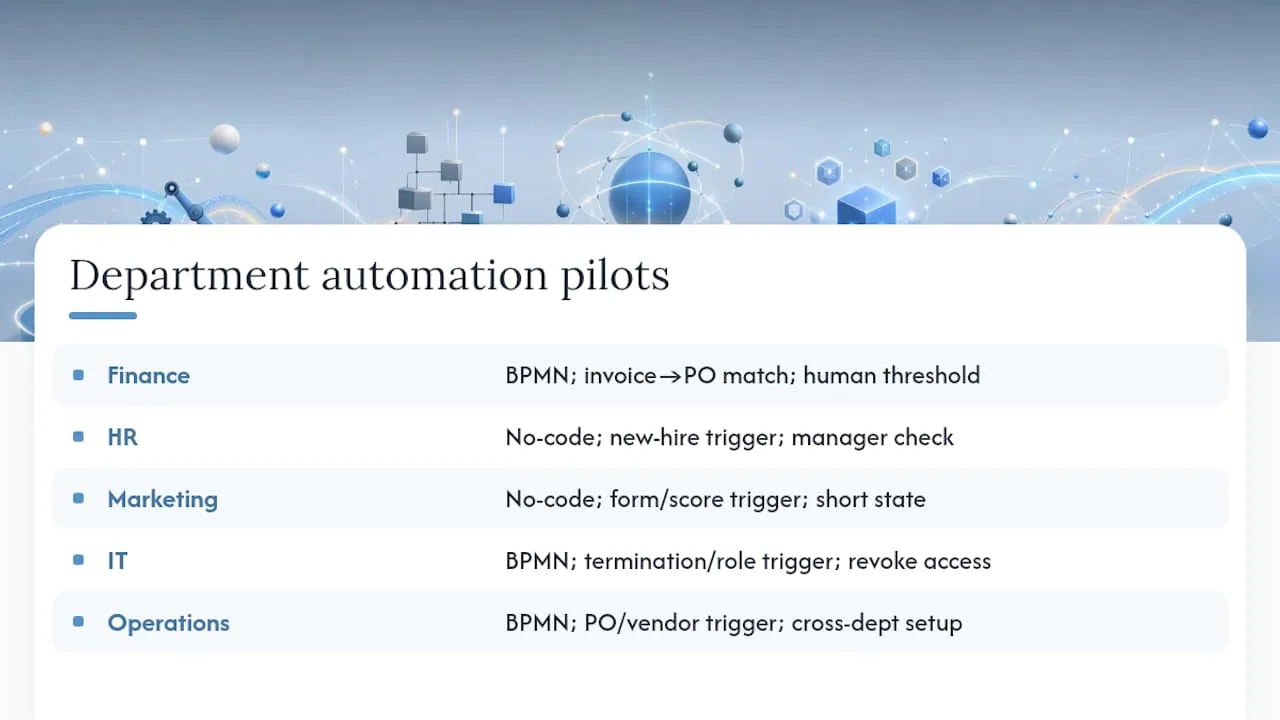
Abstract categories become useful the moment you attach them to a real process in your own building. Here’s how the categories above translate into department-level pilots.
Finance. Invoice approval routing is the classic starting point: an invoice arrives, gets matched against a purchase order, and routes to the right approver based on dollar amount. The automation boundary usually stops at the approval decision itself, since a human still signs off on anything above a threshold. This is squarely BPMN orchestration territory once multiple approval tiers and audit requirements enter the picture. Expect a conservative reduction in manual matching time and fewer missed approval deadlines, not a headline-grabbing overnight transformation.
HR. Employee onboarding, spanning IT provisioning, benefits enrollment, and document collection, is a natural no-code candidate when it stays within one or two systems. Trigger: a new hire is added to the HR system. Steps: generate accounts, send benefits forms, schedule orientation. The boundary is usually the final manager check-in, which stays human. Expect faster provisioning and fewer dropped onboarding tasks.
Marketing. Lead routing and nurture sequencing, triggered by a form fill or a lead score crossing a threshold, is well suited to no-code integration platforms since it rarely requires long-running state or heavy audit trails. Expect faster lead response times and more consistent follow-up, which tends to show up as improved lead quality over time.
IT. Access request and offboarding workflows benefit from BPMN-style orchestration because they involve multiple systems, require an approval step, and absolutely need an audit trail for security reviews. Trigger: a termination or role change event. Steps: revoke access across systems, notify managers, log the change. Expect fewer orphaned accounts and a cleaner security audit.
Operations. Purchase order and vendor onboarding workflows, which span procurement, finance, and sometimes legal, are a good fit for BPMN orchestration once more than two departments are involved. Expect shorter vendor setup times and fewer stalled orders sitting in someone’s inbox.
Across every department, the pattern holds: single-system, low-judgment tasks fit no-code tools, while anything crossing departments or requiring sign-off belongs in a governed orchestration layer.
How Do You Roll Out Automation Without Breaking Everything?
A pilot that works in isolation and then collapses at scale is the most common automation failure story, and it’s almost always a planning problem, not a technology problem.
- Discovery (weeks 1 to 3). Inventory the processes actually eating your team’s time. Interview the people doing the work, not just their managers, since the gap between the documented process and the real one is often where the automation opportunity hides. Capturing this “tribal knowledge” in a visual process model early on pays off later, because it standardizes a process that previously lived only in one person’s head.
- Design (weeks 3 to 6). Map the chosen process end to end, define the automation boundary explicitly, and decide who owns exceptions. Build a simple RACI: who’s Responsible for the build, Accountable for the outcome, Consulted on edge cases, and Informed of changes.
- Pilot (weeks 6 to 10). Pick one process, not five. A good pilot is high-frequency enough to generate real data quickly but low-risk enough that a mistake doesn’t damage a customer relationship. Success metrics should be set before the pilot starts, not after.
- Scale (months 3 to 6 and beyond). Once the pilot proves out, expand to adjacent processes, formalize governance, and connect automation metrics into your existing analytics stack.
Two pitfalls show up in nearly every automation program that stalls. Shadow automations, meaning tools individual employees quietly build outside any governance process, create invisible dependencies that break the moment that employee leaves or a connected system changes. Brittle integrations, especially RPA bots pointed at software with no stable API, tend to fail silently until someone notices the process just stopped running. Mitigate both by requiring every automation, regardless of who builds it, to go through the same lightweight design and ownership review.
Pro Tip: Size your first pilot to run at least fifty times before you evaluate it. A handful of executions won’t surface the edge cases that actually determine whether the automation is production-ready.
What Controls Do Mission-Critical Automations Need?
Any automation touching money, personal data, or regulated decisions needs a specific set of controls, and skipping them isn’t a shortcut, it’s a liability waiting to surface during an audit.
- Audit trails and version control. Every process change and every execution needs a timestamped record. If a process is modified, the platform should retain the prior version so you can prove what ran on any given date.
- Rollback capability. When a process change causes unexpected behavior, you need the ability to revert to the last known good version without rebuilding it from scratch.
- Role-based access and separation of duties. The person who builds an approval workflow shouldn’t be the same person who can approve requests inside it. Enforce this at the platform level, not through an honor system.
- Data encryption and residency. Confirm where data is stored and processed, particularly for any workflow touching customer or employee records subject to regional privacy rules.
- Error handling and SLAs. Define what happens when a step fails: does it retry, escalate to a human, or halt the process entirely? Document the expected response time for each failure type.
- Incident processes. When something breaks in production, someone needs a clear playbook for diagnosing, communicating, and fixing it, not an improvised scramble.
BPMN-based orchestration platforms build much of this in natively. UiPath Maestro, for instance, permits pausing and rewinding a running process along with SLA-aware exception handling, which gives compliance teams something concrete to point to during a review rather than a verbal assurance that “the system logs everything.”
How Do You Prove Automation Is Actually Working?
Automation projects die in year two when nobody can show the number that justified the investment in year one. Set your metrics before the pilot starts, or you’ll be reconstructing a baseline from memory later.
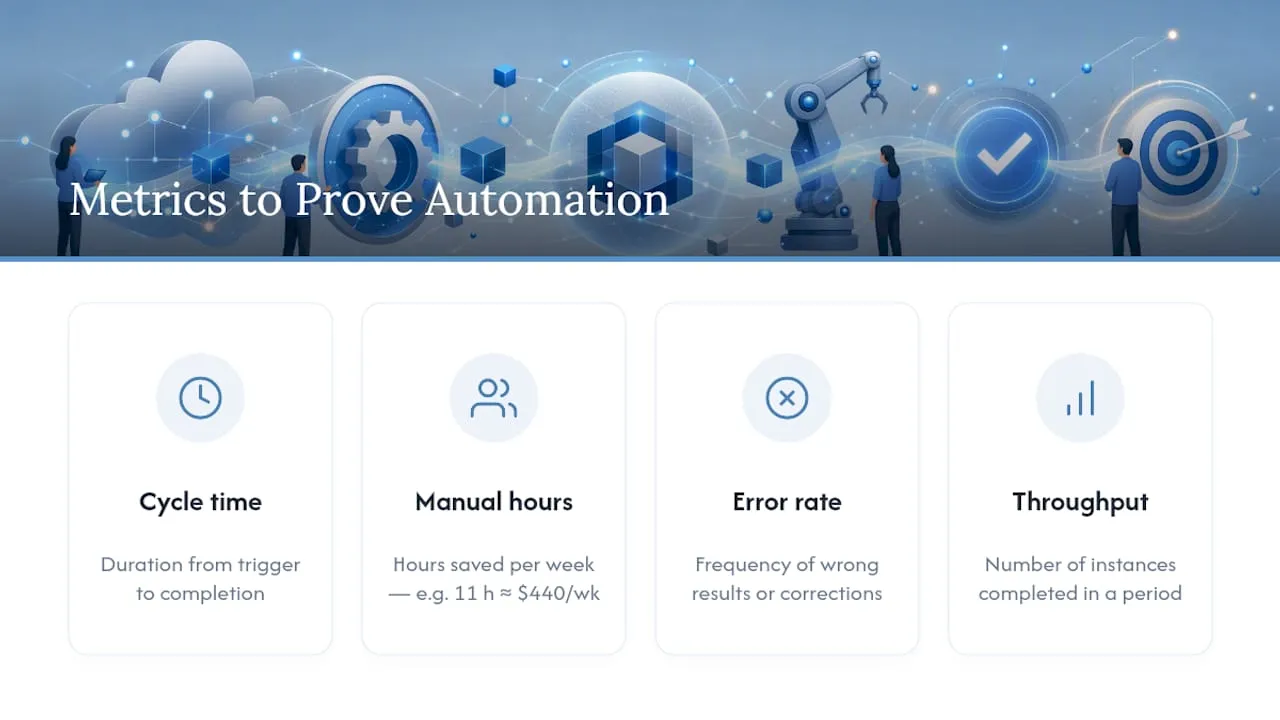
Track four numbers consistently: cycle time (how long the full process takes from trigger to completion), manual hours saved per week, error rate (how often the process produces a wrong result or requires human correction), and throughput (how many instances the process completes in a given period). Measure all four for at least two to four weeks before automating anything, so your “after” numbers have a real “before” to compare against.
Here’s a conservative illustration of how the math might work for a mid-sized approval process, using assumptions rather than a claimed result:
If a fully burdened hourly rate for the staff involved is $40, saving 11 hours a week works out to roughly $440 a week, or around $22,880 annualized, before accounting for the cost of the platform and implementation. That’s a deliberately conservative example, built on assumed inputs, not a guarantee. Run the same math with your own labor costs and error-correction time, and treat the first pilot’s real numbers, not the projection, as the figure you bring back to leadership.
Forefront Industries in Practice
Forefront Industries builds custom automation infrastructure for service businesses that have outgrown template tools and off-the-shelf connectors. That work spans custom-coded web platforms, enterprise-grade CRM and email engineering on Salesforce Marketing Cloud and Braze, and AI-driven workflow automation built around each client’s actual systems rather than a generic template.
The team’s background includes enterprise CRM and lifecycle marketing work for organizations like Amazon and Verizon, which shapes how engagements get structured: process discovery first, then a scoped build, then measured results. [Detailed case studies covering specific client engagements are in development and will be published separately.]
A typical engagement starts with a discovery call to map current systems and bottlenecks, moves into a scoped proposal defining the automation boundary and timeline, and proceeds through build and testing before handoff. Forefront also maintains regional project pages, including examples of automation work delivered for businesses in Miami, West Palm Beach, and Delray Beach, for readers who want a sense of the kind of work involved before requesting a quote.
Your First 30, 90, and 180 Days
Momentum matters more than perfection in the early stages of an automation program. Here’s a sequence that keeps you moving without skipping the groundwork.
- Days 1 to 30: Inventory and select. List every recurring process consuming significant staff time. Interview the people actually doing the work. Pick exactly one pilot process, ideally one that’s frequent, moderately painful, and low-risk if something goes wrong. Identify the stakeholders who own the process and who’ll need to approve the automated version.
- Days 30 to 90: Pilot and measure. Build and launch the pilot. Collect the four core KPIs, cycle time, manual hours saved, error rate, and throughput, from week one. Iterate weekly based on what actually breaks, not what you assumed would break.
- Days 90 to 180: Scale and govern. Once the pilot’s numbers hold up over a full quarter, expand to two or three adjacent processes. Formalize your governance checklist, so every new automation goes through the same review. Connect your automation metrics into whatever analytics or BI tool your leadership already trusts, so the results don’t live in a spreadsheet only you can see.
Each phase builds on proof from the last one. Skipping the measurement step in days 30 to 90 is the single most common reason automation programs lose executive support by month six.
Agentic AI or Deterministic Workflows: Where Should You Bet First?
Every vendor pitch right now leans hard on agentic AI, the idea that an autonomous agent can figure out the right sequence of steps on its own. That’s genuinely useful for low-stakes, exploratory tasks: drafting a first-pass response, summarizing a document, triaging a support ticket. It’s a poor fit for anything where a wrong decision has real financial or compliance consequences.
Deterministic BPMN orchestration remains necessary precisely because it’s boring in the right way. It executes the same steps the same way every time, logs everything, and lets a human intervene at a defined checkpoint. AI hype tends to treat that predictability as old-fashioned. It isn’t. It’s the difference between an automation you can defend to an auditor and one you can only explain in hindsight.
The practical prioritization: pilot agentic automation on low-risk, reversible tasks where a mistake costs you a few minutes, not a customer or a compliance finding. Reserve governed BPMN orchestration for anything touching money, personal data, or regulatory obligations. Chasing the newer technology everywhere is how teams end up automating the wrong risk.
- Jeremy
Ready to Build a Workflow That Actually Holds Up?
If the categories above told you anything, it’s that most off-the-shelf platforms force a tradeoff between ease of setup and the governance a growing business actually needs. Forefront Industries skips that tradeoff by building the automation around your specific systems instead of bending your process to fit a generic template.

That means custom-coded integrations between your CRM, your lead intake, and your internal tools, engineered by a team with enterprise CRM and lifecycle marketing experience on platforms used by companies like Amazon and Verizon. Whether the priority is a custom-built website that actually converts, a CRM and email system that routes leads correctly the first time, or an AI automation layer connecting the two, the engagement starts the same way: a scoped review of what’s currently costing you leads or hours, followed by a fixed proposal rather than an open-ended retainer. [Additional client case studies and detailed project outcomes are being compiled and will be added as they become available.]
If your current systems are quietly losing leads or burning staff hours on manual handoffs, request a quote through Forefront Industries’ custom web development page and get a scoped plan back before you commit to anything.