Website Security Hardening for Site Owners: A Priority Checklist

The five highest-impact actions to apply first are: enforce HTTPS sitewide with HSTS, require MFA or passkeys for every admin account, patch known vulnerabilities immediately, deploy a WAF with DDoS protection and rate limiting, and set a baseline Content Security Policy plus core security headers. Everything else in a hardening program builds on top of those five.
Apply in order:
- 0 to 48 hours: Force HTTPS/HSTS, enable MFA on all admin logins, patch any critical CVEs.
- 3 to 14 days: Deploy or tune your WAF, add CSP and security headers, review cookie flags and session settings.
- Longer term: DNS hardening, dependency scanning, backup verification, and scheduled penetration testing.
These five measures work because they close the attack paths that automated scanners and bots exploit within minutes of a site going live, not the sophisticated, targeted attacks most site owners worry about. CISA’s defense-in-depth guidance treats configuration hygiene, access control, and patching as the baseline layer beneath everything else, and both OWASP and MDN frame the same five categories as the floor, not the ceiling, of a serious hardening effort.
Pro Tip: Don’t try to do all five simultaneously on a production site. Stage TLS and WAF changes on a subdomain or maintenance window first. Firewall and certificate mistakes are the most common cause of self-inflicted downtime during hardening work.
Key Takeaways
Website security hardening works best as a prioritized, layered process, not a single audit, with HTTPS/HSTS, MFA, patching, WAF/DDoS protection, and CSP forming the non-negotiable foundation.
| Point | Details |
|---|---|
| Apply the top five first | Enforce HTTPS/HSTS, MFA for admins, critical patches, WAF/DDoS, and CSP before tuning anything else. |
| Layer your defenses | Cover network, transport, application, infrastructure, third-party, and recovery, since no single control catches everything. |
| Test on a real cadence | Run automated scans weekly, dependency scans monthly, authenticated scans quarterly, and penetration tests annually. |
| Stage risky changes | Firewall, SSH, and TLS changes need a tested rollback window before touching production. |
| Forefront Industries builds it in | Forefront Industries folds hardening and ongoing maintenance into custom-coded builds rather than retrofitting security after launch. |
Table of Contents
- Why Website Security Hardening Matters
- The Core Website Security Hardening Checklist
- How Do You Harden WordPress Specifically?
- How Do You Test and Validate Your Hardening Work?
- What Does Hardening Cost and How Long Does It Take?
- How Forefront Industries Approaches Website Security Hardening
- Website Hardening Done Right, and What Gets Overrated
- Get Website Security Hardening Built In, Not Bolted On
- Where to Go for Deeper Website Security Hardening Guidance
- Frequently Asked Questions
- Sources
Why Website Security Hardening Matters
Weak hardening doesn’t just create theoretical risk. It creates specific, exploitable gaps that attackers scan for automatically, around the clock, without knowing or caring who you are. A site with no rate limiting gets hit by credential-stuffing bots. A site with permissive CSP or missing output encoding gets hit by cross-site scripting (XSS). A site with unparameterized database queries gets hit by SQL injection (SQLi). Cross-site request forgery (CSRF) exploits the trust a browser places in an authenticated session, and denial-of-service (DoS) traffic simply tries to knock the site offline.
The CIA triad, confidentiality, integrity, and availability, gives you a simple lens for prioritizing fixes: does this gap expose data, let someone tamper with it, or take the site down? Defense-in-depth means no single control carries the whole burden. If your WAF misses something, your input validation should catch it. If a plugin gets compromised, file permissions and secrets management limit the blast radius.
Hardening reduces three business risks in particular:
- Data leakage from injection flaws or exposed credentials.
- Downtime from DDoS traffic or unpatched exploits.
- Account takeover from weak authentication or session handling.
Each of those has a direct revenue and trust cost, which is why CISA’s advisories treat access control and patching cadence as operational, not optional.
The Core Website Security Hardening Checklist
Website security hardening works across six layers: network, transport, application, infrastructure, third-party content, and recovery. Each layer needs its own configuration, and skipping one undermines the others.
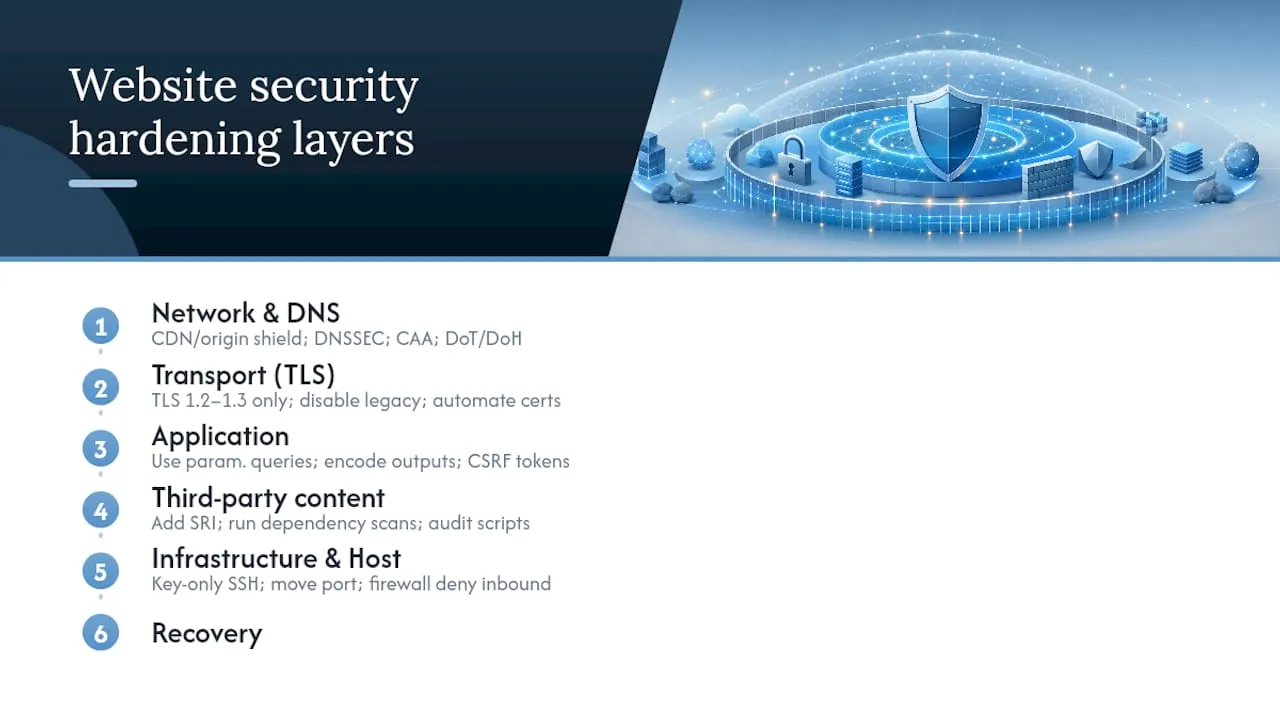
1. Network and DNS. Put your site behind a CDN or origin shield so the real server IP stays hidden from direct probing. Enable DNSSEC to prevent DNS spoofing, and add CAA records to your DNS zone so only your chosen certificate authorities can issue certificates for your domain. If you’re evaluating DNS providers, confirm they support DNS-over-TLS (DoT) or DNS-over-HTTPS (DoH) for resolver privacy, and consider moving DNS off your hosting provider entirely if it doesn’t support these.
2. Transport (TLS). Support only TLS 1.2 and TLS 1.3, and disable legacy ciphers and protocols like TLS 1.0/1.1 and SSLv3 outright. Automate certificate renewal (Let’s Encrypt with certbot or your host’s built-in automation) so expired certificates never become an outage. Once HTTPS is stable sitewide, add HSTS:
Strict-Transport-Security: max-age=63072000; includeSubDomains; preload
The preload directive is powerful but permanent for months across browsers. Don’t add it until you’re certain every subdomain supports HTTPS, since removal from the preload list is slow and painful.
3. Application-layer controls. Use parameterized queries or an ORM, never string-concatenated SQL, to eliminate SQLi. Encode all output based on context (HTML, JavaScript, URL) to block XSS. Add CSRF tokens to every state-changing form. On cookies, set:
Set-Cookie: session=abc123; Secure; HttpOnly; SameSite=Strict
HttpOnly blocks JavaScript access to the cookie, Secure forces HTTPS-only transmission, and SameSite=Strict closes most CSRF vectors outright. MDN’s application security guidance treats input validation and output encoding as inseparable, since validating input alone won’t stop a stored XSS payload from executing later.
4. Security headers and CSP. A conservative starter policy looks like this:
Content-Security-Policy: default-src 'self'; script-src 'self'; object-src 'none'; frame-ancestors 'self'
X-Content-Type-Options: nosniff
Referrer-Policy: strict-origin-when-cross-origin
Permissions-Policy: geolocation=(), camera=(), microphone=()
Skip X-Frame-Options if you’re already using frame-ancestors in your CSP. Both do the same job, and CSP is the modern standard. Roll out CSP in Content-Security-Policy-Report-Only mode first so you can see what would break before you enforce it.
5. Third-party content and supply chain. Every external script you load is code you didn’t write running with your site’s trust. Add Subresource Integrity (SRI) hashes to any script pulled from a CDN:
<script src="https://cdn.example.com/lib.js" integrity="sha384-oqVuAf..." crossorigin="anonymous"></script>
SRI prevents a tampered or compromised CDN file from executing on your site, and it’s one of the most commonly skipped controls in this entire checklist. Run dependency scanning (npm audit, Dependabot, Snyk) on a schedule, and audit every third-party script and tracking pixel for what data it can actually see.
6. Infrastructure and host. Disable password-based SSH login in favor of key-based auth, and move SSH off port 22 if your host allows it. Set a firewall baseline with UFW or iptables that denies inbound traffic by default and allows only the ports you actually need. File permissions matter more than most site owners assume: web-writable directories should never be executable, and config files holding secrets should be readable only by the application user, not world-readable. Store API keys and credentials in a secrets manager or environment variables, never committed to a repository. Operator-safe hardening references for SSH, TLS, and firewall baselines exist specifically because these changes carry real lockout risk if applied carelessly.
7. Perimeter defenses. A WAF filters malicious request patterns before they reach your application, and pairing it with rate limiting stops brute-force login attempts and scraping bots cold. Cloudflare’s checklist treats DDoS mitigation, bot management, and origin IP protection as inseparable, since a WAF is far less useful if attackers can bypass it by hitting your origin server directly.

8. Operational controls. Set a patching cadence, weekly at minimum for anything flagged critical, and pair it with automated vulnerability scanning and centralized log aggregation so you notice anomalies before they become incidents.
9. Recovery and resilience. Back up your database and files on a schedule that matches how much data loss you can tolerate, and verify at least one backup offline, disconnected from production credentials, every quarter. A backup that only exists on the same compromised server is not a backup.
A single misconfigured firewall rule or an SSH change applied without a fallback session can lock you out of your own server faster than any attacker could. Hardening changes at the infrastructure level carry real operational risk, which is why every change to SSH, firewall rules, or TLS configuration needs a tested rollback path before it touches production.
Pro Tip: Stage every risky change (firewall rules, SSH config, TLS settings) on a secondary session or a non-production clone first. Keep a second terminal window open with root access while you test the new configuration, so you can revert instantly if something breaks.
How Do You Harden WordPress Specifically?
WordPress runs a large share of the web, which makes it a constant target, and most WordPress compromises trace back to outdated plugins, not the core software itself. The fix isn’t complicated, but it does require discipline.
- Keep core, themes, and plugins updated, and remove anything you’re not actively using rather than just deactivating it.
- Enforce MFA or passkeys on every account with admin or editor access, and scope permissions with least privilege instead of giving every contributor full admin rights.
- Set
wp-config.phppermissions to 440 or 400, disable the built-in file editor withdefine('DISALLOW_FILE_EDIT', true);, and rotate your secret keys and salts if you inherited a site from a previous developer. - Vet plugins before installing: check the last update date, active install count, and support forum activity. A plugin untouched for two years is a liability regardless of its feature set.
- Run automated scanning against your WordPress install regularly, and sandbox any plugin that requests broad file or database access before deploying it to production.
Managed WordPress hosting handles a meaningful slice of this automatically, patching, WAF rules, and malware scanning included, but it trades away some configuration control. Self-hosted setups give you full control but put the entire burden of patching cadence and monitoring back on you. If you’re running a business-critical site on WordPress without a managed security layer, that gap is worth closing before anything else on this list. The WordPress hardening handbook maps closely to the general checklist above, just applied to WordPress-specific file paths and configuration constants.
Pro Tip: Set a recurring calendar reminder to audit your plugin list quarterly. Plugins accumulate on WordPress sites the way junk drawers accumulate in kitchens, and every unused one is still a potential entry point.
How Do You Test and Validate Your Hardening Work?
Applying a checklist means nothing if you can’t confirm it worked. Testing follows a clear progression:
- Run an unauthenticated automated scan first to catch surface-level issues (missing headers, exposed files, outdated software fingerprints).
- Follow with an authenticated scan using OWASP ZAP or a comparable tool, logged in as a real user, to catch issues hidden behind login walls.
- Schedule dependency scans monthly to catch newly disclosed vulnerabilities in libraries you didn’t write.
- Run a full authenticated scan quarterly, and bring in a third-party penetration tester annually or after any major release.
A useful vulnerability scanning methodology treats scan frequency and scope as tied directly to how often your codebase changes, not a fixed annual event.
When findings come back, triage by exploitability and exposure, not just severity labels:
- Critical: exploitable remotely, no authentication required, active exploit code exists.
- High: exploitable with authentication, or requires user interaction (like a phishing click).
- Medium/low: requires local access or highly specific conditions to trigger.
Test each vulnerability class deliberately: submit script payloads to every input field for XSS, try single-quote injection in search fields for SQLi, attempt a state-changing action from an external site for CSRF, and check your TLS configuration with an SSL scanner for weak ciphers. Feed automated scans into your CI/CD pipeline so a new deployment can’t ship with a regression you already fixed once. Hire an outside penetration tester when you need an adversarial perspective your team can’t replicate internally; keep scanning in-house for the recurring, mechanical work.
What Does Hardening Cost and How Long Does It Take?
Most sites can triage the critical five actions within a couple of days. Full remediation of everything flagged in that first scan typically takes a few weeks. A complete full-stack hardening project, network through recovery, plus testing, often requires about a month to two months depending on how much legacy configuration you’re untangling.
- Stage all TLS, firewall, and DNS changes on a maintenance window with a defined rollback point.
- Bundle related fixes together (all header changes in one deploy, all authentication changes in another) to limit the number of risky windows.
- Budget for a maintenance retainer after the initial project. Hardening decays without ongoing patching and monitoring.
| Site Complexity | Typical Cost Band | Primary Cost Drivers |
|---|---|---|
| Small brochure site | Low | Basic TLS/header setup, minimal WAF configuration |
| CMS-driven site (WordPress, etc.) | Moderate | Plugin remediation, authenticated scanning, ongoing patch management |
| Custom app with API integrations | Higher | Third-party dependency remediation, penetration testing, infrastructure changes |
Cost climbs fastest when remediation touches third-party integrations you don’t control directly, since coordinating a fix with an external vendor takes longer than fixing your own code.
How Forefront Industries Approaches Website Security Hardening
Forefront Industries treats hardening as part of the same discipline that goes into building a site in the first place: discovery and threat modeling, prioritized implementation, validation testing, then ongoing monitoring through a maintenance retainer. Forefront Industries specializes in creating custom digital growth infrastructure for service businesses, and security work follows the same custom-coded philosophy rather than a templated plugin stack.
Every change gets staged and tested before it touches a live, revenue-generating site; a firewall misconfiguration that takes down a lead-generation page for even an hour costs a service business real pipeline. That constraint shapes the whole process:
- Coordinate every risky change (TLS, firewall, CSP enforcement) with the business owner and a defined rollback window.
- Preserve conversion-focused UX while adding security headers and CSP, since an overly aggressive policy can silently break forms or third-party integrations.
- Forefront Industries builds bespoke solutions rather than relying on generic templates, which extends naturally into hardening work that’s tailored to the actual stack rather than a one-size checklist.
Forefront Industries’ background spans enterprise-grade CRM and lifecycle marketing work, the kind of environment where a security gap has direct revenue consequences, which is the same lens applied to smaller service-business sites.
Website Hardening Done Right, and What Gets Overrated
The conventional advice on hardening treats it as a checklist you complete once and revisit during an annual audit. That framing is backward, and it’s the single biggest reason hardening efforts decay within months. A CSP written in January doesn’t account for the marketing pixel someone added in April. A firewall rule set that made sense at launch doesn’t account for the API integration bolted on six months later.
What’s overrated: exotic, low-probability attack vectors that dominate security blog headlines. What’s underrated: patch cadence and MFA coverage, the boring, mechanical controls that stop the overwhelming majority of automated attacks before they ever require a sophisticated response. Most site compromises aren’t the result of a novel zero-day. They’re the result of a plugin that went two versions unpatched or an admin account with a reused password.
The checklist in this article matters less as a one-time project and more as a cycle: fix, test, monitor, repeat. Treat your CSP and WAF rules as living configuration that changes every time your site changes, not a settings page you configure and forget. Site owners who succeed at this long term are the ones who bake testing into their deployment process, not the ones who scored well on a single audit.
Get Website Security Hardening Built In, Not Bolted On
Most site owners patch security in after something breaks, a plugin scan flags a vulnerability, or a client asks why the site isn’t using HTTPS everywhere. Forefront Industries builds hardening into the site from the first line of code instead of retrofitting it onto a template later. Because every site is custom-coded rather than assembled from a plugin stack, there’s no bloated third-party dependency tree to patch every week, and no guessing which plugin caused last month’s vulnerability scan to fail.

That matters most for service businesses where downtime or a compromised lead form isn’t just an inconvenience, it’s lost revenue during the exact window a prospect was ready to convert. Forefront Industries’ custom web development engagements fold hardening, TLS, headers, WAF configuration, and ongoing patching, into the build itself, then carry it forward through a maintenance retainer so security does not quietly decay after launch. If your current site was never built with this layer in mind, start with a conversation about what a hardened, custom-coded rebuild would look like for your business.
Where to Go for Deeper Website Security Hardening Guidance
- OWASP: foundational standards and prioritization frameworks.
- MDN Web Docs: implementation examples for headers, cookies, and CSP.
- CISA: advisories and defense-in-depth guidance for prioritizing fixes.
- Web Stack Defense: operator-safe server and infrastructure configuration examples.
- WordPress hardening handbook: CMS-specific configuration and plugin guidance.
Frequently Asked Questions
What is the difference between website security and website security hardening? Website security covers the general practice of protecting a site from attacks. Website security hardening refers specifically to the configuration work, TLS settings, headers, permissions, authentication, that reduces your attack surface before an incident happens.
How often should I run a vulnerability scan? Run automated unauthenticated scans weekly, dependency scans monthly, and full authenticated scans quarterly, with a professional penetration test at least annually or after any major site change.
Do I need a WAF if I already have strong application code? Yes. A WAF catches malicious traffic patterns, bot floods, credential stuffing, known exploit signatures, before it ever reaches your application logic, which is a different layer of defense than clean code alone provides.
Is HSTS preload safe to enable right away? Not immediately. Confirm every subdomain fully supports HTTPS first, since removing a domain from browser preload lists once submitted is slow. Run HSTS without preload for a few weeks before adding it.
Can I harden a WordPress site without hiring a developer? Basic steps, updates, MFA, plugin cleanup, are manageable without a developer. Server-level changes like firewall rules, TLS configuration, and custom security headers usually need someone with server access experience to avoid locking yourself out or breaking the site.