A Website Security Checklist Every Site Owner Needs Now

Six actions separate a resilient site from an easy target: sitewide HTTPS with valid certificates, MFA on every admin login, current patches across CMS and plugins, tested backups, core security headers, and input validation against SQL injection and XSS. Add monitoring and you’ve covered the OWASP Top Ten priorities and the HSTS baseline most breaches exploit when missing. Forefront Industries builds this into every client maintenance plan because gaps here cause more incidents than sophisticated attacks do.
- Sitewide HTTPS, HSTS, and valid certificates
- MFA on admin, hosting, DNS, and backup consoles
- Patched CMS, plugins, and server components
- Backups tested for actual restore, not just creation
- Core security headers (CSP, X-Frame-Options, nosniff)
- Input validation against SQLi and XSS
Assign an owner to each item and set a review cadence. Security isn’t a one-time project.
Key Takeaways
A resilient website depends on assigning an owner and a review cadence to each control area, not just implementing controls once at launch.
| Point | Details |
|---|---|
| Fix transport security first | Confirm sitewide HTTPS, valid certificate chains, and cautious HSTS rollout before anything else. |
| Headers block silent exploits | Deploy CSP in report-only mode, then enforce, alongside nosniff and frame-ancestors settings. |
| Access control stops most breaches | Require MFA on every admin console and apply least privilege to every account. |
| Backups need restore tests | Test restores quarterly into a non-production environment, not just confirm backups exist. |
| Forefront builds security into maintenance | Forefront Industries integrates patching, monitoring, and backup checks into ongoing website maintenance plans. |
Table of Contents
- Website Security Checklist: TLS, Certificates, and HSTS
- Security Headers That Stop Silent Browser Exploits
- How Do You Secure Admin Access and User Sessions?
- Application-Layer Defenses Against SQLi, XSS, and CSRF
- Building an Inventory for Patch Management
- Locking Down DNS, Your Registrar, and the Network Edge
- What Should a Backup and Recovery Plan Include?
- Monitoring, Scanning, and Catching Incidents Early
- Managing Third-Party Scripts and Dependency Risk
- How Often Should You Review Each Security Item?
- What Actually Backs This Checklist
- Why Most Security Checklists Fail in Practice
- Get Expert Help Implementing Your Security Checklist
- Authoritative Resources for Implementation
- Sources
Website Security Checklist: TLS, Certificates, and HSTS
Every page needs HTTPS, no exceptions for “low-risk” static pages. Confirm your HTTP-to-HTTPS redirects fire on every URL pattern, including old paths search engines still index. Then check for mixed content: images, scripts, or stylesheets loading over plain HTTP inside an HTTPS page. Browsers block or flag this, and it quietly breaks the padlock icon users trust.
Certificate management fails more often from neglect than misconfiguration. Verify the full chain, not just the leaf certificate, and set up auto-renewal through your certificate authority or hosting provider. Log expiration dates somewhere outside your memory. A lapsed certificate takes a site offline faster than most attacks do.
Prefer TLS 1.3 wherever your stack supports it, and audit cipher suites to eliminate deprecated algorithms like SHA-1. Run your domain through an SSL checker quarterly. It’s free, it takes two minutes, and it catches configuration drift that manual review misses.
HSTS forces browsers to use HTTPS automatically, which closes a common downgrade attack window. Enable it, but treat includeSubDomains and preload carefully. Both are difficult to reverse once search engines and browsers cache the policy. HSTS guidance from HTTPS.gov recommends a staged rollout before committing to preload.
- Confirm HTTPS redirects on every URL, including legacy paths
- Scan for mixed content on every template
- Verify certificate chain and automate renewal
- Prefer TLS 1.3 and retire deprecated cipher suites
- Enable HSTS; delay
preloaduntil you’re confident in the configuration
Pro Tip: Set a calendar reminder 30 days before certificate expiration even with auto-renewal enabled. Renewal automation fails silently more often than people expect, usually after a hosting migration or DNS change.
Security Headers That Stop Silent Browser Exploits
Security headers cost nothing to implement and block entire attack categories outright. MDN’s security documentation treats Content Security Policy, cookie flags, and Subresource Integrity as baseline, not advanced, hardening.
Content Security Policy (CSP) tells the browser which sources can load scripts, styles, and frames. Start in report-only mode. A CSP deployed straight to enforcement mode breaks third-party widgets, analytics, and payment embeds without warning. Log violations for two to three weeks, fix what’s legitimately broken, then switch to enforcement. A conservative starting directive: default-src ‘self’, with explicit allowances added only as violations surface.
Add X-Frame-Options: DENY or the CSP frame-ancestors directive to block clickjacking, where attackers embed your site in an invisible iframe to hijack clicks. Set X-Content-Type-Options: nosniff so browsers won’t guess file types and execute disguised scripts.
Referrer-Policy controls how much URL data leaks to external sites when users click outbound links. Permissions-Policy restricts browser features like camera or geolocation access that your site doesn’t need.
For anything loaded from a CDN, add Subresource Integrity (SRI) hashes. If a compromised CDN serves altered code, the browser rejects it instead of executing it.
- Deploy CSP in report-only mode first, then enforce
- Set frame-ancestors or X-Frame-Options: DENY
- Add X-Content-Type-Options: nosniff
- Configure Referrer-Policy and Permissions-Policy
- Apply SRI hashes to third-party scripts
Pro Tip: Check your current header configuration with a free scanner like the Mozilla HTTP Observatory before writing a single directive. It flags what’s missing in under a minute and gives you a concrete starting point.
How Do You Secure Admin Access and User Sessions?
Weak access control is how most site compromises actually start, not exotic exploits. Least privilege principles and multi-factor authentication together cut unauthorized access risk more than any other single control.
- Require MFA everywhere that matters. Admin panels, hosting dashboards, DNS registrars, and backup storage all need it. Prefer passkeys or TOTP apps over SMS, which is vulnerable to SIM-swapping.
- Enforce strong credentials. Mandate a password manager for anyone with elevated access, or move to passkeys entirely where your platform supports them.
- Harden session behavior. Set cookies with
Secure,HttpOnly, andSameSiteflags, and configure session timeouts that match actual risk. A banking-adjacent form needs a shorter timeout than a blog dashboard. - Apply least privilege and clean up access regularly. Eliminate shared admin logins so every action traces to a person. When staff leave or change roles, revoke access and rotate API keys the same day, not the same month.
Pro Tip: Audit your admin user list right now. Most sites carry at least one former contractor or employee account with active credentials nobody remembered to remove.
Application-Layer Defenses Against SQLi, XSS, and CSRF
Application vulnerabilities are where the OWASP Top Ten earns its reputation as the field’s core reference, and where a foundational security checklist puts most of its weight.
SQL injection happens when user input gets concatenated directly into database queries. Parameterized queries or an ORM eliminate this category almost entirely by treating input as data, never as executable code. There’s rarely a good reason to build raw SQL strings from form input in 2026.
Cross-site scripting (XSS) injects malicious scripts through unescaped user input rendered back into the page. Output encoding, applied consistently at render time, closes this gap. Don’t rely on input filtering alone; encode at output too.
Cross-site request forgery (CSRF) tricks a logged-in user’s browser into submitting unwanted actions. CSRF tokens tied to the user’s session, combined with SameSite cookie attributes, block this reliably.
File uploads deserve their own scrutiny. Restrict allowed file types, validate MIME types server-side rather than trusting the file extension, and store uploads outside the web root so they can’t be executed directly. Scan uploads for malware where volume justifies it.
- Use parameterized queries or an ORM; never build raw SQL from input
- Apply output encoding consistently to prevent XSS
- Use CSRF tokens and SameSite cookies for state-changing requests
- Store uploads outside the web root and validate MIME types server-side
- Avoid permissive CORS configurations on authenticated endpoints
Building an Inventory for Patch Management
Every compromise investigation eventually asks the same question: what version was running, and who was responsible for updating it? MDN’s guidance on website security points to outdated components as one of the most consistent root causes of breaches, more common than novel zero-day exploits.
- Build a real inventory. List your CMS core, every plugin and theme, server runtime, and OS packages, with an owner assigned to each.
- Automate security updates where it’s safe to do so, and test everything else on staging before it touches production.
- Remove what you’re not using. Unused plugins and themes are attack surface with zero benefit, even when deactivated.
- Minimize deploy account privileges. A deployment script rarely needs full database admin rights.
- Rotate secrets and revoke API keys the moment someone leaves the team, not during the next scheduled review.
Pro Tip: Deactivated isn’t the same as removed. A dormant plugin still on disk can be a live vulnerability if it’s ever reactivated by mistake or exploited directly.
Locking Down DNS, Your Registrar, and the Network Edge
Domain-level compromise is quieter than most attacks and far more damaging. If someone hijacks your registrar account, they can redirect your entire domain without touching a line of your code.
Lock your registrar account with MFA and a recovery contact you actually control, not an old email address. Audit DNS records for stale entries pointing to decommissioned services, since attackers scan for exactly these forgotten subdomains. Document your critical records and enable change logging if your registrar offers it.
A CDN or web application firewall (WAF) adds a meaningful layer at the edge: bot blocking, rate limiting on login and form endpoints, and hiding your origin server’s real IP address from direct attack. Where operationally feasible, restrict admin login endpoints to specific IP ranges or a VPN, which removes an entire class of brute-force attempts before they start.
- Enable MFA on your domain registrar account
- Audit DNS for stale or forgotten records
- Deploy a CDN/WAF for bot blocking and rate limiting
- Hide origin server IPs behind the CDN
- Restrict admin endpoints by IP or VPN where feasible
What Should a Backup and Recovery Plan Include?
A backup you’ve never restored isn’t a backup, it’s an assumption. Back up your database, uploaded media, application code, configuration files, and DNS records, and store copies offsite with encryption and access controls.
- Define your RTO and RPO. How long can the site stay down, and how much data can you afford to lose? These numbers drive every other backup decision.
- Set a retention policy and control who can access restore functions. Restore access is admin-level access.
- Test restores quarterly, minimum, into a non-production environment. A backup file that exists but has never been restored is unverified.
- Document the restore runbook and communication plan so anyone on the team can execute it under pressure, not just the one person who set it up originally.
Pro Tip: Schedule your quarterly restore test on the calendar now, not “when things settle down.” That date never comes on its own.
Monitoring, Scanning, and Catching Incidents Early
Detection speed determines damage more than almost any other factor. A practical audit approach starts with automated scans, since they surface high-impact hygiene issues fastest.
Run automated weekly scans checking SSL/TLS configuration, exposed files, and known vulnerability signatures. Schedule a deeper manual audit quarterly. Automated weekly checks paired with quarterly manual review gives most small-to-medium sites a workable cadence; sites handling sensitive data or high traffic need monthly or continuous scanning instead.
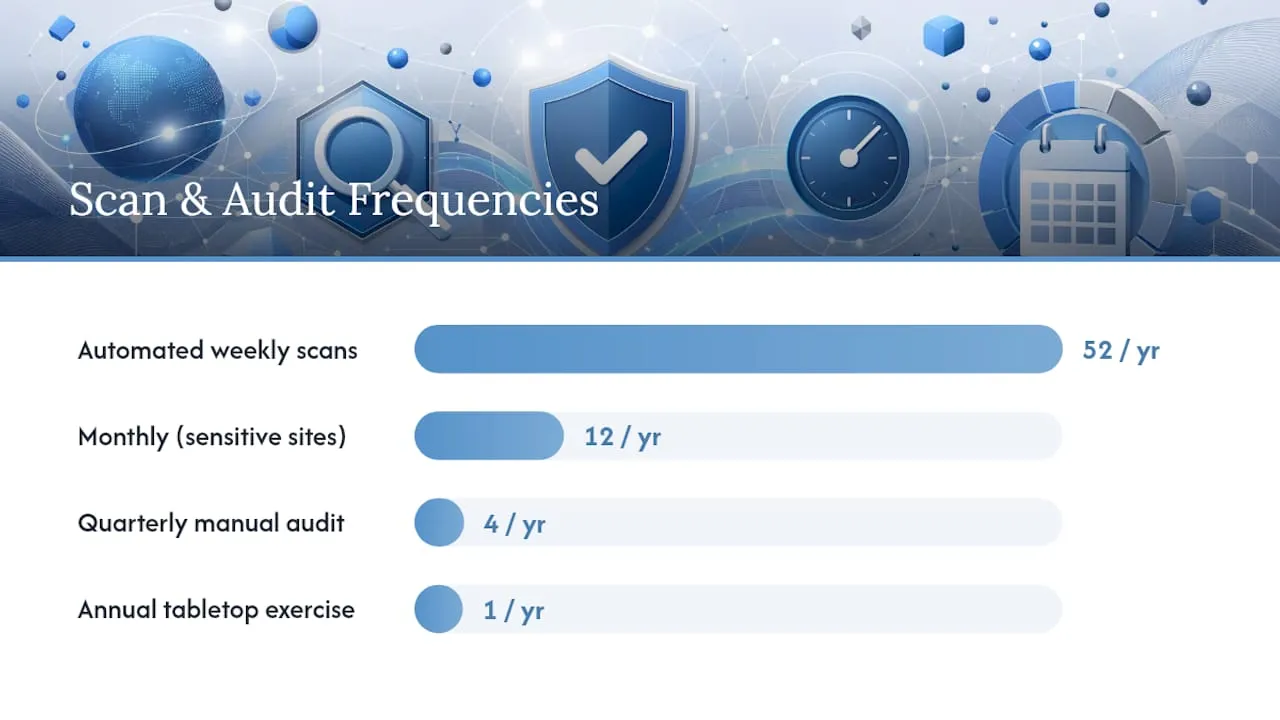
Enable uptime monitoring and certificate expiration alerts, routed to someone who’s actually on call, not a shared inbox nobody checks on weekends. Centralize authentication logs and unusual traffic patterns in one place. You don’t need elaborate dashboards, just a few high-signal alerts that catch failed login spikes or traffic anomalies.
Maintain a written incident playbook and run at least one tabletop exercise a year. The first breach is the worst time to figure out who calls whom.
- Automate weekly SSL/TLS and exposure scans
- Schedule quarterly manual security audits
- Enable uptime and certificate expiration alerts
- Centralize auth logs and set high-signal alerts
- Practice the incident response plan annually
Managing Third-Party Scripts and Dependency Risk
Every third-party script on your site runs with roughly the same trust level as your own code, which is exactly why supply-chain attacks work. Inventory every external script currently loading on your site and remove anything that’s no longer earning its place.

For scripts you keep, apply Subresource Integrity hashes and a strict CSP that limits which external domains can execute code at all. Where you have a choice, self-host critical libraries rather than pulling them from a third-party CDN, and reserve vendor hosting for cases where it’s genuinely necessary.
Pin dependency versions rather than accepting automatic updates blindly, run a dependency scanner against known vulnerabilities, and subscribe to security advisories for anything mission-critical. Review what production data access any third-party vendor actually has, and limit it to the minimum required for the integration to function.
- Inventory and prune unnecessary third-party scripts
- Apply SRI and strict CSP to remaining external scripts
- Pin dependency versions and run vulnerability scanners
- Limit vendor access to production data
How Often Should You Review Each Security Item?
Ownership without a schedule quietly decays into nobody’s job. Assign both to every checklist area: weekly for scanning and log review, monthly for patch status and access audits, quarterly for backup restore tests and full header/CSP review.
- Update your inventory of software, plugins, and access.
- Run baseline checks across TLS, headers, and authentication.
- Compare against the last review to catch drift.
- Fix the highest-risk gaps first, not the easiest ones.
- Schedule the next check before closing this one out.
Trigger an immediate full audit outside the normal cadence after a breach, a major platform migration, or any new third-party integration that touches sensitive data. Scaling up functionality without revisiting the security baseline is one of the most common ways gaps get introduced unnoticed.
What Actually Backs This Checklist
This checklist reflects practical experience helping service businesses fix outdated systems that were quietly leaking leads, and sometimes data, before anyone noticed. Forefront Industries’ background building enterprise CRM and lifecycle marketing systems for brands including Ring, Blink, and Audible during in-house enterprise work at Amazon shapes how security gets treated here: as infrastructure, not an afterthought bolted onto a launch.
Clients working with Forefront on custom-coded rebuilds have seen improved inbound lead quality, a result tied directly to sites that are fast, trustworthy, and free of the technical debt that both hurts conversion and invites compromise.
Forefront folds security checks into every website maintenance engagement, covering patching, monitoring, and backup verification as ongoing work rather than a one-time deliverable.
Why Most Security Checklists Fail in Practice
The conventional advice on website security treats it as a knowledge problem: learn the OWASP Top Ten, understand CSP syntax, know what HSTS does. That’s necessary but insufficient. The actual failure point isn’t ignorance, it’s ownership. Teams know they should rotate credentials when someone leaves. They know backups need testing. The checklist exists somewhere in a shared drive. Nobody’s job includes running it on a schedule.
That’s the gap worth taking seriously: security work that has no assigned owner and no calendar date gets deferred indefinitely, right up until an incident forces the issue. I’d argue the single highest-leverage change a site owner can make isn’t adding another control to the list. It’s converting the existing list into a rotation with names and dates attached.
Prioritize the boring stuff first: patch inventory, backup restore tests, and access cleanup. These lack the technical appeal of a well-tuned CSP, but they close the gaps attackers actually exploit most often. Sophisticated attacks make headlines. Forgotten admin accounts and stale plugins cause the actual breaches.
- Jeremy
Get Expert Help Implementing Your Security Checklist
Running through this checklist once is straightforward. Maintaining it every week, month, and quarter across TLS renewals, patch cycles, backup tests, and log review is where most in-house teams run out of bandwidth, and where gaps quietly creep back in.

Forefront Industries treats security as part of the build, not an add-on. Every custom-coded site we deliver ships with sitewide HTTPS, hardened headers, secure session handling, and a maintenance plan that covers patching, monitoring, and tested backups on a defined cadence. That’s a different starting point than a template site retrofitted with plugins after launch. If you’re not sure where your current site stands against this checklist, our free website audit walks through TLS configuration, headers, access controls, and patch status, and tells you exactly what needs attention first. Request your audit and get a prioritized list back, not a generic report.
Authoritative Resources for Implementation
- OWASP Top Ten Web Application Security Risks - the standard prioritization framework for web application threats
- Security - MDN Web Docs - core HTTP security practices including CSP, cookies, and SRI
- Ultimate 9-Point Website Security Checklist - HackerOne - foundational configuration checklist
Sources
- Ultimate 9-point website security checklist - HackerOne
- OWASP Top Ten Web Application Security Risks - OWASP Foundation
- Least privilege - SailPoint identity library