Speed to Lead: The Response Benchmark That Wins Deals

Speed to lead is the elapsed time between a prospect’s inbound action, a form fill, a chat message, a callback request, and your team’s first meaningful reply. The benchmark to aim for is tiered: a few minutes for high-intent leads like demo requests, within the same hour for mid-intent leads like content downloads, and within the day for low-intent leads like newsletter signups.
The research behind this is old but has held up. The InsideSales/MIT-linked finding cited by Harvard Business Review found that contacting leads within an hour dramatically raised qualification odds compared to waiting even a few hours longer. More recent benchmark studies from EmailAnalytics put the median B2B response time at roughly 42 hours, meaning most teams are leaving qualification odds on the table by a wide margin.
Here’s your immediate next step: before you read another paragraph, pull your form-submission timestamps for the last 30 days and calculate the median (not average) time to first human contact, broken out by lead source. That single number will tell you more about your pipeline health than almost any other metric you track this quarter.
Table of Contents
- What Does Speed to Lead Actually Measure?
- Why Does Faster Response Improve Conversion Rates?
- What Are Realistic Speed to Lead Benchmarks By Channel?
- How Should You Measure Speed to Lead Correctly?
- What’s the Playbook for Cutting Response Time to Minutes?
- What Tools Actually Support a Faster Response Process?
- How Did One Client Cut Speed to Lead and Lift Conversion?
- Copy This Checklist and SLA Language Into Your Playbook
- Where the Benchmarks in This Guide Come From
- Where Teams Go Wrong on Speed to Lead
- How Forefront Industries Builds the Infrastructure Behind Faster Response
- Frequently Asked Questions About Speed to Lead
- Sources
What Does Speed to Lead Actually Measure?
Speed to lead measures one thing precisely: the gap between when a prospect takes action and when they receive a response that actually addresses their intent. The clock starts at the prospect’s action, not when your CRM finishes processing it. A form submission, a chat message sent, a callback request, or a booked call cancellation that triggers re-engagement, each of these starts the clock the instant the prospect does something, not when a record appears in your database.
The clock stops at first meaningful contact. This distinction trips up more teams than any other part of the metric. An autoresponder that says “Thanks, we’ll be in touch” does not stop the clock. Neither does a generic “your ticket has been received” chatbot message. Meaningful contact means a human, or a qualifying automated interaction like an AI agent asking discovery questions, engages with the substance of what the prospect wants.
Track auto-acknowledgment and meaningful response as two separate numbers. Conflating them hides the real gap. A prospect who gets an instant email confirmation but waits six hours for an actual salesperson has experienced a six-hour speed to lead, not an instant one, no matter what your dashboard says.
Channel expectations vary sharply:
- Live chat: Prospects expect a reply within 30 to 60 seconds or they assume no one is there.
- Phone/callback requests: Same-hour contact is the floor for anyone claiming to be responsive.
- Email and form fills: Five minutes is the gold standard for high-intent forms; an hour is workable for lower-intent ones.
- Social and LinkedIn: Same-day response is generally acceptable given the asynchronous nature of the channel.
Common measurement pitfalls include using CRM record-creation time (which can lag the actual prospect action by minutes due to sync delays), reporting averages instead of medians (a handful of six-day outliers will distort your average badly), and failing to separate weekday from after-hours submissions when calculating your numbers.
Why Does Faster Response Improve Conversion Rates?
Speed converts because buyer intent decays fast, and the data on this is not subtle. The classic finding, now decades old but still the anchor point for the entire category, showed that contacting a lead within five minutes made it dramatically more likely to qualify than contacting it after thirty minutes. Harvard Business Review’s analysis of firm-level contact data reached a parallel conclusion: companies that reached leads within an hour were substantially more likely to qualify them than firms that waited longer.
The gap between benchmark and reality: Only about 7% to 23% of companies hit the five-minute window today, even though the conversion advantage of doing so is well documented. Median B2B response time across a 939-company benchmark study sits close to 47 hours.
That gap is the opportunity. If your competitors are averaging two days and you’re averaging twenty minutes, you’re not competing on price or features for that lead, you’re just the only company that showed up while the prospect still remembered filling out the form.
Here’s a simplified version of the pipeline math that makes this concrete:
- Say your team generates 200 leads a week from a demo request form.
- At a typical 1% close rate for leads contacted after several hours, that’s roughly 2 closed deals.
- Benchmark data suggests that moving a meaningful share of that cohort into the sub-5-minute contact window can push close rates into a 15% to 21% range for that segment.
- Even converting a fraction of your weekly volume into that faster tier can add multiple additional closed deals per week, which usually dwarfs the cost of the routing tools or staffing needed to get there.
That’s the ROI case for investing in speed, not as a nice-to-have metric but as a lever with a calculable payback period.
Speed alone doesn’t close deals, though. A few things temper the enthusiasm:
- Context still matters. A rep who calls in four minutes but has no idea what the prospect asked about will lose the lead anyway.
- Handoff quality matters as much as timing. Fast but scripted, generic outreach converts worse than a slightly slower but well-informed touch.
- Lead quality varies by source. A five-minute callback to someone who filled out a form by accident won’t move your numbers; speed amplifies good leads more than it rescues bad ones.
Speed to lead is a multiplier, not a standalone strategy. It makes a good sales process better and a broken one only marginally less broken.
What Are Realistic Speed to Lead Benchmarks By Channel?
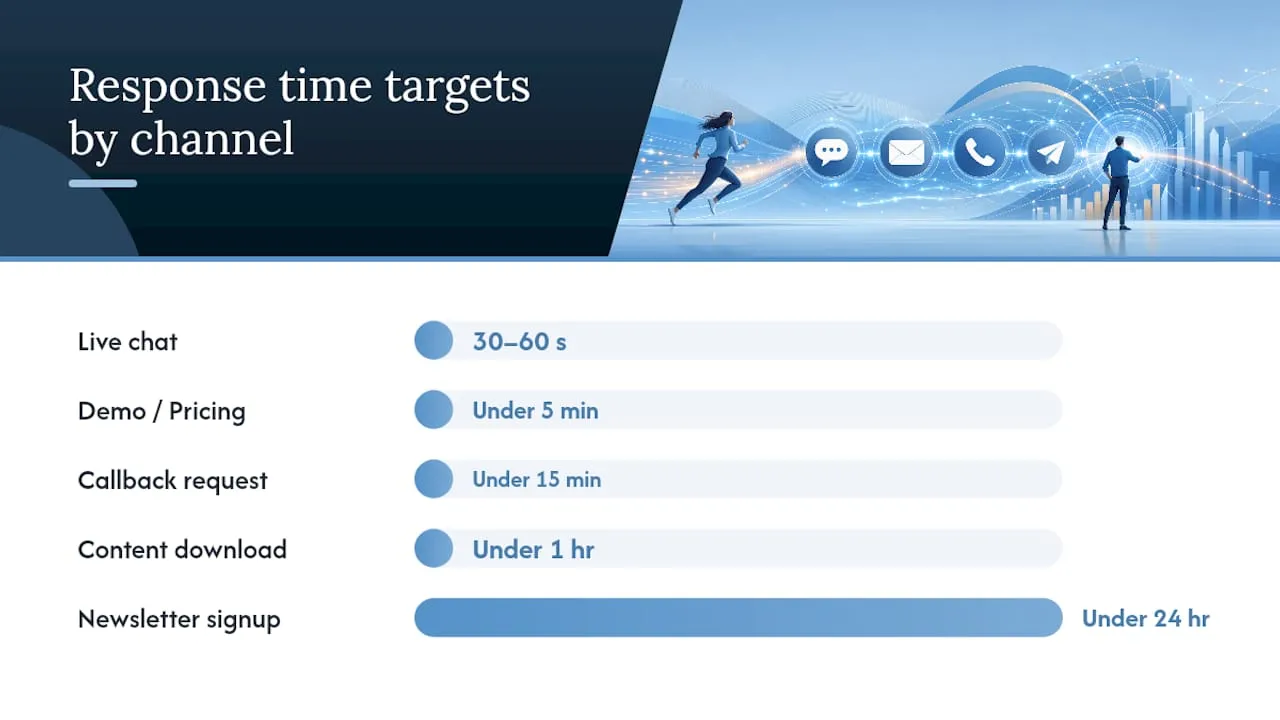
Chasing a single universal number is where most SLA policies fall apart. A five-minute rule makes sense for a demo request from a $50,000 deal and is overkill for a whitepaper download from someone still in early research. Tiering your targets by lead type and channel is what makes an SLA survivable for your team and effective for your pipeline.
| Lead type / channel | Target response time | Notes |
|---|---|---|
| Demo or pricing request | Under 5 minutes | Highest-intent signal; treat as your top SLA tier. |
| Live chat message | Under 30 to 60 seconds | Prospects expect near-instant reply or they leave the chat. |
| Callback request / phone form | Under 15 minutes | Parallel call and SMS attempts improve pickup rates. |
| Content download (ebook, whitepaper) | Under 1 hour | Lower intent; a same-hour human touch still outperforms next-day. |
| Newsletter signup / low-intent form | Under 24 hours | Automated nurture sequence can bridge the gap before a human follow-up. |
Tighten these targets further for referral leads, existing-customer expansion requests, or anything tied to a high-value pipeline segment. A referral from an existing client carries enough trust that a slow response reads as a real slight, not just inefficiency. Conversely, a slower cadence is acceptable for leads that arrive through low-commitment channels like a content syndication partner, where the prospect isn’t expecting a same-day call anyway.
After-hours coverage is where most teams leak the most value. The fix is not staffing a 24-hour call center. It’s layering automated immediate engagement, a scheduler link, an AI qualification bot, or an interactive demo, within 15 minutes of submission, followed by a human SLA of contact within 2 hours of the next business window opening. Recovering lost after-hours opportunity this way tends to capture leads that would otherwise go cold overnight.
How Should You Measure Speed to Lead Correctly?
The formula is simple to state and easy to get wrong in practice: median time from the prospect’s form-submit timestamp to the first meaningful outbound touch. Median matters more than mean here, because a handful of leads that sit untouched for three days will drag your average into meaningless territory while your typical experience might actually be fine. Measurement guidance from Optifai’s benchmark study recommends anchoring the start time at the point of capture, not at CRM record creation, since sync delays between your form tool and your CRM can add minutes or hours that have nothing to do with your team’s actual responsiveness.
Track these CSAT, FCR, and AHT support quality metrics on a recurring basis:
- Median speed to lead, segmented by source and lead type.
- Percentage of leads contacted within SLA, your real compliance number.
- Response time by rep, by hour of day, and by source, to find where the gaps cluster.
- P90 response time, the number that shows you your worst cases, not just your typical ones.
- Percentage of leads never responded to at all, which is often higher than teams assume.
To keep your numbers honest, run a quarterly audit sample: pull 90 days of raw timestamp data directly from your form platform, not your CRM’s summary report, and manually verify a sample of records against actual outbound activity logs.
It also helps to separate three distinct clocks that get blurred together constantly:
- Auto-response time: how fast an automated acknowledgment fires, useful but not the real metric.
- Human response time: how fast a person engages with the actual content of the inquiry, the number that predicts conversion.
- Time to value: how fast the prospect gets something useful, a quote, a demo, an answer, regardless of who or what delivered it.
Reporting only the first number while implying it’s the second is the most common way speed-to-lead dashboards mislead sales leadership.
What’s the Playbook for Cutting Response Time to Minutes?
Getting from a 42-hour median to a 5-minute one is not a single fix. It’s a sequence of process and tooling changes, executed in order, each one closing a specific leak.
-
Audit your current state first. Pull your real median and P90 speed to lead by source before changing anything. You cannot fix what you haven’t measured honestly, and most teams are surprised by how bad the baseline actually is.
-
Set tiered SLAs by lead type. Use the benchmark table above as a starting framework, then adjust based on your own close-rate data by source.
-
Implement auto-routing with fallback rules. Round-robin distribution to available reps is the baseline. The fallback matters more: if the assigned rep doesn’t acknowledge the lead within a set window, say 5 minutes, it should automatically reassign to the next available rep and notify a manager. Playbook-level recommendations from TheRevOpsReport treat this escalation layer as the single highest-leverage fix most teams skip.
-
Add real-time alerts outside your CRM’s inbox. Push notifications and Slack alerts get noticed within seconds; an email sitting in an inbox does not. If your only notification method is email, you’ve already lost several minutes before a rep even sees the lead.
-
Embed calendar scheduling directly on high-intent forms. Letting a demo-request prospect book a specific time slot themselves removes the back-and-forth entirely and effectively zeroes out the wait on your highest-value form type.
-
Staff chat and after-hours coverage deliberately. This doesn’t require a night shift. It requires an automated first touch, an AI qualifier or a scheduler, paired with a human SLA for the next business window.
-
Review and coach weekly using P90 data by source. The reps and sources sitting in your worst 10% tell you exactly where your process is breaking down.
A few technical tactics separate the top performers from everyone else. Benchmark analysis from Aloware points to instant dialing paired with SMS fallback as the mechanism that lets the small cohort of companies hitting sub-5-minute response do it consistently, not occasionally. Parallel call and SMS attempts, firing both within seconds of a form submission, catch prospects who screen unknown calls but read texts immediately. Branded caller ID matters more than most sales teams assume: an unrecognized number gets ignored at a far higher rate than one displaying your company name, which quietly kills pickup rates on the callback tier.
On the organizational side, duty rotations need clear ownership. Someone has to own the SLA number itself, not just the individual leads, or accountability disappears the moment volume spikes. Aligning incentives helps too: if speed to lead isn’t part of how you evaluate rep performance, it will quietly slip whenever a rep is busy with an existing deal.
Pro Tip: Set your escalation trigger at half your SLA target, not the full window. If your demo-request SLA is five minutes, auto-reassign at two and a half minutes with no acknowledgment. This gives the fallback rep enough runway to actually hit the real deadline instead of inheriting a lead with no time left.
What Tools Actually Support a Faster Response Process?
The right tooling depends on which leak you’re fixing, not on buying the most feature-dense platform available. A few categories cover most of what a speed-to-lead overhaul actually requires.
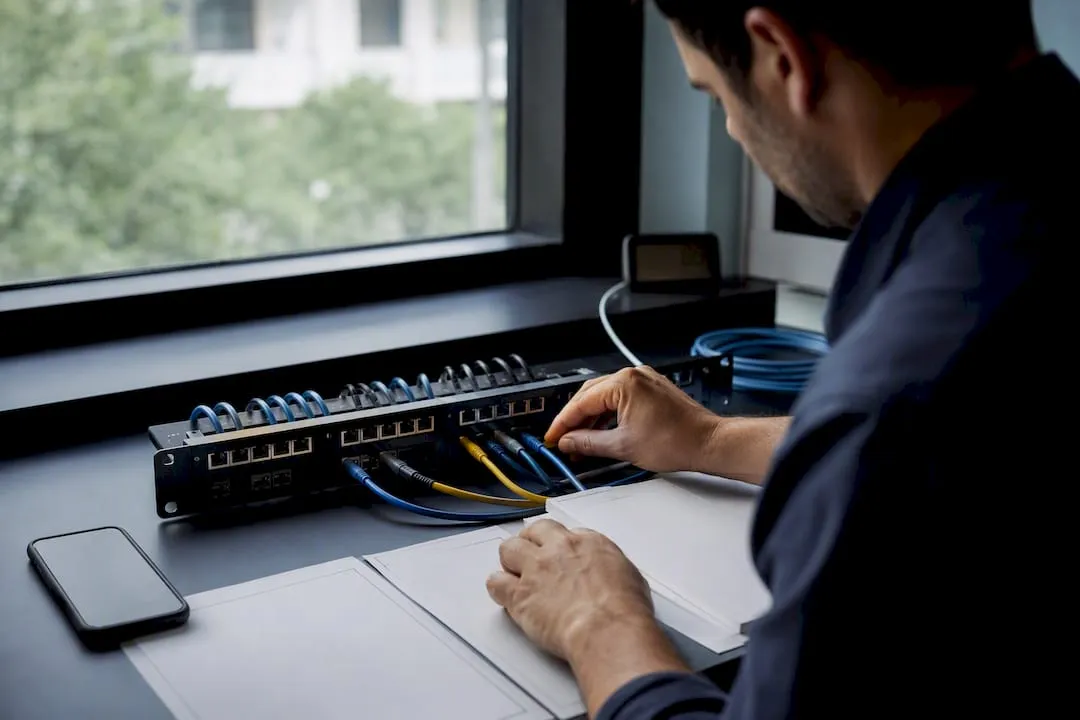
Lead routers handle round-robin distribution and fallback logic, the backbone of making sure a lead never sits unassigned. Sales engagement platforms layer in sequenced outreach and reminders so a rep doesn’t have to remember to follow up. Real-time alerting tools, often built on push or Slack integrations, solve the notification-lag problem that plain email leaves wide open. Email response-time trackers give you the reporting layer to actually see your median and P90 numbers instead of guessing. Chat staffing and AI handoff tools cover the always-on channel where 30-second expectations are non-negotiable. Calendar scheduling tools, the category behind widely used embeds that G2 reviewers consistently credit with reducing no-shows and pickup friction, remove the scheduling back-and-forth entirely.
Before adopting any of these, run through an integration checklist: does the tool capture the form timestamp at the moment of submission, not after CRM processing? What’s the actual writeback latency into your CRM? Does it support mobile push alerts, or only email? Does it log the type of first meaningful action taken, not just that something happened?
Evaluation criteria worth insisting on:
- SLA enforcement logic, not just tracking, actual automated escalation.
- Fallback rules that trigger without manual intervention.
- Audit logs you can pull for a 90-day sample review.
- P90 reporting built in, not something you have to calculate manually every week.
- Phone and SMS deliverability rates, since carrier filtering can quietly kill your fastest channel.
- Branded caller ID support, which materially affects pickup rates on the callback tier.
How Did One Client Cut Speed to Lead and Lift Conversion?
A Forefront Industries client, a regional service business with a high-intent demo-request form, came in with a median response time north of six hours and a routing process that relied on manually forwarded email notifications. The fixes were mechanical but precise.
The team cleaned up form-timestamp capture so the clock started at the actual moment of submission rather than at CRM sync, which had been adding an average delay of its own. Round-robin routing replaced manual assignment, with a fallback reassignment rule triggering if no rep acknowledged a lead within a set window. A calendar embed was added directly to the demo-request form so prospects could self-book a time slot instead of waiting for a callback. CRM writeback issues that had been silently dropping a share of form submissions were also identified and fixed during the audit phase.
- Median response time dropped from over six hours to under ten minutes within the measurement window.
- Percentage of leads contacted within the new SLA rose sharply once fallback routing went live.
- Inbound lead quality improved by roughly 30%, a lift the client attributed directly to faster, more consistent first-touch engagement once the routing and timestamp fixes were in place.
Results were tracked over a defined post-launch period using the same median and SLA-compliance metrics outlined earlier in this guide, not a one-time snapshot.
Copy This Checklist and SLA Language Into Your Playbook
30/60/90-day rollout:
- Days 1 to 30: Audit current timestamps and median response by source; fix any CRM sync or form-capture gaps.
- Days 31 to 60: Implement tiered SLAs, auto-routing, and fallback escalation; add real-time alerting.
- Days 61 to 90: Launch calendar embeds on high-intent forms; add chat or AI after-hours coverage; begin weekly P90 review.
Sample SLA language you can paste directly into a team doc:
- High-intent (demo, pricing request): “First meaningful contact attempted within 5 minutes during business hours; automated engagement plus human follow-up within 2 hours after-hours.”
- Mid-intent (content download, webinar signup): “First meaningful contact within 1 hour during business hours; next business day if submitted after-hours.”
- Low-intent (newsletter, general inquiry): “Automated nurture triggered immediately; human follow-up within 24 hours.”
First-touch script (adapt to your voice): “Hi [Name], thanks for reaching out about [specific thing they requested], I wanted to jump on this right away. Quick question: are you exploring this for a specific timeline, or still gathering information? I’ve got openings [Time A] or [Time B] this week if you’d like to talk through it.”
Pro Tip: An SLA without an enforcement mechanism is just a suggestion. Confirm your alerts actually fire on mobile, your escalation rule reassigns automatically, and someone reviews the P90 report weekly, not quarterly, before you call the SLA “live.”
Speed to lead improves conversion because faster contact captures buyer intent before it decays, and a tiered SLA measured by median response time from form submission converts that speed into pipeline.
| Point | Details |
|---|---|
| Start the clock at prospect action | Measure from form submission or chat initiation, never from CRM record creation. |
| Use median, not average | A few slow outliers distort averages; median reflects the typical prospect experience. |
| Tier your SLAs by intent | Aim for under 5 minutes on demos, under 1 hour on content downloads, under 24 hours on low-intent forms. |
| Automate the fallback | Round-robin routing with automatic reassignment closes the biggest leak in most sales teams. |
| Fix instrumentation before scaling | Forefront Industries client work shows that cleaning up timestamp capture and routing logic can lift inbound lead quality by roughly 30%. |
Where the Benchmarks in This Guide Come From
The figures and playbook recommendations in this guide draw from a handful of primary sources worth bookmarking directly: Harvard Business Review’s analysis of online sales lead contact rates, EmailAnalytics’ lead response time benchmark and calculation guide, Optifai’s 939-company response time benchmark study, Aloware’s 2026 lead response time benchmark report, and TheRevOpsReport’s speed-to-lead playbook.
When comparing benchmarks across sources, check whether they report median or mean, and note sample size. A 939-company median tells a different story than a self-selected survey of 50 fast-moving sales teams.
Where Teams Go Wrong on Speed to Lead
Most speed-to-lead failures trace back to one of three mistakes. Teams measure the wrong timestamp, usually CRM creation time instead of the prospect’s actual action, which makes their numbers look better than reality. They set one flat SLA for every lead type, which either overworks reps chasing low-intent forms or lets high-value demos sit too long. Or they assume a notification email is enough, when in practice alerts that don’t hit a phone in real time get missed for hours.
What consistently works is less exciting than it sounds: tiered SLAs matched to actual lead value, automation placed in front of the rep so the prospect never waits on human availability, and a weekly habit of checking your P90 number by source instead of just your average.
None of this replaces good sales conversations. Speed gets you in the door faster; it doesn’t make the conversation better once you’re there. The first touch still has to add context, not just arrive quickly.
How Forefront Industries Builds the Infrastructure Behind Faster Response
Fixing speed to lead usually isn’t a staffing problem, it’s an infrastructure problem: broken timestamp capture, no routing logic, and forms that create friction before a prospect ever reaches a human. Forefront Industries builds the systems underneath that fix, custom-coded websites engineered for accurate lead capture, enterprise CRM and email development on platforms like Salesforce Marketing Cloud and Braze, and AI workflow automation that handles routing and fallback escalation without manual intervention.

The work spans custom web development that eliminates form friction and capture errors, CRM and email system engineering that fixes the sync delays quietly padding your response times, and calendar-embedded booking flows that let high-intent prospects self-schedule the moment they submit a form.
If your team suspects the bottleneck is technical rather than behavioral, start with a look at Forefront’s full services overview to see which piece, capture, CRM, or automation, matches where your leads are actually getting stuck.
Frequently Asked Questions About Speed to Lead
What is a good speed to lead benchmark for B2B sales teams?
Aim for under 5 minutes on high-intent leads like demo or pricing requests, under 1 hour for mid-intent leads like content downloads, and under 24 hours for low-intent inquiries. Most B2B teams currently sit around a 42 to 47 hour median, so hitting even the mid-intent tier consistently puts you ahead of most competitors.
Why does speed to lead matter more than lead quality alone?
Speed and quality work together, not against each other. A well-qualified lead contacted within five minutes converts at a dramatically higher rate than the same lead contacted an hour later, because buyer intent and attention decay quickly after the initial action.
Should I measure speed to lead using average or median response time?
Use median. A handful of leads that sit untouched for days will distort an average badly, making your team look slower or faster than the typical prospect experience actually is. Track P90 separately to catch your worst-case outliers.
How do I improve speed to lead without hiring more sales reps?
Automate the parts that don’t require a human: instant routing with fallback escalation, real-time mobile alerts instead of email-only notifications, and calendar embeds that let prospects self-book a time slot. These fixes typically close most of the gap before headcount even enters the conversation.
What counts as a “meaningful” first response for speed-to-lead tracking?
A meaningful response addresses the substance of what the prospect asked for, a real answer, a qualifying question, or a scheduled call, not a generic autoresponder confirming receipt. Track auto-acknowledgment and meaningful human contact as two separate numbers to see your true response gap.
Sources
- The Short Life of Online Sales Leads - Harvard Business Review
- 12 Ways to Calculate and Improve Lead Response Time (2026) - EmailAnalytics
- Lead Response Time Benchmarks - How Fast Is Fast Enough? (939 Companies) - Optifai
- Speed to Lead benchmarks and playbook - TheRevOpsReport