24–72h SLAs: Security Patch Management for Ops Teams

Security patch management is the systematic process of identifying, testing, deploying, and verifying software updates that close known vulnerabilities before attackers exploit them. The operational posture that works: treat patching as scheduled preventive maintenance, not emergency firefighting, prioritizing fixes by real-world risk rather than release date. That means running a risk-based framework aligned with NIST SP 800-40 guidance, watching the CISA KEV catalog for active exploitation signals, and automating everything that doesn’t require human judgment.
TL;DR:
- Prioritize patches based on CVSS score, active exploitation signals, and business impact, not just release dates or severity alone.
- Automate vulnerability detection, deployment orchestration, retries, and compliance reporting, while retaining human oversight for exceptions and emergency patches.
- Use a three-ring deployment model starting with a pilot group, then validation, and full rollout, with pre-planned rollback procedures tested regularly.
- Cloud and container environments require updating images in the CI/CD pipeline and scanning images and infrastructure code continuously to prevent vulnerabilities.
- Maintain detailed documentation of SLA tiers, exception justifications, and unpatchable systems, and track key metrics like time-to-patch and compliance to improve program effectiveness.
Table of Contents
- What Are the Stages of the Patch Management Lifecycle?
- How Should You Prioritize Patches By Risk?
- Which Parts of Patch Management Should You Automate?
- How Do You Patch Cloud and Container Workloads?
- What Does a Safe Patch Rollout Actually Look Like?
- What Policy Documentation Do Auditors Expect?
- Which Metrics Prove Your Patch Program Is Working?
- Practitioner Notes From Forefront Industries
- Why Patching Fails When It’s Treated As an IT-Only Problem
- A Managed Path to Keeping Web Systems Current
- Sources
- FAQ
What Are the Stages of the Patch Management Lifecycle?
The lifecycle NIST outlines runs in seven practical stages, each with a distinct owner and output. Skipping any one of them is how a “patched” environment ends up breached anyway.
- Asset inventory. Build and maintain a live catalog of every device, OS version, application, and firmware component, tagged with business criticality, data sensitivity, and network exposure. A server nobody remembers owning is the one that never gets patched.
- Vulnerability identification. Pull intelligence from vendor security advisories, the National Vulnerability Database, and the CISA KEV catalog to see which CVEs affect your actual asset list.
- Prioritization. Score each candidate patch against severity, exploitation status, and business impact rather than patching alphabetically or by whatever landed in the inbox first.
- Testing. Validate patches in a staging environment that mirrors production configurations, checking for application compatibility and performance regressions.
- Deployment. Push patches through defined rings, moving from a small pilot group to the broader estate once no issues surface.
- Verification. Confirm the patch actually applied, the vulnerability is closed, and no new issues appeared. Deployment success and patch success are not the same thing.
- Documentation. Log what was patched, when, by whom, and record exceptions with a named risk owner and a compensating control.
That last step matters more than most teams admit. Auditors and incident responders both need a paper trail showing why a system was left unpatched, not just that it was. IT leads typically own inventory and documentation, while security analysts drive prioritization and vulnerability intelligence, and systems administrators handle testing and deployment. Splitting those roles clearly is what keeps the lifecycle from stalling at handoff points.
How Should You Prioritize Patches By Risk?
Patching every CVE the moment a vendor ships a fix is neither realistic nor smart. A working triage model weighs three inputs together instead of treating any single score as gospel.
- CVSS severity from the NVD gives you the vendor’s baseline read on technical impact, scored 0 to 10.
- Active exploitation status, pulled directly from the CISA KEV catalog, tells you whether attackers are already using the flaw in the wild.
- Business impact captures what the affected asset actually does. A CVSS 9.8 on an isolated test server ranks lower than a CVSS 7.2 on your customer-facing payment gateway.
That weighting, outlined by N-able, converts a vague sense of urgency into a defensible, repeatable process.
From there, map the ranked queue to maintenance groups with clear SLAs:
- Critical (KEV-listed or CVSS 9+ on internet-facing systems): patch within 24 to 72 hours, aligned with CISA’s accelerated remediation expectations for cataloged vulnerabilities.
- High (CVSS 7 to 8.9, no active exploitation): patch within 7 days.
- Medium (CVSS 4 to 6.9): patch within 30 days, folded into the standard monthly cycle.
- Low (CVSS below 4): patch within a quarter, or during scheduled maintenance windows.
Pro Tip: Document the SLA tier and the reasoning for every exception in the same ticketing system you use for patch tracking. When an auditor asks why a critical asset sat unpatched for 40 days, “the change request is right here” beats a scramble through email threads.
Which Parts of Patch Management Should You Automate?
Automation should own the repetitive, high-volume work; humans should own judgment calls. Getting that split backward is the fastest way to either miss critical patches or break production with an unattended update.
Hand these tasks to automation:
- Continuous vulnerability identification and cross-referencing against your asset inventory
- Scheduling and orchestrating deployment across rings
- Retry logic for failed installations
- Compliance reporting and dashboard updates
Keep these with a human in the loop:
- Approving exceptions and compensating controls
- Emergency patching decisions when a KEV addition demands deviation from standard SLAs
- Rollback calls when a patch breaks something automated testing didn’t catch
When evaluating patch orchestration tools, run down a feature checklist rather than trusting a vendor’s marketing page. Look for unified inventory across OS and third-party applications, not just Windows updates. Confirm the platform supports staged deployment rings natively, not through manual scripting. Verify automated rollback exists, not just manual uninstall instructions. Check that it handles laptops and remote devices that are off the corporate network during scheduled scans, and that it produces per-device compliance reports auditors can actually read. Kaseya’s analysis of high-impact practices found that ringed deployment and automated rollback specifically move the needle on time-to-patch, while cosmetic dashboard features tend to be checkbox items nobody uses.
How Do You Patch Cloud and Container Workloads?
Cloud environments split patching responsibility in ways that trip up teams still thinking in on-premises terms. Your cloud provider patches the hypervisor and underlying infrastructure; you’re still responsible for the guest OS, container images, and application dependencies running on top of it.
Containers and ephemeral workloads need a different approach entirely, since you rarely patch a running container. Instead, patches get baked into the base image, and the old container gets replaced rather than updated in place.
- Adopt a patch-as-code model where updated images build automatically through your CI/CD pipeline whenever a base image or dependency ships a fix, an approach documented in recent cloud-native security research.
- Scan base images and container registries continuously, not just at build time, since a clean image today can carry a newly disclosed CVE tomorrow.
- Extend vulnerability scanning to infrastructure-as-code templates so misconfigurations and outdated dependencies get caught before they’re ever deployed.
- Treat every new container instance as unpatched by default until it’s provisioned from a current, scanned image.
The practical shift: stop thinking about “patching a server” and start thinking about “rebuilding from a patched image.” That mental model is what keeps ephemeral infrastructure from becoming a blind spot in an otherwise solid program.
What Does a Safe Patch Rollout Actually Look Like?
Deployment rings exist because “patch everything at once” is how a single bad update becomes an outage across your entire estate. A three-ring pattern that holds up in practice looks like this:
- Pilot ring: Deploy to a small, representative sample that includes different hardware configurations and application loads. Hold for a short period before proceeding.
- Validation ring: Expand deployment once the pilot shows no regressions, watching for issues that only surface at larger scale.
- Full rollout (remaining estate). Push to everything else once validation confirms stability, per the ring structure Kaseya recommends for reducing patch-induced incidents.
Rollback planning has to exist before you need it, not after. Take a snapshot or image backup immediately before deployment on critical systems, and write the rollback procedure down as a specific runbook, not a vague “we’ll figure it out” plan. Run rollback drills quarterly so the procedure is muscle memory instead of a document nobody has opened since it was written.
Emergency patching flips the timeline when a CVE lands on the KEV catalog with active exploitation in the wild, as CISA regularly announces. Standard testing compresses from days to hours, pilot ring holding periods shrink dramatically, and incident response gets looped in immediately in case the vulnerability is already being exploited inside your environment.
Pro Tip: Pre-approve an emergency change process before you need it. If your standard change advisory board takes three days to convene, a KEV-listed vulnerability with active exploitation won’t wait for your normal governance calendar.
What Policy Documentation Do Auditors Expect?
A patch management policy needs to name specific SLA tiers by severity, define who approves exceptions, and set a review cadence for how often the policy itself gets revisited. Vague language like “patches will be applied promptly” doesn’t survive an audit.
- Document SLA tiers explicitly, tied to the same severity and exploitation framework used in day-to-day prioritization.
- Name roles: who identifies vulnerabilities, who approves exceptions, who signs off on emergency deviations.
- Maintain a formal exception process, including a required business justification and expiration date for every exception.
- Keep an inventory of unpatchable systems, each with a documented compensating control and a named risk owner who has formally accepted the residual risk.
- Set a review cadence, typically quarterly, for the policy and the exception list alike.
Federal-adjacent frameworks like the CISA FISMA evaluation guidance specifically call for documented compensating controls and formal risk-owner sign-off on unpatchable systems. Structure your exception list the same way even if you’re not under federal audit: system name, CVE, business justification, compensating control, risk owner, and review date, in one place an auditor can review in minutes rather than piecing together from tickets.
Which Metrics Prove Your Patch Program Is Working?
A handful of metrics tell leadership and auditors more than a dozen vanity numbers ever will. Track them on a recurring dashboard, reviewed weekly for operational teams and monthly for leadership reporting.
| Metric | What it shows |
|---|---|
| Time-to-patch (critical) | Speed of response for KEV-listed and high-severity vulnerabilities |
| Percent compliant by SLA tier | Whether tiered SLAs are actually being met, not just defined |
| Mean age of unpatched vulnerabilities | Whether backlog is shrinking or quietly growing |
| Devices in exception state | Volume of accepted risk, with review dates attached |
| Patch-induced incidents per cycle | Whether deployment rings and testing are catching problems before production |
Rising mean age or a growing exception count without matching review dates are early warning signs worth escalating before they become an audit finding.
Practitioner Notes From Forefront Industries
Some companies build and maintain custom digital infrastructure for service businesses, work that lives or dies on treating maintenance as ongoing, not episodic. Its website maintenance services apply the same preventive-maintenance discipline NIST recommends for patching to custom-coded sites and connected systems. That extends to platform-level work through Salesforce Marketing Cloud development and AI automation, where keeping CRM and workflow systems current is inseparable from keeping them secure.
Why Patching Fails When It’s Treated As an IT-Only Problem
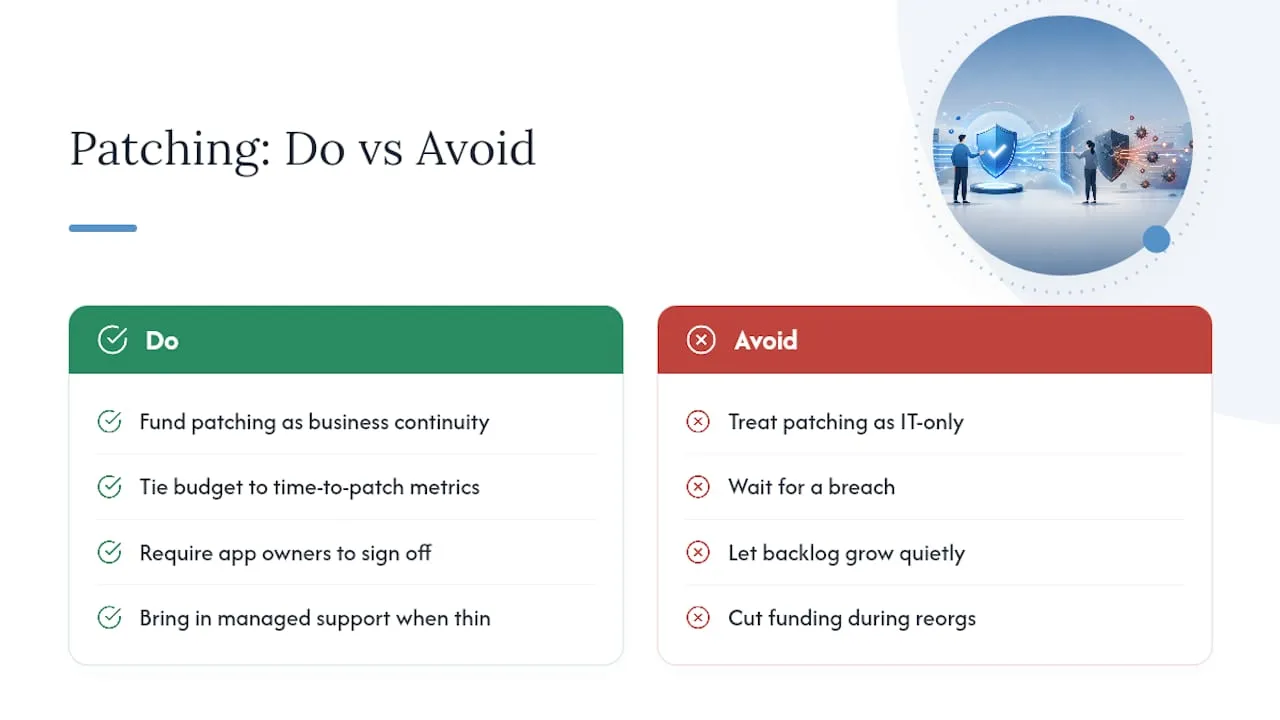
The programs that stay current year over year aren’t the ones with the best tooling. They’re the ones where leadership funds patching as a business continuity function, not a line item IT begs for after an incident. Get budget and staffing tied to time-to-patch metrics, not to “we haven’t been breached yet,” and the program survives the next reorg.
Cross-functional ownership matters more than people expect. When application owners, not just IT, sign off on testing windows and accept exception risk, friction drops and patches actually ship on schedule. Teams stretched thin on capacity are better served bringing in managed support than letting the backlog grow quietly.
- Jeremy
A Managed Path to Keeping Web Systems Current
For service businesses without a dedicated security team, Some providers offer a managed alternative to building that capacity in house, not a replacement for a security program you already run well. The practical advantage: instead of hiring and training staff to monitor, test, and deploy updates across a custom-coded site and its connected systems, you get that ongoing upkeep handled as part of a maintenance relationship built around uptime and performance.

Forefront Industries’ website maintenance covers the performance and security upkeep that keeps custom React frontends and integrated systems current without waiting for something to break first. That pairs naturally with email and CRM development work on platforms like Salesforce Marketing Cloud and Braze, where outdated components create the same exposure as an unpatched server. If your team is short on capacity to run this cycle in house, start with a look at Forefront Industries’ full services to see what managed upkeep would actually cover for your systems.
Sources
- Guide to Enterprise Patch Management Planning: Preventive Maintenance for Technology (NIST SP 800-40r4)
- CISA Known Exploited Vulnerabilities Catalog
- National Vulnerability Database (NVD)
- Enterprise patch management best practices (N-able blog)
- Patch management best practices (Kaseya)
FAQ
What Is a Security Patch Management Process?
It’s the documented lifecycle of inventorying assets, identifying vulnerabilities, prioritizing by risk, testing, deploying in stages, verifying success, and recording exceptions, following the structure NIST SP 800-40 lays out.
What Is the Most Secure Method for Patch Management?
A risk-based approach that combines CVSS severity, active exploitation status from the CISA KEV catalog, and business impact, deployed through staged rings with rollback plans, consistently outperforms first-in-first-out or vendor-release-date patching.
What Are the Top Patch Management Tools?
Rather than naming specific vendors, evaluate any tool against a feature checklist: unified inventory across OS and third-party applications, native support for deployment rings, automated rollback, off-network device support, and per-device compliance reporting.
What Are the NIST Guidelines for Patch Management?
NIST SP 800-40r4 recommends framing patch management as preventive maintenance, built around an asset-centric lifecycle of inventory, prioritization, testing, deployment, and verification, with documented exceptions for systems that can’t be patched.
How Often Should Critical Patches Be Deployed?
Critical, KEV-listed vulnerabilities generally warrant remediation within 24 to 72 hours, while high-severity, non-exploited vulnerabilities typically fit a 7 day SLA and medium-severity issues fold into a 30 day cycle.