Stop Form Spam Without CAPTCHAs: Accessibility-First Layering

The most effective form spam prevention combines honeypots, server-side validation, rate limiting, and risk-based invisible verification in layers rather than relying on a single tool. Email and IP filtering catch what slips through. Accessibility and server-side token checks are non-negotiable at every layer. Controls get tuned per endpoint, not applied uniformly across a site.
TL;DR:
- Prioritize server-side validation and rate limiting for high-risk endpoints like login and signup to effectively block automated attacks.
- Use honeypot fields with CSS positioning and rotate their names regularly to catch unsophisticated bots without disrupting assistive technology.
- Combine invisible, risk-based verification tools like Turnstile or Cap with server checks to reduce friction and boost accessibility while preventing automated abuse.
- Implement graduated response thresholds based on suspicion levels to balance security with user experience, rather than relying on a single blocking method.
- Continuously monitor validation failures, honeypot hits, and traffic patterns post-deployment to maintain effective defenses as bot tactics evolve.
Table of Contents
- Which defenses to enable first, and where
- Honeypots and form hygiene done right
- Invisible verification and alternatives to CAPTCHA
- Server-side validation and rate limiting rules
- Filtering, reputation checks, and inbox protection
- Monitoring, logging, and tuning after launch
- How Forefront Industries sequences anti-spam controls
- Why low-friction, server-first defenses are the right default
- Forefront Industries: managed implementation and audits for form abuse protection
- Sources
- FAQ
Which defenses to enable first, and where
Not every form carries the same risk. A login endpoint faces credential stuffing. A contact form faces content spam and link injection. A signup flow faces fake account creation. Each needs a different mix of controls, and most teams get better results prioritizing server-side checks before adding anything visible to the user.
Start with these, in order:
- Honeypot fields: near-zero cost, catches unsophisticated bots on contact and signup forms immediately.
- Server-side validation: required for every endpoint regardless of what client-side widget is present, since attackers often skip the browser and POST directly to endpoints.
- Rate limiting: apply to login, signup, and API endpoints first, since these absorb the highest volume of automated traffic.
- Invisible verification (Turnstile, proof-of-work): reserve for higher-risk forms, login and signup, before contact forms.
- Email and IP reputation filtering: layer onto any form that collects an email address, including contact and newsletter signup.
Mapping this by endpoint keeps friction proportional to risk. A login page justifies rate limiting plus invisible verification. A low-traffic contact form may only need a honeypot and server-side validation. The OWASP Bot Management and Anti-Automation Cheat Sheet recommends mapping defenses to each endpoint’s threat profile instead of applying one blanket rule, since over-protecting a low-risk form adds friction for no benefit, and under-protecting a high-risk one invites abuse. Client-side additions (a honeypot field, a JavaScript check) take an afternoon. Server-side rate limiting and token validation take longer, typically a few days of engineering time depending on the existing backend.
Honeypots and form hygiene done right
A honeypot is a form field invisible to humans but visible to basic bots that fill every field they find. Done correctly, it costs nothing and blocks a meaningful share of naive submissions. Done poorly, it either gets ignored by smarter bots or breaks the form for assistive technology.
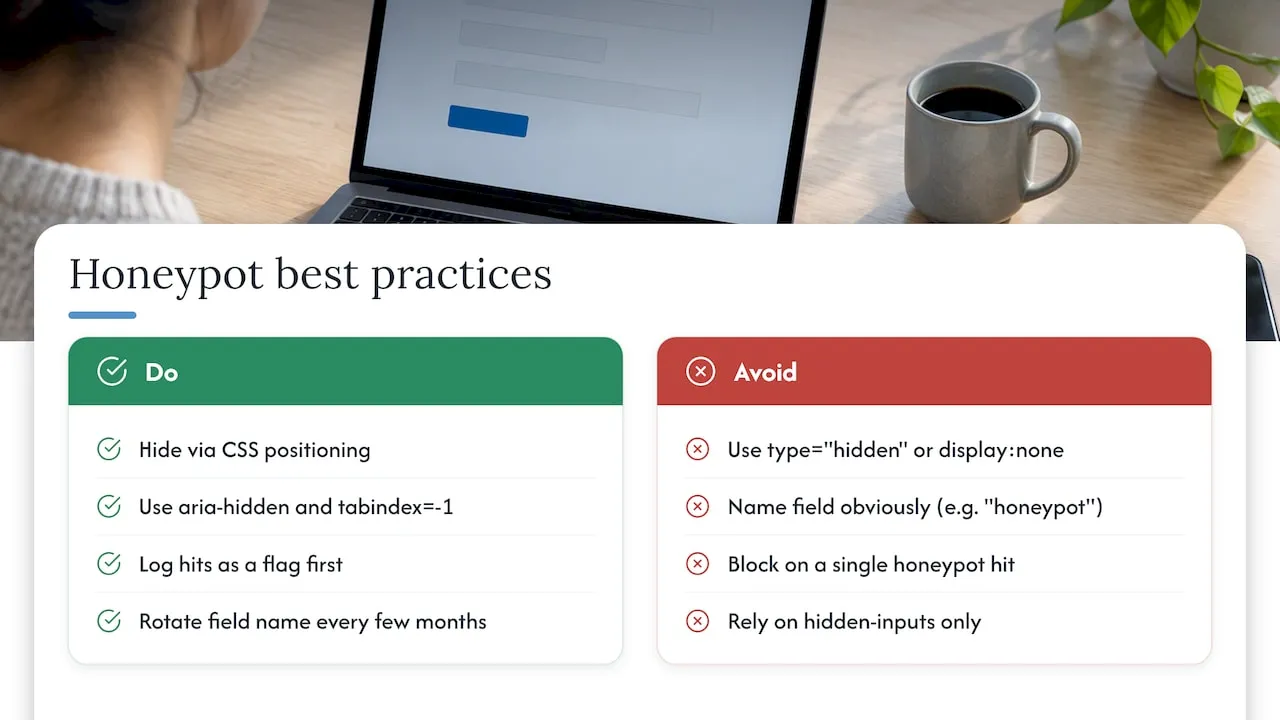
Hide the field with CSS positioning, not display:none or type="hidden", since some bots specifically skip hidden input types and some scrapers still parse them. Use aria-hidden="true" and tabindex="-1" so screen readers and keyboard navigation skip it entirely. Name the field something a bot would plausibly fill, like website or url, rather than something obviously bait, like honeypot. The Spamkill notes that honeypots must avoid accessible traps and should never depend on a hidden input type that some assistive tech exposes or some bots ignore.
Log honeypot hits as a flag, not an automatic hard drop, for the first occurrence from a given IP. A single hit could be a browser autofill quirk. Repeated hits from the same source justify blocking.
Pro Tip: Rotate the honeypot field name every few months. Bots trained on your form’s current markup lose effectiveness once the field name changes.
Honeypots catch volume, not sophistication. A bot that renders JavaScript and mimics human timing will walk past one untouched. That’s the ceiling, and it’s why the next layer matters.
Invisible verification and alternatives to CAPTCHA
Visible CAPTCHAs ask users to prove they’re human by solving a puzzle: distorted text, image grids, logic questions. They work, but they add friction, and W3C and WCAG guidance warns that visual CAPTCHAs can impede accessibility for users with visual or cognitive disabilities unless a non-visual alternative exists. Invisible, risk-based verification solves both problems: it runs in the background and only escalates to a visible challenge when confidence is low.
Two approaches dominate here:
- Cloudflare Turnstile: analyzes browser signals and behavior without a puzzle, issuing a token the server verifies.
- Cap, a self-hosted proof-of-work option documented at Trycap, runs a browser-side computation invisibly and avoids sending user data to a third party.
Both require a server-side check. The client-side widget issues a token, but the server must validate that token against the provider’s API before accepting the submission. Skip that step and the widget becomes decorative, since a bot can bypass the browser entirely and post straight to the form’s endpoint.
A layered approach outperforms any single tool, according to independent analysis comparing CAPTCHA and honeypot methods, which recommends combining honeypots with risk-based verification and server-side checks rather than depending on one layer alone.
Escalate conditionally. Most submissions pass invisible checks silently. Reserve a visible challenge for sessions that fail multiple signals, a pattern that shields conversion rates on the vast majority of legitimate traffic while still raising the cost of automated abuse.
Server-side validation and rate limiting rules
Every client-side verification method needs a server-side counterpart. A token from Turnstile, Cap, or any widget means nothing until the server confirms it against the provider directly. This single step closes the gap that lets bots bypass JavaScript entirely.
Rate limiting stops volume attacks: automated POST floods, credential stuffing, repeated signup attempts. The OWASP cheat sheet recommends sliding-window or token-bucket algorithms over fixed-window counters, since fixed windows are easier to manipulate by timing requests around the reset. It also recommends separate buckets per IP address and per identity (username or email), rather than one combined bucket, since a shared bucket lets an attacker rotating IPs exhaust a single account’s limit, or lets a shared office IP lock out many legitimate users at once.
Setting thresholds follows a simple sequence:
- Baseline existing traffic for a week or two before changing anything.
- Set a conservative limit well above observed legitimate peaks.
- Monitor for false positives and adjust.
- Tighten gradually as confidence in the baseline grows.
Pair thresholds with a graduated response instead of an immediate block, since a hard block on the first violation risks turning away a legitimate lead who mistyped a password or refreshed a form twice.
| Confidence level | Action |
|---|---|
| Low suspicion (single honeypot hit, minor rate spike) | Log the event |
| Moderate suspicion (repeated rate-limit triggers) | Present invisible challenge or step-up verification |
| High suspicion (failed tokens, known bad IP range) | Tarpit, delay the response to slow automation |
| Confirmed abuse (sustained flood after warnings) | Block the IP or identity |
This matrix, adapted from the graduated response strategy OWASP recommends, preserves legitimate submissions while still raising the cost of sustained abuse.
Filtering, reputation checks, and inbox protection
Controls at the form level catch bots before submission. Filtering catches what gets through, before it reaches a sales inbox or CRM pipeline. Spam scoring assigns a numeric risk value to each submission based on content patterns, link density, and sender reputation, with thresholds splitting results into auto-delete, auto-approve, and manual review.
- Flag disposable email domains and addresses from providers created to bypass signup requirements.
- Check domain age heuristically: a domain registered days before the submission is a stronger spam signal than an established one.
- Route borderline cases to a quarantine queue rather than auto-deleting, so a human can review before a legitimate lead gets lost.
- Delay publishing of public-facing content (reviews, comments) a few hours to catch obvious spam before it goes live.
Tuning filters too aggressively costs real leads, which is the tradeoff every threshold decision carries. Filtering approaches built on Bayesian or hot-word scoring, discussed in W3C’s work on spam-filtering strategies, let teams strip high-volume spam from inboxes without losing legitimate contacts when the thresholds are reviewed regularly rather than set once and left alone.
Monitoring, logging, and tuning after launch
Defenses degrade without monitoring. Bots adapt, thresholds that fit last quarter’s traffic stop fitting this quarter’s, and a control that worked at launch can quietly start blocking legitimate users six months later.
Capture these events at minimum:
- Token validation failures, which flag bypass attempts on invisible verification.
- Honeypot hits, tracked by frequency and source IP.
- Rate-limit triggers, broken out by endpoint and bucket type.
- Sudden spikes from a single IP range or ASN.
Compute a baseline from at least a week of normal traffic before setting any threshold, and start conservative rather than aggressive. Review false positives on a set schedule, weekly during the first month after deployment, then monthly once thresholds stabilize, and check whether legitimate submissions are getting caught in escalation tiers meant for suspicious traffic.
Pro Tip: Keep a running log of every threshold change with the date and reason. When a legitimate lead complains about a blocked submission, that log tells you exactly which rule change caused it.
How Forefront Industries sequences anti-spam controls
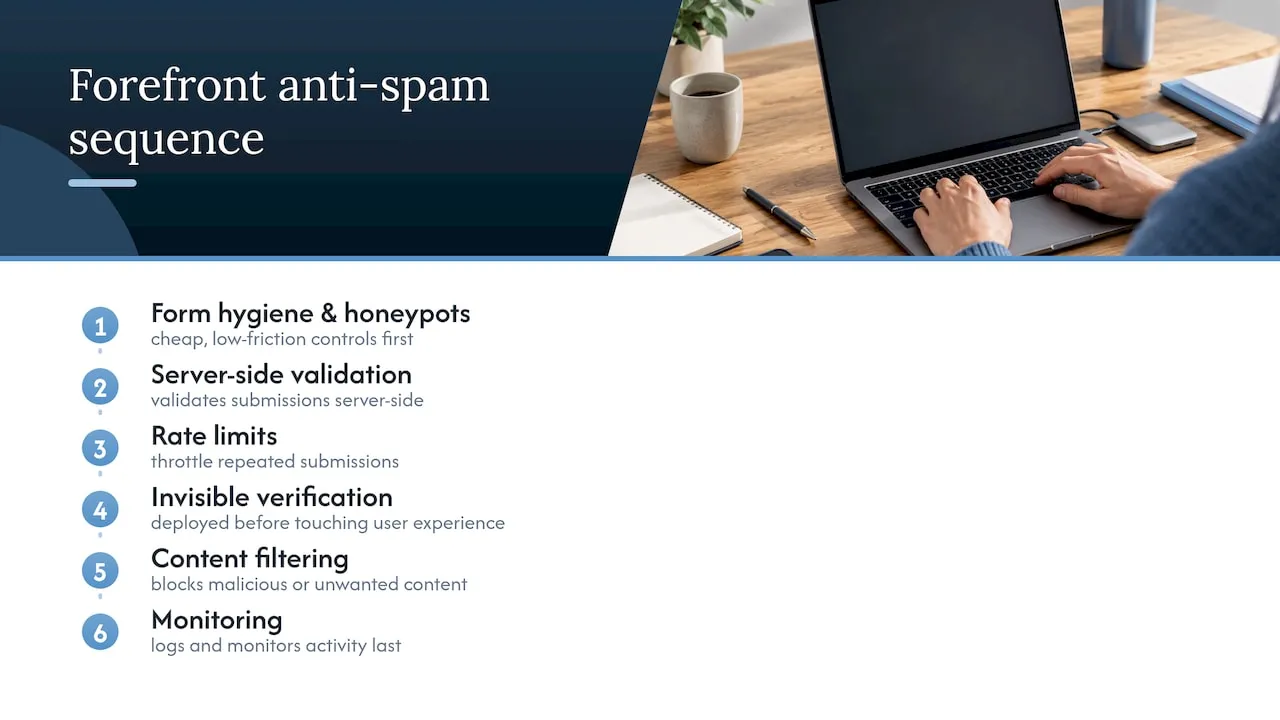
Forefront Industries typically builds these controls in sequence: form hygiene and honeypots first, server-side validation next, then rate limits, invisible verification, content filtering, and monitoring last. That order reflects the same logic throughout this guide, cheap and low-friction controls deployed before anything that touches user experience.
Complex CRM routing or high-risk authentication endpoints often warrant a specialist, since misconfigured rate limits or token validation on those systems can block revenue instead of protecting it.
Why low-friction, server-first defenses are the right default
The instinct to add a visible CAPTCHA to every form is understandable but usually wrong. Visible challenges cut conversion and accessibility at the same time, and the forms that need them least (low-traffic contact pages) are the ones that get them first. Server-side validation and graduated responses tied to actual confidence levels protect a site without punishing the legitimate majority. Anti-spam work is not a project with an end date. It’s an operational control that needs the same ongoing attention as any other piece of infrastructure.
- Jeremy
Forefront Industries: managed implementation and audits for form abuse protection
Forefront Industries builds custom server-side validation, rate limiting, and CRM routing directly into the websites and systems it develops, so spam controls aren’t bolted onto a template after the fact. Readers who want a technical audit of existing forms, or a full implementation across a contact page, CRM, and lead routing workflow, can start with Forefront’s website maintenance and managed hosting services, which include ongoing monitoring and tuning after launch.

Sources
- OWASP Bot Management and Anti-Automation Cheat Sheet
- Cloudflare Turnstile: get started
- Honeypot vs CAPTCHA - Which Actually Stops Form Bots?
- Cap - open-source, self-hosted CAPTCHA alternative
FAQ
What is the best spam filter for 2026?
No single filter works alone. The strongest setups for 2026 combine honeypots, server-side token validation for invisible verification like Turnstile, rate limiting, and email reputation checks layered together rather than relying on one tool.
How do I turn on my spam filter?
This depends on the platform: most email providers and form tools have a spam or junk filter enabled by default in account or inbox settings. For a website’s contact form, “turning on” filtering means adding server-side checks, such as disposable email detection and a honeypot field, rather than flipping a single switch.
What are five types of spam?
Common categories include content spam (promotional links and keyword stuffing), credential stuffing attempts, fake account signups, comment and review spam, and automated contact form floods. Each pattern calls for a different control, which is why layered defenses outperform a single filter.
How do I protect my phone number from spam?
Avoid posting a phone number in plain text on public pages, since scrapers harvest exposed numbers for spam calls and texts. Where a form collects a phone number, the same server-side validation and rate-limiting principles used for email fields apply, flagging suspicious submission patterns before the number ever reaches a database.